Disclosure: topratedkitchenware.com is reader-supported. When you buy through links on our site, we may earn an affiliate commission from Amazon and other retailers, at no extra cost to you.
Where to buy
Short on time? These are the six shortlisted best chairs for aminators picks, each linked to its Amazon listing so you can check the latest price on Amazon and confirm the current configuration before you buy. The full reviews, sizing guidance and care notes follow below. Read the full guide ↓
- Daeorio High-Back Big and Tall Leather Chair with Footrest — Best Overall for Long Sessions. Check on Amazon for the current listing details.
- FOKESUN Ergonomic Office Desk Chair with Footrest — Best Adjustability for Desk Setups. Check on Amazon for the current listing details.
- GTPLAYER PU Leather Office Chair with Memory Foam — Best for Restless Animators. Check on Amazon for the current listing details.
- TRALT Office Chair Ergonomic Desk Chair with Headrest — Best All-Rounder. Check on Amazon for the current listing details.
- ELABEST X100 Ergonomic Mesh Office Chair with Footrest — Best for Hot Studios. Check on Amazon for the current listing details.
- MIMOGLAD Ergonomic Office Chair with Dual Lumbar Support — Best for Structured Workdays. Check on Amazon for the current listing details.
The best chairs for aminators — animators, to give the keyword’s cheerful misspelling its intended meaning — are chairs for a peculiar double life. Half the animator’s day is spent in one of the most demanding seated postures in any craft: leaned over a drawing tablet, drawing arm extended, eyes at screen distance, for hours that stretch when the work is flowing. The other half is spent leaned right back, reviewing playback, checking timing, watching the same twelve frames forty times. A chair for this life must serve both postures superbly, and switch between them without breaking the flow that animators guard so carefully.
The six chairs here approach that double brief from different directions. There is a big executive chair whose recline and footrest turn review sessions into genuine rest positions, a fine-adjustment ergonomic chair whose three-way arms can be set precisely under a drawing arm, a rocking chair with flip-up arms for sketchbook-and-tablet freedom, a balanced all-rounder with a headrest for playback, a mesh chair built for hot studios and long renders, and a tilt-locking chair that turns drawing, keyboard work and review into three named, repeatable positions.
Each chair is reviewed below as studio equipment. The guide then covers choosing for your medium and your setup — tablet, lightbox, or hybrid — a setup routine for the two-posture day, and the mistakes that leave animators aching through crunch in chairs designed for email.
Readers who arrived here from a neighbouring search may also want our guide to Best Chairs For Apartment, which covers that seating problem in the same detail.
Key Takeaways
- Support the drawing arm: arms that adjust in several directions, or flip away entirely, are the animator’s key feature.
- You need two postures — upright for drawing, reclined for playback review — and tilt locks or a footrest make both real.
- Mesh backs earn their keep under studio lights and long renders; foam seats forgive marathon in-betweening.
- Flip-up arms switch a chair between tablet mode and keyboard mode in seconds.
- Animation is sedentary for long stretches — build standing and walking breaks into the day; the chair is one layer, not the whole answer.
In this guide
Quick Picks
| Pick | Badge | Standout trait | Listing |
|---|---|---|---|
| Daeorio High-Back Big and Tall Leather Chair with Footrest | Best Overall for Long Sessions | Recline and footrest turn render waits and playback reviews into real breaks | Check on Amazon |
| FOKESUN Ergonomic Office Desk Chair with Footrest | Best Adjustability for Desk Setups | 3D arms can be set to support the drawing arm without lifting the shoulder | Check on Amazon |
| GTPLAYER PU Leather Office Chair with Memory Foam | Best for Restless Animators | Flip-up arms clear the space for a tablet in the lap or a sketchbook | Check on Amazon |
| TRALT Office Chair Ergonomic Desk Chair with Headrest | Best All-Rounder | Headrest supports leaned-back scene and timing reviews | Check on Amazon |
| ELABEST X100 Ergonomic Mesh Office Chair with Footrest | Best for Hot Studios | Mesh back keeps animators cool under studio lights and long renders | Check on Amazon |
| MIMOGLAD Ergonomic Office Chair with Dual Lumbar Support | Best for Structured Workdays | Three tilt locks map to drawing, keyboard and review postures | Check on Amazon |
How These Picks Were Chosen
Picks were selected from Creators-API-verified ergonomic office chair listings, filtered for the animator’s specific demands. Arm design was the first filter — adjustable in multiple directions or flipping fully away — because drawing-arm support and tablet clearance are the same problem seen from two sides. The second filter was posture range: tilt locks, recline depth and footrests that make the review posture a real position. Lumbar support and stated capacity were checked from the listings for the long-session hours.
The set balances studio realities: mesh for warm rooms full of machines, cushioning for marathon drawing, executive scale for big-and-tall artists, and mid-range all-rounders for home studios. Every specification comes from the product’s own listing, and the framing is comfort and craft — these are chairs that fit an animator’s working day, presented as furniture, with no medical claims attached.
The 6 best chairs for aminators, reviewed in detail

Daeorio High-Back Big and Tall Leather Chair with Footrest
Badge: Best Overall for Long Sessions
Animation work alternates between two postures: hunched over a drawing tablet in flow, and leaned right back reviewing playback frame by frame. The Daeorio serves both ends of that swing, with lumbar support for the drawing hours and a recline-plus-footrest for the reviewing hours, all in a wide, uncramped frame.
Animation is two jobs wearing one name: the drawing hours, tablet in hand and shoulder down, and the reviewing hours, leaned back and watching playback with a critic’s eye. Daeorio High-Back Big and Tall Leather Chair with Footrest was judged on both halves of that working day, because a chair that only serves one will be cursed during the other.
Strengths
- Recline and footrest turn render waits and playback reviews into real breaks
- Wide frame suits animators who shift between tablet, keyboard and sketchbook
- High back supports storyboard-review leaning as well as drawing posture
Trade-offs
- Large footprint in a studio corner
- Leather warms during long summer sessions
- Big-and-tall sizing may swamp smaller animators
At a glance
- Form: high-back big and tall chair with footrest
- Features: ergonomic reclining, lumbar support
- Material: leather upholstery
- Colour: black
One honest limitation: Animators in tight studio nooks should measure before choosing the biggest chair here.
Living with the Daeorio High-Back Big and Tall Leather Chair with Footrest day to day is mostly a story of small conveniences adding up. Its defining specification — form: high-back big and tall chair with footrest — shapes every use, and the quality noted in the strengths list, that it wide frame suits animators who shift between tablet, keyboard and sketchbook, turns out to be the one owners mention most once the novelty wears off. In the context of animation studio work, that consistency matters: a chair that behaves the same way on the fiftieth use as on the first is a chair that stops being thought about, which is the highest compliment furniture in daily service can earn.
Set against the rest of the shortlist, the Daeorio High-Back Big and Tall Leather Chair with Footrest is the pick for buyers who read its badge — Best Overall for Long Sessions — and nod. If your priorities lean the other way, the neighbouring picks frame the choice: the FOKESUN Ergonomic Office Desk Chair with Footrest answers with its own strength (3d arms can be set to support the drawing arm without lifting the shoulder), while the MIMOGLAD Ergonomic Office Chair with Dual Lumbar Support counters with three tilt locks map to drawing, keyboard and review postures. None of the six is the best chair in the abstract; each is the best answer to a differently weighted version of the same question, and this one weights best overall for long sessions above all.
Across a long session — the unit of time animation studio work is really measured in — the Daeorio High-Back Big and Tall Leather Chair with Footrest holds its character. The seat and support do not change their minds halfway through, the structure stays quiet and settled, and the small ergonomic facts established in the first ten minutes are still true in the third hour. That steadiness is easy to underrate in a listing and impossible to overrate in ownership, because long sessions are where chairs are actually judged.
Best for: readers whose priority is best overall for long sessions in the context of animation studio work / Not suited for: buyers whose needs run against that strength — read the trade-offs above before deciding.

FOKESUN Ergonomic Office Desk Chair with Footrest
Badge: Best Adjustability for Desk Setups
Tablet work lives or dies on arm support: the FOKESUN’s 3D arms can be brought in and forward to meet a drawing arm at tablet height, while its lumbar support and tilt locks let animators keep separate, repeatable setups for drawing, keyframing at the keyboard, and leaned-back playback review.
The drawing arm is the animator’s instrument, and its support decides how a session ends. FOKESUN Ergonomic Office Desk Chair with Footrest is reviewed with the arm’s whole journey in mind — tablet height, keyboard stretches, and the sketchbook-in-lap moments in between.
Strengths
- 3D arms can be set to support the drawing arm without lifting the shoulder
- Tilt locks separate drawing, animating and reviewing positions
- Headrest supports leaned-back timing and spacing reviews
Trade-offs
- Many adjustments to set up around a tablet desk
- Executive styling rather than studio-cosy
- Footrest is for breaks, not for drawing posture
At a glance
- Features: footrest, 2D lumbar support, 3D arms, headrest
- Capacity: 350 lb capacity
- Tilt: 3-position tilt lock
- Testing note: BIFMA-tested (per listing)
One honest limitation: Traditional-media animators at a lightbox may prefer a simpler stool-like chair.
What ownership of the FOKESUN Ergonomic Office Desk Chair with Footrest feels like across a season is worth spelling out, because the listing photographs cannot. The detail that defines it in practice is this: testing note: bifma-tested (per listing). Around that, the everyday experience is shaped by how it tilt locks separate drawing, animating and reviewing positions — a quality that sounds minor in a specification list and becomes the reason the chair is reached for first. For animation studio work, reliability of that kind is worth more than any single headline feature.
The comparison that matters for the FOKESUN Ergonomic Office Desk Chair with Footrest is not against a rival brand but against the other five answers in this guide. Choose it over the GTPLAYER PU Leather Office Chair with Memory Foam when headrest supports leaned-back timing and spacing reviews matters more to you than raw versatility; choose it over the Daeorio High-Back Big and Tall Leather Chair with Footrest when its particular trade-off — many adjustments to set up around a tablet desk — is one you can accept happily. Framed that way, the decision is honest: you are not buying the most features, you are buying the features arranged in the order your own days will use them.
Session length is where this class of chair separates into the honest and the optimistic, and the FOKESUN Ergonomic Office Desk Chair with Footrest is on the honest side of that line. Nothing about its comfort depends on a first impression: the support is mechanical, the surfaces are what they appear to be, and the experience at the end of a long stretch of animation studio work matches the experience at the start closely enough that you stop budgeting your comfort — which is, in the end, the entire point of buying well in this category.
Best for: readers whose priority is best adjustability for desk setups in the context of animation studio work / Not suited for: buyers whose needs run against that strength — read the trade-offs above before deciding.

GTPLAYER PU Leather Office Chair with Memory Foam
Badge: Best for Restless Animators
Plenty of animators think in motion, and the GTPLAYER’s gentle rocking plus flip-up arms fit that workflow: arms away for sketchbook or lap-tablet work, arms down for keyboard stretches, and a memory foam seat underneath marathon in-betweening sessions.
Deadline weeks are the truth test of any studio chair: the third consecutive long day, the render queue running, the light unchanged. GTPLAYER PU Leather Office Chair with Memory Foam is assessed for that week, not for the showroom sit.
Strengths
- Flip-up arms clear the space for a tablet in the lap or a sketchbook
- Rocking motion suits the think-between-drawings rhythm of animation
- Memory foam seat holds up across deadline-length days
Trade-offs
- Mid back only — no headrest for review reclines
- Rocking base is not ideal for absolute stillness in fine inking
- PU leather needs gentle care
At a glance
- Seat: memory foam cushioning
- Arms: 90-degree flip-up arms
- Features: flexible rocking, ergonomic mid back
- Material: PU leather
- Colour: black
One honest limitation: Stop-motion and precision inking artists who need a locked-still base should choose a tilt-lock pick.
Day to day, the GTPLAYER PU Leather Office Chair with Memory Foam settles into a routine quickly, and routine is the real test of any pick in this guide. Its memory foam cushioning gives it a clear identity among the six, and in practice the trait that earns its keep is that it rocking motion suits the think-between-drawings rhythm of animation. Owners of chairs in this class tend to judge them at the three-month mark, not the three-day mark, and this is a design whose virtues — steady, repeatable, uncomplaining — are precisely the three-month kind.
It also helps to place the GTPLAYER PU Leather Office Chair with Memory Foam on the shortlist’s map of compromises. Every pick here trades something: this one trades on the fact that rocking base is not ideal for absolute stillness in fine inking, and in exchange delivers memory foam seat holds up across deadline-length days. Buyers who find that exchange attractive will be satisfied for years; buyers who bristle at it should walk one pick up or down this list, where the same budget of compromises is spent differently — toward the TRALT Office Chair Ergonomic Desk Chair with Headrest on one side or the FOKESUN Ergonomic Office Desk Chair with Footrest on the other.
One more practical observation about the GTPLAYER PU Leather Office Chair with Memory Foam in extended use: it forgives interruption. Sessions in real homes and real studios are broken by doors, phones, kettles and colleagues, and a chair that is easy to leave and easy to return to — no readjustment ritual, no lost position — protects the thread of the work or the evening. Across weeks of such interrupted days, that forgiveness compounds into the feeling owners describe as the chair simply suiting their life.
Best for: readers whose priority is best for restless animators in the context of animation studio work / Not suited for: buyers whose needs run against that strength — read the trade-offs above before deciding.

TRALT Office Chair Ergonomic Desk Chair with Headrest
Badge: Best All-Rounder
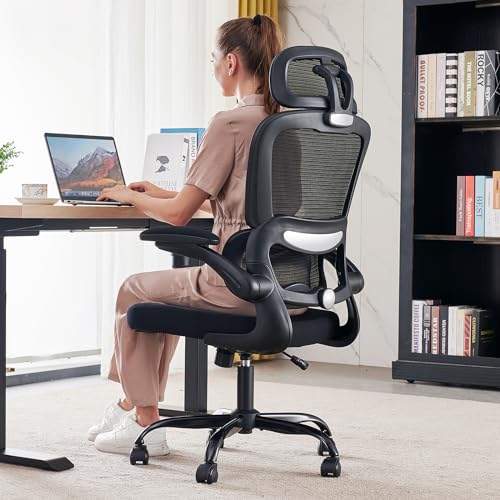
The TRALT covers an animator’s whole day without drama: lumbar support and an upright set-up for drawing, flip-up arms when the tablet comes out, and a headrest waiting when the work turns to watching playblasts and timing charts. Its listed 330 lb capacity covers most builds comfortably.
Animation is two jobs wearing one name: the drawing hours, tablet in hand and shoulder down, and the reviewing hours, leaned back and watching playback with a critic’s eye. TRALT Office Chair Ergonomic Desk Chair with Headrest was judged on both halves of that working day, because a chair that only serves one will be cursed during the other.
Strengths
- Headrest supports leaned-back scene and timing reviews
- Flip-up arms switch between tablet and keyboard modes quickly
- Balanced feature set without flagship complexity
Trade-offs
- No footrest for full recline breaks
- Tilt is everyday rather than deep
- Single colourway
At a glance
- Capacity: 330 lbs (per listing)
- Features: lumbar support, headrest, flip-up armrests
- Colour: black
- Form: ergonomic desk chair
One honest limitation: Footrest fans should step up to the FOKESUN or ELABEST.
Living with the TRALT Office Chair Ergonomic Desk Chair with Headrest day to day is mostly a story of small conveniences adding up. Its defining specification — capacity: 330 lbs (per listing) — shapes every use, and the quality noted in the strengths list, that it flip-up arms switch between tablet and keyboard modes quickly, turns out to be the one owners mention most once the novelty wears off. In the context of animation studio work, that consistency matters: a chair that behaves the same way on the fiftieth use as on the first is a chair that stops being thought about, which is the highest compliment furniture in daily service can earn.
Set against the rest of the shortlist, the TRALT Office Chair Ergonomic Desk Chair with Headrest is the pick for buyers who read its badge — Best All-Rounder — and nod. If your priorities lean the other way, the neighbouring picks frame the choice: the ELABEST X100 Ergonomic Mesh Office Chair with Footrest answers with its own strength (mesh back keeps animators cool under studio lights and long renders), while the GTPLAYER PU Leather Office Chair with Memory Foam counters with flip-up arms clear the space for a tablet in the lap or a sketchbook. None of the six is the best chair in the abstract; each is the best answer to a differently weighted version of the same question, and this one weights best all-rounder above all.
Across a long session — the unit of time animation studio work is really measured in — the TRALT Office Chair Ergonomic Desk Chair with Headrest holds its character. The seat and support do not change their minds halfway through, the structure stays quiet and settled, and the small ergonomic facts established in the first ten minutes are still true in the third hour. That steadiness is easy to underrate in a listing and impossible to overrate in ownership, because long sessions are where chairs are actually judged.
Best for: readers whose priority is best all-rounder in the context of animation studio work / Not suited for: buyers whose needs run against that strength — read the trade-offs above before deciding.

ELABEST X100 Ergonomic Mesh Office Chair with Footrest
Badge: Best for Hot Studios
Studios run warm — lights, machines, deadlines — and the ELABEST X100’s mesh back is the cool-headed answer for animators. Its five-direction arms are the most precise drawing-arm support in this group, and the footrest waits for the render-watching part of the job.
The drawing arm is the animator’s instrument, and its support decides how a session ends. ELABEST X100 Ergonomic Mesh Office Chair with Footrest is reviewed with the arm’s whole journey in mind — tablet height, keyboard stretches, and the sketchbook-in-lap moments in between.
Strengths
- Mesh back keeps animators cool under studio lights and long renders
- 5D arms offer the finest drawing-arm positioning here
- Footrest plus recline covers genuine break posture
Trade-offs
- Mesh feel is firmer than foam chairs
- Big frame needs a big desk bay
- Longest setup in the roundup
At a glance
- Features: footrest, 5D flip-up arms, adjustable 3D lumbar support
- Form: big and tall mesh desk chair
- Style: gaming and executive computer chair
One honest limitation: Animators who prefer a soft, cushioned sit will find mesh austere.
What ownership of the ELABEST X100 Ergonomic Mesh Office Chair with Footrest feels like across a season is worth spelling out, because the listing photographs cannot. The detail that defines it in practice is this: style: gaming and executive computer chair. Around that, the everyday experience is shaped by how it 5D arms offer the finest drawing-arm positioning here — a quality that sounds minor in a specification list and becomes the reason the chair is reached for first. For animation studio work, reliability of that kind is worth more than any single headline feature.
The comparison that matters for the ELABEST X100 Ergonomic Mesh Office Chair with Footrest is not against a rival brand but against the other five answers in this guide. Choose it over the MIMOGLAD Ergonomic Office Chair with Dual Lumbar Support when footrest plus recline covers genuine break posture matters more to you than raw versatility; choose it over the TRALT Office Chair Ergonomic Desk Chair with Headrest when its particular trade-off — mesh feel is firmer than foam chairs — is one you can accept happily. Framed that way, the decision is honest: you are not buying the most features, you are buying the features arranged in the order your own days will use them.
Session length is where this class of chair separates into the honest and the optimistic, and the ELABEST X100 Ergonomic Mesh Office Chair with Footrest is on the honest side of that line. Nothing about its comfort depends on a first impression: the support is mechanical, the surfaces are what they appear to be, and the experience at the end of a long stretch of animation studio work matches the experience at the start closely enough that you stop budgeting your comfort — which is, in the end, the entire point of buying well in this category.
Best for: readers whose priority is best for hot studios in the context of animation studio work / Not suited for: buyers whose needs run against that strength — read the trade-offs above before deciding.

MIMOGLAD Ergonomic Office Chair with Dual Lumbar Support
Badge: Best for Structured Workdays
The MIMOGLAD suits animators who run their day in deliberate blocks: an upright lock for drawing, a mid lock for keyboard and compositing work, and a deep recline with footrest for reviewing the day’s shots. Dual lumbar support and adjustable arms keep each block honest, and the listed capacity covers big-and-tall artists.
Deadline weeks are the truth test of any studio chair: the third consecutive long day, the render queue running, the light unchanged. MIMOGLAD Ergonomic Office Chair with Dual Lumbar Support is assessed for that week, not for the showroom sit.
Strengths
- Three tilt locks map to drawing, keyboard and review postures
- Dual lumbar support keeps long seated stretches comfortable
- Arms and headrest adjust to keep each posture properly supported
Trade-offs
- Deep recline is a temptation during crunch
- Substantial chair for substantial desks
- Setup deserves an unhurried first hour
At a glance
- Capacity: 350 lbs capacity
- Features: dual lumbar support, footrest, 3D adjustable armrests and headrest
- Tilt: 90 / 120 / 145-degree tilt lock positions
One honest limitation: Its scale and feature list exceed what a part-time hobby desk needs.
Day to day, the MIMOGLAD Ergonomic Office Chair with Dual Lumbar Support settles into a routine quickly, and routine is the real test of any pick in this guide. Its 350 lbs capacity gives it a clear identity among the six, and in practice the trait that earns its keep is that it dual lumbar support keeps long seated stretches comfortable. Owners of chairs in this class tend to judge them at the three-month mark, not the three-day mark, and this is a design whose virtues — steady, repeatable, uncomplaining — are precisely the three-month kind.
It also helps to place the MIMOGLAD Ergonomic Office Chair with Dual Lumbar Support on the shortlist’s map of compromises. Every pick here trades something: this one trades on the fact that substantial chair for substantial desks, and in exchange delivers arms and headrest adjust to keep each posture properly supported. Buyers who find that exchange attractive will be satisfied for years; buyers who bristle at it should walk one pick up or down this list, where the same budget of compromises is spent differently — toward the Daeorio High-Back Big and Tall Leather Chair with Footrest on one side or the ELABEST X100 Ergonomic Mesh Office Chair with Footrest on the other.
One more practical observation about the MIMOGLAD Ergonomic Office Chair with Dual Lumbar Support in extended use: it forgives interruption. Sessions in real homes and real studios are broken by doors, phones, kettles and colleagues, and a chair that is easy to leave and easy to return to — no readjustment ritual, no lost position — protects the thread of the work or the evening. Across weeks of such interrupted days, that forgiveness compounds into the feeling owners describe as the chair simply suiting their life.
Best for: readers whose priority is best for structured workdays in the context of animation studio work / Not suited for: buyers whose needs run against that strength — read the trade-offs above before deciding.
Comparison Table
| Pick | Badge | Key specification from the listing | Best for | Listing |
|---|---|---|---|---|
| Daeorio High-Back Big and Tall Leather Chair with Footrest | Best Overall for Long Sessions | Form: high-back big and tall chair with footrest | Best Overall for Long Sessions | Check on Amazon |
| FOKESUN Ergonomic Office Desk Chair with Footrest | Best Adjustability for Desk Setups | Features: footrest, 2D lumbar support, 3D arms, headrest | Best Adjustability for Desk Setups | Check on Amazon |
| GTPLAYER PU Leather Office Chair with Memory Foam | Best for Restless Animators | Seat: memory foam cushioning | Best for Restless Animators | Check on Amazon |
| TRALT Office Chair Ergonomic Desk Chair with Headrest | Best All-Rounder | Capacity: 330 lbs (per listing) | Best All-Rounder | Check on Amazon |
| ELABEST X100 Ergonomic Mesh Office Chair with Footrest | Best for Hot Studios | Features: footrest, 5D flip-up arms, adjustable 3D lumbar support | Best for Hot Studios | Check on Amazon |
| MIMOGLAD Ergonomic Office Chair with Dual Lumbar Support | Best for Structured Workdays | Capacity: 350 lbs capacity | Best for Structured Workdays | Check on Amazon |
How to Choose a Chair for Animation Work
Begin with your medium, because it writes the brief. Tablet animators live on arm support: the drawing arm hovers and glides for hours, and an armrest set at exactly tablet height — close, forward, at the right angle — is the difference between a session that ends in flow and one that ends in a raised, aching shoulder. That argues for the multi-adjustable arms in this guide. Traditional animators at a lightbox sit more upright and central, value a stable, non-swivelling base more, and should weight simplicity. Hybrid artists need the flip-up compromise: arms present for keyboard and compositing, gone for drawing.
Second, honour the two postures. Price the recline as a working feature, not a luxury: playback review is analysis, and it happens leaned back, often with a notepad. Tilt locks that hold a mid angle, a headrest that meets you there, and a footrest that completes the position turn review into a posture the body can sustain across a long critique. A chair that only does upright asks you to review slumped, and slumped reviewing is how small timing errors survive to the final cut.
Third, respect the room. Studios run warm — lights, workstations, render machines — and mesh backs are the pragmatic answer for artists who overheat in padded chairs by the second hour. Conversely, a cold home studio in winter argues for foam and leather. Sound matters too, in small ways that compound: a chair that creaks during a voice call or a recording session will be resented out of proportion to the fault.
Finally, fit and honesty. Big-and-tall animators should start with the chairs whose width and stated capacity fit them — a squeezed artist shifts constantly, and constant shifting is the enemy of a steady drawing hand. And build the day around the chair rather than inside it: standing breaks, a walk between sequences, a stretch for the drawing hand. The chair supports the work; the routine sustains the worker.
If your shortlist started with a related question, see Best Chairs For Around Pool for the companion rundown.
Setting Up the Animator’s Two-Posture Chair
Set the drawing posture first, with the tablet live and a real drawing in progress — not by eye at an empty desk. Seat height so the drawing arm rests toward the tablet without the shoulder lifting; armrest brought in and forward until it meets the drawing forearm’s natural line; lumbar placed for the leaned-in sit you actually use, which is more upright than most chairs assume. Draw for ten minutes before touching another lever; the hand reports what the mirror cannot.
Then set the review posture as a separate, named position: tilt lock at your review angle, headrest met, footrest out if fitted, screen at the distance your eyes prefer for watching rather than working. Practise the switch — drawing to review and back — until it takes seconds and no thought, because a transition that costs effort will be skipped during crunch, and skipped transitions are how animators end up reviewing in the drawing slump.
Maintenance serves the flow state. Weekly: casters cleared of the hair and paper dust studios generate, so the chair glides rather than drags between desk and lightbox. Monthly: arm fasteners re-tightened — animator arms are adjusted and leaned on more than most — and adjustment levers checked for crisp engagement. Seasonally: re-run both posture setups from scratch, because cushions settle and so do artists.
A close cousin of this search is covered in Best Chairs For Arthritic Knees And Neckd, where the same shortlist method is applied to that brief.
Troubleshooting
Problem: the drawing shoulder aches by mid-session → the armrest is too low, too far back or absent under the drawing arm; bring it in and forward to meet the forearm at tablet height, and check the seat is not so low that the shoulder hikes to reach.
Problem: you review playback slumped in the drawing position → the recline was never set up as a position; build it deliberately with tilt lock, headrest and footrest, and anchor it to a ritual — playback means recline, every time.
Problem: the chair creaks through calls and recordings → tighten arm and back fasteners, clear and check the casters, and place the chair on a low rug or mat, which studios do for exactly this reason.
Tablet, Lightbox and the Hybrid Desk
The tablet desk wants the chair low, close and precisely armed; the lightbox wants it upright, central and still; the hybrid desk — most modern animators’ reality — wants a chair that changes personality in seconds. Flip-up arms are the hybrid’s best friend: present and supportive for keyboard, compositing and admin, vanished for the drawing hours, with no tools and no drama.
If your work is purely traditional, invert the usual advice: favour the simplest, most stable chair here, set it once, and let your consistency come from the furniture never changing. The lightbox tradition is a one-posture craft, and it is allowed to buy a one-posture chair.
For the adjacent angle on this topic, Best Chairs For Baacks works through its own set of picks and trade-offs.
Surviving Crunch: The Chair During Deadline Weeks
Crunch weeks expose every compromise in a studio chair: the arm that will not stay set, the cushion that bottoms out by day three, the recline that was never configured and so is never used. The defence is preparation done in a calm week — both postures built, fasteners tight, casters clean — because no one sets up ergonomics at 1 a.m. on a deadline.
Use the chair’s full vocabulary during crunch, deliberately: drawing position for production, review recline for checks, and the deepest lock only for genuine timed breaks away from the screen’s demands. The animators who emerge from crunch least wrecked are rarely the ones with the best chair; they are the ones whose chair, routine and breaks were arranged before the storm — the chair simply has to be good enough to hold its side of that arrangement.
You may also find Best Chairs For Baby Nursery Net useful if your seating problem turns out to be that one instead.
What to Check When Your Chairs Arrive
The first ten minutes with a new chair decide whether small problems get solved free or lived with forever, so give every arrival a proper inspection before the packaging leaves the house. Work through it in order: all parts present against the listing, every fastener tightened in sequence, and the finished chair set down on a hard, level floor and loaded with your own weight in your normal position for animation studio work. Rock gently, shift, stand, sit again. Anything that creaks, wobbles or feels uneven at this stage is information — most of it is a fastener asking for a quarter-turn, and all of it is easier to address on day one than in month three.
Check the fit against the measurements you made when choosing, while returning is still simple. Seat height against the surface it serves, width against the space it must share, arms or edges against whatever they must clear. Photograph the chair in place; the photograph is both a sanity check for proportion — rooms reveal in pictures what eyes forgive in person — and a record if anything needs discussing with the seller. Keep the packaging until the first full week of use has passed, because the honest verdict on any chair in this category is a week of real days, not an afternoon of deliberate sitting.
Finally, register the details future-you will want: the assembly sequence that worked, which key fits the fasteners, and where the spare pads or glides live. A note in a phone is enough. Chairs in daily service loosen, settle and drift on a schedule measured in months, and the owners who stay happy with them are the ones whose first-week diligence turned later maintenance into a five-minute ritual rather than an archaeological expedition.
The First Month: How a Good Chair Becomes Your Chair
There is a settling-in month for every chair in this guide, and it runs in both directions: the chair settles — fasteners seat, cushions take their working shape, mechanisms smooth — and you settle, learning the chair’s positions and habits until using it well is unconscious. Expect to re-tighten once in the first fortnight and to revisit any adjustable settings at least twice; a setting chosen on day one was chosen by a stranger, and the month-one version, chosen by an experienced owner, is the one the chair will keep for years.
Use the month to test the chair against your real range of days, not your best day: the longest session, the busiest gathering, the messiest task, the tired evening. A pick that serves the whole range has earned its place permanently; a pick that only serves the showcase day is telling you something worth hearing while change is still possible. This is also the month to establish the care rhythm from the how-to section above — small, weekly, unremarkable — because rhythms established in month one are the ones still running in year three.
By the end of the month, a well-chosen chair disappears. That disappearance is the true product being bought in this entire category: not a specification list, not a badge, but the absence of a daily friction. If your chair has achieved it, the work of this guide is done and the chair’s work — years of unnoticed, reliable service in animation studio work — has begun.
Common Buying Mistakes
- Buying for the drawing posture alone and reviewing playback in a slump for years.
- Ignoring arm adjustability — the drawing arm is the whole job, and its support is the chair’s first duty.
- A swivelling, rocking base for precision inking that needs stillness, or a rigid chair for a restless workflow.
- Never configuring the recline, so the chair’s second posture effectively does not exist.
- Letting casters clog with studio dust until every reposition drags.
- Expecting the chair to carry the whole of crunch — breaks and routine remain the animator’s own responsibility.
And if the project widens, Best Chairs For Baby Room is the natural next read in this series.
Final Recommendation
For most animators, the FOKESUN is the precision choice — its three-way arms are the finest drawing-arm support here, and its tilt locks and footrest build the review posture properly. The Daeorio is the big-room alternative: a wide executive chair whose recline turns playback sessions into genuine rest positions, ideal for larger artists and long critiques.
Restless sketchbook-and-tablet artists should take the GTPLAYER’s flip-up arms and gentle rock; hot studios belong to the mesh ELABEST X100; structured workers to the MIMOGLAD’s three locked postures; and anyone wanting the balanced middle road to the TRALT. Set up both postures on day one — the drawing you is only half the animator.
Quick links to the three lead picks: Daeorio High-Back Big and Tall Leather Chair with Footrest, FOKESUN Ergonomic Office Desk Chair with Footrest, GTPLAYER PU Leather Office Chair with Memory Foam, each linking to its Amazon listing to check the latest price on Amazon.
Frequently Asked Questions
What chair feature matters most for animators?
Drawing-arm support: armrests that adjust in several directions to meet the forearm at tablet height, or flip fully away when the tablet or sketchbook needs the space. It decides how drawing sessions end more than any other feature.
Do animators need a footrest on their chair?
For the review posture, it completes the position — recline, headrest, feet up is a sustainable analysing posture. For drawing, feet belong grounded. Treat the footrest as review equipment and it earns its place.
Mesh or cushioned for a studio?
Mesh for warm studios and long renders, where breathability decides the second hour; cushioned for cold rooms and marathon drawing, where the seat’s forgiveness matters most. Your room’s temperature is the honest guide.
Is a gaming-style chair suitable for animation?
The feature set often is — recline, arms, footrest — provided the arms adjust or flip for tablet work and the base can lock still for precision tasks. Judge the individual chair’s adjustments, not its styling category.
How should a traditional lightbox animator choose?
Upright, stable and simple: a chair that sets once and never changes, favouring a firm seat and reliable lumbar over recline range. The one-posture craft is the exception to this guide’s two-posture rule.
How often should I re-set my chair’s adjustments?
At every project change and at least seasonally. Cushions settle, arms drift, and your own posture across a long production changes too — re-running the two-posture setup keeps the chair fitted to the animator you currently are.