An alarm clock with a phone dock keeps the charger and the clock in one spot on the nightstand. The dock can be a wireless pad, a pair of USB ports or, on older gear, a 30-pin connector for early iPhones and iPods. Which one fits depends on the phone you own.
The six clocks below cover wireless stations, plain USB charging and one vintage dock. Sizes, ports and features come from each product’s listing page. We have not used these clocks ourselves. Charging and sound claims are the makers’ own.
As an Amazon Associate we earn from qualifying purchases. Links below are affiliate links, and they do not change the product information we give.
What to Look For
| Feature | Why it matters |
|---|---|
| Charging type | Wireless pad, USB ports or a 30-pin dock suit different phones |
| Case limits | Wireless pads list a maximum case thickness |
| Display | A dimmer or off setting keeps the room dark at night |
| Power | Corded, with or without backup batteries |
In this guide
Specs at a Glance
| Clock | Charging | Display | Notes |
|---|---|---|---|
| ANJANK 4 in 1 | Wireless pad for phone, watch and earbuds | LED with 6 dimming levels | 3 alarm volumes; 9 minute snooze; cases up to 5 mm |
| DreamSky 11 in 1 | Magnetic wireless pad plus USB-A and USB-C | Brightness dimmer | Bluetooth speaker; 26 sleep sounds; 10 alarm sounds |
| LONET 5 in 1 | Wireless: 15W phone, 5W earbuds, 3W watch | LED with time, date and temperature | Snooze up to 3 times; hidden pen holder |
| NONSTOP Station W. | 10W Qi pad plus 2 front USB outlets | Digital; display can be turned off | Auto daylight saving; CR2 backup battery included |
| Sharp dual USB | 2 USB ports, 2 amp each | Green LED; 3-step dimmer | 5.95 x 2.3 in; 2 AAA backup (not included) |
| Sony ICF-C05IP | 30-pin iPhone/iPod dock | Clock radio | FM with 20 presets; sleep timer to 90 minutes |
The 6 Best Alarm Clocks With a Phone Dock
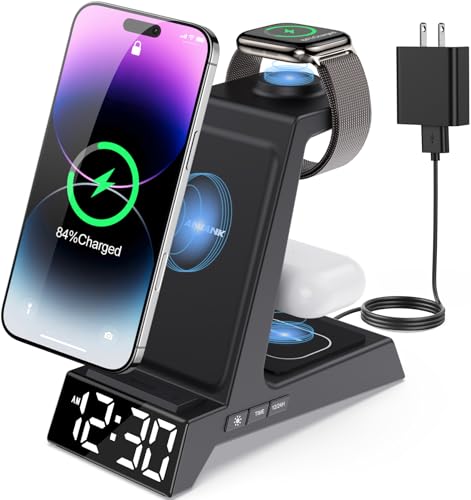
Top pickBest for an Apple-device nightstand
1. ANJANK 4 in 1 Wireless Charging Station Alarm Clock
A wireless station that holds a phone, an Apple Watch and AirPods on one base, with an LED clock that has six dimming levels, three alarm volumes, a nine minute snooze and a 12 or 24 hour format. The listing gives a package size of 6.42 by 6.14 by 3.11 inches.
Suits: an Apple-device nightstand. Strengths: six dimming levels and a charger adapter in the box. Weaknesses: the phone pad is not magnetic and the listing says it is not compatible with Samsung watches. Skip it if you use a thick case with a metal ring.


Best for one hub for charging, sound and alarm
2. DreamSky 11 in 1 Wireless Charging Station with Alarm Clock
A corded hub with a magnetic wireless pad, a USB-A and a USB-C port, a Bluetooth speaker with phone time sync, 26 sleep sounds with a 10 to 480 minute timer and an alarm with 10 sounds and a nine minute snooze. The listing says to use the included 48W adapter.
Suits: one hub for charging, sound and alarm. Strengths: wireless plus two wired ports. Weaknesses: many functions on one base; the listing says to remove cases thicker than 0.1 inch. Skip it if you want a simple clock.


Best for a desk or nightstand that doubles as storage
3. LONET 5 in 1 Wireless Charging Station with Alarm Clock
A USB-C powered station that charges a phone, an Apple Watch and earbuds, with a large LED display for time, date and temperature, a 12 or 24 hour switch, Celsius or Fahrenheit, three alarm volumes, a snooze up to three times and a hidden pen holder at the back.
Suits: a desk or nightstand that doubles as storage. Strengths: temperature and date on the display, a pen holder. Weaknesses: the listing gives no size. Skip it if you need the exact footprint.

Best for a dark bedroom with several devices
4. NONSTOP Station W. Wireless Charger with USB and USB-C Charging
A wood-material station with a 10W Qi wireless pad, two front-facing USB outlets, a Lightsleeper mode that turns the display fully off, automatic daylight saving and a backup battery. The listing says one CR2 battery is included.
Suits: a dark bedroom with several devices. Strengths: display off mode and auto daylight saving. Weaknesses: the listing gives no clock dimensions. Skip it if you want a compact clock.

Best for a plain clock with two cable ports
5. Sharp Digital Alarm Clock, Dual USB Fast Charge Ports
A 5.95 by 2.3 inch oval clock with a bright green LED display, a three-step dimmer, large top controls and two USB ports that are each listed at 2 amps. Two AAA batteries (not included) keep the settings and the alarm during an outage, though the screen goes blank.
Suits: a plain clock with two cable ports. Strengths: simple controls and large digits. Weaknesses: no wireless pad; batteries not included. Skip it if you want a wireless dock.

View Sharp Digital Alarm Clock, Dual USB Fast Charge Ports, Green LED Display on Amazon

Best for older iPods and early iPhones
6. Sony ICF-C05IP 30-Pin iPhone/iPod Clock Radio Speaker Dock
A clock radio with a 30-pin dock, a digital FM tuner with 20 presets, wake-to-iPod, radio or buzzer, a sleep timer of 15, 30, 60 or 90 minutes and a backup battery for outages. The listing names iPod models and iPhone up to the 3GS.
Suits: older iPods and early iPhones. Strengths: FM radio and a sleep timer. Weaknesses: a 30-pin dock does not fit newer phones. Skip it if your phone has a Lightning or USB-C port.

Care and Setup
- Check the maximum case thickness before using a wireless pad.
- Use the power adapter that comes with the clock.
- Keep the pad clear of metal objects and cards.
- Dim or turn off the display at night.
Mistakes to Avoid
- Buying a 30-pin dock for a modern phone.
- Ignoring the case limits on a wireless pad.
- Assuming a wireless pad charges every watch or earbud case.
- Skipping backup batteries when the clock supports them.
Matching the Dock to Your Phone and Accessories
A dock is only useful if it fits the devices you own. The first question is how your phone charges. Many recent phones support wireless charging with a Qi-style pad, while others charge only through a cable. Some docks use a USB port or a wired connection, and older docks use a connector that fits only certain devices. Check your phone’s specifications to confirm whether it supports wireless charging before choosing a pad-style clock.
Next, look at who else will use the station. Some units add spots for a smartwatch or earbuds, and these spots often work only with specific products. Listings may note limits, such as a watch charger that works with one brand of watch and not others. Do not assume that a multi-device base charges everything you own, and read the compatibility notes carefully. Ask which items in your bag or on your nightstand you want to charge at once, and then count the pads or ports.
If your household has both wireless-capable and wired-only phones, USB ports on the clock give flexibility. A clock with a wireless pad and a USB port can serve two phones, one on the pad and one by cable. Check whether the ports share a total power budget, since using all of them at once may reduce speed. The product page or manual should describe the outputs.
Charging Speed, Heat and Alignment
Wireless charging is convenient but usually slower than a good cable, and the actual speed depends on the pad, the adapter, the phone and the case. Phones may reduce charging speed when they warm up. Overnight charging does not need top speed, since the phone has hours to fill, so an average rate is often enough. If you need to top up quickly, a wired port may be better.
Alignment matters with a pad. The coil in your phone must line up with the coil in the pad, so a phone placed off-center may charge slowly or stop. Magnetic designs help with alignment for supported phones, while flat pads need careful placement. A non-slip surface keeps the phone in place if the clock is nudged. Some stands hold the phone upright so you can see notifications, which is useful but may need a different position of the coil.
Heat is normal at a modest level, but a phone that becomes hot, a pad that smells or a warning on the phone means you should stop and check. Remove thick cases or metal objects between the phone and the pad. Keep the dock away from soft bedding that traps heat. Use the adapter that comes with the clock or one recommended by the maker, because underpowered adapters may charge slowly or not at all.
Display Brightness and Sleep-Friendly Settings
A clock on the nightstand is visible all night, so display behavior matters. Check how many brightness levels the clock offers, and whether it can be turned fully off. A display that remains bright in a dark room can disturb sleep, and one that cannot be dimmed far enough is a common complaint. Look for a mode that turns the display off completely while still keeping the alarm active.
Color and size also affect the experience. Digits that are legible from the bed but not glaring are the goal. Some clocks display temperature, date or other information, which is useful during the day but adds clutter at night. See whether those extras can be hidden. If the clock has indicator lights for charging, check whether they shine in your eyes or can be turned off.
- Check for a dimmer with several steps.
- Check whether the display can be switched off.
- Check whether charging lights can be disabled.
- Check whether alarm settings are retained after a power cut.
If a clock includes a night light or sound features, see whether they can be disabled so they do not interfere with sleep. Test the clock for a few nights, and adjust the brightness before deciding it is not suitable.
Alarm Features, Reliability and Backup Power
A charging clock is still, first of all, an alarm clock, so check the alarm basics. Look for adjustable volume, a snooze button that is easy to find in the dark and a clear alarm on or off indicator. Some clocks offer more than one alarm, weekday and weekend modes or a choice of sounds. Decide how many alarms you actually use, and skip complexity you will not need.
Think about what happens when the power goes out. Some clocks have a battery backup that keeps the time and settings, though the display may go dark. Others reset to a default time, which could cause a missed alarm. If reliability matters, look for backup power, check what kind of battery it needs and whether it is included. Test the alarm on the first day by setting it a few minutes ahead.
Consider using your phone’s own alarm as a backup, at least at first, until you trust the clock. Also check how the clock gets its time. Some set time manually and others sync from the phone or the connection, so find out whether daylight saving changes need manual adjustment. Be careful about relying on a single device for important early mornings, such as travel days.
Read recent buyer comments about alarm reliability, because a clock that looks good in photos can still fail at basic functions.
Placement, Cords and Longer-Term Care
Decide where the clock will sit before you buy. A nightstand needs space for a base, a cord and perhaps a lamp. Check the dimensions, the cord length and whether the outlet is reachable. A clock with a short cord may force awkward placement. Try to avoid stretching cables across a walkway.
Charging pads work best with a clear surface. Keep cards with magnetic strips, keys and metal objects off the pad. Wipe the surface with a soft cloth, unplugged, to remove dust and fingerprints. Do not use liquid cleaners directly on the electronics. Keep drinks well away from the nightstand clock.
Over time, watch for signs of trouble such as:
- The pad charges less reliably or stops after a few minutes.
- The USB ports are loose or do not hold a cable.
- The display flickers or loses segments.
- The alarm fails or sounds weak.
- The unit gets unusually warm even without a phone.
Before assuming the clock is broken, try a different cable, adapter and outlet. If problems persist, check the warranty and return window. For phones that change often, consider a clock with USB ports or a universal pad, because a model tied to one connector can become obsolete when you upgrade.
Checklist Before You Pick a Dock Clock
The nightstand is a small stage, so it pays to plan. Whether you favor the ANJANK, DreamSky or LONET stations, the NONSTOP, the Sharp or the Sony dock, these checks save a headache.
- Note your phone model and what its charging connection supports, whether wireless, USB-C or something older.
- Measure the nightstand and look at how much space the base takes.
- Check where the outlet sits and the length of the supplied cord.
- Look for the brightness control, since a bright digital display can be distracting in a dark room.
- Find out how many alarms you can set and whether there is a backup option.
- Check if the clock includes a power adapter or asks you to provide one.
The answers are usually listed on the product page, and the manual can fill any gaps.
Glossary for Charging Clocks
- Qi: a common wireless charging standard used by many phones and accessories.
- Coil alignment: how well the phone sits over the charging coil.
- Snooze: a short delay that silences the alarm and lets it ring again.
- Dimmer: a control that lowers display brightness.
- Battery backup: small cells that keep the time and alarm if power is lost.
- 30-pin: an older Apple connector found on early iPhones and iPods.
- Output power: the power a port can deliver, listed in watts or amps.
Use these words as a guide when comparing listings.
Which Style Suits Which Bedside
| Bedside need | Style to consider |
|---|---|
| Newer phone, tidy look | Wireless station |
| Several devices to charge | Multi-device station or USB ports |
| Old iPhone or iPod | 30-pin dock such as the Sony |
| Simple alarm and cable charging | Clock with USB ports |
If a phone case is thick, check the maker’s notes before assuming it will work.
Mistakes to Avoid at the Bedside
- Buying a 30-pin dock for a phone with a newer connector. It will not fit.
- Forgetting that a thick or metal case can block wireless charging.
- Placing the clock where the display shines in your eyes.
- Relying only on the phone alarm, when the clock has its own backup.
- Using a power adapter that does not match what the maker lists.
- Leaving cords stretched across a walkway or the edge of the table.
Set the alarm times once, then check them the next morning. Read the manual for how the clock keeps time after a power cut, and for how to switch between alarm modes.
Setup Notes and When to Check the Manual
Unbox the clock and plug it in away from the bed first. Set the time, set the alarm, then place your phone on the pad or in the dock and confirm that charging begins. If the phone does not charge, remove the case, line up the coil and try again before assuming something is wrong.
The maker manual covers things a listing cannot: what the alarm tones sound like, how the dimmer works and what the indicator lights mean. If a cord or adapter looks damaged, stop using it. For wiring or outlet questions, a licensed electrician is the right person to ask. If you travel, note whether the station packs flat and needs a separate adapter.
Phone Dock Alarm Clock FAQ
Wireless pad or USB port?
A pad is cable-free but limits case thickness. USB ports work with any case and any cable.
Will a 30-pin dock fit my phone?
Only older iPods and iPhones up to the 3GS, per the Sony listing.
Will my phone charge through its case on a wireless pad?
Often yes for thin cases, but each pad lists a maximum thickness and metal or magnetic plates can block charging. Check the listing and try without the case if it fails.
Is wireless charging slower than a cable?
Usually it is, though the difference depends on the pad, adapter and phone. For overnight charging the speed is often not important.
Can I use my own power adapter?
Use the adapter recommended by the maker if possible. A weaker adapter may charge slowly or not power all features.
Can the clock display be turned off?
Some models offer a display-off mode or low dimming, while others only dim. Check the listing before buying if you want a fully dark room.
Will the alarm sound if the phone is charging?
The clock's alarm is independent of the phone in most cases. Test it yourself before relying on it.
What if I change phones?
A wireless pad or USB port is more likely to keep working than a device-specific connector. Check compatibility with your next phone before buying.
Why does my phone stop charging in the middle of the night?
The phone may have shifted off the pad, or it may have paused charging due to heat. Check alignment and case thickness, and keep the area ventilated.
The Short Version
For an Apple nightstand, the ANJANK. For one hub with sound, the DreamSky. For a pen holder and temperature, the LONET. For a dark room, the NONSTOP. For plain USB ports, the Sharp. For an old iPod dock with radio, the Sony.
A Deeper Look at What Separates a Good Choice From a Frustrating One
The headline feature on a alarm clock with a phone dock is easy to spot in a listing, but the ownership experience is decided by smaller details that only show up after a week of real mornings. Start with the control layout. Buttons you can find by touch, without turning on a lamp and fully waking a partner, matter more than almost any extra mode. Feel for raised or well spaced controls, check whether the snooze control is the largest and easiest target on the case, and think about whether settings are changed with simple presses or with long menus you will forget by the second week.
Next, consider how the clock behaves at night rather than how it performs at the moment of waking. A display that is pleasant at arm’s length in a shop can be far too bright across a dark room, and a dimmer with only two steps may leave you choosing between glare and guesswork. If the models above offer several brightness levels or a display that can be switched off entirely, treat that as a genuine daily comfort feature for a alarm clock with a phone dock, not a minor extra. Light sleepers sharing the room will thank you for it.
Finally, judge the clock by its worst morning, not its best one. Ask what happens after a power cut, after a guest presses the wrong button, after the clocks change for daylight saving, and after you come home tired from travel and set the alarm half asleep. A alarm clock with a phone dock that recovers gracefully, keeps its settings in plain language, and can be checked at a glance earns its place on the nightstand. One that needs the manual for routine changes will eventually cause a missed morning, however impressive its headline feature looks.
Setting It Up Properly in the First Evening
Unbox and set up your alarm clock with a phone dock in the evening, never in the rushed minutes before you need it. Work through the manual once with the clock in front of you, set the time, set a test alarm for a few minutes ahead, and let it ring or activate in the way you plan to use it. That single rehearsal teaches you the snooze behaviour, the shut-off method, and the real character of the sound or sensation in your own room, with your own bedding and flooring, which no listing description can reproduce.
Place the clock where you will actually interact with it. It should be reachable for snooze but not so close that you can silence it without opening your eyes, a balance that differs for every sleeper. Keep the power lead routed so it cannot be pulled off the nightstand by a duvet or a pet, leave ventilation space around any charging surface or speaker grille, and make sure nothing leans against the display. Small placement decisions like these decide whether the clock still works perfectly months later.
Write down, on a card kept in the nightstand drawer, the two or three settings you are most likely to need again: how to change the alarm time, how to adjust brightness, and how to turn the alarm off completely for a holiday. It sounds old fashioned, but at dawn, half awake, that card is faster than any phone search. It also helps a partner, a guest, or a family member who may need to change the alarm clock with a phone dock while you are away.
Living With It: Routines That Make Mornings Calmer
A alarm clock with a phone dock works best as part of a routine rather than as a lone gadget doing battle with your habits. Pair the alarm with a consistent lights-out time, keep the same wake time on most days including weekends where you can, and get up at the first or second alert instead of negotiating a long chain of snoozes. Each extra snooze tends to fragment the last stretch of sleep without adding real rest, and it trains you to ignore the very signal you bought the clock to deliver.
Think about the first five minutes after the alarm as part of the product you are really buying. Open curtains or switch on a lamp promptly, put distance between you and the bed, and have water, clothes, or a kettle waiting as a small reward for standing up. For anyone who charges a phone at the bedside and wants the clock to remain in charge of the morning, these surrounding habits often matter as much as a dock or pad that suits the phone and case you actually use, with charging you can trust overnight. The clock starts the process; the routine finishes it, and mornings feel noticeably less abrupt once both halves are in place.
Review the arrangement once a month. Rooms change with the seasons: heavier bedding muffles sound, earlier sunrise changes how a bright display feels, and a new work schedule can make a second alarm setting suddenly useful. A short monthly check of alarm time, brightness, volume or vibration level, and backup batteries keeps the setup matched to real life instead of slowly drifting out of date until it fails on the one morning that really matters.
Care, Cleaning and Keeping It Reliable
Bedside clocks live in a dusty, lint-heavy environment and are handled with sleepy hands, so a little care goes a long way. Dust the case and display with a dry or very slightly damp soft cloth, keep speaker grilles and charging contacts free of fluff, and never spray cleaner directly onto the clock. If a bed shaker, pad, or cable is part of the setup, check it regularly for pinched sections, fraying, or a connector that has worked loose, and reposition it before small wear becomes a failure.
Batteries used for backup deserve a calendar note. Replace them on a fixed date each year whether they seem tired or not, and remove them entirely if the clock will be stored or unused for a long stretch, since old cells can leak and damage contacts. If the clock is rechargeable or uses a phone battery as part of its routine, avoid leaving it in direct sun on a windowsill nightstand, because heat is quietly hard on every battery chemistry.
Keep the original adapter with the clock where the listing or manual specifies one. A substitute adapter with the wrong output can cause slow charging, unreliable features, or a clock that resets itself, and the fault often looks like a defective product when it is really a power mismatch. If you move house or rearrange the room, test the alarm again that same evening rather than assuming the new socket, cable run, and placement behave exactly like the old ones did.
Troubleshooting the Problems Owners Actually Meet
When a alarm clock with a phone dock seems to fail, work through the simple causes first. Confirm the alarm is actually armed, since many models have a quiet indicator that is easy to miss, and check that the volume, vibration, or sound selection has not been left at a low setting after a weekend lie-in. Verify the time is showing the correct half of the day, because an alarm set for the evening instead of the morning is one of the most common and most embarrassing causes of a missed wake-up.
If the display, sound, or charging behaviour seems inconsistent, return the clock to a known state: unplug it briefly where the manual allows, restore the basic settings, and run another short test alarm. Change one thing at a time and note what helped. Random button pressing tends to bury the original small problem under several new settings, and makes it much harder to describe the fault accurately if you later need help from the maker or a knowledgeable friend.
Know when to stop troubleshooting and replace or seek support. A clock that loses time repeatedly, a shaker that works only when its cable is held at an angle, a charging pad that has become unreliable with every device, or buttons that no longer respond are signs of wear or damage rather than user error. Reliability is the entire point of an alarm clock, so a unit you no longer trust should not stay on the nightstand through one more important morning.
Mistakes Worth Avoiding With This Kind of Clock
A frequent mistake is buying a alarm clock with a phone dock for its single most dramatic feature and ignoring everything else. The loudest, brightest, or most connected clock in a list is not automatically the right one for your room, your partner, or your routine. Match the strength of the wake signal to the actual problem you have: sleeping through a normal alarm, needing a silent wake-up that spares a partner, wanting a calmer evening routine, or simply wanting the phone out of reach. Buying for the real problem avoids both overspending and disappointment.
Another is testing only once, on the day of arrival, in daylight, and assuming the job is done. Test at night, at real volume or brightness, in the position you will sleep in, and with the bedding you actually use. Many returns and bad mornings trace back to a clock that was never tried under real conditions. A weekend trial, when a late start costs little, is the safest way to learn a new clock’s character before trusting it with a flight, an exam, or an early shift.
A third mistake is letting the phone quietly take the job back. If you bought a dedicated alarm clock with a phone dock to simplify the nightstand or to wake more reliably, keep that division of labour. Charge the phone elsewhere or leave its own alarms off, so there is one clear signal, one snooze habit, and no confusion about which device is in charge of the morning. Two competing systems usually produce more snoozing, not more waking.
More Questions, Answered in Detail
Will my phone case fit the dock?
Cases are the most common cause of dock disappointment. A shaped dock or connector may refuse a thick or rugged case, while a wireless pad is usually more forgiving but still dislikes metal plates and card holders. Check the listing details for the models above against your case, and be honest about whether you will really remove the case every night. If removing it is a chore you will skip, choose the design that accepts your phone exactly as it lives.
Is it safe to charge a phone by the bed all night?
Charging overnight on a sound dock, with an undamaged phone and cable and the maker’s recommended adapter, is the routine these products are designed for. Keep bedding and papers away from the charging area, replace frayed cables promptly, and never charge a device with a swollen battery or a damaged port. If a phone becomes unusually hot, stop and investigate rather than treating it as normal.
What happens to the alarm if the phone is removed or its battery dies?
On a proper clock, nothing: the alarm belongs to the clock and sounds independently, which is precisely why a dock clock is better than relying on the phone alone. Confirm this during setup with a test alarm and the phone absent. If a particular model leans on a connected phone or an app for alarm features, weigh that dependence carefully before trusting it with important mornings.
Dock, wireless pad, or plain USB ports: which ages best?
Plain ports and standards based pads age best, because they welcome the next phone as readily as the current one. A shaped dock can be the neatest and most satisfying while your phone matches it, and the most frustrating the day you change handset or case. Households that change phones often should favour flexibility, while someone settled with a device for years can enjoy a dock made to fit it.
Why does the phone sometimes stop charging partway through the night?
Usually it has shifted off the charging position, paused because of heat, or been nudged by bedding or a pet. Improve alignment, keep the area clear and ventilated, and check whether a case or accessory is interfering. If the same phone charges reliably on another charger, suspect the dock’s alignment or adapter. A morning battery that is repeatedly short is a problem to solve promptly, since the phone is often the day’s essential tool.
How do I keep cables and the dock area safe and tidy?
Give the clock one power lead, routed behind the nightstand and away from the bed’s moving parts, and coil spare length out of sight. Keep drinks on the other side of the bed from the electronics, wipe the dock and pad surfaces weekly, and inspect cables monthly for damage at the connectors. A tidy dock area is not just neater; it charges more reliably and is safer for sleepy hands in the dark.
One More Practical Consideration
Consider also who else is affected by your choice. A wake signal that works perfectly for one sleeper can be a nightly grievance for a partner on a different schedule, a child in the next room, or a flatmate through a thin wall. Talk about the arrangement, test it together on a low-stakes morning, and use directional placement, lower settings, or a personal vibration option where the models above allow it. The best bedside setup is the one the whole household can live with, because a clock that gets unplugged in protest wakes nobody at all.
Travel is a useful test of how well you understand your own clock. If you take it with you, pack its adapter, arrive with enough time to set it up before bed, and run a short test in the unfamiliar room, where different acoustics, blackout curtains, and socket positions can all change the result. If you leave it at home, set a backup plan rather than assuming you will return to the same settings. Many missed mornings happen not at home, but on the first night back from a trip, with a tired traveller and a clock in an unknown state.
Think about the evening as much as the morning. A clock that encourages a calmer wind-down, with a dim display, a pleasant evening sound, or simply by replacing the phone as the last thing you touch, improves the quality of the sleep the alarm later interrupts. Keep the nightstand uncluttered, keep water within reach, and keep the clock as the single purposeful object by the bed. That small discipline is part of why a dedicated alarm clock still earns its place in a world full of phones.
If you are buying for someone else, choose forgiveness over cleverness. Pick the model whose controls you could explain over the phone, whose display can be read without glasses, and whose alarm can be set without an app or an account. Set it up with them, run a test together, and leave the quick settings written down. A gift alarm clock succeeds when the recipient trusts it within the first week, and trust comes from a calm first setup far more than from a long feature list.
Longevity is mostly about expectations. Plastics fade a little in sunlight, displays and batteries age, and buttons soften with years of use, but a well chosen clock should give long, uneventful service if it is kept dry, dusted, and powered as its maker intended. Keep the manual, note the model name somewhere durable, and when the clock eventually becomes unreliable, replace it promptly rather than layering backup alarms around a unit you no longer believe. Confidence at bedtime is worth more than squeezing out a final season.
It also helps to separate the wake-up problem into its parts before blaming the clock. If you wake but fall back asleep, the issue is snooze discipline and what waits for you out of bed. If you never hear or feel the signal at all, the issue is volume, placement, or vibration. If you wake anxious or groggy, the issue may be the abruptness of the sound or an inconsistent sleep schedule. Naming the real problem points you to the right adjustment, and often the clock you already own can be set up to solve it.
Everyday Scenarios, and How the Picks Above Handle Them
Picture a few ordinary weeks with a alarm clock with a phone dock and the differences between the picks above become clearer than any feature list can make them. In the first week, everything is novelty: you test settings, adjust brightness or strength, and find the position on the nightstand that feels natural. By the third week, novelty has gone and only design remains. The clock you still like is the one whose controls you operate without thinking, whose display or light never annoys you at midnight, and whose alarm you trust enough that you stop setting a phone backup. Judge every model above by that third week, not by the unboxing.
Shift work and irregular schedules expose a different set of strengths. Someone sleeping through the day needs a alarm clock with a phone dock that works against daylight, household noise, and a body clock pulling the other way, and they need settings that can be changed without a long routine at the end of an exhausting shift. Dual alarms, clear indicators, and a wake signal that can be made stronger on difficult days all matter here. If your schedule rotates, write your current settings on the drawer card each time they change, because the most common failure in shift households is an alarm faithfully set for last week’s pattern.
Guests and shared homes add another test. A visiting relative sleeping in the room, a partner returning late, or children wandering in at dawn can all disturb a finely tuned setup. A good alarm clock with a phone dock survives this gracefully: its alarm can be paused for a holiday without losing its settings, its display can be dimmed for a light-sensitive guest, and its controls are obvious enough that nobody silences the wrong thing by accident. After any disruption, run the same short evening test you ran on the first day, and the setup is trustworthy again within a minute.
There is also a quieter benefit that owners mention often: the bedside feels calmer. When one object owns the time, the alarm, and in some of these models the charging or the evening sound, the nightstand stops being a pile of cables and glowing screens. That calm is not a luxury detail. A room that feels settled helps you fall asleep, and a morning that begins with one clear signal instead of a phone full of overnight notifications starts the day on better terms. It is a large part of why the dedicated alarm clock with a phone dock has survived every prediction of its disappearance.
When you finally choose between two close picks above, let dock fit and overnight charging be the deciding ground, because those are the qualities you will meet every single day. Extra modes you use twice a year cannot compensate for a daily irritation, and a slightly plainer model that fits your room, your eyes, your ears, and your habits will quietly outperform a richer one that fights them. Read the strengths and weaknesses lines in each review above once more with your own bedroom in mind, and the right choice usually names itself.
If the first model you try is nearly right but not quite, change the setup before you change the product. Move it closer or further away, adjust its angle, alter the setting you suspect, and give each change a few nights. Bedside products are unusually sensitive to placement and routine, and many apparent disappointments are really a good clock in the wrong spot or on the wrong setting. Only when a fair trial in your own room, at your own hours, still leaves you frustrated should you conclude that a different pick from the list above would suit you better.