Disclosure: topratedkitchenware.com is reader-supported. When you buy through links on our site, we may earn an affiliate commission from Amazon and other retailers, at no extra cost to you.
Where to buy
The six picks below are the verified selection for this guide to best mini audio mixers. The list deliberately spans the category’s two halves: true 2-channel DJ mixers from Numark and Pioneer DJ, one honestly labelled DJ controller, and compact multi-channel consoles for streaming and live sources. Each review says which half its pick belongs to. Each name links to its Amazon listing, where you can check the latest price on Amazon and confirm the current version before you order.
- Numark M2 DJ Mixer
- Numark Scratch DJ Mixer
- Pioneer DJ DJM-250MK2 Mixer
- Pioneer DJ DDJ-FLX4 Controller
- Riworal 6-Channel Audio Mixer
- FULUODE CT-80S 8-Channel Audio Mixer
Read the full guide ↓ for the reasoning behind each pick, the honest trade-offs, and the checks that matter more than the label.
The best mini audio mixers share one promise: real mixing, in a footprint that fits the space you actually have. Beyond that promise the category splits, and understanding the split is the whole buying skill. A DJ’s mini mixer is a performance instrument for two decks, judged on its crossfader and EQ. A creator’s mini mixer is a compact console, judged on microphone inputs, phantom power, and how cleanly it feeds a computer. Both are ‘mini audio mixers’ in search results, side by side, and buying the wrong half is the most common disappointment in this category.
This guide therefore reviews six picks as what they are. The Numark M2 and Numark Scratch are battle-proven 2-channel DJ mixers at two depths of performance. The Pioneer DJ DJM-250MK2 brings the club layout home, while its stablemate the DDJ-FLX4 is a controller — included, labelled, and recommended only for the laptop-first buyers it genuinely suits. The Riworal and FULUODE consoles close the list with the multi-source answer: six and eight channels for streamers, singers, and small live rigs that have outgrown a DJ format.
Choose by session, not by search ranking. List your sources, decide whether your hands perform transitions or ride levels, and let that answer pick your half of the guide. The detailed reviews keep the two vocabularies separate, and the buying guide translates between them for readers still deciding — the same service our Best Mini Sound Mixers guide performs for live-sound buyers.
Key Takeaways
- Mini audio mixers split into DJ mixers (two decks, crossfader) and compact consoles (multiple sources, USB) — pick your half first.
- The Numark M2 is the purest mini mixer here: 2 channels, 3-band EQ, and a replaceable, slope-adjustable crossfader.
- Consoles win when sources multiply: the Riworal brings six channels and the FULUODE eight, both with phantom power and recording paths.
- The DDJ-FLX4 is a controller, not a mixer — ideal for beginner laptop DJs, wrong for a standalone booth.
- Buy the footprint your desk can keep permanently connected; a mini mixer that lives in a drawer mixes nothing.
In this guide
Quick Picks
Badges name the session, not just the product — find your session in the table and read that review first.
| Pick | Badge | Best for | Link |
|---|---|---|---|
| Numark M2 DJ Mixer | Best Overall | DJs wanting a true mini mixer for two decks | Check on Amazon |
| Numark Scratch DJ Mixer | Best for Performance DJs | Scratch and routine DJs playing hybrid vinyl-digital sets | Check on Amazon |
| Pioneer DJ DJM-250MK2 Mixer | Best Club-Style Mixer | DJs training for club booths on a home setup | Check on Amazon |
| Pioneer DJ DDJ-FLX4 Controller | Best for Beginner Laptop DJs | First-time DJs learning on a laptop and streaming services | Check on Amazon |
| Riworal 6-Channel Audio Mixer | Best for Streaming | Streamers and singers mixing several sources live | Check on Amazon |
| FULUODE CT-80S 8-Channel Audio Mixer | Best for More Inputs | Small bands and karaoke rigs that have outgrown six channels | Check on Amazon |
How These Picks Were Chosen
This guide is research-led. Every console was verified against its listing for channel count, connectivity, phantom power, effects, and recording path, and the picks were compared on those verifiable facts rather than on brand reputation or unverifiable sound-quality claims. No hands-on testing is claimed: the judgements here reason from specifications, layout, and intended use, and each review states plainly where a budget console’s limits will show up in real sessions.
For this keyword the pool spans DJ hardware and consoles, so classification came before comparison: each unit is reviewed inside its true family, against the standard that family is judged by. Crossfaders and EQ for the DJ mixers, preamps and recording paths for the consoles, and learning curve for the controller — with the controller’s nature stated in its badge, its review, and the sources file.
The 6 Best Mini Audio Mixers
Each verdict opens with the family and the session. If the session is not yours, the next pick probably is.

Numark M2 DJ Mixer
Badge: Best Overall
The M2 takes the overall badge because it is the category in its purest form: a mini audio mixer for two decks, with 3-band EQ, a microphone input, and a crossfader that adjusts for slope and replaces when worn. It rack-mounts into a small booth, keeps its layout instantly readable, and asks nothing of a computer. For vinyl and media-player DJs, this is the benchmark every other pick here is a variation on.
Its absences define its honesty. Streaming, multi-microphone work, and USB recording live in the console half of this guide, and the M2 does not pretend otherwise. Buy it as a DJ instrument and it will serve for years; buy it as a studio hub and you will be shopping again by spring.
Strengths
- The essential DJ mixer, with nothing in the way
- A replaceable crossfader makes it a long-term instrument
- Microphone input covers announcements and hosting duties
Trade-offs
- No USB path — recording needs separate hardware
- Two channels only, by design
- No phantom-powered inputs for studio microphones
Key specs from the listing
- Channels: 2
- EQ: 3-band
- Crossfader: Replaceable, slope-adjustable
- Extras: Microphone input, rack-mountable
Best for: DJs wanting a true mini mixer for two decks / Not suited for: Creators needing USB recording and multiple microphone inputs

Numark Scratch DJ Mixer
Badge: Best for Performance DJs
If the M2 is the benchmark, the Scratch is the benchmark with a performance career. The Innofader crossfader, FX paddles that put effects under your fingers mid-routine, and eight performance pads turn the mixer into the centre of a modern battle set, and the included Serato DJ Pro with DVS means turntables and a digital library share the same two channels without extra purchases. For DJs building routines, this is the mini mixer that stops being a constraint.
The judgement call is appetite. A DJ who plays blends and the occasional cut will never open half of this surface, and the M2’s clarity will make them happier. A DJ practising juggles and pad routines will hit the M2’s ceiling within months. Know which DJ you are becoming.
Strengths
- A performance feature set no other pick here matches
- The Innofader anchors serious scratch technique
- Included software and DVS make the hybrid rig complete on day one
Trade-offs
- Depth you pay for whether or not your routines use it
- Software workflow is part of the product, for better or worse
- Still a 2-channel ceiling for sources
Key specs from the listing
- Channels: 2
- Crossfader: Innofader
- Software: Serato DJ Pro included, DVS license
- Controls: FX paddles, 8 performance pads
- Audio: 24-bit
Best for: Scratch and routine DJs playing hybrid vinyl-digital sets / Not suited for: Minimalists who want the simplest possible two-deck mixer

Pioneer DJ DJM-250MK2 Mixer
Badge: Best Club-Style Mixer
The DJM-250MK2 sells a specific and valuable thing: the club workflow, at home, at mini scale. Its layout mirrors the mixers installed in venues, so practice hours compound instead of needing translation on the night. The Sound Color FX filter gives each channel a single expressive knob that makes transitions sound intentional from the first week, and the rekordbox DVS unlock extends the rig to a digital library through the same turntables.
Buyers outside that ambition should notice what is absent: no multi-source console features, no streaming conveniences, and an ecosystem assumption running through the design. Inside the ambition, it is the most purposeful mixer in this guide.
Strengths
- Skills transfer directly to club-installed mixers
- Sound Color FX makes expressive transitions nearly effortless
- A focused layout with nothing a two-deck DJ does not need
Trade-offs
- Ecosystem-centred: rekordbox is the assumed library
- Two channels, permanently
- No console features for streaming or recording desks
Key specs from the listing
- Channels: 2
- Effects: Sound Color FX filter
- Software: rekordbox DVS unlock
- Style: Club-style workflow
Best for: DJs training for club booths on a home setup / Not suited for: Home creators mixing microphones and computer sources
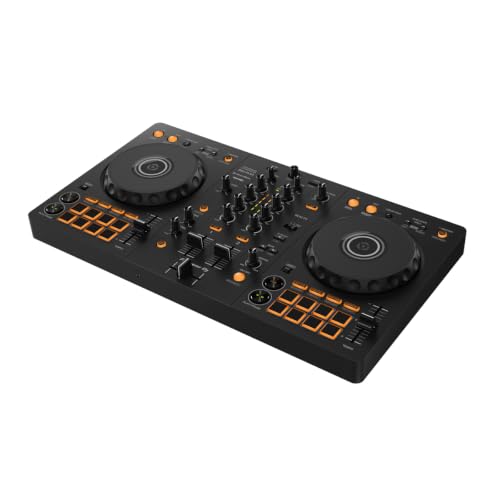
Pioneer DJ DDJ-FLX4 Controller
Badge: Best for Beginner Laptop DJs
Labelled plainly, again: this is a controller, and its presence in a mixer guide is a service to beginners, not a category error. The DDJ-FLX4 assumes a laptop and a library, then removes every early obstacle — Smart Fader to help blends land, 16 pads for cues and performance, and a microphone input that makes the same unit a livestream station. For the large share of new DJs whose collection is a streaming catalogue, this is the honest starting point.
It is equally honest to name who should skip it: anyone with turntables, anyone who wants hardware that works with the laptop closed, anyone building towards club booths. Those buyers have three excellent mixers above. Beginners have this — and should disable the training wheels as their ears grow.
Strengths
- Smart Fader helps first mixes land from day one
- Pads and jog wheels teach the modern controller workflow
- One device serves practice, parties, and livestreams
Trade-offs
- A controller: inert without a computer and software
- No analog turntable workflow
- Assistance features can become a crutch if never switched off
Key specs from the listing
- Channels: 2 decks
- Pads: 16
- Features: Smart Fader, streaming-ready
- Input: Microphone input for livestreaming
Best for: First-time DJs learning on a laptop and streaming services / Not suited for: Standalone, vinyl, or computer-free setups

Riworal 6-Channel Audio Mixer
Badge: Best for Streaming
Crossing into the console half, the Riworal is the streaming pick: six channels for microphones, instruments, and feeds; a 16-bit DSP reverb that gives a streamed vocal its polish; phantom power for the condenser microphone most streamers graduate to; and Bluetooth so a phone’s audio joins without stealing a channel. As a mini audio mixer for a creator’s desk, it is the most complete answer here.
Its size deserves a word: mini for a console means desk-compact, not pocketable, and a DJ will find no crossfader to perform on. Within its half of the category it has no serious weakness at this tier — which is exactly why the family decision in the introduction matters more than any single review.
Strengths
- Six channels end the repatching era for multi-source desks
- Phantom power and reverb cover the streamed-vocal brief
- Bluetooth playback keeps phones out of the input count
Trade-offs
- No DJ crossfader or turntable workflow
- A console’s width is mini only by console standards
- One shared effects section for all sources
Key specs from the listing
- Channels: 6
- Effects: 16-bit DSP with reverb
- Power: +48V phantom power
- Connectivity: Bluetooth, USB audio interface
Best for: Streamers and singers mixing several sources live / Not suited for: DJ booths of any kind

FULUODE CT-80S 8-Channel Audio Mixer
Badge: Best for More Inputs
The FULUODE closes the list by stretching the keyword honestly: at eight channels it is mini only relative to full consoles, and its review should say so. What those channels buy is the end of compromise for small live rigs — a band’s microphones and instruments, a karaoke host’s singers and tracks, all connected at once, with reverb onboard, MP3 and Bluetooth for playback, phantom power throughout, and USB recording of the result.
For that buyer it is the best value in the guide. For the solo streamer it is a warning about buying capacity as a substitute for fit. Measure your session, count your sources, and let the arithmetic — not the channel headline — make this decision. Readers whose rigs keep growing should continue to our Best Mixers 6 Mic Inputs guide.
Strengths
- The input count a small band actually needs
- Onboard MP3 playback covers tracks and breaks reliably
- USB recording captures performances for review and content
Trade-offs
- The largest unit here — mini is a courtesy at eight channels
- Solo creators will leave most of it dark
- More surface to learn, clean, and cable
Key specs from the listing
- Channels: 8
- Model: CT-80S
- Effects: Reverb
- Connectivity: Bluetooth, MP3 player, USB recording
- Power: 48V phantom power
Best for: Small bands and karaoke rigs that have outgrown six channels / Not suited for: Solo desk setups, where it is mostly unused surface
Comparison Table
The table’s format column does the honest work: DJ mixer, controller, or console — compare inside your family first.
| Pick | Badge | Format | Standout trait | Link |
|---|---|---|---|---|
| Numark M2 DJ Mixer | Best Overall | 2-channel DJ mixer | Replaceable, slope-adjustable crossfader in a rack-mountable body | Check on Amazon |
| Numark Scratch DJ Mixer | Best for Performance DJs | 2-channel DJ mixer | Innofader, FX paddles, pads and Serato DJ Pro in the box | Check on Amazon |
| Pioneer DJ DJM-250MK2 Mixer | Best Club-Style Mixer | 2-channel DJ mixer | Club workflow and Sound Color FX in a home-size mixer | Check on Amazon |
| Pioneer DJ DDJ-FLX4 Controller | Best for Beginner Laptop DJs | 2-channel DJ controller | Smart Fader assistance and livestream microphone input | Check on Amazon |
| Riworal 6-Channel Audio Mixer | Best for Streaming | 6-channel compact console | Six channels, DSP reverb, phantom power and Bluetooth | Check on Amazon |
| FULUODE CT-80S 8-Channel Audio Mixer | Best for More Inputs | 8-channel console | Eight channels with MP3 playback and USB recording | Check on Amazon |
How to Choose a Mini Audio Mixer
Write your source list before you read another spec. Two decks and a microphone is a DJ booth. A microphone, a computer, a phone, and an instrument is a creator desk. A small band is a live rig. Each list maps to a different half of this guide, and no product in either half substitutes for the other — a crossfader cannot phantom-power a condenser microphone, and a console cannot scratch. The list takes two minutes and prevents the category’s most expensive mistake.
For DJ buyers, judge the crossfader and the EQ. The crossfader is your instrument’s action: slope adjustability shapes technique, replaceability shapes lifespan, and named performance faders exist because serious players feel the difference. EQ should be per-channel and musical enough to blend with, not just to correct. Software bridges — DVS, included DJ software — matter exactly as much as your library is digital, and no more.
For console buyers, judge preamps, phantom power, and the recording path. Count microphone inputs against your largest session, confirm +48V for condensers, and understand that USB on these boards carries a stereo mix — ideal for streaming and capturing performances, not for multitrack production. Effects are a live and karaoke virtue and a recording irrelevance; weight them by how often an audience hears you in real time. Our Best Mini Stand Mixers guide makes the parallel point for small kitchens: the right mini is the one matched to the real workload.
For every buyer, judge the physical fit. A mini mixer’s superpower is permanence — it stays out, connected, ready. Measure the desk, shelf, or booth it will live in, check that its cables can stay plugged in, and be suspicious of any unit that will need to be fetched from storage per session. Gear that is set up gets used; gear that is stored gets sold.
How to Set Up a Mini Audio Mixer for Two Very Different Jobs
One setup discipline serves both halves of this guide: gain first, performance second, recording checked before it counts.
- Connect powered down, in signal order. Sources to mixer, mixer to speakers or computer, power on from source to speaker.
- Gain-stage every source to a common strength. Each microphone, deck, or feed should peak healthily on its own gain before any fader moves.
- Set performance controls from neutral. EQ centred, effects off, crossfader slope chosen for your style — then adjust one thing at a time.
- For consoles, enable phantom power deliberately. Only condenser channels need +48V; switch it with faders down and gains low.
- Test the recording path before the session. Record a short pass over USB or in your DJ software, play it back, and only then trust it.
- Leave the setup assembled. Photograph the panel, coil spare cable neatly, and let the mini mixer stay ready — permanence is its purpose.
Revisit gains whenever a source changes: a new microphone, a different deck output, a louder singer. Most ‘my mixer sounds off’ reports trace to a changed source meeting an untouched panel, and the fix is the two-minute gain pass above, not a new purchase.
Troubleshooting
Problem: the recording is silent although the room sound is fine → the computer or software is listening to the wrong device; select the mixer or controller as the input and repeat the ten-second test recording.
Problem: one source distorts while others stay clean → that channel’s gain is too hot; turn the gain down and raise the fader instead — faders add volume without adding distortion.
Problem: the microphone feeds back at modest volume → the microphone is too close to a speaker or the gain is chasing distance; move the speaker forward of the microphone, shorten the distance to the singer, and re-gain.
Why Mini Wins: Permanence, Practice, and the Ready Desk
The case for mini gear is behavioural, not technical. A mixer that lives permanently on the desk gets played daily; a full-size board that needs setting up gets played on weekends, then monthly. DJs practise more on a booth that is always assembled. Streamers sound consistent because their gains never move. Small bands rehearse tighter when the rig is a single case and ten minutes. Every pick in this guide is, in that sense, a practice-and-permanence device that also mixes audio.
Permanence has a discipline: the setup must be finished, not merely present. Cables dressed, gains set, recording tested, panel photographed. A half-configured mini mixer is just small clutter. Finish the setup once, using the sequence in this guide, and the category’s real benefit — zero-friction starts — arrives at every session afterwards.
The Vocabulary Problem: Reading Mixer Listings Without Being Fooled
Listings in this category borrow each other’s language shamelessly: consoles call themselves DJ mixers because they can play a track, DJ mixers imply studio readiness because they have a microphone input, and controllers appear under ‘mixer’ searches because shoppers use the words loosely. The defence is a three-question filter. Does it have a performance crossfader? Then it is built for decks. Does it have phantom power and several preamps? Then it is built for sources. Does it need a computer to make sound? Then it is a controller, whatever the headline says.
Apply the filter to this guide and every pick sorts itself honestly — which is how the guide was built. Apply it to any listing elsewhere and the marketing fog thins considerably. The filter costs nothing, works on every future category you shop, and is worth more than any single recommendation in this article.
When to Outgrow Mini: The Honest Upgrade Triggers
Mini gear should be replaced on evidence, not appetite. The genuine triggers are few: you repatch cables every session because sources exceed inputs; a second performer needs a channel that does not exist; your recording ambitions turn multitrack; or a wear part — usually a crossfader — has been replaced and the surrounding hardware is now the limit. Each trigger names a specific larger product, which keeps the upgrade rational.
The false triggers are more common: a new model’s longer feature list, a sale, a bigger board in someone else’s setup. Chasing them restarts the learning curve and the setup permanence that made the mini mixer valuable. If none of the genuine triggers has fired, the best upgrade available is usually a better microphone, better speakers, or more practice — in that order.
Headphones and Monitoring: Hearing What the Audience Cannot
Every mixer in this guide is ultimately judged through two monitoring paths: the room’s speakers and the operator’s headphones. Headphones are the diagnostic instrument — cueing the next track as a DJ, checking a stream’s actual feed as a creator, isolating which channel carries a hum before the audience hears it. A comfortable, closed-back pair that you trust is worth more than any single feature upgrade, because decisions made through monitoring you distrust are guesses wearing a uniform.
Build the habit of checking the delivered product, not the intended one. Streamers should listen to the stream’s return feed for ten seconds per session; DJs should record and replay a blend rather than trusting the booth’s flattering volume; live operators should walk the room during soundcheck, because the mix position is the one seat the sound was not built for. Mini mixers make all of this easier by keeping the setup permanent — the checks become rituals instead of projects.
Cable Literacy for Small Rigs
Small rigs fail at their cables with a reliability that would be impressive if it were not so preventable. The working knowledge is compact: balanced connections reject interference over distance and are the right choice for microphones; unbalanced connections are fine at short range for instruments and playback; and a cable that works intermittently is worse than a dead one, because it schedules its failure for the performance. Label both ends of every cable in a permanent setup — the label is what turns a fault-finding hour into a thirty-second swap.
Spares are a system, not a shopping trip: one spare of every cable type the rig depends on, coiled with the setup, plus the adaptors your venues historically demand. Coil cables in loops rather than around elbows, store them where the mixer lives, and replace the first cable that crackles instead of negotiating with it. None of this appears in mixer marketing, and all of it decides whether the mixer you bought gets to demonstrate its quality on the night.
From Mini to Midrange: Reading Your Own Upgrade Signals
The healthiest reason to leave the mini category is a list of specific, repeated frustrations: the third source that never has a channel, the guest microphone borrowed per episode, the recording that needed channels separated. Each frustration names its own remedy, which is what makes the upgrade rational rather than aspirational. Buyers who keep a simple session log — sources used, channels wanted, problems met — can read their own upgrade signal in a month, in their own handwriting, instead of taking a retailer’s word for it.
Until the log speaks, the mini mixer’s job is to make the log boring: same sources, same gains, same clean recordings, session after session. That boredom is the sound of a correctly sized rig. When it breaks, it breaks informatively — and the midrange shelf, including the boards compared in our midrange coverage, will be waiting with exactly the channel or feature your log requested. A house-party footnote for readers whose rigs serve social rooms: the drinks station beside the booth has its own mixer logic, covered in our Best Mixers Alcohol Pairs guide.
The Quiet Setup: Noise, Hum, and Small-Room Troubleshooting
Noise problems in small rigs follow a short list of usual suspects, and a calm order finds them faster than random cable-swapping. Work source to speaker: mute channels one at a time to localise the noise to a single input; swap that input’s cable first, because cables fail most; then swap the source itself if the noise follows the cable’s new home. Hum that changes when you touch the mixer or a turntable is a grounding story; hiss that scales with gain is a staging story; interference that follows a phone’s arrival is a placement story — move the phone, not the rig.
Prevention is mostly geometry and discipline: audio cables crossing power cables at right angles rather than running parallel, one power distribution point for the whole rig so grounds agree, and gains set so no stage runs needlessly hot. A mini setup that is permanently assembled can be made permanently quiet — one afternoon of methodical hunting, repaid at every session afterwards.
Room Acoustics for People with Small Mixers
The room is the largest component in any small rig, and the least shopped-for. Hard, parallel surfaces — bare walls, glass, tile — reflect sound back into microphones and audiences as echo and harshness that no mixer EQ fully removes. The domestic remedies are disproportionately effective: soft furnishings in the recording corner, a rug under the live setup, curtains drawn for sessions. A streamer who treats one corner will outperform, on the same board, a streamer with a better board in a bare room, because the microphone hears the room before it hears the voice.
Judge your room with a clap: a sharp clap should die quickly and cleanly, without a metallic flutter or a lingering tail. Where it does not, add softness nearest the microphone first. Live operators have less freedom — the hall is the hall — but speaker placement and the EQ discipline in this guide exist precisely for rooms that cannot be treated. Either way, the mixer is the last link in the acoustic chain, and buying decisions improve the moment the earlier links are heard honestly.
USB Audio Without Tears: Drivers, Defaults, and Sample Rates
Most USB mixer frustration is not the mixer’s fault; it is the computer’s defaults quietly choosing other devices. The permanent fix is a one-time audit: set the mixer as the system’s default input and output where appropriate, disable the webcam and built-in microphones in the apps that matter, and confirm the recording software’s device list by name. Sample-rate mismatches between the system and the software cause the classic chipmunk-or-slowed recordings; setting both to the same rate, once, ends that genre of surprise.
Keep a known-good configuration documented — a screenshot of the audio settings beside the panel photograph this guide keeps recommending. Computers update, apps reset, and the document turns a forty-minute fault-finding session into a two-minute comparison. Small rigs live on computers owned by households, not studios, and the documentation habit is what makes a domestic computer behave like studio infrastructure.
Two People, One Board: Sharing a Mini Setup
Households and studios share mini mixers, and sharing has protocols that prevent the two classic conflicts: the reset panel and the borrowed cable. The reset panel is solved by the photograph — house settings documented, so any user can restore them after experimenting, and experimentation itself is licensed rather than resented. The borrowed cable is solved by the spares rule: the rig’s cables are the rig’s, permanently, and household needs draw on a separate household cable, full stop.
Shared boards also benefit from a channel convention: microphones always in the same channels, playback always in the same pair, so any operator’s muscle memory works on any day. Conventions feel bureaucratic in a two-person studio and are, in fact, what let two people run one rig as fluently as one person does. The mini format intensifies all of this — fewer channels, more sharing — and rewards the households that write the conventions down while they are still obvious.
What to Listen For: A Beginner’s Critical-Listening Curriculum
New mixer owners improve fastest by learning what to listen for, in a fixed order. First, noise: with everything connected and gains set, the silent system should sound silent — hiss and hum are diagnoses waiting for the troubleshooting section. Second, balance: in a blend or a mix, can every source be heard at its intended level, or is one element doing all the work? Third, distortion: the moment a clean sound gains a fizzy edge, a gain somewhere is too hot, and finding it is a skill this guide’s gain-staging sections teach mechanically.
Fourth, and last, come effects and polish — deliberately last, because beginners who start there build mixes on decoration while the foundations wobble. Run the curriculum weekly against a reference recording you admire, through the same headphones, and the ear develops on schedule. Equipment bought after the ear develops is bought once; equipment bought before it is bought twice. That ordering, more than any pick in this guide, is the beginner’s real best buy.
Portable Power and Playing Anywhere
Mini gear invites location work — garden parties, community events, recordings in interesting rooms — and location work runs on power discipline. Know your rig’s total draw, carry a distribution lead rated for it, and never let the audio share a circuit with catering equipment if the venue offers a choice: kettles and urns are hum’s favourite accomplices. Where mains power is absent or suspect, battery solutions exist for small boards and speakers, sized in hours that shrink at performance volume — test the real runtime at home, at level, before the event depends on it.
Weather and transport complete the location brief: a cover for the board between sets, cables ramped or taped where feet travel, and a setup that can be struck in minutes when rain re-plans an outdoor afternoon. The mini format’s portability is only real when the whole system — board, cables, power, protection — was designed to move. Design it once, on a quiet day, and every location afterwards is a variation instead of an improvisation.
A Tale of Two Desks: The Same Budget, Spent Two Ways
Imagine two buyers with the same modest budget. The first buys the largest board the money allows, fills a desk with channels that mostly stay dark, and spends the first year learning around the surplus — every session a negotiation with unused surface, every recording preceded by checking which of many inputs the microphone wandered into. The second buys the mini mixer matched to a written source list, spends the remainder on the microphone and headphones the first buyer deferred, and spends the year making things: episodes, practice tapes, small gigs, each starting in seconds because the setup never changes. By December the second desk has a body of work and a precise, evidence-based idea of what to buy next. The first desk has a larger mixer.
The story is not an argument against large boards — the second buyer’s year-two purchase may well be one, bought with a log of exactly which channels and features the work demanded. It is an argument about sequence. Capability should chase evidence, and the mini category is where evidence is cheapest to gather, because the setup’s permanence generates sessions, and sessions generate the truth about what a rig actually needs. Buy the truth-gathering tool first. The rest of the rig will introduce itself, by name, in the session log.
Signal Flow, Explained with a Kettle’s Honesty
Every confusion in small-rig audio dissolves once signal flow is pictured plainly: sound is water, the board is plumbing. Sources are taps, each with its own pressure — that pressure is gain, and it is set at the tap, not downstream. Channels are pipes running in parallel, each with a valve (the fader) and a filter (the EQ). Effects are a side-loop that borrows water from the pipes and returns it flavoured, which is why one loop flavours everything sent to it. The master is the main valve before the tank, and the tank — speakers, stream, recording — can only hold what the plumbing delivers, at the pressure the weakest joint allows.
The picture explains the guide’s recurring rules without a single technical term. Distortion is a tap opened past the pipe’s rating. Hiss is a system straining at low pressure, amplified downstream. A muted channel is a closed valve, not a broken tap — check valves before replacing taps. And the recording that sounds distant is drawing from the wrong tank entirely: the computer’s own microphone, a tap you did not know was open. Operators who internalise the plumbing stop memorising fixes and start reasoning, which is the moment a mini mixer stops being equipment and becomes an instrument they understand.
Common Buying Mistakes
- Shopping the keyword instead of the session. ‘Mini audio mixer’ names two product families; your source list names the right one.
- Assuming a controller works standalone. Controllers need a computer and software — a feature for laptop DJs, a failure for everyone else.
- Counting channels instead of preamps. Stereo line channels do not take microphones; count what your sources actually need.
- Skipping the recording test. The first time you check the USB or software path should not be the first take that matters.
- Storing the mini mixer between uses. Its value is permanence; a stored mini is just a small inconvenience.
- Buying capacity for imagined sessions. Eight channels for a solo desk is not headroom — it is surface you clean, not surface you use.
Final Recommendation
For the classic brief behind this keyword — two decks, hands on, no computer required — the decision is the benchmark DJ mixer at the top of this list. Start with the Numark M2 DJ Mixer if you want the safest all-round choice in this list.
Performance DJs and club-track DJs have their own picks directly beneath it, and creators should cross to the console half without hesitation. If your priorities lean the other way, the Numark Scratch DJ Mixer and the Pioneer DJ DJM-250MK2 Mixer cover the two most common alternative briefs in this guide.
Whichever half you land in, finish the setup the day the mixer arrives: gains set, recording tested, panel photographed, cables staying put. A mini mixer earns its money in the sessions that start instantly because it was already ready — and that readiness, more than any badge in this guide, is the best in the category.
Related guides
Frequently Asked Questions
What is a mini audio mixer?
A compact mixer for small source counts: either a 2-channel DJ mixer built around a crossfader, or a small console with a handful of channels for microphones and feeds. ‘Mini’ describes footprint and permanence — it lives on the desk, always connected — rather than a compromise in the mixing itself.
Can a mini DJ mixer be used for streaming?
Only partially. A DJ mixer can send its output to a separate interface, but it lacks the phantom-powered microphone channels and direct USB feed a streaming desk wants. Streamers are better served by the console picks in this guide, which were designed for exactly that signal path.
Do I need phantom power on a mini mixer?
If you use, or plan to use, a condenser microphone — the studio-style microphones most streamers and vocalists graduate to — yes. Dynamic microphones and DJ sources do not need it. Both console picks here include +48V; the DJ mixers are built for a different microphone job.
What is the difference between a DJ mixer and a DJ controller?
A mixer processes audio itself and works without a computer; a controller sends commands to DJ software, which does the processing, so the controller is silent without its laptop. Controllers add pads, jog wheels, and learning assistance; mixers add independence and turntable workflow. The DDJ-FLX4 in this guide is the controller example, labelled as such.
How many channels does a small band need in a mini format?
Most small bands exceed the mini idea quickly: count every microphone and instrument, add playback, add a spare, and many land at eight channels — the FULUODE’s territory, and the practical ceiling of this guide. Beyond that, shop the midrange category rather than a mini board.
Which pick is best for a beginner?
It depends on the beginner’s instrument. A beginner DJ with a laptop: the DDJ-FLX4, for its assisted learning curve. A beginner DJ with turntables: the Numark M2, for its clarity. A beginner creator: the Riworal console, because its channels end repatching from the first session.


