Disclosure: topratedkitchenware.com is reader-supported. When you buy through links on our site, we may earn an affiliate commission from Amazon and other retailers, at no extra cost to you.
Where to buy
Every product in this guide to the best mixers for music is a current Amazon listing with API-verified product data, and the list deliberately mixes the two families the word ‘mixer’ covers in music: DJ mixers and controllers for performance, and consoles for gathering voices and instruments. Buy the family that matches your music-making, and the model that matches your source count.
- Pioneer DJ DJM-250MK2 2-Channel DJ Mixer — Check on Amazon
- Pioneer DJ DDJ-FLX4 2-Channel DJ Controller — Check on Amazon
- Riworal 6-Channel Audio Mixer — Check on Amazon
- FULUODE CT-80S 8-Channel Audio Mixer
- Pyle PMXU68BT 6-Channel Mixer
- Pyle PMXU48BT 4-Channel Mixer
Read the full guide ↓
Ask ten musicians for the best mixers for music and you will start an argument, because ‘mixer’ names two different instruments that share a shelf. For DJs and electronic performers it is the two-channel performance mixer or controller — crossfader, EQ, effects, pads. For bands, singers and home recordists it is the console — channels of microphones and instruments blended into a stereo whole. This guide refuses to pretend otherwise: it presents three picks from each family, states plainly which job each one does, and lets your actual music decide. If your interest is narrower — say Best Mixers For Music Production or Best Mixers For Music Festivals — the relevant picks below are flagged in their reviews.
What both families share is the same underlying craft: gain, EQ, balance and taste. A great vocal mix and a great DJ transition are both, at bottom, decisions about what the listener should notice next. So while the hardware below diverges sharply in shape, the choosing logic converges: count your sources, decide how much performance you do with your hands, and buy the tool whose controls match the gestures your music actually involves. The reviews are organised to make that matching easy.
Key Takeaways
- ‘Mixer’ means two families — DJ performance mixers/controllers and multi-channel consoles — and the first choice is which family your music lives in.
- DJ picks here (Pioneer DJM-250MK2, DDJ-FLX4) centre on crossfader craft, effects and pads; console picks centre on channels, phantom power and USB recording.
- Consoles send a stereo mix to a computer over USB; DJ hardware performs live and records as a performance.
- Phantom power matters to the console family (condenser microphones); crossfader quality matters to the DJ family.
- Most musicians eventually discover their second family — buy the first one for the music you make this year.
In this guide
Quick Picks
| Pick | Badge | Channels / format | Why it is here | Link |
|---|---|---|---|---|
| Pioneer DJ DJM-250MK2 2-Channel DJ Mixer | Best DJ Mixer | 2 channels | Club-layout DJ mixing with Sound Color FX and rekordbox DVS — the performance standard. | Check on Amazon |
| Pioneer DJ DDJ-FLX4 2-Channel DJ Controller | Best DJ Controller | 2 channels, 2 decks | A 16-pad controller with Smart Fader for software-centred performers and beginners. | Check on Amazon |
| Riworal 6-Channel Audio Mixer | Best Console Overall | 6 channels | Six channels, DSP reverb and USB — the balanced console for small acts and studios. | Check on Amazon |
| FULUODE CT-80S 8-Channel Audio Mixer | Most Console Inputs | 8 channels | Eight channels for bands and multi-source setups that keep growing. | Check on Amazon |
| Pyle PMXU68BT 6-Channel Mixer | Best Portable Console | 6 channels | A portable six-channel Pyle with Bluetooth and USB for gigging small acts. | Check on Amazon |
| Pyle PMXU48BT 4-Channel Mixer | Best Simple Console | 4 channels | Four uncomplicated channels for solo performers and simple recording setups. | Check on Amazon |
How These Picks Were Chosen
All six picks were verified through Amazon’s Creators API on 2026-11-20 — ASIN, listing title and official image confirmed — and only verified picks carry purchase links. The shortlist was composed as a deliberate cross-section: the two Pioneer DJ products represent the performance family at its club-standard and beginner-friendly ends, and the four consoles represent the gathering family from four channels to eight. Specifications in the reviews come from the verified listings — channel counts, phantom power, DSP figures, DVS inclusions — because in a category this broad, the listing is the only honest common ground.
This is a research-led overview, not a claim of comparative testing across two product families that rarely share a room. Its promise is narrower and more useful: every product fact traces to its verified listing, every pick’s family and role is stated without blur, and the guidance concentrates on the matching decision — which family, then which size — that determines whether a music mixer purchase succeeds. Musicians who already know their family can read their three picks closely; those still deciding should read the guide section first.
The 6 Best Mixers for Music

Pioneer DJ DJM-250MK2 2-Channel DJ Mixer
Badge: Best DJ Mixer
Strengths
- Club-style layout means the skills learned on it transfer to the mixers installed in venues
- The Sound Color FX filter is a genuinely musical one-knob performance tool
- rekordbox DVS unlock is included, opening the digital vinyl route
Trade-offs
- Two channels, deliberately — this is a focused DJ mixer, not a utility console
- The Pioneer ecosystem (rekordbox) is the assumed home software
- No performance pads, so cue juggling lives on the decks or controller instead
| Channels | 2 channels |
|---|---|
| Workflow | Club-style 2-channel layout |
| Effects | Sound Color FX filter |
| Software | Free rekordbox DVS unlock |
Pioneer DJ’s DJM-250MK2 distils the club mixer formula into two channels: the layout mirrors the larger mixers installed in venues, the Sound Color FX filter puts a sweepable, musical effect on a single knob per channel, and a free rekordbox DVS unlock opens digital vinyl control inside Pioneer’s ecosystem. For a DJ, the transferable layout is the quiet superpower — muscle memory built at home on this mixer works on the club-standard surfaces found in booths. It deliberately omits performance pads and extra channels; the design bet is that clean EQ, a great filter and a familiar layout beat feature sprawl for the mixing itself.
For music as performance, the DJM-250MK2 is the reference shape: two channels mixed by hand, a Sound Color FX filter that turns transitions into musical gestures, and a layout identical in spirit to the mixers installed in clubs — so home practice compounds into booth skill. Its rekordbox DVS unlock means digital libraries are playable from turntables, blending the DJ traditions. Producers who perform their material live, and DJs whose music is the mix itself, are its constituency. It will not mix a band, and judged inside its family it never promised to.
The DJM-250MK2’s daily pleasure is familiarity: every control is where club-standard layout says it should be, so practice at home compounds directly into competence on installed venue mixers — a transfer effect no other pick here offers in the same way. The Sound Color FX filter becomes a signature gesture with use, a single-knob sweep that marks transitions as yours. The rekordbox DVS unlock keeps the digital library under turntable control inside Pioneer’s world. It is a focused, almost austere tool, and DJs who value transfer and touch over feature sprawl tend to keep mixers like this for years.
Best for: DJs and live performers in the Pioneer ecosystem / Not suited for: bands or multi-source recording
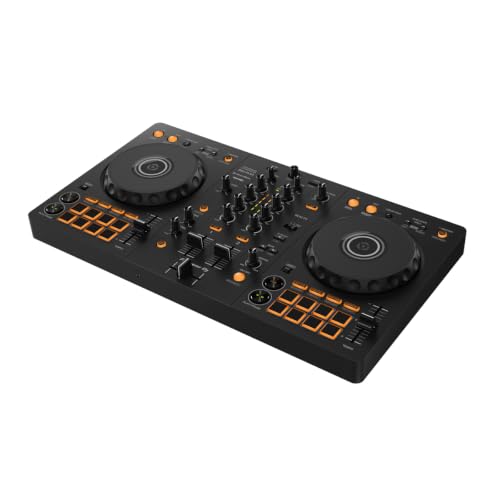
Pioneer DJ DDJ-FLX4 2-Channel DJ Controller
Badge: Best DJ Controller
Strengths
- Smart Fader helps first mixes sound smooth while the underlying skills develop
- Sixteen pads and two full decks make it a complete performance instrument, not just a mixer
- A mic input and streaming-ready design suit the modern bedroom-to-broadcast path
Trade-offs
- It is a controller: it needs a computer and software running to make sound
- No standalone mixer inputs for external decks the way a true DJ mixer offers
- The jog-and-pad layout is a DJ instrument, not a general-purpose mixing console
| Channels | 2 channels, 2 decks |
|---|---|
| Pads | 16 pads |
| Finish | Graphite |
| Features | Smart Fader, streaming-ready, mic input for livestreaming |
The DDJ-FLX4 is a two-channel DJ controller rather than a standalone mixer: sixteen pads, two decks, Smart Fader assistance, streaming-ready design and a microphone input for livestreaming, all in Pioneer’s graphite finish. Smart Fader is the beginner-friendly headline — it helps transitions blend smoothly while beatmatching skills are still developing — and the pad count gives cue juggling and performance play real room. Because it is a controller, the computer and DJ software are part of the instrument; in return the whole setup is one USB-connected unit that can also carry a livestream with a mic. It is the modern, software-centred way into DJing in this group.
The FLX4 is music-making for the software generation: two decks, sixteen pads for cues and finger-play, Smart Fader smoothing the first transitions, and a microphone input that even covers the livestreamed set. For beginners it collapses the distance between loving music and performing it; for experienced laptop DJs it is a compact, complete surface. Its family limit is dependence — no computer, no music — and its family strength is the opposite: everything a modern DJ set needs in one USB device. Readers whose music is moving toward Best Mixers For Newbie Djs will find this the natural starting surface.
Living with the FLX4 means living in software, comfortably: updates add features, the pads and Smart Fader keep early sessions sounding better than your technique yet deserves, and the whole rig packs into a backpack with the laptop it needs. The microphone input quietly extends its life beyond beginner status — streamed sets, talk-over practice, a friend’s party — and the graphite finish survives the bag-and-desk cycle gracefully. Its daily discipline is the laptop itself: keep the software organised and the library analysed, and the controller simply delivers. For the software-native generation of DJs, this is what a mixer looks like now.
Best for: beginner and laptop-centred DJs and performers / Not suited for: standalone rigs without a computer

Riworal 6-Channel Audio Mixer
Badge: Best Console Overall
Strengths
- Six channels cover a vocal, a guitar, keys and playback without swapping cables mid-set
- Built-in 16-bit DSP reverb means one less outboard unit to carry and patch
- Bluetooth and USB give you walk-in music and a simple recording feed from the same small board
Trade-offs
- Compact desktop format, so the faders and knobs sit close together for larger hands
- Effects are a single shared DSP block rather than per-channel processing
- No dedicated DJ crossfader, so it is a mixing console first and a DJ tool second
| Channels | 6 channels |
|---|---|
| Effects | 16-bit DSP with reverb effect |
| Phantom power | +48V phantom power |
| Connectivity | Bluetooth, USB audio interface |
The Riworal six-channel console is built around a simple promise: plug in a handful of sources, add a touch of its 16-bit DSP reverb, and get a balanced stereo mix out without a rack of extra gear. The +48V phantom power means a condenser vocal microphone is welcome alongside dynamic mics and line-level instruments, and the Bluetooth input quietly handles the jobs nobody thinks about until they are missing — background music before the show, a backing track from a phone, a reference song during soundcheck. As a USB audio interface it also doubles as the recording path, so the same board that runs the room can capture the stereo mix to a computer with no additional hardware purchase hiding in the plan.
The Riworal console is the gathering family’s all-rounder: six channels for the small band or the multi-source home studio, DSP reverb for the vocal, phantom power for the good microphone, USB for recording the result. A songwriter can run a mic, a guitar, keys and a laptop through it and capture the song as it is played; a small act can gig with the same board on weekends. It performs no DJ tricks, and its music is the music of sources blended well — which is, most weeks, most music.
In daily use, the Riworal’s workflow is refreshingly literal: sources in, gains set, reverb to taste, master up. The Bluetooth pairing is the kind of feature that gets used exactly as intended — a phone appears, pairs, and plays — and the USB connection identifies itself to a computer without ceremony, which matters when the same board alternates between stage and desk duty. Owners of small boards learn to love or hate the spacing of the controls, and while this one is compact, the layout follows the universal small-console map, so experience gained on it transfers to almost any other board you will ever be handed at a venue or a rehearsal room.
Best for: small acts and home studios blending several sources / Not suited for: DJ performance of any kind

FULUODE CT-80S 8-Channel Audio Mixer
Badge: Most Console Inputs
Strengths
- Eight channels is the most input room in this group, useful when the source count keeps growing
- USB recording, an MP3 player and Bluetooth cover playback and capture without extra boxes
- 48V phantom power runs condenser microphones directly from the board
Trade-offs
- The largest footprint here, which matters on a crowded desk or a small stage corner
- A shared reverb is a convenience effect, not a substitute for dedicated processing
- Channel count is shared across mic and line sources, so plan the input list before you buy
| Channels | 8 channels |
|---|---|
| Model | CT-80S |
| Effects | Built-in reverb |
| Connectivity | MP3 player, Bluetooth, USB recording |
| Phantom power | 48V phantom power supply |
The FULUODE CT-80S is the big-input option in this pool: eight channels, a built-in reverb, an MP3 player, Bluetooth and USB recording in one sound-system mixer board. That combination suits anyone whose source list refuses to stay small — several microphones, a keyboard, a guitar, a laptop and a phone can all live on the board at once instead of queuing for inputs. The 48V phantom power supply keeps condenser microphones in play, and the USB recording path means the performance or rehearsal can be captured as it happens. It asks for more desk or stage space than the compact boards here, and repays it with headroom in the input count that the four-channel models simply cannot offer.
When the music involves many simultaneous sources — the full band rehearsal, the choir, the multi-instrument session — the FULUODE’s eight channels stop being a specification and start being the difference between everyone plugged in and someone miming. USB recording captures the rehearsal for review, the MP3 and Bluetooth paths handle reference tracks and breaks, and phantom power keeps condensers available for the acoustic moments. It is the largest board here because its music is the largest: many people, playing at once, needing one honest blend.
Living with the CT-80S means planning its place: it wants a defined spot — a desk corner, a rack-adjacent shelf, the top of the equipment case — rather than being squeezed in last. In return, the day-to-day experience is calm, because nothing needs repatching when the source list changes; the extra channels absorb the change. The MP3 player deserves a specific mention in daily use: loading walk-in or interval material onto a stick removes the phone from the system entirely, and the USB recording behaves like the simple stereo capture it is — start it, forget it, and have a reference of the session waiting afterwards.
Best for: bands, choirs and multi-source sessions / Not suited for: solo performers travelling light

Pyle PMXU68BT 6-Channel Mixer
Badge: Best Portable Console
Strengths
- A known brand name in budget live audio, with a portable format that travels easily
- USB audio interface duties mean the computer becomes a source and a recorder
- Bluetooth pairing is quick for phone playback between sets or segments
Trade-offs
- Six channels fill up fast once stereo sources are counted honestly
- No DSP effects count is stated in the listing title, so treat effects as basic
- Portable boards trade some long-term heft for their low weight
| Channels | 6 channels |
|---|---|
| Model | PMXU68BT |
| Connectivity | Bluetooth, USB mixer audio interface |
| Format | Portable digital mixing console |
Pyle’s PMXU68BT takes the classic small live board and adds the two connections modern small gigs actually revolve around: Bluetooth for wireless playback from a phone, and a USB mixer audio interface so a laptop becomes both a source and a recorder. Six channels is the working size for a duo with a spare, a small worship team, a karaoke host with backing tracks, or a streamer juggling a microphone and game or music feeds. The portable format is the point — this is a board designed to be carried, set up quickly and packed away, rather than installed and left. It keeps the control layout familiar to anyone who has used a compact analog-style console before.
The PMXU68BT is the working musician’s portable: six channels, Bluetooth for the break music and reference tracks, USB for the laptop, in a format that rides to the gig without drama. Duos and trios, worship teams and function acts — the musicians who play every week in rooms that were not built for music — are its people. Its music is practical music, made reliably, and the board’s virtue is that it never becomes the story of the night; the performance does.
Day to day, the PMXU68BT behaves like the appliance it is meant to be: it lives in the gig bag or on the desk corner, sets up in minutes, and presents the same familiar face every time. The Bluetooth connection is quick enough for the way it is actually used — reference tracks, break music, a guest’s phone — and the USB interface means a laptop joins the rig with one cable and no interface box in between. Its controls follow the classic compact-console layout, so skills and habits transfer directly from almost any small board you have used before, and to any house board you meet later.
Best for: gigging duos, trios and function acts / Not suited for: full-band input lists

Pyle PMXU48BT 4-Channel Mixer
Badge: Best Simple Console
Strengths
- The simplest layout here, which is a genuine virtue when the operator is also the performer
- Four channels is exactly right for a solo or duo source list with nothing wasted
- USB interface and Bluetooth cover the two connections small rigs actually use
Trade-offs
- Four channels is a hard ceiling — a growing act outgrows it quickly
- No room for a spare input when a cable or a guest appears at the last minute
- Shares the compact-control spacing of the other small Pyle boards
| Channels | 4 channels |
|---|---|
| Model | PMXU48BT |
| Connectivity | Bluetooth, USB mixer audio interface |
| Format | Portable digital mixing console |
The PMXU48BT is the four-channel sibling in Pyle’s portable line: Bluetooth-compatible, USB-equipped and deliberately simple. Four channels sounds modest until you map a real small setup onto it — a vocal microphone, an acoustic guitar, a keyboard or backing-track source, and one spare — at which point the board stops looking small and starts looking exact. The USB audio interface means recordings and streams come straight off the same unit, and Bluetooth removes the cable hunt for phone playback. What it will not do is grow: there is no hidden expansion, so the honest way to judge it is against the source list you actually have, not the one you might assemble someday.
The little Pyle is the solo musician’s mixer: a voice, an instrument, a backing source, a spare. Singer-songwriters, ceremony musicians and buskers-with-a-battery-rig all live at this scale, and for them the PMXU48BT’s simplicity is a musical feature — adjustments happen by feel, mid-song, without breaking the spell. USB recording captures the set or the demo. It will not grow with a band, and it is not asked to: its music is one person, complete, and the board is exactly as large as that music needs.
The PMXU48BT’s daily virtue is invisibility. It occupies almost no desk or stage space, asks for almost no setup thought, and handles its small list of jobs — a microphone, an instrument, a playback source — with the reliability of a much simpler device, which in a sense it is. The USB connection keeps it honest as a recording path for demos and streams, and Bluetooth covers the casual playback that small setups constantly need. Owners tend to keep boards like this long after upgrading, because there is always a small job — a ceremony, a rehearsal, a backup rig — that is exactly its size.
Best for: solo performers and simple demo recording / Not suited for: any growing ensemble
Comparison Table
| Pick | Channels | Computer connection | Effects | Link |
|---|---|---|---|---|
| Pioneer DJ DJM-250MK2 2-Channel DJ Mixer | 2 channels | See review | Sound Color FX filter | Check on Amazon |
| Pioneer DJ DDJ-FLX4 2-Channel DJ Controller | 2 channels, 2 decks | See review | See review | Check on Amazon |
| Riworal 6-Channel Audio Mixer | 6 channels | Bluetooth, USB audio interface | 16-bit DSP with reverb effect | Check on Amazon |
| FULUODE CT-80S 8-Channel Audio Mixer | 8 channels | MP3 player, Bluetooth, USB recording | Built-in reverb | Check on Amazon |
| Pyle PMXU68BT 6-Channel Mixer | 6 channels | Bluetooth, USB mixer audio interface | See review | Check on Amazon |
| Pyle PMXU48BT 4-Channel Mixer | 4 channels | Bluetooth, USB mixer audio interface | See review | Check on Amazon |
How to Choose a Mixer for Music
The family decision comes first and forgives nothing if skipped. If your music is performed by blending recordings — DJ sets, electronic live performance — your hands need a crossfader, per-channel EQ and effects, and your sources are two decks or a controller: the Pioneer picks. If your music is made by blending simultaneous sources — voices, instruments, a band — your hands need channels, microphone preamps and phantom power: the consoles. Hybrid musicians exist (the DJ who also runs a live vocalist, the band with a DJ member), and they generally solve it with one of each, in series, rather than one compromised box — a lesson the festival-scale version of this problem, in Best Mixers For Music Festivals, teaches at higher volume.
Within the console family, size follows the source list with the usual arithmetic: microphones one channel each, stereo sources two, plus a spare for the guest or the failure. Four channels is a solo act, six is the small group, eight is the band that keeps adding members. Phantom power is the family’s other binary — any condenser microphone, present or planned, makes +48V mandatory, and all four consoles here provide it. USB recording, present across the consoles, converts rehearsals and gigs into reviewable music, which is how acts improve; treat it as a core feature, not a bonus.
Within the DJ family, the deciding specifications are the crossfader, the effects and the ecosystem. The DJM-250MK2 bets on layout and a single great filter; the FLX4 bets on pads, software integration and beginner assistance. Ecosystem — rekordbox here — matters because your library, cues and habits live in software, and the mixer that speaks your library’s language gets played more. Producers should also read this family through the Best Mixers For Music Production lens: a DJ mixer in a studio is a sampling and performance instrument, and several of these picks moonlight there legitimately.
Finally, buy for the music calendar you actually keep. A weekly gig justifies the portable console; a bedroom production habit justifies the controller; the annual band rehearsal justifies neither at the top of the range. The most musical purchase is the one that disappears into regular use — set up, understood, and reached for without deliberation. Every pick here can be that purchase for somebody; the guide’s job is to make sure it is that purchase for you.
How to Get a Clean Mix: A Practical Routine for Any Mixer
Whatever family you chose, the craft of a clean mix follows the same order of operations. This routine works on a two-channel DJ mixer and an eight-channel console alike.
- Start from silence: all gains and faders down, EQ centred, effects off. Every good mix is built upward from a known zero.
- Set gain per source first — the loudest moment of that source, strong but never clipping — before touching its fader; gain is the foundation, faders are the furniture.
- Bring sources in one at a time, in order of importance: the lead voice or the lead deck first, everything else arranged underneath it.
- Use EQ by cutting before boosting: remove the rumble, the boxiness or the harshness, and most sources need nothing added at all.
- Add effects last, as seasoning — a shared reverb low enough to miss when muted, a filter sweep performed rather than parked.
- Check the mix at the volume it will actually be heard, and from more than one position if a room is involved; mixes are for listeners, not for the mix position.
- Record or note the result: a photograph of the console, a recorded set, a saved session — something the next mix can start from.
The most common mix problem in both families is level creep: every source gets nudged up to compete, the master creeps toward distortion, and the music gets louder without getting clearer. The discipline that prevents it is subtraction — when something needs to be more present, first try turning something else down. Mixers reward that discipline physically: there is always another fader, and using the downward ones is what separates mixing from merely amplifying.
Taste is the final stage and the only un-teachable one, but it develops faster with references. Use the Bluetooth or playback path on the consoles, or your second deck, to A/B your mix against a recording you admire, through the same speakers, at the same volume. The gap between the two is your practice plan, stated more honestly than any tutorial can state it.
Troubleshooting
Problem: the mix distorts even though no single channel looks overloaded → the master bus is the sum of everything; pull the master down and rebuild the balance at lower fader positions (the level-creep fix).
Problem: a vocal or lead source will not sit forward no matter how loud it gets → stop pushing it up; cut the competing sources’ midrange slightly and lower them — presence is relative, not absolute.
Problem: the recording of a good-sounding live mix sounds flat → room acoustics were flattering the live sound; record a reference pass, listen on headphones, and adjust the board for the recording when the recording is the product.
One Word, Two Instruments: A Short History of the Split
The split in this guide is not a marketing invention; it is history. The console descends from radio and recording studios, where many microphones needed blending — hence channels, preamps and phantom power. The DJ mixer descends from disco and hip-hop, where two record players needed blending — hence the crossfader, cueing and battle-grade faders. Digital production blurred the border (controllers perform, consoles record to laptops), but the underlying gestures remain distinct, and musicians still choose, consciously or not, which tradition their hands belong to.
Recognising your tradition is liberating rather than limiting. The band musician stops envying pad controllers; the DJ stops apologising for owning no microphone preamps. And the growing number of hybrid acts simply run both traditions in series — controller or decks into a console channel, voices alongside — which is why so many working rigs contain one of each family, each doing the job its history shaped it for.
Recording Your Music: What These Mixers Capture and What They Do Not
Every console here records its stereo mix over USB, and the DJ hardware records its performance through its software path — so all six picks can capture music. What none of them captures is multitrack: the separate, remixable voices of a performance. For demos, rehearsals, live albums and performed beats, the stereo capture is not a limitation but the document itself. For productions you intend to mix for weeks, it is the wrong tool, and a multitrack interface is the honest recommendation.
Knowing which kind of recording your music needs — document or raw material — is the last fork in this guide, and it is a creative question disguised as a technical one. Plenty of great records are documents of performances that happened once, in a room, through a mixer like these. Buy the capture that matches the record you are actually trying to make.
The Room Is an Instrument: Listening Where Your Music Lives
Every mixer decision in this guide is ultimately filtered through a room — the bedroom, the hall, the rehearsal space — and the room contributes more to the sound than any single feature difference between these picks. Before upgrading anything, learn your room: where the bass piles up, where the vocal disappears, how the mix changes between the desk and the back wall. The boards here all provide the tools to respond — EQ to cut what the room exaggerates, balance to place sources against the room’s character, playback paths to compare your music with references in the same space.
This is also why the guide resists declaring a single winner for ‘music’ as a whole. A mixer that disappears into a well-understood room will outperform a theoretically better one fighting an unknown space, every time. Spend a month learning your room with whichever pick you choose; the knowledge transfers to every future upgrade, and it is the only upgrade that makes all the others sound better.
Consider, finally, the second-owner test: every pick in this guide is the kind of equipment that remains useful after your music changes. The console becomes the rehearsal board when the studio upgrades; the DJ mixer becomes the practice rig when the booth calls; the controller becomes the travel setup. Musicians’ lives are long and their phases are many, and equipment chosen for honest capability rather than fashion tends to follow them through all of it. Buy the board your current music needs, learn it completely, and trust that a well-chosen tool rarely becomes a wrong one — it just becomes the older, trusted one.
Learning by Recording: The Habit Both Families Share
If one recommendation in this guide applies to literally every musician reading it, it is this: record everything, cheaply, starting now. The consoles here record their stereo mix over USB; the DJ hardware records its performances through software; either way the cost of capturing a rehearsal, a set or a song sketch has fallen to nearly nothing, and the return is the fastest musical education available. Playback does not flatter, does not forget, and does not care about your intentions — it reports the balance you actually made, the tempo you actually held, the vocal you actually sang. Musicians who listen back improve in public, measurably, within weeks.
Make the habit frictionless or it will not survive contact with real life: the recorder armed as part of setup, a folder per date, ten minutes of listening within a day while the memory of performing is still warm. Judge the playback for one thing at a time — this week’s rehearsal is about balance, next week’s about endings — and write the judgement down. A year of that notebook is worth more than any single equipment upgrade either family of mixers could offer you, and it begins with whichever pick in this guide is already on its way to you.
There is a fitting symmetry to end on: the two families in this guide, divided by history and by hardware, reunite in the modern musician’s actual life. The band’s console records the rehearsal that becomes the demo; the DJ’s performance becomes the live stream the console hosts; the controller player’s original tracks get mixed, at a friend’s studio, on a board from the other family. Musical lives are not as tribal as equipment categories pretend. Buy for the chapter you are in, keep the equipment honest and understood, and the next chapter — whichever family it belongs to — will find you ready, with skills that transfer and a rig that still makes sense.
If you take one sentence from this guide into the shop, make it this: the right mixer is the one whose controls match the gestures your music already makes. Hands that blend records need a crossfader; hands that gather voices need channels; hands that do both need, eventually, one of each — and there is no shame in that sequence, because it is the sequence most working musicians actually live. Start where your music is, learn the tool completely, and let the next purchase be an answer to experience rather than a guess about it. Experience, in the end, is the only reviewer whose verdicts you will never need to double-check.
Common Buying Mistakes
- Choosing the family by appearance — DJ mixers and consoles look similar on a shelf and do opposite jobs.
- Counting stereo sources as single channels when sizing a console.
- Judging a DJ mixer by channel count, or a console by its crossfader (it does not have one).
- Buying against a fantasy calendar — the band that rehearses twice a year, the DJ career that exists only in intention.
- Skipping phantom power with a condenser microphone already in the bag.
- Expecting stereo USB recording to behave like multitrack, then blaming the board at mixdown.
Final Recommendation
If your music is performed from decks or a laptop, start with the DJM-250MK2 for the standard’s own layout, or the DDJ-FLX4 if you are beginning and want the friendliest surface in the group. If your music is made by people playing together, the Riworal six-channel console is the balanced default, the FULUODE the step up for growing source lists, and the two Pyles the portable and solo ends of the same family. Musicians headed toward a stage full of people should also read the Best Mixers For Party guidance, where these same family decisions play out at party scale.
There is no universal best mixer for music — there is a best match between a tool and a musical life. Name your family, count your sources, buy once, and get back to the part that matters: the music itself.
Frequently Asked Questions
What is the difference between a DJ mixer and a regular mixer?
A DJ mixer blends two performance sources with a crossfader, cueing and effects, and is built for transitions and tricks. A regular mixer (console) blends many microphones and instruments into a stereo mix, with preamps and phantom power. They share knobs and little else.
Can I use a console for DJing, or a DJ mixer for a band?
Improvised versions exist — a DJ can play through one console channel pair — but the crafts fight you: consoles lack crossfaders and cueing for DJ work, and DJ mixers lack the channels and microphone preamps for a band. Buy the family your music lives in.
Do these mixers record to a computer?
The consoles send their stereo mix over USB for recording, and the DJ hardware records its performance through its software. None of them records multitrack — separate tracks per source — which requires a dedicated multitrack interface.
How many channels does a home musician need?
Count simultaneous sources: a solo performer needs about four, a small group six, a full band eight or more — remembering that stereo sources take two channels each. The consoles here map exactly onto those three sizes.
Is the DDJ-FLX4 suitable for a total beginner?
Yes — it is arguably the most beginner-friendly pick in this guide, with Smart Fader assistance and a layout designed for first mixes. It needs a computer and DJ software, which is the natural habitat of a new DJ anyway.
Which pick is best if I both DJ and record vocals?
Run both families in series, as many hybrid acts do: the DJ hardware for performance, a console for the microphone and the blend. If one purchase must come first, buy for the activity you do weekly — the other family can join the rig later without replacing it.


