Disclosure: topratedkitchenware.com is reader-supported. When you buy through links on our site, we may earn an affiliate commission from Amazon and other retailers, at no extra cost to you.
Where to buy
The six products below are the verified picks for this guide to best mixers for ableton live. Each name links to its Amazon listing, where you can check the latest price on Amazon, confirm the current configuration, and read the newest owner feedback before you decide.
- Pioneer DJ DJM-250MK2 2-Channel DJ Mixer
- Pioneer DJ DDJ-FLX4 2-Channel DJ Controller
- Riworal 6-Channel Audio Mixer Console
- FULUODE CT-80S 8-Channel Audio Mixer
- Pyle PMXU68BT 6-Channel Studio Audio Mixer
- Pyle PMXU48BT 4-Channel Studio Audio Mixer
Read the full guide ↓ for the ranking logic, the honest limitations of every pick, and the buying checks that matter more than any headline claim.
The best mixers for ableton live setups have to survive the one condition studio gear never faces: an audience watching while you work. Ableton Live is built for performance — clips launched in scenes, loops layered in real time, effects ridden by hand — and the hardware around it must divide the labour sensibly. Consoles feed it live sources, microphones, and instruments as a balanced mix; DJ mixers and controllers put playback and manipulation under your fingers. The six verified products in this guide cover both halves of that stage, and every review states plainly which half its pick belongs to, because on a live stage the wrong half is not a compromise, it is a failure waiting for its moment.
Live work also reorders priorities. Reliability and familiarity outrank novelty; a control you can find in the dark outranks a feature you must menu-dive for; and a setup you can soundcheck in ten minutes outranks a cleverer one that takes forty. This guide scores the consoles on channel handling and computer connection, and the DJ products on performance feel and the software their own listings name — Serato DJ Pro and rekordbox ecosystems included in the open, since a performer deserves to know exactly which stage they are buying into. Acoustic acts sharing the bill will recognise the console half of this list from our guide to Best Mixers For Acoustic Bands, where the same desks serve unplugged sets.
Key Takeaways
- On stage, the first question is still workflow: consoles feed Ableton Live your sources; DJ hardware performs beside it.
- Familiarity is a live feature: the desk you can run without looking is worth more than the cleverest desk you cannot.
- The DDJ-FLX4 is a controller that needs its computer and software; it is labelled as one throughout this guide.
- DJ picks here name Serato DJ Pro or rekordbox in their listings — hybrid rigs are normal, but build yours knowingly.
- Soundcheck is part of the instrument: every pick in this guide sounds better inside a ten-minute pre-show routine.
In this guide
Quick Picks
Short on time? These are the six verified picks for best mixers for ableton live, each with the job it does best. The detailed reviews below explain the trade-offs behind every badge.
| Pick | Badge | Standout (from the listing) | Link |
|---|---|---|---|
| Pioneer DJ DJM-250MK2 2-Channel DJ Mixer | Best Club-Style Performance Pick | Type: 2-channel club-style DJ mixer | Check on Amazon |
| Pioneer DJ DDJ-FLX4 2-Channel DJ Controller | Best Controller Pick for New Performers | Type: DJ controller (not a standalone mixer) | Check on Amazon |
| Riworal 6-Channel Audio Mixer Console | Best Console for Live Source Mixing | Effects: 16-bit DSP with reverb effect | Check on Amazon |
| FULUODE CT-80S 8-Channel Audio Mixer | Best for Large Live Rigs | Model: CT-80S | Check on Amazon |
| Pyle PMXU68BT 6-Channel Studio Audio Mixer | Best Studio-Live All-Rounder | Model: PMXU68BT | Check on Amazon |
| Pyle PMXU48BT 4-Channel Studio Audio Mixer | Best Compact Live Desk | Model: PMXU48BT | Check on Amazon |
How These Picks Were Chosen
As with the parent keyword, this pool mixes performance hardware with studio consoles, so selection began by classifying each product by the job its listing describes. The Pioneer DJ and controller picks were scored on performance criteria — layout, creative controls, and the software path named by the manufacturer. The Riworal, FULUODE, and Pyle consoles were scored on live-source criteria: how many microphones and instruments they can balance into Ableton Live at once, phantom power for condensers, and the USB connection that carries the mix. Nothing was reclassified to make the list tidier. A controller is called a controller, a DJ mixer is reviewed as a DJ mixer, and the consoles carry the recording and source-mixing argument. Readers comparing the broader Ableton question can cross-check Best Mixers For Ableton, where the same two-workflow split is mapped for studio-first users.
Our method is research-led and we are plain about its limits. We did not buy every board in this guide and we do not claim hands-on lab testing we did not do. Instead, every pick was cross-checked against the manufacturer listing data available through the Amazon Creators API on 2026-11-20: the exact model, the channel count, the effects and connectivity the listing actually promises, and the official product image. Picks were then scored for this keyword’s specific job, not for generic feature count, which is why a smaller board can outrank a bigger one when the job is small. Anything a listing did not state was left out of the spec boxes rather than filled in from guesswork, and where a product is a specialist design — a DJ mixer in a guide that also covers consoles, for example — the review says so in plain words instead of quietly scoring it as something it is not.
The 6 Best Options for Best Mixers For Ableton Live

Pioneer DJ DJM-250MK2 2-Channel DJ Mixer
Badge: Best Club-Style Performance Pick
Strengths
- Club-style two-channel workflow that mirrors larger Pioneer DJ mixers
- Sound Color FX filter gives one-knob creative control per channel
- The listing includes a free rekordbox DVS unlock for digital vinyl use
Trade-offs
- Two channels and a DJ layout, not a multi-input recording console
- Its software ecosystem is rekordbox, which will not suit every user
- No phantom power or multi-microphone provision is listed
Key specs from the listing
- Channels: 2
- Type: 2-channel club-style DJ mixer
- Effects: Sound Color FX filter
- Software: Free rekordbox DVS unlock (per listing)
Pioneer DJ’s DJM-250MK2 is a two-channel mixer built in the club style: a layout that mirrors the larger mixers DJs meet in venues, a Sound Color FX filter for one-knob creative sweeps, and, per the listing, a free rekordbox DVS unlock so turntables can control digital files. Its appeal is familiarity and focus. A DJ who learns this desk can walk up to bigger Pioneer DJ mixers and feel at home, and the two-channel format keeps the performance uncluttered. The Sound Color FX filter is the creative centrepiece: a single control that changes the sound in a musical way, designed to be ridden during a set rather than set and forgotten. The boundaries are the same ones that apply to every DJ pick here. Two channels is a performance format, not an ensemble format; the listing offers no phantom power and no array of microphone inputs; and its software home is rekordbox. Judge it as a DJ mixer and it is a strong, coherent design. Judge it as a general recording desk and you are asking it to be a different product.
On a live stage, the Pioneer DJ DJM-250MK2 2-Channel DJ Mixer has to justify itself through 2-channel club-style DJ mixer while the show is already moving. Live hardware is not operated, it is played, and the audience hears every hesitation. Judge this pick by whether it shortens the distance between hearing a problem and fixing it — a fader under a finger, a control that behaves the same way every night — because in a live Ableton set, the mix is a performance, not a post-production task.
Picture the Pioneer DJ DJM-250MK2 2-Channel DJ Mixer twenty minutes into a set: its 2 channels are assigned, levels were set in soundcheck against the loudest moment of the show, and the performer’s hands move between the hardware and Ableton’s session view without either side waiting on the other. That fluency is rehearsed, not bought. The boards and surfaces in this guide all reward the same investment: a fixed channel map, a written soundcheck routine, and settings that get restored before every show rather than reinvented during it.
The DJM-250MK2’s ownership appeal is that it behaves like the larger club mixers it mirrors, so skills and habits transfer in both directions. Keep the Sound Color FX as a performance tool rather than a permanent setting, maintain the faders, and treat the rekordbox DVS path as part of the instrument that deserves the same pre-show checks as the turntables themselves. Owners who play out will appreciate that this desk asks for no special pleading in a venue: it is a known format, and known formats get trusted quickly.
Best for: DJs performing club-style sets in a hybrid rig with Ableton Live handling clips or effects / Not suited for: mixing several live microphones and instruments into Ableton
Check on Amazon for the current listing, configuration, and delivery details.
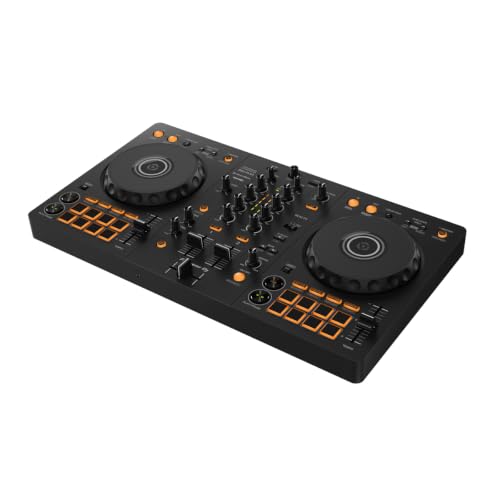
Pioneer DJ DDJ-FLX4 2-Channel DJ Controller
Badge: Best Controller Pick for New Performers
Strengths
- Smart Fader helps first mixes sound smooth while technique develops
- The listing highlights easy first mixes with room to grow across two decks
- A mic input for livestreaming from one device suits DJ streamers
Trade-offs
- This is a controller that works with a computer and DJ software, not a standalone analogue mixer
- Two-deck DJ format only; no multi-microphone or phantom-power provision is listed
- Buyers wanting a desk that works with the computer off should choose a true mixer instead
Key specs from the listing
- Channels: 2
- Type: DJ controller (not a standalone mixer)
- Performance: 16 pads
- Features: Smart Fader, streaming-ready (per listing)
- Microphone: Mic input for livestreaming from one device (per listing)
The Pioneer DJ DDJ-FLX4 needs the clearest label in this guide: it is a two-channel DJ controller, not a standalone mixer. It works with a computer and DJ software, and its listing sells exactly that experience: easy first mixes, room to grow across two decks, a Smart Fader that smooths transitions while technique develops, streaming readiness, and a microphone input for livestreaming from one device. Sixteen pads provide the performance controls. For a beginner DJ, this is a genuinely friendly design, because the software carries the library and the controller carries the hands-on control. The distinction matters for this guide’s other readers. A controller with the laptop closed is a paperweight; it offers no row of microphone inputs, no phantom power, and no analogue path to powered speakers on its own. Where the keyword’s job is DJ performance or DJ livestreaming, the FLX4 is a legitimate, popular-shaped answer. Where the job is mixing several live sources, choose one of the true consoles in this guide and treat this pick as the specialist alternative it is.
On a live stage, the Pioneer DJ DDJ-FLX4 2-Channel DJ Controller has to justify itself through DJ controller (not a standalone mixer) while the show is already moving. Live hardware is not operated, it is played, and the audience hears every hesitation. Judge this pick by whether it shortens the distance between hearing a problem and fixing it — a fader under a finger, a control that behaves the same way every night — because in a live Ableton set, the mix is a performance, not a post-production task.
Picture the Pioneer DJ DDJ-FLX4 2-Channel DJ Controller twenty minutes into a set: its 2 channels are assigned, levels were set in soundcheck against the loudest moment of the show, and the performer’s hands move between the hardware and Ableton’s session view without either side waiting on the other. That fluency is rehearsed, not bought. The boards and surfaces in this guide all reward the same investment: a fixed channel map, a written soundcheck routine, and settings that get restored before every show rather than reinvented during it.
Owning the DDJ-FLX4 means owning a computer peripheral as much as a musical instrument, and its care routine reflects that: keep the DJ software updated and tested, keep the USB connection reliable, and rehearse with the exact laptop that will perform. The Smart Fader is a learning aid, and owners who treat it as training wheels — gradually relying on their own ears — get the most from the design. Physically it is light and travel-friendly; digitally it is only ever as stable as the machine it is plugged into, so that machine deserves a performer’s discipline too.
Best for: new performers learning controller-based sets with a computer at the centre / Not suited for: anyone needing hardware that mixes with the computer off
Check on Amazon for the current listing, configuration, and delivery details.

Riworal 6-Channel Audio Mixer Console
Badge: Best Console for Live Source Mixing
Strengths
- Six channels cover a small group of microphones and instruments without daisy-chaining gear
- Built-in reverb from the 16-bit DSP section adds space without an external effects unit
- +48V phantom power runs condenser microphones that need it
Trade-offs
- Reverb is the headline effect, so the effects palette is narrower than boards built around large DSP libraries
- Bluetooth is convenient for backing tracks but adds a pairing step you must test before a session
- Compact console layout means controls sit close together for larger hands
Key specs from the listing
- Channels: 6
- Effects: 16-bit DSP with reverb effect
- Phantom power: +48V
- Wireless: Bluetooth
- Intended uses (per listing): Karaoke, studio, streaming, recording
The Riworal six-channel console is a compact mixing board built around the jobs home studios and small live rigs actually repeat: a handful of microphone and line inputs, a digital effects section with reverb, phantom power for condenser microphones, and Bluetooth for bringing in music from a phone. The listing positions it as an audio interface sound board as well as a mixer, which means it is meant to sit between your microphones and a computer or powered speakers rather than only feeding a PA. Six channels is the size class where a solo performer with guests, a small ensemble, or a creator with more than one microphone stops outgrowing a basic interface but does not yet need a full-size desk. The 16-bit DSP reverb is the feature most users will touch daily, because a touch of reverb is what separates a dry, flat capture from one that sounds finished. Phantom power matters for the same reason: many affordable condenser microphones simply will not work without it, and boards at this size sometimes leave it off. Bluetooth playback is a practical extra for rehearsal tracks, walk-in music, or reference songs, as long as you remember it is a convenience input rather than a critical signal path.
On a live stage, the Riworal 6-Channel Audio Mixer Console has to justify itself through 16-bit DSP with reverb effect while the show is already moving. Live hardware is not operated, it is played, and the audience hears every hesitation. Judge this pick by whether it shortens the distance between hearing a problem and fixing it — a fader under a finger, a control that behaves the same way every night — because in a live Ableton set, the mix is a performance, not a post-production task.
Picture the Riworal 6-Channel Audio Mixer Console twenty minutes into a set: its 6 channels are assigned, levels were set in soundcheck against the loudest moment of the show, and the performer’s hands move between the hardware and Ableton’s session view without either side waiting on the other. That fluency is rehearsed, not bought. The boards and surfaces in this guide all reward the same investment: a fixed channel map, a written soundcheck routine, and settings that get restored before every show rather than reinvented during it.
Ownership notes for the Riworal are mostly about habits. The board rewards a fixed channel map and a written note of your reverb setting, because the difference between a good vocal sound and a washed-out one is a small turn of one knob. Keep the Bluetooth input for playback only, run critical sources through cables, and dust the faders occasionally if the desk lives in a rehearsal room. None of that is maintenance in the dramatic sense; it is the ordinary care that keeps a compact console sounding like it did on its first day.
Best for: live acts feeding several sources into Ableton Live as one balanced mix / Not suited for: scratch or controller performance techniques
Check on Amazon for the current listing, configuration, and delivery details.

FULUODE CT-80S 8-Channel Audio Mixer
Badge: Best for Large Live Rigs
Strengths
- Eight channels give the most input headroom in this guide, useful when the group grows
- USB recording captures the stereo mix without a separate interface
- Reverb, MP3 playback, and Bluetooth cover rehearsal and break-music duties in one box
Trade-offs
- The largest board here, so it asks for more desk or table space than the four-channel options
- More channels mean more gain knobs to check when something feeds back or distorts
- Feature breadth is aimed at live and karaoke work as much as at quiet studio tracking
Key specs from the listing
- Channels: 8
- Model: CT-80S
- Effects: Reverb
- Playback: MP3 player, Bluetooth
- Phantom power: 48V
- Recording: USB recording
- Intended uses (per listing): Studio, karaoke, live music
The FULUODE CT-80S is the eight-channel option in this pool, and channel count is its whole argument. Eight inputs let you keep microphones and instruments plugged in instead of swapping cables between songs, guests, or segments, and the board adds the live-work extras that bigger small rigs need: reverb for vocals, an MP3 player and Bluetooth for tracks, 48V phantom power for condenser microphones, and USB recording so the main mix can be captured straight from the desk. The listing aims it at studio, karaoke, and live music use, which matches how these boards are really bought: one desk that rehearses, performs, and records in the same room. If your sessions involve several voices at once, this is the pick that postpones the day you need a second mixer. The honest cost of that headroom is size and housekeeping. A bigger board takes more space, and every extra open channel is another gain stage that can hiss or feed back if it is left up with nothing connected. Discipline fixes that: mute what you are not using, and the extra channels become pure flexibility.
On a live stage, the FULUODE CT-80S 8-Channel Audio Mixer has to justify itself through CT-80S while the show is already moving. Live hardware is not operated, it is played, and the audience hears every hesitation. Judge this pick by whether it shortens the distance between hearing a problem and fixing it — a fader under a finger, a control that behaves the same way every night — because in a live Ableton set, the mix is a performance, not a post-production task.
Picture the FULUODE CT-80S 8-Channel Audio Mixer twenty minutes into a set: its 8 channels are assigned, levels were set in soundcheck against the loudest moment of the show, and the performer’s hands move between the hardware and Ableton’s session view without either side waiting on the other. That fluency is rehearsed, not bought. The boards and surfaces in this guide all reward the same investment: a fixed channel map, a written soundcheck routine, and settings that get restored before every show rather than reinvented during it.
Living with the FULUODE means living with capacity, and the ownership skill is restraint. Label every channel, keep unused inputs muted and their gains down, and resist filling inputs simply because they exist. The USB recording path deserves a monthly test recording even in busy seasons, so the first sign of a problem arrives in private. Treated that way, the eight channels become what they were bought for: a desk that is always ready for one more source, without ever sounding like it is carrying seven spares.
Best for: larger live rigs with many microphones and instruments sharing one desk / Not suited for: minimalist solo setups travelling light
Check on Amazon for the current listing, configuration, and delivery details.

Pyle PMXU68BT 6-Channel Studio Audio Mixer
Badge: Best Studio-Live All-Rounder
Strengths
- Six channels suit small groups and multi-microphone setups without a full-size desk
- USB audio interface function connects the mix straight to a computer
- Bluetooth input handles reference tracks and break music from a phone
Trade-offs
- A generalist studio board, so it carries no large built-in effects library in the listing
- Six channels can still run out when a full band and playback sources share the desk
- Buyers who only ever use one microphone are paying for inputs they will not open
Key specs from the listing
- Channels: 6
- Model: PMXU68BT
- Connectivity: Bluetooth, USB audio interface
- Intended uses (per listing): Studio recording
Pyle’s PMXU68BT is a six-channel studio mixer board with Bluetooth and a USB audio interface, positioned by its listing squarely at studio recording. That combination is the modern small-desk formula: analogue inputs for microphones and instruments, a digital door into the computer for recording and playback, and a wireless input for the phone that always seems to hold the reference track or the backing music. Six channels is a deliberate middle size. It covers a couple of microphones, a stereo instrument or playback source, and a spare input, which describes a large share of home-studio and small-venue rigs. Pyle sells a wide family of these boards, and the PMXU68BT’s appeal is that it keeps the layout conventional: if you have used any small analogue desk, the signal path here will feel familiar within minutes. The trade-off of a generalist board is focus. The listing does not promise a deep effects section, so buyers who want polished sound straight from the desk, with no software help, should compare the DSP-equipped picks in this guide before deciding.
On a live stage, the Pyle PMXU68BT 6-Channel Studio Audio Mixer has to justify itself through PMXU68BT while the show is already moving. Live hardware is not operated, it is played, and the audience hears every hesitation. Judge this pick by whether it shortens the distance between hearing a problem and fixing it — a fader under a finger, a control that behaves the same way every night — because in a live Ableton set, the mix is a performance, not a post-production task.
Picture the Pyle PMXU68BT 6-Channel Studio Audio Mixer twenty minutes into a set: its 6 channels are assigned, levels were set in soundcheck against the loudest moment of the show, and the performer’s hands move between the hardware and Ableton’s session view without either side waiting on the other. That fluency is rehearsed, not bought. The boards and surfaces in this guide all reward the same investment: a fixed channel map, a written soundcheck routine, and settings that get restored before every show rather than reinvented during it.
The PMXU68BT asks little of its owner beyond the standard studio courtesies: a fixed place on the desk, cables that are not strained, and settings that get written down once a session sounds right. Its conventional layout means a guest engineer or a bandmate can run it without a briefing, which is an underrated ownership virtue in shared spaces. Keep the USB connection as the permanent path to the computer rather than re-plugging it per session, and the board settles into the furniture of the room in the best sense.
Best for: small live acts wanting a familiar six-channel studio layout on stage / Not suited for: performers whose show is built on DJ techniques
Check on Amazon for the current listing, configuration, and delivery details.

Pyle PMXU48BT 4-Channel Studio Audio Mixer
Badge: Best Compact Live Desk
Strengths
- Four channels keep the layout simple and fast to learn
- USB audio interface function records the mix to a computer
- Bluetooth covers phone playback for tracks and references
Trade-offs
- Four channels is a hard ceiling: a growing group will outgrow it
- The listing does not headline phantom-powered studio features, so check your microphone needs first
- No large effects section is promised, so polish may need software
Key specs from the listing
- Channels: 4
- Model: PMXU48BT
- Connectivity: Bluetooth, USB audio interface
- Intended uses (per listing): Studio recording
The PMXU48BT is Pyle’s four-channel version of the same studio-board idea: Bluetooth on board, a USB audio interface for the computer, and a compact desk aimed at studio recording. Four channels sounds modest until you map a real small session onto it: one or two microphones, a stereo source, and you are set for a duo, a solo creator with a guest, or a simple two-person recording. The smaller channel count is also a genuine usability feature. Fewer knobs mean faster setup, fewer open inputs to hiss, and a board a beginner can learn in an evening instead of a month. The limit is equally real. The day a third microphone or a stereo instrument joins, the desk is full, and the only fixes are sub-mixing elsewhere or a bigger board. Buyers who know their setup is stable and small get a tidy, honest tool here. Buyers whose guest list keeps growing should read this pick as the floor of the range, not the ceiling, and compare the six- and eight-channel options before they commit.
On a live stage, the Pyle PMXU48BT 4-Channel Studio Audio Mixer has to justify itself through PMXU48BT while the show is already moving. Live hardware is not operated, it is played, and the audience hears every hesitation. Judge this pick by whether it shortens the distance between hearing a problem and fixing it — a fader under a finger, a control that behaves the same way every night — because in a live Ableton set, the mix is a performance, not a post-production task.
Picture the Pyle PMXU48BT 4-Channel Studio Audio Mixer twenty minutes into a set: its 4 channels are assigned, levels were set in soundcheck against the loudest moment of the show, and the performer’s hands move between the hardware and Ableton’s session view without either side waiting on the other. That fluency is rehearsed, not bought. The boards and surfaces in this guide all reward the same investment: a fixed channel map, a written soundcheck routine, and settings that get restored before every show rather than reinvented during it.
Ownership of the PMXU48BT is deliberately uneventful, which suits the small stable setups it serves. Four channels are quick to check, quick to clean around, and quick to teach to a co-host or partner. The one discipline it rewards is honesty about growth: the day a third regular source appears, plan the move to a bigger desk instead of inventing workarounds with splitters and shared channels. Until that day, this board’s small footprint and simple routine make it the kind of equipment that gets used daily rather than admired occasionally.
Best for: duos and small acts with a stable, compact source list / Not suited for: growing live rigs that keep adding inputs
Check on Amazon for the current listing, configuration, and delivery details.
Comparison Table
| Pick | Channels | Phantom power (per listing) | Effects / standout | Link |
|---|---|---|---|---|
| Pioneer DJ DJM-250MK2 2-Channel DJ Mixer | 2 | Not listed | Sound Color FX filter | Check on Amazon |
| Pioneer DJ DDJ-FLX4 2-Channel DJ Controller | 2 | Not listed | Smart Fader, streaming-ready (per listing) | Check on Amazon |
| Riworal 6-Channel Audio Mixer Console | 6 | Yes | 16-bit DSP with reverb effect | Check on Amazon |
| FULUODE CT-80S 8-Channel Audio Mixer | 8 | Yes | Reverb | Check on Amazon |
| Pyle PMXU68BT 6-Channel Studio Audio Mixer | 6 | Not listed | PMXU68BT | Check on Amazon |
| Pyle PMXU48BT 4-Channel Studio Audio Mixer | 4 | Not listed | PMXU48BT | Check on Amazon |
Split this table by job before comparing within it. Consoles compete on channels and phantom power; DJ products compete on performance controls and software path. The one row that is not a mixer at all — the DDJ-FLX4 controller — is labelled in its name and type, because on stage that distinction decides whether your rig works when a laptop misbehaves.
How to Choose the Right Mixer for a Live Ableton Rig
Live buying decisions should be made at soundcheck, in imagination if not in fact. Picture the show at its most demanding moment — most sources active, audience present, no pause button — and let these checks judge every pick against that moment.
- Job clarity: sources into Ableton Live, or performance beside it; buy inside one job and the shortlist behaves.
- Soundcheck speed: the rig must go from cases to checked in minutes; layouts you already know are a genuine specification.
- Failure behaviour: know what still works if the laptop stumbles; consoles keep mixing, controllers do not, and your show plan should reflect that.
- Software ecosystems in the open: the DJ picks name Serato DJ Pro or rekordbox in their listings; hybrid rigs work, accidental ones cause grief.
- Headroom for the loudest moment: set gains for the show’s peak, not its average, because live distortion cannot be edited out.
The best live rig is the one that has already survived your rehearsal room. Buy the pick whose job matches your show, rehearse the exact setup you will perform, and let novelty earn its place in practice before it earns a place on stage. Duo-format live acts may also appreciate Best Mixers For Acoustic Guitar Duo, where small-desk discipline is the whole subject.
How to Set Up an Ableton Live Rig With a Mixer
Live setup is a timed drill disguised as a technical task. The routine below builds the rig in the order that finds problems earliest, when there is still time to fix them quietly.
- Connect the hardware and computer first, select the device in Ableton Live’s audio preferences, and confirm a test clip plays and any console-fed source registers on the input meter.
- For consoles: assign one channel per live source, apply phantom power only where a condenser microphone needs it, and label the desk to match the setlist order of your sources.
- Set every gain against the loudest moment of the actual show — full chorus, biggest drop, loudest guest — and leave headroom above it; live peaks do not send warning letters.
- Balance sources at the faders, then walk the room at show level and listen from the audience position, fixing level and feedback problems with position before processing.
- For DJ hardware beside Ableton: decide which program owns playback, rehearse the handoffs between them, and make sure the microphone path works for announcements and hosting.
- Restore and photograph the final settings, save the Live set as the show template, and pack a written copy of the routine with the rig.
Troubleshooting
Problem: feedback appears only at show volume → a microphone is too close to a speaker path or a channel is hotter than the room allows; reposition first, trim the channel second, and re-check at full show level, not at soundcheck politeness.
Problem: the laptop audio drops or the controller stops responding mid-set → keep the show alive on whatever still works — a console keeps its sources audible — then restart the affected software between songs; rehearsed failure behaviour is the difference between a hiccup and a collapse.
Problem: the mix sounds balanced on stage but harsh out front → you are hearing monitors, not the room; balance from the audience position during soundcheck, or have a trusted listener stand there and signal, because the desk position lies politely.
A live rig is a promise you make to an audience. Keep the promise with routine: same setup order, same loudest-moment gain check, same room walk, every show. The gear in this guide is capable; the routine is what makes it dependable.
Consoles and Controllers on the Same Stage
A hybrid Ableton Live rig is not a compromise; it is how a great many real shows are built. The console owns the live sources — voices, instruments, anything with a microphone — and delivers them to the software as one trustworthy mix. The controller or DJ mixer owns playback performance: launching, blending, and manipulating the recorded material. Each side does the job its design understands, and the performer’s attention splits along a clean line.
The rigs that fail are the ones where the line was never drawn: two devices both half-owning playback, a microphone routed through whichever box happened to be nearer, levels living in two places at once. Draw the line in rehearsal, write it on the channel labels, and the hybrid stops being a tangle and becomes an instrument. That clarity, more than any single product choice, is what this keyword’s shoppers are actually buying.
Why Live Performers Should Buy Boring Reliability
Studio shoppers can afford curiosity; live performers cannot. A novel feature earns its stage place only after it has survived rehearsals, because the cost of a surprise scales with the size of the audience hearing it. This is why the consoles in this guide emphasise conventional layouts and why the DJ picks lean on established performance formats: on stage, the best interface is the one already in your muscle memory.
Boring reliability is also a maintenance posture. Cables get spares, settings get photographed, templates get saved, and every part of the rig has a known behaviour when something else fails. None of that appears in a product listing, and all of it decides whether the products in the listing get to show what they can do. Buy the pick that fits your show, then invest the difference in the routine around it.
Rehearsing the Rig, Not Just the Set
Performers rehearse songs; professionals rehearse setups. The distinction decides how a live Ableton rig behaves on its worst night, because the worst night is never about the music — it is about a cable, a setting, a program that chose that evening to update itself. A rig rehearsal means building the entire setup from cases, in order, against the clock, and then breaking it on purpose: pull the laptop’s audio, kill a channel, lose the controller, and practise the recovery while the music continues on whatever still works.
That practice changes buying decisions too, which is why it belongs in this guide. A console that keeps its sources audible through a computer failure stops being a specification and becomes a show-saving design. A controller-centred rig demands a different plan — a backup playback path, however humble. Neither plan is wrong; both must exist before the audience does. The products above give you capable halves of several possible rigs. The rehearsal is where those halves become one instrument you trust, and trust, on stage, is the only feature that cannot be bought separately.
Common Buying Mistakes
Live rigs fail in rehearsal-shaped ways: the mistakes are made at purchase and at setup, and collected in public. These are the common ones.
- Buying a controller for a job that needs a standalone mixer, and learning the difference when the laptop falters.
- Setting gains at soundcheck politeness and clipping at show commitment.
- Letting two programs share playback duties with no rehearsed handoff between them.
- Skipping the room walk, then mixing all night for the one spot where the desk sits.
- Adding a new feature to the rig on show day instead of in rehearsal, where surprises are free.
Final Recommendation
For live source mixing into Ableton, start with the Riworal 6-Channel Audio Mixer Console (Check on Amazon), and step up to the Fuluode CT-80S 8-Channel Audio Mixer (Check on Amazon) when the act outgrows six channels. For performance-first rigs, the Pioneer DJ DJM-250MK2 2-Channel DJ Mixer (Check on Amazon) brings the club-style layout, while the controller and Numark-style routes are covered in the detailed reviews above.
An Ableton Live rig succeeds when the audience never thinks about it. Choose the hardware by the job it will do at the loudest moment of your show, rehearse that exact configuration, and the technology will take its proper place: underneath the performance, holding it up.
Related guides
Frequently Asked Questions
What is the difference between this guide and mixers for Ableton generally?
This guide weights everything for live performance: soundcheck speed, failure behaviour, and controls that work under stage pressure. The general Ableton guide weights recording workflows more heavily. The products overlap because the workflows share hardware, but the priorities differ.
Can a console and a DJ controller work in the same rig?
Yes, and many live rigs are built exactly that way: the console balances live sources into Ableton Live while the controller performs playback. The rule is to assign each job to one device in rehearsal and never renegotiate it mid-show.
Does the DDJ-FLX4 work without a laptop?
No. It is a DJ controller and needs its computer and DJ software to function. If your show must keep running through a laptop failure, a true mixer or console must be in the chain.
How do I stop feedback during a live set?
Set gains for the loudest moment, keep microphones out of speaker paths, and fix problems with position before processing. Feedback found in the room walk at soundcheck is feedback the audience never hears.
Which software do the DJ picks in this guide use?
Their listings name Serato DJ Pro and rekordbox ecosystems. Hybrid rigs combining DJ software with Ableton Live are common, but you should plan the partnership deliberately rather than discovering it at setup.
How many channels does a live act need?
One per simultaneous live source, counting stereo feeds as two, plus a spare for the guest or instrument that appears on the night. Small acts fit four to six channels; larger ensembles should start at eight.
Related reading: readers who arrived here comparing neighbouring questions often continue to Best Mixers For Absinthe, which treats a closely related version of this decision with its own verified picks and trade-offs.


