Disclosure: topratedkitchenware.com is reader-supported. When you buy through links on our site, we may earn an affiliate commission from Amazon and other retailers, at no extra cost to you.
Where to buy
If you are comparing the best mixers for live streaming, start with the six products below, all sold through Amazon. The first two are multi-channel audio mixers with USB computer connections built for voices, instruments, and game or music sources at a desk. The remaining four come from the DJ world — two scratch mixers, a club-style DJ mixer, and a DJ controller that its listing explicitly describes as streaming-ready — and their reviews explain exactly which kind of streamer each one genuinely serves.
- Riworal 7 Channel Audio Mixer Sound Board — Check on Amazon
- Aveek 4 Channel Audio Mixer with 99 DSP Effects
- Numark M2 2-Channel Scratch DJ Mixer
- Numark Scratch 2-Channel DJ Scratch Mixer
- Pioneer DJ DJM-250MK2 2-Channel DJ Mixer
- Pioneer DJ DDJ-FLX4 2-Channel DJ Controller
Read the full guide ↓
A live stream lives or dies on its audio. Viewers forgive a soft camera, a plain background, and even a dropped frame, but they leave quickly when the voice is muffled, the game sound drowns the commentary, or a buzz sits under everything the host says. That is why streamers who take their channels seriously eventually move from a headset microphone straight into a mixer: one place where the microphone, music, game audio, and alerts are balanced before they ever reach the streaming software. The best mixers for live streaming are the ones that make that balance easy to set, easy to reach mid-stream, and hard to get wrong.
The six products in this guide approach that job from two directions. The Riworal and Aveek boards are desk consoles with USB audio, phantom power for condenser microphones, Bluetooth and playback inputs, and built-in effects — the classic streaming set-up for podcasters, musicians, and talk-format hosts. The Numark and Pioneer DJ products serve the large community of DJ streamers, whose shows are performances: mixing records live, hosting with a microphone, and taking viewers through a set. One product, the Pioneer DJ DDJ-FLX4, is a controller rather than a standalone mixer, and it is labelled that way throughout this guide; its listing specifically highlights a mic input for livestreaming from one device, which is why it belongs in a streaming conversation at all.
Whichever direction fits your channel, the deciding questions are the same. How many sources do you actually run at once? Is your microphone a condenser that needs phantom power, or a dynamic that does not? Do you want effects on your voice from the board itself, or do you prefer to add them in software later? And when something sounds wrong mid-stream — because something eventually will — can you fix it with one hand without stopping the show? The reviews below answer those questions pick by pick, with the limits of each format stated as plainly as its strengths.
Key Takeaways
- For talk, podcast, and music streams, a USB mixer with phantom power — the Riworal 7 Channel or the Aveek 4 Channel here — is the most direct upgrade to clear, balanced audio.
- Built-in DSP effects let a streamer polish a voice on the board, before the streaming software ever sees it.
- DJ streamers should shop the DJ formats honestly: scratch mixers and the DJM-250MK2 mix records and a host microphone, not a desk full of separate sources.
- The Pioneer DJ DDJ-FLX4 is a controller, not a standalone mixer; its appeal is an all-in-one, beginner-friendly path that its listing describes as streaming-ready with a mic input.
- Balance is a workflow, not a feature: set levels before the show, keep controls within reach, and monitor on headphones while you stream.
- Buy for the sources you run today plus one spare input, so a guest, a second microphone, or a new console does not force a replacement.
In this guide
Quick Picks
Badges below match the detailed reviews, so you can scan for your format first and read deeply second. No prices are shown because they change; check the latest price on Amazon through the links before deciding.
| Pick | Badge | Format | Best use | Link |
|---|---|---|---|---|
| Riworal 7 Channel Mixer | Best Overall | 7-channel audio mixer, USB interface, Bluetooth, MP3 and computer input, +48V phantom power | Multi-source desk streams | Check on Amazon |
| Aveek 4 Channel Mixer | Best for Voice Effects | 4-channel mixer, 99 DSP effects, USB PC recording, Bluetooth, 48V phantom power | Solo hosts and podcasters | Check on Amazon |
| Numark M2 | Best Simple DJ Stream Rig | 2-channel scratch DJ mixer, 3-band EQ, mic input, replaceable crossfader | DJ streams with hosting | Check on Amazon |
| Numark Scratch | Best for Performance DJ Streams | 2-channel DJ scratch mixer, Innofader, Serato DJ Pro, FX paddles, 8 performance pads, 24-bit audio | Turntablist shows | Check on Amazon |
| Pioneer DJ DJM-250MK2 | Best Premium DJ Mixer | 2-channel club-style DJ mixer, Sound Color FX filter, rekordbox DVS unlock | Club-style DJ streams | Check on Amazon |
| Pioneer DJ DDJ-FLX4 | Best for Beginner DJ Streamers | 2-channel DJ controller, 16 pads, Smart Fader, mic input for livestreaming | First DJ streams from one device | Check on Amazon |
The honest headline from that table: two of these products mix a streaming desk, four of them perform music on stream. Both are legitimate streaming tools, but they are not interchangeable, and the most expensive mistake in this category is buying one family to do the other family’s job.
How These Picks Were Chosen
This guide is research-led. It is built from the verified listing data for each product — channel count, computer connection, phantom power, effects, software, and format — assessed against how live streams are actually produced: a host balancing sources in real time, with no engineer and no second take. No hands-on testing is claimed, and no specification appears in the spec boxes unless it is present in the verified listing information for that product.
Three filters shaped the ranking. First, the path to the computer: a streaming mixer must get audio into streaming or recording software cleanly, whether that is a USB audio interface on a console, a DJ mixer’s software workflow, or a controller designed to work with a laptop. Second, the microphone story: condenser microphones need 48V phantom power, which the two desk consoles provide, while the DJ products centre on a single mic input for hosting — a real difference that decides which hosts each product can serve. Streamers who record and edit in a DAW after the show will also recognise the neighbouring questions covered in Best Mixers For Logic and Best Mixers For Logic Pro X, where the mixer feeds production software rather than a live audience.
Third, live control: streaming is a performance, so the guide weighed whether a host can adjust the voice, the music, and an effect with one hand, mid-sentence, without menu-diving. Faders, channel EQ, effect paddles, and performance pads all scored here, each within its own format. What did not score: novelty, lighting, and feature counts that never get touched during a real show. The result is a list where the badge on each product names the streamer it fits, and the verdict line names the streamer it does not.
The 6 Best Mixers for Live Streaming
The reviews run from the most complete desk console to the most beginner-friendly DJ controller. Each one states its badge, three strengths, three trade-offs, only the specifications verified in its listing, and a plain best-for verdict.

Riworal 7 Channel Audio Mixer Sound Board
Badge: Best Overall
Strengths
- Seven channels cover a host mic, a guest mic, instruments, game audio, and music with room to spare.
- +48V phantom power supports the condenser microphones most desk streamers eventually choose.
- USB audio plus Bluetooth, MP3, and computer inputs give every source a way into the stream.
Trade-offs
- More board than a single-microphone streamer strictly needs.
- A seven-channel layout takes a rehearsal stream or two to learn confidently.
- Bluetooth is best kept for music beds and breaks; critical sources deserve cables.
Mini spec box
- Channels: 7
- Phantom power: +48V
- Computer connection: USB audio mixer interface
- Playback: Bluetooth, MP3, computer input
- Intended uses in listing: karaoke, DJ, stage, streaming, studio
Most streaming set-ups grow. The show that starts as one person and one microphone adds a co-host, then a guest, then a guitar, a game console, or a music bed that needs its own fader. The Riworal 7 Channel board is built for that growth curve, which is why it leads this guide: seven channels mean the stream you are planning next season still fits on the board you buy today. Its USB audio interface carries the finished mix into your streaming or recording software, so the balance you set with your hands is the balance your audience hears.
The +48V phantom power is the quiet headline. Desk streamers gravitate toward condenser microphones for their clarity at close speaking distances, and condensers simply do not run without phantom power. With it on board, your microphone choices stay open. The input variety matters in the same practical way: Bluetooth for a phone’s music or a guest joining casually, MP3 and computer inputs for produced beds, stingers, and game audio. A streamer can build an entire show’s sound — voice, music, effects beds, and a second voice — without unplugging anything, and that stability shows up on air as confidence.
The honest limitation is that this is a real console with a real learning curve. A brand-new streamer with one dynamic microphone will use a fraction of it at first, and should budget a private test stream or two to learn gain staging: setting each channel’s input level strong and clean, with headroom, before touching the streaming software’s own controls. Do that homework once, though, and this becomes the board a channel can grow into for years rather than out of in months.
Best for: streamers running several sources, guests, or instruments / Not suited for: minimal single-mic set-ups that prize simplicity above all

Aveek 4 Channel Audio Mixer with 99 DSP Effects
Badge: Best for Voice Effects
Strengths
- 99 DSP effects put a wide range of vocal polish on the board itself, no plug-in chain required.
- USB PC recording and playback handle the stream mix and music beds through one connection.
- Four channels with 48V phantom power and Bluetooth fit the classic solo-host desk perfectly.
Trade-offs
- Four channels cap how many guests and sources can run at once.
- Effects are shared rather than per-channel, so one chosen sound colours what is sent to it.
- A long effects list rewards restraint; heavy processing tires listeners quickly.
Mini spec box
- Channels: 4
- Phantom power: 48V
- Computer connection: USB PC recording, USB playback
- Wireless: Bluetooth
- Effects: 99 DSP effects
If the Riworal is the board for the growing show, the Aveek 4 Channel is the board for the focused one: a solo host, a podcaster, a musician streaming acoustic sets, a karaoke or talk streamer whose voice is the entire product. Its defining feature is the bank of 99 DSP effects, which lets that voice arrive with space, warmth, and presence straight from the board. For streamers, that matters twice over — the audience hears the polished version live, and the same polish is what lands in the recording, with no post-production session required to make a clip sound finished.
The rest of the desk workflow is equally well judged for one person. USB connects the mix to the PC for recording and streaming while also handling playback, Bluetooth brings in a phone’s music or reference audio without another cable across the desk, and 48V phantom power keeps condenser microphones available. Four channels map neatly onto the solo reality: main microphone, a second microphone or instrument, music, and one spare. Set-up stays fast enough that going live never feels like an engineering project, which quietly encourages the consistency that grows channels.
Its limits are the familiar ones of a compact board. A panel show with three guests will not fit, and because the effects are shared, the host cannot easily give the microphone a large space while keeping a second source completely dry if both are sent to the same effects path. New owners should also audition effects at low levels first: on stream, a little processing sounds expensive, while a lot sounds like a novelty filter. For the solo and duo formats that dominate live streaming, though, this is the most purpose-fit pick in the guide.
Best for: solo hosts, podcasters, and singing streamers who want polished vocals / Not suited for: multi-guest panels needing more than four inputs

Numark M2 2-Channel Scratch DJ Mixer
Badge: Best Simple DJ Stream Rig
Strengths
- Mic input with 3-band EQ lets a DJ host, shout out viewers, and take requests on stream.
- Replaceable, slope-adjustable crossfader supports scratch technique and long-term servicing.
- Rack-mountable, uncomplicated layout keeps a DJ stream rig tidy and predictable.
Trade-offs
- Two DJ channels and one mic input cannot run a multi-source streaming desk.
- No bank of phantom-powered microphone channels for condenser-based talk set-ups.
- Streamers must route its output to the computer through their existing audio set-up.
Mini spec box
- Channels: 2 (DJ)
- EQ: 3-band
- Microphone: mic input
- Crossfader: replaceable, slope-adjustable
- Mounting: rack-mountable
DJ streams are performances first and broadcasts second: the audience comes to watch someone mix. For that format, the Numark M2 offers a refreshingly simple centrepiece — two channels for the decks, a crossfader built for scratch work, 3-band EQ for shaping each side, and a microphone input so the performer can host the show, greet subscribers, and talk over the music without a second mixer. Its rack-mountable body suits the permanent corner-of-the-room rig many DJ streamers build, where everything stays cabled and ready to go live in minutes.
The replaceable, slope-adjustable crossfader is the detail that separates a DJ mixer from a generic small mixer with a slider. Scratch DJs depend on a sharp, predictable cut, and a fader that can be adjusted and eventually replaced keeps a heavily used stream rig performing like itself. For a streamer whose show is two turntables and personality, that focus is worth more than a dozen inputs they will never plug in.
The boundary is just as clear as it was in the live-sound context: this is not a desk console. A talk streamer with two condenser microphones, game audio, and music beds needs the Riworal or Aveek above. The M2 also assumes the rest of a DJ’s chain — decks, and a way to carry the mixer’s output into the streaming computer — already exists. Bought for the right show, it is a durable, honest tool; bought for the wrong one, no mixer in this guide will disappoint faster.
Best for: DJ streamers performing on two decks with a host microphone / Not suited for: talk, podcast, or gaming desks with several separate sources

Numark Scratch 2-Channel DJ Scratch Mixer
Badge: Best for Performance DJ Streams
Strengths
- Innofader crossfader delivers the sharp cut serious scratch performance depends on.
- Serato DJ Pro included, with a DVS licence, for turntable control of a digital library.
- FX paddles and 8 performance pads make the stream itself a live remix performance, with 24-bit audio.
Trade-offs
- A 2-channel performance instrument, not a multi-source streaming console.
- Its software-centred value is irrelevant to non-DJ streamers.
- Hosting and guest-microphone flexibility is minimal compared with the desk consoles.
Mini spec box
- Channels: 2 (DJ)
- Crossfader: Innofader
- Software: Serato DJ Pro included, DVS licence
- Performance: FX paddles, 8 performance pads
- Audio: 24-bit
Some DJ streams are closer to sport than to radio: the draw is watching a turntablist cut, juggle, and rebuild tracks in real time. The Numark Scratch exists for exactly that performer. Its Innofader crossfader is the centrepiece — a fader chosen for scratch work — and the FX paddles and eight performance pads put echoes, sweeps, cues, and samples under the streamer’s hands mid-routine. On camera, that physicality is the show, and this mixer gives a skilled performer more ways to be watched than any other product in this guide.
The included Serato DJ Pro software and DVS licence complete the streaming picture for this format: turntables control a digital library, so a performer can scratch with the feel of vinyl and the catalogue of a laptop, while the 24-bit audio path keeps the result clean on its way to the audience. For a channel built on DJ skill — battles, routines, practice sessions streamed live — this is the most exciting pick here, and it is not close.
It is also, deliberately, the narrowest. Nothing about it serves a podcaster, a gaming desk, or a talk show: there are no rows of microphone inputs, no phantom-powered channels for a panel, no desk workflow. Streamers should buy it the way musicians buy an instrument — because the performance is the content — and everyone else should admire it and choose a console.
Best for: turntablist and performance DJ streamers / Not suited for: talk, gaming, or multi-microphone streaming desks

Pioneer DJ DJM-250MK2 2-Channel DJ Mixer
Badge: Best Premium DJ Mixer
Strengths
- Club-style 2-channel workflow will feel familiar to any DJ who has played on venue gear.
- Sound Color FX filter gives each channel an expressive, one-knob performance effect.
- Free rekordbox DVS unlock connects the mixer to Pioneer’s DJ software ecosystem.
Trade-offs
- A DJ mixer through and through — not a multi-source streaming desk.
- Its strengths reward experienced DJs more than first-time streamers.
- Talk-format streamers get no phantom-powered mic channels or vocal DSP bank.
Mini spec box
- Channels: 2 (DJ)
- Effects: Sound Color FX filter
- Software: free rekordbox DVS unlock
- Workflow: club-style
The DJM-250MK2 brings the layout of club DJ booths to a streaming desk. Its 2-channel, club-style workflow is the point: DJs who learned on venue equipment can sit down and perform immediately, and streamers who play out as well as broadcast get one consistent way of working in both places. The Sound Color FX filter is its signature performance tool — a single, expressive control per channel that sweeps and colours the sound in ways an audience can hear and a performer can ride musically, which makes DJ streams feel alive rather than merely played back.
The free rekordbox DVS unlock ties the mixer into Pioneer’s software world, letting turntables control digital files inside rekordbox. For a DJ streamer, that ecosystem continuity matters: the library, cues, and habits built for gigs carry straight into the broadcast. Positioned qualitatively, this is the premium-tier DJ option in the guide — chosen for feel, familiarity, and that filter, rather than for input count.
Its trade-offs mirror the other DJ picks. Two channels and a DJ-first layout cannot host a talk show’s microphones and sources, and a first-time streamer with no DJ background will find the beginner controller below a gentler teacher. Buy the DJM-250MK2 when the performance is DJing itself and the stream is how the world watches it.
Best for: experienced DJs streaming club-style sets / Not suited for: talk-format streamers or DJ beginners
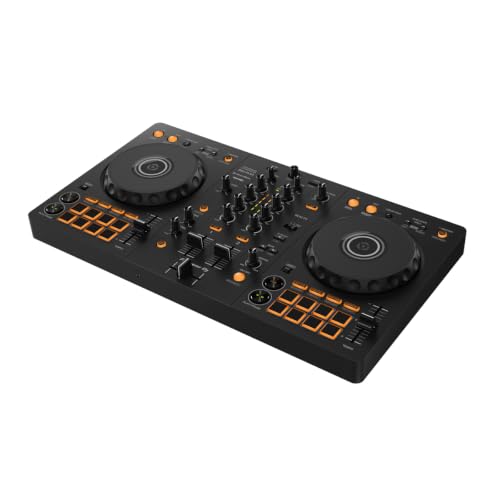
Pioneer DJ DDJ-FLX4 2-Channel DJ Controller
Badge: Best for Beginner DJ Streamers
Strengths
- Listing describes it as streaming-ready, with a mic input for livestreaming from one device.
- Smart Fader and an easy first-mix design lower the barrier for brand-new DJ streamers.
- 16 pads and a 2-deck layout give beginners room to grow into fuller performances.
Trade-offs
- It is a controller, not a standalone mixer — it works with a computer and DJ software.
- Two decks cannot host a multi-source talk or gaming desk.
- Serious scratch performers will eventually want a dedicated battle mixer.
Mini spec box
- Type: DJ controller (not a standalone mixer)
- Decks: 2-channel, 2-deck layout
- Pads: 16
- Features in listing: Smart Fader, mic input for livestreaming, streaming-ready
- Finish in listing: Graphite
Every DJ streamer starts somewhere, and the DDJ-FLX4 is designed to be that somewhere. It is a controller — it needs a computer and DJ software to make sound — and this guide labels it as such rather than dressing it up as a mixer. What earns it a place in a streaming guide is right in its verified listing: it is described as streaming-ready, with a mic input for livestreaming from one device. For a beginner, that single-device simplicity is the whole appeal: plug in, open the software, add a microphone, and the first broadcast is genuinely within reach on day one.
The learning aids are real. Smart Fader helps new DJs produce smooth transitions while their ears and hands catch up, and the layout is explicitly designed for easy first mixes with room to grow into a 2-deck performance using its 16 pads. A beginner can therefore stream early, stream often, and build skills on the same hardware for a long while — the exact pattern that turns a tentative first broadcast into a channel.
The limits follow from its type. Because it is a controller, it is not a general streaming mixer for microphones, consoles, and instruments, and its two decks define the show’s shape. Performers who fall in love with scratch technique will graduate toward the Numark Scratch; talk streamers should never start here at all. As a first step into DJ streaming, though, nothing else in this guide asks so little of a newcomer or gives back so much so quickly. Readers whose mixing questions are about drinks rather than decks are in a different aisle entirely — see Best Mixers For Makers Mark for that separate topic.
Best for: beginners starting DJ streams from one device / Not suited for: talk desks, multi-source set-ups, or dedicated scratch performance
Comparison Table
| Pick | Format | Phantom power | Computer path | Defining feature | Link |
|---|---|---|---|---|---|
| Riworal 7 Channel | Desk console, 7 channels | +48V | USB audio interface | Most sources at once | Check on Amazon |
| Aveek 4 Channel | Desk console, 4 channels | 48V | USB PC recording and playback | 99 DSP effects | Check on Amazon |
| Numark M2 | DJ scratch mixer, 2 channels | Not a multi-mic console | DJ chain into existing set-up | Replaceable crossfader, 3-band EQ, mic input | Check on Amazon |
| Numark Scratch | DJ scratch mixer, 2 channels | Not a multi-mic console | Serato DJ Pro with DVS | Innofader, FX paddles, pads | Check on Amazon |
| Pioneer DJ DJM-250MK2 | DJ mixer, 2 channels | Not a multi-mic console | rekordbox DVS unlock | Sound Color FX filter | Check on Amazon |
| Pioneer DJ DDJ-FLX4 | DJ controller, 2 decks | Not a multi-mic console | Computer and DJ software | Smart Fader, streaming-ready mic input | Check on Amazon |
Choose your row by format first: desk consoles for voices and sources, DJ hardware for performed music. Within the right family, the defining-feature column then points at the pick that matches how your show actually runs.
How to Choose the Best Mixers for Live Streaming for Your Format
Begin by naming your format in one sentence, because the format chooses the family. “I talk with a guest and play music beds” is a desk-console sentence. “I mix records and host” is a DJ sentence. “I am learning to DJ and want to broadcast my practice” is a controller sentence. Streamers who skip this step buy features instead of fit, and end up with a battle mixer under a podcast or a talk console under a turntable set-up — both fine products doing the wrong job.
Next, list your sources and microphones. Each simultaneous source needs a home: host microphone, guest microphone, instrument, game or console audio, music device. Condenser microphones settle the phantom-power question immediately — they need 48V, which in this guide means the Riworal or the Aveek. Dynamic microphones are more forgiving and pair happily with DJ mic inputs for hosting. Then decide where your voice polish lives. Board effects, like the Aveek’s DSP bank, work live and land in the recording automatically; software processing offers more surgery but adds set-up, latency management, and one more thing to fail mid-show. Many streamers sensibly start with the board and add software later only if a specific problem demands it.
Also consider where the mixer will physically live, because streaming desks are rarely generous. A seven-channel console needs a permanent home with cables dressed behind it; a compact four-channel board can share space with a keyboard and still leave room for notes, a controller, or a second screen. Measure the desk, think about which hand will run the faders while the other works the mouse or the instrument, and place the board on that side. Streamers underestimate this ergonomic step and then spend every broadcast reaching across themselves to fix the one control that matters — a small misery that a tape measure prevents entirely.
Finally, think about the show’s growth and your own tolerance for complexity, in qualitative tiers. The desk consoles sit in the capability tier for multi-source shows; the DJ mixers occupy a performance tier where feel and technique matter more than inputs; the controller is the entry tier, deliberately trading depth for a first stream that actually happens. The right tier is the one whose limits you will not meet this year. A streamer planning guests should not buy a two-input answer to a four-input future, and a DJ should not buy channels when what the show needs is a better crossfader.
How to Set Up a Streaming Mixer and Balance a Live Show
Set-up order prevents most streaming audio problems. First, connect the mixer to the computer and confirm the streaming or recording software sees it as the audio source before anything else is plugged in. Second, connect the microphone and set its gain alone: speak at your real show volume, at your real distance, and raise the input until the level is strong and clean with headroom for laughter and emphasis — never set gain while whispering, or your first excited moment will distort. Third, add each other source one at a time — music, game, instrument, guest — and set each against the voice, which stays on top. Music beds in particular should be balanced while you are talking over them, because that is the only relationship the audience ever hears.
Before going live, record a private two-minute test that imitates the show: talk, play music, trigger a stinger, welcome an imaginary guest. Listen on the headphones your audience’s experience most resembles — ordinary earbuds are a brutally honest reference — and fix levels there, not from the mixer’s meters alone. During the show, keep the mixer within one hand’s reach, monitor on headphones so you hear the stream’s balance rather than the room’s, and resist constant adjustment: set the show in the first minutes, then perform it. Streamers who also broadcast in a radio-style format will find the related discipline in Best Mixers For Lpfm Stations interesting, where consistent levels matter for exactly the same reason — the audience cannot ask you to repeat a distorted sentence.
Troubleshooting. Problem: the stream hears an echo of the host → the software is likely monitoring the same audio twice, or speakers are feeding the microphone; switch to headphones and check that only one monitoring path is active. Problem: a buzz under the voice → move the mixer’s power supply away from audio cables, try a different USB port, and disconnect sources one at a time until the buzz leaves with the culprit. Problem: music sounds fine alone but buries the talk → lower the music channel while speaking over it during the test recording; beds should sit clearly under the voice, not beside it.
Microphones, Headphones, and the Rest of the Streaming Chain
A mixer improves a stream only as part of a chain, and two links deserve the same attention as the board. The microphone comes first: a condenser on a phantom-powered console channel gives a close, detailed voice that suits talk formats, while a dynamic microphone forgives untreated rooms and energetic hosts. Either way, position beats price — a well-placed microphone a hand’s width away, slightly off-axis, will outperform an expensive one left across the desk. Pop protection and a stable stand are unglamorous purchases that remove the two sounds audiences complain about most: plosive thumps and desk bumps.
Headphones are the second link, because a streamer who cannot hear the mix cannot run it. Closed-back headphones keep the stream’s sound out of the microphone and let the host catch a rising music bed, a distorting guest, or a silent channel in seconds rather than from chat’s delayed complaints. Build the habit of a thirty-second headphone check in every pre-show routine: voice, music, one effect, one transition. Channels grow on consistency, and consistent audio — the same balanced, intelligible sound every time a viewer arrives — is the quiet foundation that the mixers in this guide exist to provide.
Recording While You Stream: Capturing a Version Worth Keeping
Live and recorded audiences judge the same audio differently. A live viewer forgives a momentary imbalance because the moment passes; a viewer of the saved video can rewind it, and a listener of the podcast edit lives inside it for an hour. Streamers who publish their broadcasts afterwards should therefore set the mix for the recording as deliberately as for the room: the USB-equipped consoles in this guide send the finished mix to the computer, so what you balance is what you keep. Run the test recording described earlier at show energy, not at soundcheck politeness, because voices rise, laughter peaks, and music beds creep — and every one of those habits is baked into the saved version.
A practical routine helps. Save a short test before every show, listen to the first thirty seconds on earbuds, and only then go live. Keep a notebook — physical or digital — of the settings that worked: microphone gain, music level relative to voice, the effect you chose and how much of it. When a stream sounds particularly good, that note is the recipe; when one sounds wrong, it is the diagnosis. Over a season, those notes become a personal preset library that no piece of hardware can sell you, and they make guest episodes, charity streams, and other one-off formats far easier to balance under time pressure.
Growing From One Stream a Week to a Real Schedule
The mixers in this guide also differ in how gracefully they support a growing schedule, and that is worth weighing before the growth arrives. A solo streamer adding a weekly guest needs spare channels and a second microphone path — the argument for the Riworal’s seven channels. A podcaster adding video and live call-ins needs playback flexibility and the calm of a rehearsed four-channel desk — the Aveek’s territory. A DJ streamer moving from bedroom broadcasts to booked hybrid shows needs hardware that works in both places, which is why the rack-mountable M2 and the club-style DJM-250MK2 keep appearing in working rigs.
What growth should not require is relearning the show. Keep the microphone on the same channel, the music on the same fader, and the effects choice written down, even as formats evolve around them. Viewers experience that consistency as professionalism: the voice sounds like itself every time, the music sits where it always sits, and the host’s attention stays on the audience instead of the equipment. Choose the board whose ceiling sits one clear step beyond the show you are planning — not the show you might vaguely imagine — and the equipment will fade into the background, which is exactly where good streaming audio belongs. And if your research wandered here from an entirely different shelf of the store, the drink-mixing sense of the word lives over in Best Mixers For Loco Nut — a reminder that counting your sources matters in every kind of mixing.
Common Buying Mistakes
The first mistake is buying across formats: a DJ mixer for a podcast desk, or a talk console for a turntable show. The second is ignoring phantom power and discovering a new condenser microphone will not run. The third is choosing by channel count alone when the show is really one voice that needs effects and simplicity — or, in mirror image, buying a compact board months before a planned co-host arrives. The fourth is forgetting the return path: a mixer is only useful once its output reliably reaches the streaming computer, so confirm the connection your whole chain needs before ordering. The fifth is skipping the test stream; every product in this guide rewards an hour of private practice and punishes a public first attempt.
Final Recommendation
For most streamers, the Riworal 7 Channel is the safest long-term answer: seven channels, phantom power, and flexible inputs carry a show from solo beginnings to guests and instruments without a replacement. Solo hosts and podcasters should choose the Aveek 4 Channel instead, trading spare channels for a compact desk and the vocal polish of its DSP effects, while DJ streamers should pick between the Numark M2 for simple hosted sets, the Numark Scratch for performance, and the DJM-250MK2 for a club-style feel. Brand-new DJ streamers should start on the DDJ-FLX4 and let the show — not the hardware — be the hard part. Name your format honestly, count your sources, and any of these six will make your next stream sound like you meant it.
Frequently Asked Questions
Do I really need a mixer to stream, or is a USB microphone enough?
A USB microphone is enough for one person, one voice, and no other live sources. A mixer earns its place when a second source appears — a guest, an instrument, game audio, music beds — or when you want effects and hands-on balance during the show. Most growing channels reach that point quickly, which is why a mixer is usually a when, not an if.
What does phantom power do for a streamer?
It powers condenser microphones, the type many desk streamers choose for a clear, close voice. Without 48V phantom power a condenser will not work at all. In this guide, the Riworal and Aveek consoles provide it; the DJ products are built around hosting-style mic inputs instead, which suit dynamic microphones.
Can I stream a DJ set and talk over it with these picks?
Yes — that is precisely the DJ family’s job. The Numark M2 and DJM-250MK2 mix two decks with a microphone for hosting, the Numark Scratch adds performance tools, and the DDJ-FLX4 controller’s listing specifically highlights a mic input for livestreaming from one device. What they cannot do is run a separate multi-microphone talk desk at the same time.
Should vocal effects come from the mixer or from software?
Board effects, such as the Aveek’s 99 DSP options, are simpler and more reliable live: set them once, and they are present in both the stream and the recording. Software offers finer control but adds set-up and failure points. A sensible path is board effects first, software only when you can name the exact problem it solves.
How do I stop music from drowning out my voice on stream?
Balance the music while talking over it, during a private test recording, and leave the voice clearly on top. Keep the mixer within reach so the music fader can dip under speech and rise in pauses, and monitor on headphones — judging the balance from room speakers is how music ends up louder than the host without anyone noticing.
Is a DJ controller like the DDJ-FLX4 a real mixer?
It performs a mixer’s role for DJ software, but it is a controller: it needs a computer running DJ software to produce sound, and it is not a standalone mixer for arbitrary microphones and sources. This guide includes it, clearly labelled, because its listing describes it as streaming-ready with a mic input for livestreaming — a genuine on-ramp for beginner DJ streamers.
What should I check in a test stream before going live?
Record two private minutes that imitate the real show: your voice at full energy, music underneath, a transition, and any guest or instrument source. Listen back on ordinary earbuds for distortion, buzz, echo, and balance. Fix levels from that recording, save or photograph the board settings, and repeat the same test whenever you add a new source to the show.


