Disclosure: topratedkitchenware.com is reader-supported. When you buy through links on our site, we may earn an affiliate commission from Amazon and other retailers, at no extra cost to you.
Where to buy
Mixxx is free, open-source DJ software, and the best mixers for mixxx are the ones whose hardware speaks the right languages: DVS timecode for turntables, or MIDI for controllers and mixer surfaces. The four linked picks below are current Amazon listings with API-verified data and a genuine Mixxx role; the two analogue consoles are reviewed prose-only, because no amount of channels makes a live board into a DJ instrument.
- Numark M2 2-Channel Scratch DJ Mixer — Check on Amazon
- Numark Scratch DJ Mixer — Check on Amazon
- Pioneer DJ DJM-250MK2 2-Channel DJ Mixer — Check on Amazon
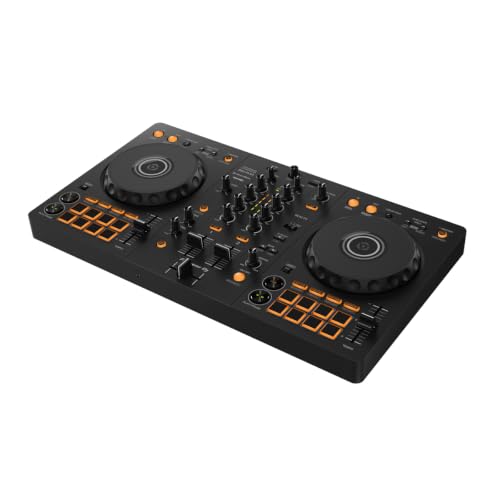
- Pioneer DJ DDJ-FLX4 2-Channel DJ Controller
- Riworal 6-Channel Audio Mixer — reviewed in full below as a prose-only pick (no purchase link; see the review for why).
- FULUODE CT-80S 8-Channel Audio Mixer — reviewed in full below as a prose-only pick (no purchase link; see the review for why).
Read the full guide ↓
Finding the best mixers for mixxx means filtering DJ hardware through one specific question: does it work with Mixxx, the free open-source DJ application? Mixxx talks to hardware two ways — DVS, where timecode vinyl or CDs let turntables control digital decks, and MIDI, where controllers and some mixers map their controls into the software. The four linked picks here qualify through one of those doors: the Numark Scratch and Pioneer DJM-250MK2 through their DVS ecosystems and audio paths, the DDJ-FLX4 as a MIDI controller class of device, and the Numark M2 as the traditional analogue partner to a DVS audio setup. Readers arriving from the wider world of Best Mixers For Mp3 Streaming Dj will find this guide narrower on purpose — Mixxx compatibility is the whole brief.
The two prose-only picks teach the boundary. A good analogue console can absolutely sit downstream of a Mixxx rig, mixing the laptop’s output with a microphone for the room — but that is a house-mixer job, not the Mixxx instrument itself, and buying an eight-channel live board to control Mixxx would be an expensive misunderstanding. This guide keeps the roles separate, links only the hardware that plays the instrument’s part, and explains the rest honestly.
Key Takeaways
- Mixxx hardware works two ways: DVS timecode through a suitable audio path, or MIDI control from a controller/mixer surface.
- The DDJ-FLX4 is the MIDI-controller route: one USB device carrying decks, pads and mixer controls into Mixxx.
- The Numark Scratch (Serato DVS) and DJM-250MK2 (rekordbox DVS) bring the audio interfaces and phono stages DVS workflows are built on — check Mixxx’s DVS requirements for your exact signal chain.
- The two analogue consoles are prose-only: no crossfader, no DVS, no MIDI means no role as the Mixxx instrument.
- An analogue board can still serve downstream as the house mixer — a different job, bought for different reasons.
In this guide
Quick Picks
| Pick | Badge | Channels / format | Why it is here | Link |
|---|---|---|---|---|
| Numark M2 2-Channel Scratch DJ Mixer | Best Traditional Analogue Partner | 2 channels | A classic scratch mixer for the analogue side of a DVS rig — crossfader craft, rack-mountable. | Check on Amazon |
| Numark Scratch DJ Mixer | Best DVS-Ready Mixer | 2 channels | Innofader, DVS licensing heritage and 24-bit audio for a turntable-plus-Mixxx setup. | Check on Amazon |
| Pioneer DJ DJM-250MK2 2-Channel DJ Mixer | Best Club-Layout DVS Pick | 2 channels | Club-standard layout with Sound Color FX and a DVS unlock in Pioneer’s ecosystem. | Check on Amazon |
| Pioneer DJ DDJ-FLX4 2-Channel DJ Controller | Best MIDI Controller Route | 2 channels, 2 decks | Sixteen pads, two decks and Smart Fader as a single USB MIDI performance surface. | Check on Amazon |
| Riworal 6-Channel Audio Mixer | Prose-Only: House Console | 6 channels | A fine small live console — reviewed to explain why it is not a Mixxx controller. | Prose-only — no link |
| FULUODE CT-80S 8-Channel Audio Mixer | Prose-Only: House Console | 8 channels | Eight channels of live console, prose-only: the house-mixer role, not the instrument. | Prose-only — no link |
How These Picks Were Chosen
Verification ran through Amazon’s Creators API on 2026-11-20: every linked pick’s ASIN, listing title and official image were confirmed, and only confirmed picks carry purchase links. The Mixxx-specific screening then asked the compatibility question in its two legitimate forms — does this hardware serve a DVS workflow (audio path, phono inputs, crossfader craft), or does it present a MIDI control surface a DJ application can map? Picks answering yes were linked; the two analogue consoles, which answer no despite being perfectly good live boards, were kept as prose-only context with the reasoning stated in their reviews and source notes.
A note on honesty about software specifics: Mixxx’s exact device support evolves with the open-source project, and controller mappings in particular are community-maintained. This guide therefore recommends the hardware by class and capability — DVS-ready mixer, MIDI controller — and advises confirming your exact model’s current mapping or DVS support in Mixxx’s own documentation before purchase, rather than printing a compatibility promise that a software update could age. The hardware judgements themselves — crossfader quality, layout, audio specifications from the listings — are stated from the verified product data.
The 6 Best Mixers for Mixxx (4 Linked, 2 Prose-Only)

Numark M2 2-Channel Scratch DJ Mixer
Badge: Best Traditional Analogue Partner
Strengths
- A purpose-built scratch layout: the crossfader is replaceable and its slope is adjustable
- Rack-mountable, which almost nothing else in this group offers
- 3-band EQ and a mic input cover the classic two-deck plus microphone formula
Trade-offs
- Two channels only — it is a DJ battle-style tool, not a multi-source console
- No USB audio interface is stated in the listing title
- No built-in effects beyond the EQ and crossfader craft
| Channels | 2 channels |
|---|---|
| Format | Rack-mountable scratch mixer |
| EQ | 3-band EQ |
| Crossfader | Replaceable, slope-adjustable crossfader |
| Inputs | Mic input |
The Numark M2 is an unapologetically traditional scratch mixer: two channels, 3-band EQ, a microphone input, rack-mountable construction, and a crossfader that is both replaceable and slope-adjustable. Those last two details are the tell of a mixer designed for heavy hands — scratch DJs wear crossfaders out, and being able to swap the fader and set its cut-in curve to taste is the difference between a tool and a toy. The rack-mountable format suits permanent installs in small venues and home rigs alike. There is no USB interface in the listing and no effects section; the M2’s craft is EQ, level and the crossfader, practised properly.
In a Mixxx DVS rig, the M2 plays the analogue half: turntables feed its phono channels, its crossfader — replaceable, slope-adjustable, built for cutting — performs the mix, and the timecode path through a suitable audio interface lets Mixxx’s digital decks follow the vinyl. That division of labour is the classic DVS architecture, and the M2’s rack-mountable toughness suits it to the home and small-venue rigs where Mixxx thrives. It contributes no USB or MIDI itself, and within this architecture it does not need to; its craft is the fader, the EQ and two honest channels.
Living with the M2 is a tactile experience: the crossfader is the centre of its world, and its replaceable design acknowledges a truth about scratch DJs — faders are consumables, and a mixer that treats them that way respects its owner. The slope adjustment lets you set the cut from a smooth blend to a near-instant switch, and finding your setting is a small rite of passage. Rack-mounting gives it a permanent home in a furniture rack or a small venue install, and the 3-band EQ covers the tone-shaping that two-deck mixing actually involves. It is a specialist’s tool that has not forgotten it will be used hard.
Best for: traditional DVS rigs and scratch-first Mixxx users / Not suited for: users wanting USB or MIDI from the mixer itself

Numark Scratch DJ Mixer
Badge: Best DVS-Ready Mixer
Strengths
- The Innofader crossfader is a serious scratch component, not a token fader
- Serato DJ Pro and a DVS license are included, so the digital vinyl workflow starts out of the box
- FX paddles and eight performance pads put live remixing controls under the fingers
Trade-offs
- Built around Serato, so software loyalty is part of the purchase
- Two channels keeps it in DJ territory rather than general mixing duty
- Performance features reward practice — it is not a set-and-forget board
| Channels | 2 channels |
|---|---|
| Crossfader | Innofader crossfader |
| Software | Serato DJ Pro included, DVS license |
| Performance | FX paddles, 8 performance pads |
| Audio | 24-bit audio |
The Numark Scratch is a battle mixer built for the digital era: an Innofader crossfader at its centre, Serato DJ Pro included with a DVS license, FX paddles, eight performance pads and 24-bit audio. The DVS license is the unlock that matters — it lets timecode vinyl or CDs on ordinary decks control Serato’s digital library, blending turntable feel with a laptop’s catalogue. The pads bring cue points and performance tricks onto the mixer itself, and the FX paddles deliver the momentary, expressive effects control scratch and party DJs reach for. It is a focused instrument: two channels, deep performance features, and a software ecosystem it expects you to join.
The Numark Scratch is the most DVS-native mixer here: it was designed around digital vinyl — Serato in its own bundle — with 24-bit audio, an Innofader for cutting, and performance pads and FX paddles for the expressive layer. For a Mixxx user building a turntable rig, the relevant inheritance is the hardware design itself: a proper battle mixer whose audio path and layout assume timecode control of digital decks. Confirm your exact DVS signal chain against Mixxx’s current documentation, as the guide advises for all DVS picks, and what remains is a mixer shaped precisely for the job.
Day to day, the Numark Scratch feels like a performance instrument that happens to be a mixer: the pads invite play, the FX paddles beg to be flicked at transitions, and the Innofader’s cut becomes part of your technique rather than a setting you tolerate. The included Serato ecosystem means the digital side arrives complete — software, DVS license, a library workflow — so the unit’s personality is coherent from the first session. Its 24-bit audio path keeps the digital chain clean. Owners should expect it to shape their habits: this mixer wants to be played, nightly, and it rewards exactly that relationship.
Best for: turntable DVS builds wanting a battle-grade modern mixer / Not suited for: pure controller-based setups

Pioneer DJ DJM-250MK2 2-Channel DJ Mixer
Badge: Best Club-Layout DVS Pick
Strengths
- Club-style layout means the skills learned on it transfer to the mixers installed in venues
- The Sound Color FX filter is a genuinely musical one-knob performance tool
- rekordbox DVS unlock is included, opening the digital vinyl route
Trade-offs
- Two channels, deliberately — this is a focused DJ mixer, not a utility console
- The Pioneer ecosystem (rekordbox) is the assumed home software
- No performance pads, so cue juggling lives on the decks or controller instead
| Channels | 2 channels |
|---|---|
| Workflow | Club-style 2-channel layout |
| Effects | Sound Color FX filter |
| Software | Free rekordbox DVS unlock |
Pioneer DJ’s DJM-250MK2 distils the club mixer formula into two channels: the layout mirrors the larger mixers installed in venues, the Sound Color FX filter puts a sweepable, musical effect on a single knob per channel, and a free rekordbox DVS unlock opens digital vinyl control inside Pioneer’s ecosystem. For a DJ, the transferable layout is the quiet superpower — muscle memory built at home on this mixer works on the club-standard surfaces found in booths. It deliberately omits performance pads and extra channels; the design bet is that clean EQ, a great filter and a familiar layout beat feature sprawl for the mixing itself.
The DJM-250MK2 offers the Mixxx DVS user a different flavour: the club-standard Pioneer layout, so skills transfer to installed booth mixers, plus the Sound Color FX filter for performed transitions, in a two-channel frame built around a DVS unlock in its own ecosystem. In a Mixxx-centred rig it plays the same analogue-plus-timecode role as the other DJ mixers here, with the layout argument as its distinction. DJs who split their time between home Mixxx sessions and venue booths will feel that argument immediately; pure home users may weigh the Numark’s pads more heavily.
The DJM-250MK2’s daily pleasure is familiarity: every control is where club-standard layout says it should be, so practice at home compounds directly into competence on installed venue mixers — a transfer effect no other pick here offers in the same way. The Sound Color FX filter becomes a signature gesture with use, a single-knob sweep that marks transitions as yours. The rekordbox DVS unlock keeps the digital library under turntable control inside Pioneer’s world. It is a focused, almost austere tool, and DJs who value transfer and touch over feature sprawl tend to keep mixers like this for years.
Best for: DJs splitting time between Mixxx at home and club booths / Not suited for: pad-performance-focused users
Pioneer DJ DDJ-FLX4 2-Channel DJ Controller
Badge: Best MIDI Controller Route
Strengths
- Smart Fader helps first mixes sound smooth while the underlying skills develop
- Sixteen pads and two full decks make it a complete performance instrument, not just a mixer
- A mic input and streaming-ready design suit the modern bedroom-to-broadcast path
Trade-offs
- It is a controller: it needs a computer and software running to make sound
- No standalone mixer inputs for external decks the way a true DJ mixer offers
- The jog-and-pad layout is a DJ instrument, not a general-purpose mixing console
| Channels | 2 channels, 2 decks |
|---|---|
| Pads | 16 pads |
| Finish | Graphite |
| Features | Smart Fader, streaming-ready, mic input for livestreaming |
The DDJ-FLX4 is a two-channel DJ controller rather than a standalone mixer: sixteen pads, two decks, Smart Fader assistance, streaming-ready design and a microphone input for livestreaming, all in Pioneer’s graphite finish. Smart Fader is the beginner-friendly headline — it helps transitions blend smoothly while beatmatching skills are still developing — and the pad count gives cue juggling and performance play real room. Because it is a controller, the computer and DJ software are part of the instrument; in return the whole setup is one USB-connected unit that can also carry a livestream with a mic. It is the modern, software-centred way into DJing in this group.
The FLX4 is the controller route into Mixxx: a single USB device whose jog wheels, sixteen pads, channel faders and crossfader present exactly the kind of MIDI control surface DJ software maps. For the Mixxx user who prefers the all-in-one workflow — no turntables, no timecode, laptop plus controller plus speakers — this is the natural hardware shape, and Smart Fader even softens the learning curve while real technique develops. Because controller mappings are community-maintained in the open-source world, confirm the current FLX4 mapping status in Mixxx’s resources before buying; the hardware class itself is the right one.
Living with the FLX4 means living in software, comfortably: updates add features, the pads and Smart Fader keep early sessions sounding better than your technique yet deserves, and the whole rig packs into a backpack with the laptop it needs. The microphone input quietly extends its life beyond beginner status — streamed sets, talk-over practice, a friend’s party — and the graphite finish survives the bag-and-desk cycle gracefully. Its daily discipline is the laptop itself: keep the software organised and the library analysed, and the controller simply delivers. For the software-native generation of DJs, this is what a mixer looks like now.
Best for: all-in-one controller workflows with a laptop at the centre / Not suited for: standalone or turntable-based rigs
Riworal 6-Channel Audio Mixer
Badge: Prose-Only: House Console
Prose-only pick: Prose-only: this Riworal board is an analogue live-sound console with no DJ crossfader, no DVS/timecode path and no MIDI control surface, so it cannot function as a Mixxx DJ mixer or controller. It could sit downstream as a house mixer, but that is not the core Mixxx use case, so it is reviewed prose-only with no link and no image.
Strengths
- Six channels cover a vocal, a guitar, keys and playback without swapping cables mid-set
- Built-in 16-bit DSP reverb means one less outboard unit to carry and patch
- Bluetooth and USB give you walk-in music and a simple recording feed from the same small board
Trade-offs
- Compact desktop format, so the faders and knobs sit close together for larger hands
- Effects are a single shared DSP block rather than per-channel processing
- No dedicated DJ crossfader, so it is a mixing console first and a DJ tool second
| Channels | 6 channels |
|---|---|
| Effects | 16-bit DSP with reverb effect |
| Phantom power | +48V phantom power |
| Connectivity | Bluetooth, USB audio interface |
The Riworal six-channel console is built around a simple promise: plug in a handful of sources, add a touch of its 16-bit DSP reverb, and get a balanced stereo mix out without a rack of extra gear. The +48V phantom power means a condenser vocal microphone is welcome alongside dynamic mics and line-level instruments, and the Bluetooth input quietly handles the jobs nobody thinks about until they are missing — background music before the show, a backing track from a phone, a reference song during soundcheck. As a USB audio interface it also doubles as the recording path, so the same board that runs the room can capture the stereo mix to a computer with no additional hardware purchase hiding in the plan.
This Riworal console appears here to prevent a purchase error, not to compete. It has no crossfader, no DVS path and no MIDI — the three mechanisms by which hardware works with Mixxx — because it was designed for a different job: mixing microphones and sources for a room. In a Mixxx household it could serve downstream, taking the laptop’s output plus a microphone for announcements, and it would do that job well. But the Mixxx instrument must come from the DJ hardware above, and a reader who understands that distinction will spend their budget correctly the first time.
In daily use, the Riworal’s workflow is refreshingly literal: sources in, gains set, reverb to taste, master up. The Bluetooth pairing is the kind of feature that gets used exactly as intended — a phone appears, pairs, and plays — and the USB connection identifies itself to a computer without ceremony, which matters when the same board alternates between stage and desk duty. Owners of small boards learn to love or hate the spacing of the controls, and while this one is compact, the layout follows the universal small-console map, so experience gained on it transfers to almost any other board you will ever be handed at a venue or a rehearsal room.
Best for: downstream house-mixer duty at events (context only) / Not suited for: controlling Mixxx in any form
FULUODE CT-80S 8-Channel Audio Mixer
Badge: Prose-Only: House Console
Prose-only pick: Prose-only: the FULUODE CT-80S is an eight-channel live/Karaoke console without a crossfader, DVS support or MIDI mapping — the three things a Mixxx setup actually needs from its mixer. Useful as a downstream PA board, not as the Mixxx instrument itself, so it is covered prose-only with no link and no image.
Strengths
- Eight channels is the most input room in this group, useful when the source count keeps growing
- USB recording, an MP3 player and Bluetooth cover playback and capture without extra boxes
- 48V phantom power runs condenser microphones directly from the board
Trade-offs
- The largest footprint here, which matters on a crowded desk or a small stage corner
- A shared reverb is a convenience effect, not a substitute for dedicated processing
- Channel count is shared across mic and line sources, so plan the input list before you buy
| Channels | 8 channels |
|---|---|
| Model | CT-80S |
| Effects | Built-in reverb |
| Connectivity | MP3 player, Bluetooth, USB recording |
| Phantom power | 48V phantom power supply |
The FULUODE CT-80S is the big-input option in this pool: eight channels, a built-in reverb, an MP3 player, Bluetooth and USB recording in one sound-system mixer board. That combination suits anyone whose source list refuses to stay small — several microphones, a keyboard, a guitar, a laptop and a phone can all live on the board at once instead of queuing for inputs. The 48V phantom power supply keeps condenser microphones in play, and the USB recording path means the performance or rehearsal can be captured as it happens. It asks for more desk or stage space than the compact boards here, and repays it with headroom in the input count that the four-channel models simply cannot offer.
The FULUODE makes the same teaching point at larger scale: eight channels of live console, entirely competent for karaoke, small bands and events — and entirely without the crossfader, DVS support or MIDI mapping that a Mixxx setup needs from its mixer. Channel count is the trap here; a DJ application does not want more channels, it wants the right two, with a fader built for cutting and a path for timecode or MIDI. Keep the CT-80S in mind if your events also need a house console; buy your Mixxx hardware from the four linked picks.
Living with the CT-80S means planning its place: it wants a defined spot — a desk corner, a rack-adjacent shelf, the top of the equipment case — rather than being squeezed in last. In return, the day-to-day experience is calm, because nothing needs repatching when the source list changes; the extra channels absorb the change. The MP3 player deserves a specific mention in daily use: loading walk-in or interval material onto a stick removes the phone from the system entirely, and the USB recording behaves like the simple stereo capture it is — start it, forget it, and have a reference of the session waiting afterwards.
Best for: house console for the room at larger events (context only) / Not suited for: any role as the Mixxx instrument
Comparison Table
| Pick | Channels | Computer connection | Effects | Link |
|---|---|---|---|---|
| Numark M2 2-Channel Scratch DJ Mixer | 2 channels | See review | See review | Check on Amazon |
| Numark Scratch DJ Mixer | 2 channels | See review | See review | Check on Amazon |
| Pioneer DJ DJM-250MK2 2-Channel DJ Mixer | 2 channels | See review | Sound Color FX filter | Check on Amazon |
| Pioneer DJ DDJ-FLX4 2-Channel DJ Controller | 2 channels, 2 decks | See review | See review | Check on Amazon |
| Riworal 6-Channel Audio Mixer | 6 channels | Bluetooth, USB audio interface | 16-bit DSP with reverb effect | Prose-only |
| FULUODE CT-80S 8-Channel Audio Mixer | 8 channels | MP3 player, Bluetooth, USB recording | Built-in reverb | Prose-only |
How to Choose a Mixer for Mixxx
Choose your Mixxx architecture before choosing hardware, because the two architectures buy completely different boxes. The controller architecture is one USB device — decks, pads, mixer section — mapped over MIDI into Mixxx; it is portable, self-contained and ideal for laptop-centred DJs, and the DDJ-FLX4 is this guide’s example. The DVS architecture is turntables plus timecode plus a mixer with real phono channels and a serious crossfader; it costs more, weighs more and delivers the tactile craft many DJs refuse to give up, and the Numark and Pioneer mixers serve it. Neither is the ‘pro’ choice — they are different instruments, and Mixxx, to its credit, speaks both languages, which is more than the paid rivals gathered around Best Mixers For Mp3 Streaming Dj can always claim.
For DVS shoppers, the specifications that matter are the unglamorous ones: phono inputs that treat turntables properly, an audio path clean enough for timecode to track reliably, and above all the crossfader. Cutting on a soft, worn fader is misery, and the faders in this guide — replaceable and adjustable on the M2, the Innofader on the Numark Scratch — are specified like the working components they are. Layout is the third consideration: the Pioneer’s club-standard arrangement transfers to venue booths, while the Numark’s pads and paddles add a performance layer the Pioneer deliberately omits. Choose by the sets you actually play.
Controller shoppers should think about mappings with clear eyes. In the open-source ecosystem, device mappings are substantially community-built and maintained, which is a strength — popular hardware gets excellent mappings — and a homework assignment: confirm your chosen controller’s current mapping status in Mixxx’s own resources before purchase. Beyond mapping, judge the surface itself: jog wheel feel, pad count and layout, a microphone input if you talk or stream, and a form factor that fits the bag and the booth you actually use. The FLX4’s sixteen pads and Smart Fader make it a forgiving first surface; your second controller can be chosen with opinions you have not formed yet.
And keep the downstream question separate. Many Mixxx rigs play rooms that also need a microphone for announcements and a way to balance the laptop against the space — a house-mixer job that the prose-only consoles in this guide genuinely suit. Budget for it as its own line item if your events need it, rather than distorting the instrument purchase to cover it. A rig with the right DJ hardware and a modest house console will outperform a compromised single box at every event you play.
How to Set Up Mixxx With a Mixer or Controller
The setup forks by architecture: controller users map a surface, DVS users calibrate timecode. Both paths are covered below, in the order a first session actually happens.
- Install Mixxx, connect your hardware (controller by USB, or turntables and mixer with the audio interface your DVS chain requires), and power everything before launching the application.
- In Mixxx’s preferences, select the correct audio device and routing for your architecture — controller users confirm the device’s sound is routed as Mixxx expects; DVS users assign the timecode inputs to the decks.
- Controller users: open the controller preferences and confirm the mapping for your device is loaded and enabled; test every fader, knob and pad and note anything unmapped before your first real session.
- DVS users: play the timecode records and calibrate each deck in Mixxx’s vinyl-control settings until the signal quality reads clean and stable in both directions of movement.
- Set levels conservatively — Mixxx’s decks into the mixer (or the controller’s mixer section) with headroom at every stage — and confirm the microphone path if you announce or stream.
- Save your configuration, then practise the failure drills: restart Mixxx mid-track, reconnect the USB cable, and learn what your rig does before an audience teaches you.
The open-source bargain is real and worth stating plainly: Mixxx costs nothing and its community maintains the mappings and documentation, so the homework in these steps — checking mapping status, reading the vinyl-control guide — is the price of admission, paid in minutes rather than money. Keep the Mixxx manual’s hardware chapter bookmarked; it is unusually good, and it ages with the software in a way a printed guide page cannot.
Build your library habits inside Mixxx early: analyse tracks, set cue points on the controller, and let the software’s crates mirror the way you actually play. Hardware choices get the attention, but the DJs who sound prepared are usually the ones whose library is prepared — the mixer, whichever of these you chose, simply delivers what the library and your hands have already decided. Keep Best Mixers For Mp3 Streaming Dj in mind as the neighbouring territory, too, when friends ask you for streaming-DJ hardware advice — the same architecture questions decide that purchase.
Troubleshooting
Problem: the controller’s controls move nothing in Mixxx → the mapping is not loaded or the device is not enabled in controller preferences; enable it, confirm the correct mapping is selected, and restart Mixxx before re-testing.
Problem: DVS tracking is unstable or the deck drifts → clean the stylus and record, re-run the timecode calibration, and check that input levels are neither whisper-quiet nor clipping.
Problem: sound plays but the crossfader behaves like a volume blend → the fader curve is set for blending; switch the curve (in software for controllers, on the mixer for DVS rigs) to a sharp cut for scratch work.
DVS vs Controller for Mixxx: An Honest Comparison
The DVS path buys feel: real records under real hands, a crossfader with mechanical authority, and a workflow that connects a Mixxx user to fifty years of turntable craft. Its costs are literal — turntables, timecode records, a suitable audio path, more setup at every gig. The controller path buys convenience: one bag, one cable, pads and jog wheels mapped into the software, and a setup measured in minutes. Its cost is a layer of abstraction between the hand and the music that some DJs never stop noticing.
Mixxx’s support for both is its quiet superpower, and this guide’s picks respect it: three flavours of DVS mixer and one strong controller, rather than a verdict disguised as a shortlist. The right answer is the architecture you will still be enjoying in a year — the one whose setup ritual feels like anticipation rather than chores. Everything else is specifications.
The House Mixer Question: Where the Prose-Only Consoles Fit
Events complicate rigs. The wedding, the community hall, the bar with its own ancient speakers — these rooms ask the DJ for a microphone feed, a second source for speeches or a ceremony, and level control over the room, none of which a DJ mixer or controller is shaped to provide. That is the downstream house-mixer job, and it is the honest context for the two analogue consoles reviewed prose-only in this guide: as room mixers fed by the Mixxx rig’s output, boards like the Riworal and FULUODE are entirely sensible purchases.
Keeping the two purchases conceptually separate protects both. The instrument budget buys crossfader, DVS or MIDI quality; the house budget buys channels and microphone inputs. A DJ who understands which box is doing which job can also troubleshoot at speed — silence in the instrument chain and silence in the room chain have different suspects, and the labelled, separated rig finds them faster.
Practising With Mixxx: A Routine That Builds Real Skill
Mixxx rewards deliberate practice because its feedback is honest: recordings of your sets, played back, tell you exactly where transitions sag and levels wander. A routine that works on any of this guide’s hardware: one focused drill per session (only crossfader cuts, only EQ transitions, only pad or cue work), one free-play set recorded in full, and ten minutes of playback review with notes. The drills build the hands; the recorded sets build the judgement; the notes make both cumulative instead of accidental.
The open-source context adds one more practice asset: the community. Mixxx’s forums and documentation are full of working DJs’ mapping tweaks, library workflows and DVS troubleshooting that map directly onto the hardware classes in this guide. A beginner who reads one thread a week while practising will out-learn a peer with better gear and no community. Skill in DJing has always been social knowledge wearing technical clothes — Mixxx simply makes the social part free, like the software.
A word about total cost, because Mixxx’s freeness can distort the maths in a healthy way: with the software at zero, the entire budget lands on hardware and music, which is exactly where a DJ’s money does the most work. That argues for buying the hardware once and properly — the fader you will not need to replace in a year, the controller with the pads you will grow into — rather than economising twice. It also argues for keeping perspective: a modest Mixxx rig, practised on daily, will outperform an expensive rig that mostly gathers dust, because in DJing the scarce resource was never the equipment. It was always the hours.
Building a Library That Makes the Hardware Look Good
Ask working DJs what separates a good set from a lucky one and most will point at the library, not the mixer: tracks analysed, cue points set where the phrases actually turn, crates organised by energy and occasion rather than by download date. Mixxx supports that work natively, and every piece of hardware in this guide performs better on top of a prepared library — the controller’s pads become cue instruments instead of decorations, the DVS decks become expressive because the files under the timecode are organised, and the crossfader’s craft has material worthy of it.
The organisational habit that pays fastest is ruthless curation: a smaller library you know completely outperforms a vast one you browse hopefully, especially in the open-source workflow where your crates are entirely your own design. Tag by how tracks feel and where they belong in a night, not only by genre metadata, and prune without sentimentality. Then practise on the prepared library until the hardware disappears. That disappearance — library, hands and software moving as one — is the real product this entire category sells, and Mixxx, to its credit, never puts a paywall between you and it.
Common Buying Mistakes
- Buying an analogue live console to control Mixxx — no crossfader, no DVS, no MIDI, no exceptions.
- Skipping the mapping check for a controller and discovering the homework at the first gig.
- Neglecting crossfader quality in a DVS rig, where the fader is half the instrument.
- Forgetting the audio path in a DVS budget: timecode needs a suitable interface chain, not just a mixer.
- Expecting the DJ hardware to also be the room’s house mixer, and distorting both purchases.
- Running levels hot at every stage and blaming the software for the resulting distortion.
Final Recommendation
For most Mixxx users building new, the DDJ-FLX4 controller route is the fastest honest path: one device, a mappable surface, pads for performance and a setup that fits in a backpack — with the mapping check done before purchase, as advised. Turntable loyalists should choose by fader and flavour: the Numark Scratch for the modern battle feature set, the M2 for replaceable-fader traditionalism, the DJM-250MK2 for the club-standard layout that travels to venue booths.
And let the two prose-only consoles stand as the guide’s small monument to role clarity: excellent boards, wrong job. Buy the instrument for Mixxx, buy the house mixer for the room if the room needs one, and the open-source rig you end up with will embarrass plenty of expensive ones.
Frequently Asked Questions
Does Mixxx work with any DJ controller?
Mixxx works with MIDI controllers that have a mapping available — many are bundled or community-maintained. Always confirm your exact model’s current mapping status in Mixxx’s official resources before buying, since support is a software-side fact that evolves.
What do I need for DVS with Mixxx?
Turntables (or CDJs), timecode vinyl or CDs, a suitable audio interface path for the timecode signal, and a mixer with proper phono channels and a good crossfader — the Numark and Pioneer picks here cover the mixer side of that chain.
Can I use a normal analogue mixer with Mixxx?
Not as the instrument: without a crossfader, DVS path or MIDI, an analogue console cannot control Mixxx. It can serve downstream as a house mixer for the room — the role the two prose-only picks in this guide are honestly framed for.
Is the Numark Scratch’s Serato bundle relevant to a Mixxx user?
The bundle reflects the mixer’s design heritage — a battle mixer built for DVS workflows. For Mixxx, judge it on its hardware: Innofader crossfader, 24-bit audio path, pads and layout, and verify your DVS signal chain against Mixxx’s documentation.
Controller or DVS for a beginner on Mixxx?
A controller, for most beginners: lower cost, one-cable setup, and skills that still transfer conceptually if you later move to turntables. The DDJ-FLX4’s Smart Fader is specifically designed to make early mixes sound encouraging.
Why does this guide link only four of six picks?
Because links are recommendations. The two analogue consoles fail the core Mixxx test — crossfader, DVS or MIDI — so they are reviewed in full, with the reasoning stated, but carry no purchase link. Readers exploring the broader DJ hardware landscape, including Best Mixers For Mp3 Streaming Dj, will find the same role-clarity test worth applying everywhere.


