Disclosure: topratedkitchenware.com is reader-supported. When you buy through links on our site, we may earn an affiliate commission from Amazon and other retailers, at no extra cost to you.
Where to buy
Every pick below was shortlisted for buyers comparing the best recording mixers for audiobook voiceover narration, and each linked pick’s specifications were verified against its listing data before this guide was written. Prose-only picks are reviewed in full but carry no purchase link, for the reason stated in their review.
- K-mxerpro 8-Channel Mixer Console — check the latest price on Amazon
- Aveek 5-Channel Audio Mixer — check the latest price on Amazon
- Aveek 4-Channel Audio Mixer — check the latest price on Amazon
- Mackie ProFX10v3+ 10-Channel Mixer — check the latest price on Amazon
- Mackie ProFX12v3 12-Channel Mixer — check the latest price on Amazon
- Mackie ProFX16v3 16-Channel Mixer — check the latest price on Amazon
Read the full guide ↓ for the detailed reviews, the comparison table and the buying advice behind this shortlist.
The best recording mixers for audiobook voiceover narration are chosen by a stricter standard than almost any other recording task, because narration exposes everything: one voice, alone, for ten hours, with nowhere for hiss, hum, room echo or a wandering gain setting to hide. A board that flatters a band can fail a narrator completely. What matters here is a quiet front end for a single condenser microphone, phantom power, gain that stays composed at the levels spoken word needs, and a USB path that delivers that voice to the computer without drama.
The six picks span the realistic shapes of narration work. The Aveek boards (five and four channels) suit solo narrators and voice studios; the K-mxerpro eight-channel console suits narrators who also record guests and interviews; and the three Mackie ProFX boards — 10v3+, 12v3 and 16v3 — bring the Onyx-preamp line’s reputation to narration setups that range from a treated corner to full-cast audio drama. This guide is honest about scale: a sixteen-channel board is infrastructure for ensemble work, not a solo narrator’s requirement, and the reviews say who each size is really for. New narrators should also read Best Recording Mixers For Beginners, which weights the learning curve more heavily.
Key Takeaways
- Narration is a one-microphone discipline: preamp quietness at spoken-word gain matters more than channel count.
- The Aveek four-channel board is the right-sized solo narration desk; the Mackie ProFX10v3+ is the upgrade when guests and production enter.
- Record narration dry — no board reverb, ever. Audiobook listeners and QC standards both punish printed effects.
- Phantom power is mandatory for the condenser microphones narration depends on; every pick provides it.
- Consistency across sessions is a narration superpower: fixed channel, fixed gain landmarks, a reference recording to match against.
In this guide
Quick Picks
The narration shortlist at a glance. Badges are used consistently through the detailed reviews below.
| Pick | Badge | Headline specification | Link |
|---|---|---|---|
| K-mxerpro 8-Channel Mixer Console | Best for Solo Narration | 8 channels | Check on Amazon |
| Aveek 5-Channel Audio Mixer | Best for Voice-Only Studios | 5 channels | Check on Amazon |
| Aveek 4-Channel Audio Mixer | Best Budget Pick | 4 channels | Check on Amazon |
| Mackie ProFX10v3+ 10-Channel Mixer | Best for Narration Plus Guests | 10 channels | Check on Amazon |
| Mackie ProFX12v3 12-Channel Mixer | Best for Ensemble Voice Work | 12 channels | Check on Amazon |
| Mackie ProFX16v3 16-Channel Mixer | Best for Full-Cast Productions | 16 channels | Check on Amazon |
How These Picks Were Chosen
Selection started from the narration brief — single-voice recording quality — and compared verified specifications: phantom power, USB recording design, channel count against realistic narration formats, and effects provision (judged here mainly on whether it can be left cleanly off). Every linked product was cross-checked against its listing data through the Creators API on the recorded check date, and spec boxes contain only confirmed data.
The guide is research-led: preamp behaviour is discussed in terms of design and class rather than invented measurements, because narration buyers are ill-served by fake precision. Ranking puts the solo narrator first — the most common reader of this keyword — then scales up through guest-interview formats to ensemble production. Readers building a general studio rather than a narration booth will find the wider view in Best Recording Mixers.
Because narration buyers are unusually exposed to confident nonsense — the category is full of ‘broadcast quality’ claims attached to unremarkable hardware — this guide adopted a stricter evidence rule than usual. Every statement about a board’s suitability for voice work is tied either to a verified specification or to the physics of the task: one microphone, spoken-word gain, long-form consistency. Nothing here depends on a reviewer’s golden ears, and the guide’s central test — your softest passage, your microphone, your headphones — is deliberately one any reader can run and judge personally. If the wider market for narration gear adopted the same rule, most of its mystique would evaporate, and what remained would look much like this shortlist: modest boards, honestly described, inside disciplined setups.
One last narration-specific check: read your chosen board’s layout as a narrator, not as an engineer. In the booth, between chapters, you will operate it tired, hydrated, mid-performance, often by touch. The gain you must never move should feel different from the controls you may touch; the monitoring level should be findable without looking; the power and phantom switches should be verifiable at a glance from the narrator’s chair. Boards that pass that reading earn a calm that no specification measures, and calm, across ten hours of another person’s book, is a technical specification of its own. Choose the board your future tired self can run without thinking, and the thinking can all go to the text.
That booth-side reading is, in the end, the summary of this entire guide: narration equipment succeeds by disappearing. The boards recommended here were chosen because each can disappear at its scale — the small desks into a booth routine, the large ones into a studio’s staffed workflow — and the reader’s remaining work is the routine itself, which no purchase can perform for them and every purchase here is designed to protect.
The 6 Best Recording Mixers for Audiobook Voiceover Narration

K-mxerpro 8-Channel Mixer Console
Badge: Best for Solo Narration
Strengths
- Eight channels is the first size here that handles a small band plus playback
- USB audio interface duties are built in for streaming and recording
- 48V phantom power supports condenser microphones on the mic channels
Trade-offs
- Fewer headline extras than some rivals — the value is channel count
- A bigger footprint than the 4-channel desktop boards
- Effects detail is modest next to boards built around a named DSP engine
Key specifications (verified): 8 channels; 48V phantom power; USB audio interface; Built for live show, streaming, recording, stage and karaoke use.
The K-mxerpro console is the channel-count play in this line-up: eight channels with 48V phantom power and a USB audio interface, aimed squarely at live shows, streaming, recording, stage work and karaoke. Eight channels changes what a session can look like — two or three vocal microphones, a keyboard in stereo, a guitar and a playback feed can all live on the board at once, each with its own level, instead of being sub-mixed through adapters.
For streamers and small venues that is the difference between a board you grow out of in a year and one that absorbs the next addition. The USB interface side keeps the computer workflow simple: the stereo mix goes to the recording or streaming software without a separate interface purchase. The honest trade-off is that this board spends its budget on inputs rather than on a long list of extras, so buyers shopping for the deepest effects library or the most playback tricks should compare carefully — buyers shopping for channels per purchase will find it hard to argue with.
For narration its eight channels serve the interview format — narrator, guest, playback and spares — while a solo narrator uses one strip and a great deal of headroom.
For a narrator who also interviews, the K-mxerpro’s eight channels change session logistics: the guest’s microphone lives on its own strip with its own gain landmark, the playback feed for clips or a remote guest has a home, and the narrator’s channel is never repurposed — which protects the book’s consistency even on interview days. The narration-specific risk is operational drift: more knobs invite more touching. The defence is the logged-setup discipline from the how-to section, applied with extra strictness to the narrator’s own channel, which should be treated as calibrated equipment rather than as part of the day’s improvisation.
Best for: the default choice for most buyers in this category / Not suited for: a narrower, more specialised brief than this pick serves

Aveek 5-Channel Audio Mixer
Badge: Best for Voice-Only Studios
Strengths
- Echo and delay effects are exactly what karaoke and live vocals ask for
- PC recording interface is built in — no separate interface to buy
- Five channels cover a host mic, a guest mic and playback comfortably
Trade-offs
- Five channels leaves little spare for a growing setup
- Effects focus on echo/delay rather than a wide studio palette
- Value-brand documentation is brief
Key specifications (verified): 5 channels; Built-in PC recording interface; 48V phantom power; Bluetooth and USB playback; Echo and delay effects.
The Aveek five-channel mixer is built around a clear use case: live streaming, podcasting, karaoke and small studio recording, with a PC recording interface built in, 48V phantom power, Bluetooth and USB playback, and echo and delay effects on board. Five channels is an unfashionable number that happens to fit real life — a host microphone, a guest microphone, a music feed and a spare — without paying for inputs that never get used.
The echo and delay effects deserve their billing, because for karaoke and live-sung streaming they are the effects people actually reach for, more than exotic modulation. The built-in PC interface keeps the signal path short: microphone in, treated mix out to the streaming or recording software. Limitations are honest ones — a band will outgrow five channels quickly, and the effect set is focused rather than encyclopaedic. As a one-person broadcasting desk, though, the priorities are in the right order.
A voice-first desk: one narrator channel, playback for reference audio, and echo effects that belong to its karaoke life and stay off for book work.
The Aveek five-channel’s narration virtue is that it leaves the narrator’s attention where it belongs — on the performance. One microphone channel, set once; a playback channel for checking yesterday’s reference; nothing else demanding management. Its echo effects, designed for karaoke, are a narration board’s test of discipline: they must stay off for book work, and a narrator who cannot resist a flattering echo in the headphones should remember that the file, not the headphone feed, is the product. Used dry and consistently, this is a complete narration front end for the one-voice studio, at a tier that leaves the budget for the booth treatment that will improve the recording more.
Best for: buyers who want the balanced middle of this shortlist / Not suited for: buyers who need the largest format in the guide

Aveek 4-Channel Audio Mixer
Badge: Best Budget Pick
Strengths
- 99 DSP effects is a deep preset library for a 4-channel board
- USB PC recording makes it a complete podcast/streaming starter desk
- Compact size suits desks and small karaoke corners
Trade-offs
- Four channels is the tightest ceiling in this guide
- Preset effects cannot be edited in depth
- Not a band board — guests and instruments quickly exceed it
Key specifications (verified): 4 channels; USB PC recording; Bluetooth; 48V phantom power; 99 DSP effects; USB playback.
The Aveek four-channel mixer packs a surprising amount into the smallest footprint here: USB PC recording, Bluetooth, 48V phantom power, USB playback and a 99-preset DSP effects library. The design brief is plainly the solo creator — one microphone, one music source, a computer — and for that brief the channel count is not a limitation but a correct sizing that keeps the desk small and the workflow short.
The 99 DSP effects are the headline because they let a podcaster or karaoke singer audition reverbs, echoes and vocal treatments without software plug-ins or a second processor; what you hear while performing is what the recording gets. The trade-offs are the obvious ones: a second guest microphone plus an instrument already strains four channels, and preset effects are chosen, not sculpted. Buyers whose format is fixed — one voice, one feed — get everything they need; buyers whose format is growing should size up now rather than twice.
The solo booth pick — small enough to live beside the microphone stand, with its 99 presets relevant to live readings rather than to the dry book recording.
A four-channel desk in a narration booth is mostly empty space, and that is its merit: the Aveek’s small footprint fits the booth-side table where a narrator actually works, within reach of the copy stand, and its controls can be operated by feel between chapters. The 99-preset library is irrelevant to the book itself — narration records dry — but it serves the narrator’s other income more often than purists admit: live readings, streamed launches and as-live demos all want a finished vocal sound with no post-production. Buyers should simply be clear-eyed that they are purchasing a small, convenient front end for one voice, and judge it on quietness and consistency rather than on the preset count.
Best for: buyers whose setup is growing and needs headroom / Not suited for: buyers with a fixed, minimal format

Mackie ProFX10v3+ 10-Channel Mixer
Badge: Best for Narration Plus Guests
Strengths
- Ten channels cover a full small band plus playback with spares
- GigFX+ effects are voiced for live performance
- Bluetooth playback is built in for walk-in music and breaks
Trade-offs
- More board than a solo podcaster will ever use
- Larger and heavier than the desktop picks
- Premium-tier positioning within this group
Key specifications (verified): 10 channels; Bluetooth playback; USB recording; GigFX+ effects; Analog mixer design.
The Mackie ProFX10v3+ steps the ProFX formula up to ten channels and adds Bluetooth playback and the enhanced GigFX+ effects set alongside USB recording. Ten channels is the size at which a working small band stops negotiating: drums can take more than one microphone, the keyboard runs in stereo, there are vocal microphones for the singers who need them, and a playback feed still has a home. Mackie pitches it at live streaming, podcasting and band practice, and it covers all three without re-patching.
The GigFX+ effects matter in this context because live vocals and acoustic guitars are usually the channels crying out for reverb, and having it at the board means the stream and the room hear the same treated sound. The honest limitation is fit: a solo narrator or podcaster is paying for channels that will sit dark, and the board’s footprint assumes a permanent desk or a rehearsal room rather than a corner of a bedroom.
The production narrator’s board: Bluetooth brings a remote guest or a director’s feed into the session, and ten channels cover interview formats without a second device.
The ProFX10v3+ is where narration setups grow a production dimension. Bluetooth playback sounds like a live feature until a narrator needs a director or a remote guest in the session — then it is the simplest route for that voice to enter the recording at a controlled level. GigFX+ gives live and streamed voice work a finished treatment while tracked book work stays dry, and ten channels mean the interview format never cannibalises the narration channel. For a narrator building a studio that also earns from interviews, audio drama with a small cast and streamed events, this is the board whose headroom is professional rather than decorative — provided the core narration channel is set up with the same logged discipline as any solo booth.
Best for: buyers who prioritise the headline feature of this pick / Not suited for: buyers shopping purely on the lowest tier

Mackie ProFX12v3 12-Channel Mixer
Badge: Best for Ensemble Voice Work
Strengths
- Twelve channels with Onyx preamps is a serious small-venue front end
- GigFX effects cover live vocal and instrument treatments at the board
- A layout that working engineers can run without a learning curve
Trade-offs
- Oversized for streaming and podcast desks
- Takes real desk or case space
- The premium is in preamps and count, not in extra gadgets
Key specifications (verified): 12 channels; Onyx mic preamps; GigFX effects engine; USB connectivity; Analog mixer design.
The Mackie ProFX12v3 brings the Onyx preamp front end and the GigFX effects engine to a twelve-channel frame, and at that size the conversation changes from ‘can it cover the gig’ to ‘how well does it run the gig’. Twelve channels let a small venue or a full band keep everything patched — multiple drum microphones, stereo keys, several vocals, playback — with the gain structure set once and left alone, which is how live sound actually wants to work.
For recording and content creation the USB connection sends the stereo mix to the computer, and the GigFX treatments the audience hears are the treatments the recording gets. The limitation is simply that this is a working mixer’s board: buyers running a one-microphone stream are carrying capacity they will never light up, and the footprint belongs on a desk, in a case or at a venue — not balanced on a bedroom shelf.
Twelve channels with Onyx preamps is the small-studio voice board — several actors, a playback feed and a spare, balanced live for as-live drama and long-form work.
Twelve channels of Onyx-equipped mixer is a voice studio’s group instrument. The ProFX12v3’s narration case rests on ensemble reality: a drama with four actors needs four gained, balanced microphone channels plus playback and a director’s talkback workaround, and doing that on a board designed for it — rather than by stacking small mixers — is the difference between a session and an ordeal. For solo narration it is, plainly, ten channels of darkness, and this guide’s ranking says so. But a studio whose diary mixes solo books with cast work will find this size the honest centre of the room, with the solo channel simply being the best-documented strip on a big desk.
Best for: buyers with the specific use case this pick was designed around / Not suited for: buyers whose use case is the opposite end of the category
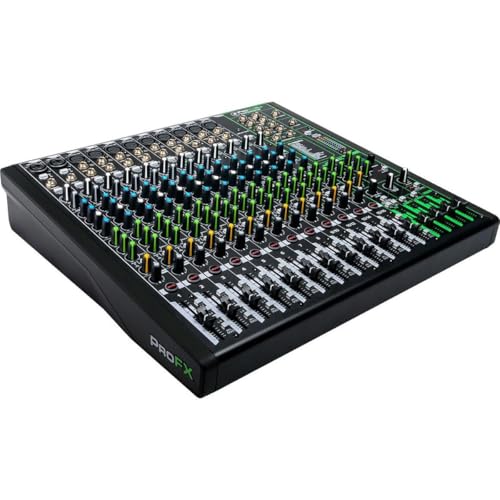
Mackie ProFX16v3 16-Channel Mixer
Badge: Best for Full-Cast Productions
Strengths
- Sixteen channels is full small-venue and band capacity
- GigFX effects keep vocal treatments at the board
- One board can serve live sound and recording duties together
Trade-offs
- Far more channels than narration or podcasting needs
- The largest footprint in this guide
- Premium-tier commitment in this line-up
Key specifications (verified): 16 channels; USB recording; GigFX effects; Analog mixer design.
The Mackie ProFX16v3 is the biggest board in this group at sixteen channels, with USB recording and the GigFX effects engine, aimed at bands, churches and small venues. Sixteen channels is the point where a mixer stops being a compromise and becomes infrastructure: a full drum kit can be miked properly, every singer has a microphone, instruments run in stereo where they should, and there are still spare channels for the guest, the playback feed and the unexpected.
Mackie’s pitch — record over USB while running the live mix — is exactly how churches and bands actually use a board like this: one setup serves the room and the recording at the same time. The limitation is not capability but proportion. For a narration booth or a podcast desk this is a venue console doing a desktop job, and the money and space it asks for only make sense when the channel count will genuinely be used, week after week.
Sixteen channels is full-cast infrastructure: a whole ensemble miked at once, recorded over USB while the session runs — a venue-scale tool for a venue-scale format.
The ProFX16v3 in a voice context is a venue decision: a drama studio, a training facility recording many voices, a church or theatre whose spoken-word productions run full casts. Sixteen channels let every actor keep a microphone for the whole production — no sharing, no re-gaining between scenes — and the USB recording captures the performed balance as the archive or the release. The narration-specific caution is proportion: a solo narrator buying this board has purchased a concert hall for a telephone call, and the money would have transformed the booth instead. Bought for genuine ensemble work, though, it is the only pick here that never asks the production to compromise on casting for channel reasons.
Best for: buyers who want the largest or most specialised option here / Not suited for: buyers who want the simplest possible tool
Comparison Table
| Pick | Badge | Format | Standout feature | Link |
|---|---|---|---|---|
| K-mxerpro 8-Channel Mixer Console | Best for Solo Narration | 8 channels | 48V phantom power | Check on Amazon |
| Aveek 5-Channel Audio Mixer | Best for Voice-Only Studios | 5 channels | Built-in PC recording interface | Check on Amazon |
| Aveek 4-Channel Audio Mixer | Best Budget Pick | 4 channels | USB PC recording | Check on Amazon |
| Mackie ProFX10v3+ 10-Channel Mixer | Best for Narration Plus Guests | 10 channels | Bluetooth playback | Check on Amazon |
| Mackie ProFX12v3 12-Channel Mixer | Best for Ensemble Voice Work | 12 channels | Onyx mic preamps | Check on Amazon |
| Mackie ProFX16v3 16-Channel Mixer | Best for Full-Cast Productions | 16 channels | USB recording | Check on Amazon |
How to Choose a Recording Mixer for Narration and Voiceover
Choose for the voice chain first. Narration lives or dies at the first stage: a condenser microphone (phantom-powered, as all these boards support) into a preamp that stays quiet when a soft-spoken narrator needs substantial gain. In this line-up the Mackie boards’ Onyx preamps are the pedigree option, while the value boards compete on completeness and price tier. Either way, judge by the quiet-passage test described in the how-to section: record your softest delivery, listen on headphones, and let the hiss — or its absence — decide.
Then be honest about format. A solo narrator needs one excellent channel and will never light the others; a four or five channel board is not a compromise but a correct fit, leaving desk and budget for the microphone and room treatment that matter more. Interview and podcast-adjacent narration justifies the ProFX10v3+’s ten channels and Bluetooth for remote-guest playback. Full-cast audio drama — several actors, live direction, ensemble scenes — is the only narration format that truly uses twelve or sixteen channels, and for that work the bigger Mackies stop being overkill and start being the tool.
Finally, plan the file workflow. These boards deliver a stereo mix over USB; a solo narrator uses one side of it, which is fine — the DAW session template (mono track, fixed input, loudness targets applied at export) is where narration consistency is really manufactured. Buy the board that makes the daily session shortest: same channel, same settings, record.
One further criterion is unique to narration: session ergonomics. A narrator works in bouts of twenty to forty minutes, hydrating, standing, re-reading, and the board must be operable in that rhythm — gain and monitoring reachable without breaking posture or position at the microphone, controls verifiable at a glance so a session can resume after a break in seconds rather than in a re-setup. Small boards win this criterion by proximity; big boards win it only when the studio is staffed. Judge your shortlist from the narrator’s chair, literally, before judging it from the engineer’s.
How to Set Up a Mixer for Audiobook Narration
Narration setup is a ritual worth fixing in writing, because a ten-hour book is recorded across many sessions that must sound like one. Fix the chain: one microphone, one channel, one gain landmark, one distance from the microphone — marked physically if needed. Set the gain on your loudest dramatic passage, not your reading voice, so climaxes never clip; then confirm your softest passage still sits clearly above the noise on a headphone listen.
The session routine: (1) power the board, phantom on, and let the microphone settle; (2) record thirty seconds of room tone and your reference paragraph — the same paragraph every session; (3) compare against last session’s reference before recording a word of the book; (4) record with board effects off and EQ flat or minimally corrective — narration processing belongs in the DAW, where it can be matched across chapters; (5) monitor on closed headphones at a modest level to avoid bleed into the microphone; (6) log the session: date, chapter, any setting touched. Room and board care overlap here: keep the board covered against dust, and treat every cable as a noise suspect until proven innocent — in a quiet booth, a failing cable announces itself before it fails outright.
Problem: a faint hiss is audible in pauses between sentences → what to do. Raise the microphone’s gain at the channel preamp and reduce later stages (master, USB send, DAW input) to compensate. Also move closer to the microphone and lower the gain overall — proximity is the narrator’s quietest gain stage.
Problem: today’s chapter sounds different from yesterday’s → what to do. Compare reference paragraphs first. Usual causes are a moved microphone, a changed gain, or a different distance — all setup drift. Restore the logged settings and re-record the reference until it matches before continuing.
Problem: plosives and mouth clicks are suddenly prominent → what to do. These are microphone-technique issues a mixer cannot fix, but check the gain is not simply too hot, which exaggerates them. Slight off-axis positioning and a pop filter solve more than any EQ.
Problem: the voice sounds boxy and close in a treated booth → what to do. Boxiness is usually excess low-mid energy from a small space plus close miking. Increase the distance to the microphone slightly, lower the gain to compensate, and if the board’s EQ offers a gentle low cut, use the smallest amount that clears the boxiness — then log it and never touch it again.
Why Narration Boards Are Bought Differently
Music recording forgives: a band’s energy covers a multitude of small technical sins, and the mix bus is crowded enough to hide a noisy channel. Narration forgives nothing, because the product is a single voice against silence, and the listener is often on headphones, in a quiet room, for hours. That is why this guide ranks a modest board with a calm front end above a feature-laden board for solo work, and why the room — treatment, isolation, a door that closes — will always matter more than the difference between any two boards here.
It is also why consistency outranks capability. Publishers’ QC listens for chapter-to-chapter drift; a narrator whose setup never changes passes that test by construction. The board’s contribution is to be boring: the same gain, the same path, session after session. Buyers tempted by the biggest board should ask the ensemble question honestly — full-cast work is real, but it is a different career from solo narration, and the buying guides diverge accordingly. The broader studio picture is in Best Recording Mixers For Studio.
Effects, EQ and the Discipline of Recording Dry
Every board here offers effects, and the professional narration setting for all of them is off. Printed reverb cannot be removed, dates instantly, and fails the clean, close sound audiobook production expects. The same discipline applies to EQ: a small low-end cut to tame a boomy booth is defensible at the board, but the matched, chapter-consistent processing belongs in the DAW template, applied identically to every file.
Where board effects do serve voice work is outside the book itself: a touch of reverb in a live-streamed reading, a comfortable headphone sound during a long session (where the board allows monitoring separate from the recorded path), or voiceover demos and auditions produced as-live. Knowing the difference — performance sound versus recorded sound — is the mark of a narrator who has stopped fighting their equipment. Streamers who narrate live to an audience live on the other side of that line, and Best Mixers For Twitch Streaming covers their boards.
Session Craft: Pacing a Ten-Hour Book
Narration quality is partly a stamina technology. Voices change across a long session — hydration, fatigue and time of day all print themselves on a recording — and the board’s contribution to managing that is to remove every non-performance variable from the narrator’s attention. Gains that never move, a monitoring level that is marked and constant, a reference paragraph that certifies the chain in thirty seconds: with those fixed, the narrator can spend their whole judgement on the text, which is where listeners will spend theirs.
Pacing interacts with equipment in one more practical way: chapter boundaries are the natural audit points. A narrator who listens back to the previous chapter’s final minute before recording the next — through the same board and headphones — catches drift while it is still a setting rather than a re-recording. The bigger boards in this guide serve narrators whose books share the diary with interviews and cast work; the small boards serve the pure form. Both are professional setups when the routine is professional.
It is worth saying plainly, because equipment guides rarely do: publishers and listeners forgive a modest board everything and a drifting performance nothing. The purchasing conclusion follows — buy the board that makes your routine shortest and your setup most forgettable, maintain the routine like a professional athlete maintains a warm-up, and let the book, not the signal chain, be the variable your audience notices.
The Booth Around the Board: What Actually Decides Narration Quality
A narration recording is a chain of environment, microphone, board and routine, and the board is deliberately not the most important link. The environment decides the noise floor the listener hears between sentences — a treated, closable space beats any equipment swap. The microphone decides the voice’s character. The board’s job is to be transparent to both: quiet gain, an unchanging path, no surprises across a ten-hour book. That is why this guide’s recommendations cluster at the modest end for solo work and why its strongest advice is budgetary: fund the booth first.
The routine is the fourth link and the cheapest. Same channel, same gain landmark, same microphone distance, same reference paragraph at every session’s start — a narrator with that routine can record a book across a month of mornings and deliver chapters a QC engineer cannot tell apart. Boards support the routine by being boring: settings that stay where they were left, a layout that can be verified at a glance. Every pick here can be that kind of boring; the narrator supplies the rest.
Before You Buy: Final Checks for a Narration Mixer
Run the quiet-passage test with your own voice and microphone if there is any way to do it: your softest delivery, at your working distance, recorded and heard on your best headphones. That test is the narration purchase in miniature — everything else in this guide is commentary on it. A board that passes it in your booth will serve a whole catalogue; a board that fails it will tax every chapter with noise management.
Confirm the format fit with equal honesty. Solo narrator: the small boards, and the savings go to the booth. Narrator with interviews: the ten-channel Mackie earns its desk space. Ensemble studio: the twelve and sixteen channel boards stop being indulgences. The expensive error in narration buying is purchasing another format’s infrastructure and calling it future-proofing; booths are future-proofed by routine, not by channels.
Finally, set the purchase up to disappear: one channel, logged settings, a reference paragraph recorded the day the board arrives and kept forever. A narration board should become the least interesting object in the studio within a week — verified, configured, forgotten — leaving the narrator’s entire attention for the only thing the listener will ever judge: the reading.
Common Buying Mistakes
- Buying channels instead of quiet. A solo narrator with a sixteen-channel board has spent the microphone-and-treatment budget on dark channels. Fit the board to the format.
- Recording with the board’s reverb on. It feels flattering in the headphones and fails QC in the file. Dry is the professional default for narration, without exceptions for ‘just a little’.
- Changing settings between chapters. Every touched knob is a potential mismatch. Log the setup, record a reference paragraph each session, and match before you narrate.
- Setting gain on reading voice. Climaxes clip. Set gain on the loudest passage the book contains, then let the DAW normalise the rest.
- Blaming the board for room problems. Echo, street noise and a humming refrigerator are room problems. No mixer purchase fixes them; treatment and scheduling do.
Final Recommendation
For the solo narrator — the reader this keyword usually means — the Aveek four-channel board is the right-sized first choice, with the five-channel Aveek as the step up when a guest microphone or a second source joins the desk. Narrators building a production practice around guests and interviews should take the Mackie ProFX10v3+ and its Onyx-grade front end. The ProFX12v3 and ProFX16v3 are ensemble infrastructure: buy them for full-cast work, not for a booth with one microphone in it. Start with the K-mxerpro 8-Channel Mixer Console, consider the Aveek 5-Channel Audio Mixer as the alternative, and keep the Aveek 4-Channel Audio Mixer on the shortlist if its badge matches your use case.
Spend the difference where narration actually lives: the microphone, the room, and an unchanging routine. A modest board inside a disciplined setup produces publishable audiobooks; an expensive board inside a drifting setup produces expensive inconsistency.
Frequently Asked Questions
What is the best mixer size for a solo audiobook narrator?
Four or five channels is the honest fit — one microphone channel used, the rest spare for a playback feed or a guest. The Aveek boards in this guide are sized exactly for that desk; larger boards only earn their place when interviews or ensemble work enter the format.
Do I need a Mackie-level preamp for narration?
You need a quiet preamp at spoken-word gain, and the Onyx-equipped Mackies are the pedigree way to get one. Value boards can also pass the quiet-passage test — the deciding move is to test with your own softest delivery on headphones rather than trusting any brand story, including this guide’s.
Should narration be recorded in stereo or mono?
The voice itself is a mono source. These boards send a stereo USB feed; record it to a mono track in your software (or use one side) so files are consistent and processing is simple. The board choice does not change this — it is a session-template decision.
Can I record a remote guest for an interview chapter?
Yes — a board with Bluetooth or a spare line input, like the ProFX10v3+, can bring a phone or computer feed for a remote guest into the recording. Set that feed’s level conservatively and record a test exchange first; remote feeds are the most common source of level surprises.
Why do full-cast productions need the bigger boards?
Ensemble scenes put several actors on separate microphones at once, each needing its own gain and balance while a director works the room. Twelve and sixteen channels stop being excess and become the minimum viable infrastructure — the one narration format where the big Mackies are the right-sized tool.
What loudness should narration files be delivered at?
That is set by your publisher or platform’s specification and achieved in the DAW at export, not at the mixer. The board’s job is a clean, unclipped recording with consistent levels; loudness normalisation happens afterwards, identically, on every chapter.
How do I match a pickup session to a chapter recorded months ago?
Use the reference paragraph and the logged setup: restore every setting, record the reference, and compare waveforms and sound against the original session’s reference before narrating. If the voice itself has changed — illness, time — record pickups at the same time of day as the original where possible, and flag them for your editor.


