Disclosure: topratedkitchenware.com is reader-supported. When you buy through links on our site, we may earn an affiliate commission from Amazon and other retailers, at no extra cost to you.
Where to buy
Short on time? These are the six shortlisted best chairs for adjustable height desk picks, each linked to its Amazon listing so you can check the latest price on Amazon and confirm the current configuration before you buy. The full reviews, sizing guidance and care notes follow below. Read the full guide ↓
- TRALT Office Chair Ergonomic Desk Chair with Headrest — Best Overall Pairing. Check on Amazon for the current listing details.
- ELABEST X100 Ergonomic Mesh Office Chair with Footrest — Best for Frequent Adjusters. Check on Amazon for the current listing details.
- MIMOGLAD Ergonomic Office Chair, Dual Lumbar Support — Best Tilt Range. Check on Amazon for the current listing details.
- COMHOMA Office Chair with Flip-up Armrests, Mesh — Best Compact Pairing. Check on Amazon for the current listing details.
- Staples Dexley Ergonomic Mesh Task Chair — Best Simple Task Chair. Check on Amazon for the current listing details.
- MOLENTS Ergonomic Office Chair, Mesh, BIFMA X5.1 Certified — Best Certified Pick. Check on Amazon for the current listing details.
The best chairs for an adjustable height desk solve a problem that fixed-desk chairs never face: the desk will not stay where you left it. A sit-stand desk visits a range of heights across a day, and the chair must meet your body correctly at every sitting stop on that range — seat height re-matched, arms re-set so elbows stay supported without striking the desktop, lumbar support still landing where your back actually is. A chair that only feels right at one desk height quietly trains you to stop adjusting the desk, which defeats the entire purchase.
The six chairs here were chosen for that moving target. They include a balanced all-rounder with flip-up arms, a mesh chair whose arms adjust five ways to track the desktop precisely, a tilt-locking chair that builds a repeatable position for each desk height, a compact mesh chair that vanishes under the desk when you stand, a straightforward task chair for shared and hot-desking setups, and a certified, wide-seated chair for buyers who like a tested standard behind a daily-use purchase.
Each chair is reviewed below as a desk partner, not in isolation. The guide then covers the pairing maths — how seat and arm heights should relate to desk height — a setup routine for building saved positions, and the mistakes that leave sit-stand owners sitting at one height forever.
Readers who arrived here from a neighbouring search may also want our guide to Best Chairs For Adults And Kids, which covers that seating problem in the same detail.
Key Takeaways
- Re-match the chair every time the desk height changes: seat first, then arms, then lumbar — in that order.
- Flip-up or multi-adjustable arms are the easiest way to keep elbows supported without fighting the desktop.
- A chair covers the sitting range; perching at a raised desk is a stool’s job — plan both if you perch.
- Mesh backs suit the long sitting stretches between standing sessions.
- Certification and stated capacity are worth checking on a chair that will be adjusted and used daily for years.
In this guide
Quick Picks
| Pick | Badge | Standout trait | Listing |
|---|---|---|---|
| TRALT Office Chair Ergonomic Desk Chair with Headrest | Best Overall Pairing | Seat height pairs across the sitting range of most adjustable desks | Check on Amazon |
| ELABEST X100 Ergonomic Mesh Office Chair with Footrest | Best for Frequent Adjusters | Arms adjust five ways, so elbow height can track desk height precisely | Check on Amazon |
| MIMOGLAD Ergonomic Office Chair, Dual Lumbar Support | Best Tilt Range | Three tilt locks give a proper position for desk-low, desk-mid and break modes | Check on Amazon |
| COMHOMA Office Chair with Flip-up Armrests, Mesh | Best Compact Pairing | Flip-up arms are the easiest way to clear a desktop at any height | Check on Amazon |
| Staples Dexley Ergonomic Mesh Task Chair | Best Simple Task Chair | Straightforward task-chair controls — set the height and get to work | Check on Amazon |
| MOLENTS Ergonomic Office Chair, Mesh, BIFMA X5.1 Certified | Best Certified Pick | BIFMA X5.1 certification gives the build a tested standard to point to | Check on Amazon |
How These Picks Were Chosen
Picks were drawn from Creators-API-verified ergonomic office chair listings and filtered for the adjustments a moving desk demands: reliable seat-height range, arms that flip away or adjust in multiple directions, and lumbar support that can be re-placed as posture changes between heights. Chairs whose arms were fixed obstacles were excluded — at a sit-stand desk, an unadjustable arm is a collision scheduled for later.
The set balances the real sit-stand population: dedicated home-office users who adjust hourly, shared-desk households, compact setups where the chair must park fully under the desk, and big-and-tall users whose capacity and seat width needs are stated plainly in the listings. All specifications come from the listings themselves, and the advice is research-led — the ergonomics of pairing are well settled, and this guide applies them rather than reinventing them.
The 6 best chairs for adjustable height desk, reviewed in detail

TRALT Office Chair Ergonomic Desk Chair with Headrest
Badge: Best Overall Pairing
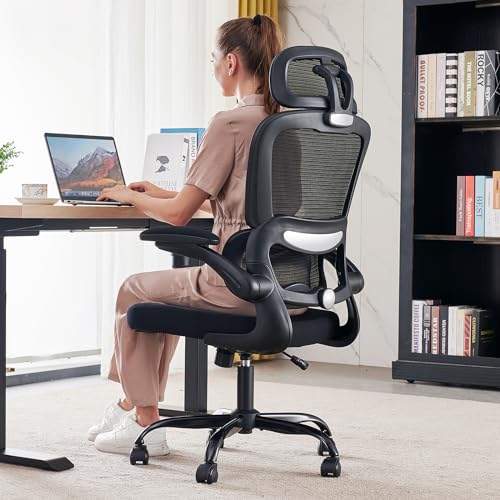
An adjustable height desk changes level all day, and the TRALT keeps up: a seat that sets correctly at each sitting height, flip-up arms that clear the desktop, and lumbar support for the hours you spend down rather than up. It is the low-drama partner a sit-stand desk needs.
An adjustable desk is only half a workstation; the chair is the half that meets your body at every height the desk visits. TRALT Office Chair Ergonomic Desk Chair with Headrest was judged on that partnership — how its seat, arms and back behave at the desk’s lowest setting, its highest sitting setting, and everywhere between.
Strengths
- Seat height pairs across the sitting range of most adjustable desks
- Flip-up arms slide under the desktop when the desk is lowered
- Lumbar support and headrest suit the sit-stand day’s sitting half
Trade-offs
- No footrest for lean-back breaks
- Tilt range is work-focused rather than lounge-deep
- Single black colourway
At a glance
- Capacity: 330 lbs (per listing)
- Features: lumbar support, headrest, flip-up armrests
- Colour: black
- Form: ergonomic desk chair
One honest limitation: Perch-style sitting at a raised desk is a stool’s job; this chair covers the seated range.
Living with the TRALT Office Chair Ergonomic Desk Chair with Headrest day to day is mostly a story of small conveniences adding up. Its defining specification — capacity: 330 lbs (per listing) — shapes every use, and the quality noted in the strengths list, that it flip-up arms slide under the desktop when the desk is lowered, turns out to be the one owners mention most once the novelty wears off. In the context of sit-stand desk pairing, that consistency matters: a chair that behaves the same way on the fiftieth use as on the first is a chair that stops being thought about, which is the highest compliment furniture in daily service can earn.
Set against the rest of the shortlist, the TRALT Office Chair Ergonomic Desk Chair with Headrest is the pick for buyers who read its badge — Best Overall Pairing — and nod. If your priorities lean the other way, the neighbouring picks frame the choice: the ELABEST X100 Ergonomic Mesh Office Chair with Footrest answers with its own strength (arms adjust five ways, so elbow height can track desk height precisely), while the MOLENTS Ergonomic Office Chair, Mesh, BIFMA X5.1 Certified counters with bifma x5.1 certification gives the build a tested standard to point to. None of the six is the best chair in the abstract; each is the best answer to a differently weighted version of the same question, and this one weights best overall pairing above all.
Across a long session — the unit of time sit-stand desk pairing is really measured in — the TRALT Office Chair Ergonomic Desk Chair with Headrest holds its character. The seat and support do not change their minds halfway through, the structure stays quiet and settled, and the small ergonomic facts established in the first ten minutes are still true in the third hour. That steadiness is easy to underrate in a listing and impossible to overrate in ownership, because long sessions are where chairs are actually judged.
Best for: readers whose priority is best overall pairing in the context of sit-stand desk pairing / Not suited for: buyers whose needs run against that strength — read the trade-offs above before deciding.

ELABEST X100 Ergonomic Mesh Office Chair with Footrest
Badge: Best for Frequent Adjusters
The ELABEST X100 is for people who actually use their desk’s full range: its arms adjust in five directions, so when the desk rises or falls, elbow support can be re-matched in seconds rather than endured. The adjustable lumbar support moves with you too, and the footrest handles the break position.
The failure mode of sit-stand setups is a chair that only feels right at one desk height, quietly discouraging the adjustments the desk was bought for. ELABEST X100 Ergonomic Mesh Office Chair with Footrest is reviewed on how completely it removes that excuse.
Strengths
- Arms adjust five ways, so elbow height can track desk height precisely
- Mesh back suits long sessions at any desk level
- Footrest makes lowered-desk recline breaks genuinely restful
Trade-offs
- Big frame needs a wide kneehole and floor area
- Setup takes time to dial in across desk heights
- Mesh seat feel divides opinion
At a glance
- Features: footrest, 5D flip-up arms, adjustable 3D lumbar support
- Form: big and tall mesh desk chair
- Style: gaming and executive computer chair
One honest limitation: Occasional desk adjusters may not exploit its range enough to justify the complexity.
What ownership of the ELABEST X100 Ergonomic Mesh Office Chair with Footrest feels like across a season is worth spelling out, because the listing photographs cannot. The detail that defines it in practice is this: style: gaming and executive computer chair. Around that, the everyday experience is shaped by how it mesh back suits long sessions at any desk level — a quality that sounds minor in a specification list and becomes the reason the chair is reached for first. For sit-stand desk pairing, reliability of that kind is worth more than any single headline feature.
The comparison that matters for the ELABEST X100 Ergonomic Mesh Office Chair with Footrest is not against a rival brand but against the other five answers in this guide. Choose it over the MIMOGLAD Ergonomic Office Chair, Dual Lumbar Support when footrest makes lowered-desk recline breaks genuinely restful matters more to you than raw versatility; choose it over the TRALT Office Chair Ergonomic Desk Chair with Headrest when its particular trade-off — big frame needs a wide kneehole and floor area — is one you can accept happily. Framed that way, the decision is honest: you are not buying the most features, you are buying the features arranged in the order your own days will use them.
Session length is where this class of chair separates into the honest and the optimistic, and the ELABEST X100 Ergonomic Mesh Office Chair with Footrest is on the honest side of that line. Nothing about its comfort depends on a first impression: the support is mechanical, the surfaces are what they appear to be, and the experience at the end of a long stretch of sit-stand desk pairing matches the experience at the start closely enough that you stop budgeting your comfort — which is, in the end, the entire point of buying well in this category.
Best for: readers whose priority is best for frequent adjusters in the context of sit-stand desk pairing / Not suited for: buyers whose needs run against that strength — read the trade-offs above before deciding.

MIMOGLAD Ergonomic Office Chair, Dual Lumbar Support
Badge: Best Tilt Range
Sit-stand routines fail when the chair only feels right at one desk height. The MIMOGLAD’s three tilt-lock positions, adjustable arms, headrest and dual lumbar support let you build a small set of repeatable positions — one per desk height you actually use — and return to each exactly.
Arms are the front line of the chair-desk relationship: too high, and they fight the desktop; too low, and elbows go unsupported. MIMOGLAD Ergonomic Office Chair, Dual Lumbar Support is assessed with unusual attention to that interface, because it decides daily comfort more than any headline feature.
Strengths
- Three tilt locks give a proper position for desk-low, desk-mid and break modes
- Arms and headrest adjust to re-match each desk height
- 350 lb listed capacity suits big-and-tall users at any setting
Trade-offs
- Large chair needs the desk area to match
- Deep recline pairs only with a lowered desk and clear floor behind
- Most setup steps in this roundup
At a glance
- Capacity: 350 lbs capacity
- Features: dual lumbar support, footrest, 3D adjustable armrests and headrest
- Tilt: 90 / 120 / 145-degree tilt lock positions
One honest limitation: If your desk lives at one height all week, simpler chairs do the same job for less fuss.
Day to day, the MIMOGLAD Ergonomic Office Chair, Dual Lumbar Support settles into a routine quickly, and routine is the real test of any pick in this guide. Its 350 lbs capacity gives it a clear identity among the six, and in practice the trait that earns its keep is that it arms and headrest adjust to re-match each desk height. Owners of chairs in this class tend to judge them at the three-month mark, not the three-day mark, and this is a design whose virtues — steady, repeatable, uncomplaining — are precisely the three-month kind.
It also helps to place the MIMOGLAD Ergonomic Office Chair, Dual Lumbar Support on the shortlist’s map of compromises. Every pick here trades something: this one trades on the fact that deep recline pairs only with a lowered desk and clear floor behind, and in exchange delivers 350 lb listed capacity suits big-and-tall users at any setting. Buyers who find that exchange attractive will be satisfied for years; buyers who bristle at it should walk one pick up or down this list, where the same budget of compromises is spent differently — toward the COMHOMA Office Chair with Flip-up Armrests, Mesh on one side or the ELABEST X100 Ergonomic Mesh Office Chair with Footrest on the other.
One more practical observation about the MIMOGLAD Ergonomic Office Chair, Dual Lumbar Support in extended use: it forgives interruption. Sessions in real homes and real studios are broken by doors, phones, kettles and colleagues, and a chair that is easy to leave and easy to return to — no readjustment ritual, no lost position — protects the thread of the work or the evening. Across weeks of such interrupted days, that forgiveness compounds into the feeling owners describe as the chair simply suiting their life.
Best for: readers whose priority is best tilt range in the context of sit-stand desk pairing / Not suited for: buyers whose needs run against that strength — read the trade-offs above before deciding.

COMHOMA Office Chair with Flip-up Armrests, Mesh
Badge: Best Compact Pairing
Smaller adjustable-desk setups need a chair that disappears politely: the COMHOMA’s flip-up arms fold away so the chair rolls fully under the desk, its adaptive lumbar support asks for no adjustment when you sit back down, and the mesh back keeps things breathable.
An adjustable desk is only half a workstation; the chair is the half that meets your body at every height the desk visits. COMHOMA Office Chair with Flip-up Armrests, Mesh was judged on that partnership — how its seat, arms and back behave at the desk’s lowest setting, its highest sitting setting, and everywhere between.
Strengths
- Flip-up arms are the easiest way to clear a desktop at any height
- Adaptive lumbar support needs no manual dialling as you change position
- Breathable mesh keeps the sitting half of a sit-stand day cool
Trade-offs
- No headrest or footrest for full recline breaks
- Adaptive lumbar is fixed-behaviour rather than adjustable
- Compact build suits average frames best
At a glance
- Features: flip-up armrests, adaptive lumbar support
- Back: breathable mesh
- Colour: black
- Form: ergonomic computer desk chair
One honest limitation: Tall users wanting head support should look at the TRALT or MIMOGLAD.
Living with the COMHOMA Office Chair with Flip-up Armrests, Mesh day to day is mostly a story of small conveniences adding up. Its defining specification — features: flip-up armrests, adaptive lumbar support — shapes every use, and the quality noted in the strengths list, that it adaptive lumbar support needs no manual dialling as you change position, turns out to be the one owners mention most once the novelty wears off. In the context of sit-stand desk pairing, that consistency matters: a chair that behaves the same way on the fiftieth use as on the first is a chair that stops being thought about, which is the highest compliment furniture in daily service can earn.
Set against the rest of the shortlist, the COMHOMA Office Chair with Flip-up Armrests, Mesh is the pick for buyers who read its badge — Best Compact Pairing — and nod. If your priorities lean the other way, the neighbouring picks frame the choice: the Staples Dexley Ergonomic Mesh Task Chair answers with its own strength (straightforward task-chair controls — set the height and get to work), while the MIMOGLAD Ergonomic Office Chair, Dual Lumbar Support counters with three tilt locks give a proper position for desk-low, desk-mid and break modes. None of the six is the best chair in the abstract; each is the best answer to a differently weighted version of the same question, and this one weights best compact pairing above all.
Across a long session — the unit of time sit-stand desk pairing is really measured in — the COMHOMA Office Chair with Flip-up Armrests, Mesh holds its character. The seat and support do not change their minds halfway through, the structure stays quiet and settled, and the small ergonomic facts established in the first ten minutes are still true in the third hour. That steadiness is easy to underrate in a listing and impossible to overrate in ownership, because long sessions are where chairs are actually judged.
Best for: readers whose priority is best compact pairing in the context of sit-stand desk pairing / Not suited for: buyers whose needs run against that strength — read the trade-offs above before deciding.

Staples Dexley Ergonomic Mesh Task Chair
Badge: Best Simple Task Chair
Not every adjustable desk needs a flagship chair. The Staples Dexley is the honest task-chair answer: mesh back, lumbar support, swivel, and a seat height you set to match the desk each time you change it. For shared desks and hot-desking, that simplicity is a genuine virtue.
The failure mode of sit-stand setups is a chair that only feels right at one desk height, quietly discouraging the adjustments the desk was bought for. Staples Dexley Ergonomic Mesh Task Chair is reviewed on how completely it removes that excuse.
Strengths
- Straightforward task-chair controls — set the height and get to work
- Mesh back and swivel suit busy multi-desk setups
- A familiar, office-proven style of chair
Trade-offs
- Fewer adjustments than the feature-led picks here
- No footrest or deep recline for breaks
- Utilitarian looks
At a glance
- Features: lumbar support, swivel
- Back: ergonomic mesh
- Brand line: Staples Dexley task chair
- Colour: black
One honest limitation: Feature hunters will find the adjustment list short next to the ELABEST.
What ownership of the Staples Dexley Ergonomic Mesh Task Chair feels like across a season is worth spelling out, because the listing photographs cannot. The detail that defines it in practice is this: colour: black. Around that, the everyday experience is shaped by how it mesh back and swivel suit busy multi-desk setups — a quality that sounds minor in a specification list and becomes the reason the chair is reached for first. For sit-stand desk pairing, reliability of that kind is worth more than any single headline feature.
The comparison that matters for the Staples Dexley Ergonomic Mesh Task Chair is not against a rival brand but against the other five answers in this guide. Choose it over the MOLENTS Ergonomic Office Chair, Mesh, BIFMA X5.1 Certified when a familiar, office-proven style of chair matters more to you than raw versatility; choose it over the COMHOMA Office Chair with Flip-up Armrests, Mesh when its particular trade-off — fewer adjustments than the feature-led picks here — is one you can accept happily. Framed that way, the decision is honest: you are not buying the most features, you are buying the features arranged in the order your own days will use them.
Session length is where this class of chair separates into the honest and the optimistic, and the Staples Dexley Ergonomic Mesh Task Chair is on the honest side of that line. Nothing about its comfort depends on a first impression: the support is mechanical, the surfaces are what they appear to be, and the experience at the end of a long stretch of sit-stand desk pairing matches the experience at the start closely enough that you stop budgeting your comfort — which is, in the end, the entire point of buying well in this category.
Best for: readers whose priority is best simple task chair in the context of sit-stand desk pairing / Not suited for: buyers whose needs run against that strength — read the trade-offs above before deciding.

MOLENTS Ergonomic Office Chair, Mesh, BIFMA X5.1 Certified
Badge: Best Certified Pick
Buyers who like a standard behind their purchase get one here: the MOLENTS lists BIFMA X5.1 certification alongside the adjustments an adjustable-desk owner actually uses — seat height, 3D arms, adjustable lumbar and tilt. It is a composed, wide-seated partner for a serious sit-stand workstation.
Arms are the front line of the chair-desk relationship: too high, and they fight the desktop; too low, and elbows go unsupported. MOLENTS Ergonomic Office Chair, Mesh, BIFMA X5.1 Certified is assessed with unusual attention to that interface, because it decides daily comfort more than any headline feature.
Strengths
- BIFMA X5.1 certification gives the build a tested standard to point to
- 3D arms re-match elbow height as the desk moves
- Wide seat suits longer sitting stretches at the lowered desk
Trade-offs
- Certified, full-feature chairs sit at the premium end of this class
- Wide seat may feel oversized for petite users
- Obsidian black only
At a glance
- Certification: BIFMA X5.1 certified (per listing)
- Features: adjustable lumbar support, 3D arm, tilt back, wide seat
- Colour: obsidian black
- Form: mesh computer desk chair
One honest limitation: Petite users should check the wide seat against their frame before choosing it over the COMHOMA.
Day to day, the MOLENTS Ergonomic Office Chair, Mesh, BIFMA X5.1 Certified settles into a routine quickly, and routine is the real test of any pick in this guide. Its bifma x5.1 certified (per listing) gives it a clear identity among the six, and in practice the trait that earns its keep is that it 3D arms re-match elbow height as the desk moves. Owners of chairs in this class tend to judge them at the three-month mark, not the three-day mark, and this is a design whose virtues — steady, repeatable, uncomplaining — are precisely the three-month kind.
It also helps to place the MOLENTS Ergonomic Office Chair, Mesh, BIFMA X5.1 Certified on the shortlist’s map of compromises. Every pick here trades something: this one trades on the fact that wide seat may feel oversized for petite users, and in exchange delivers wide seat suits longer sitting stretches at the lowered desk. Buyers who find that exchange attractive will be satisfied for years; buyers who bristle at it should walk one pick up or down this list, where the same budget of compromises is spent differently — toward the TRALT Office Chair Ergonomic Desk Chair with Headrest on one side or the Staples Dexley Ergonomic Mesh Task Chair on the other.
One more practical observation about the MOLENTS Ergonomic Office Chair, Mesh, BIFMA X5.1 Certified in extended use: it forgives interruption. Sessions in real homes and real studios are broken by doors, phones, kettles and colleagues, and a chair that is easy to leave and easy to return to — no readjustment ritual, no lost position — protects the thread of the work or the evening. Across weeks of such interrupted days, that forgiveness compounds into the feeling owners describe as the chair simply suiting their life.
Best for: readers whose priority is best certified pick in the context of sit-stand desk pairing / Not suited for: buyers whose needs run against that strength — read the trade-offs above before deciding.
Comparison Table
| Pick | Badge | Key specification from the listing | Best for | Listing |
|---|---|---|---|---|
| TRALT Office Chair Ergonomic Desk Chair with Headrest | Best Overall Pairing | Capacity: 330 lbs (per listing) | Best Overall Pairing | Check on Amazon |
| ELABEST X100 Ergonomic Mesh Office Chair with Footrest | Best for Frequent Adjusters | Features: footrest, 5D flip-up arms, adjustable 3D lumbar support | Best for Frequent Adjusters | Check on Amazon |
| MIMOGLAD Ergonomic Office Chair, Dual Lumbar Support | Best Tilt Range | Capacity: 350 lbs capacity | Best Tilt Range | Check on Amazon |
| COMHOMA Office Chair with Flip-up Armrests, Mesh | Best Compact Pairing | Features: flip-up armrests, adaptive lumbar support | Best Compact Pairing | Check on Amazon |
| Staples Dexley Ergonomic Mesh Task Chair | Best Simple Task Chair | Features: lumbar support, swivel | Best Simple Task Chair | Check on Amazon |
| MOLENTS Ergonomic Office Chair, Mesh, BIFMA X5.1 Certified | Best Certified Pick | Certification: BIFMA X5.1 certified (per listing) | Best Certified Pick | Check on Amazon |
How to Choose a Chair for an Adjustable Height Desk
Think in relationships, not absolutes. The core pairing rule: at any sitting height, your feet rest flat (or on a footrest), your seat supports your thighs without pressing their backs, and the desktop meets your forearms at roughly elbow height with shoulders relaxed. When the desk rises, the chair must rise with it to preserve that geometry — which is why seat-height range and smooth, repeatable adjustment matter more here than in any fixed-desk purchase. Check that the chair’s range covers your desk’s sitting range with room to spare at both ends.
Arms deserve their own paragraph, because they are where chair and desk collide. The ideal sit-stand arm flips up out of the way, adjusts in height to sit a fraction below the desktop, or moves in width and depth to clear the desk’s legs and frame. Fixed arms are the single most common reason adjustable-desk owners park the chair at one height: the arms fit there, so there the desk stays. If you take one rule from this guide, take that one — never pair a moving desk with immovable arms.
Lumbar and back support must survive the height changes. As seat height changes, the back’s relationship to your spine changes with it; adjustable lumbar support that can be re-placed in seconds keeps support honest at every stop. Mesh backs earn a mention for the sitting half of a sit-stand day, which is usually the longer half: breathability across a four-hour sitting stretch is a real comfort factor, not a brochure word.
Finally, plan the standing half too. When the desk is up, where does the chair go? Compact chairs with flip-up arms park fully beneath the desk; larger executive chairs need a designated standing spot that is not the middle of the room. And if your routine includes perching at the raised desk — half-sitting on a tall seat — that is a stool’s role, not a task chair’s; budget for the perch separately rather than abusing the chair at its highest, tippiest setting.
If your shortlist started with a related question, see Best Chairs For Alignment And Posture for the companion rundown.
Setting Up Chair and Desk as One System
Build your positions deliberately, one desk height at a time. Start with the height you sit at most: set the desk, then set the chair to it — feet, seat, arms, lumbar, in that order — and save the desk height to a memory preset if yours offers one. Repeat for your second sitting height, and for your standing height with the chair parked in its spot. The goal is a small repertoire of complete, repeatable setups, so changing posture is a thirty-second transition rather than a five-minute refit you will skip.
Adopt the transition habit: every time the desk moves, the chair gets its thirty seconds. Seat height first — it decides everything downstream — then arms to just under the desktop, then a glance at lumbar placement. It sounds fussy for exactly one week; after that it is as automatic as adjusting a car’s mirror, and it is the difference between a sit-stand desk that gets used as one and an expensive desk that lives at sitting height.
Maintenance keeps the system honest. Monthly, run the chair through its full height range and the desk through its presets; a lift that has grown slow or uneven changes your saved geometry silently. Check casters for the hair and grit that office floors provide, re-tighten arm fasteners — arms on a sit-stand chair are adjusted constantly and loosen accordingly — and wipe mesh or upholstery before dust becomes abrasive. A system this mechanical rewards small, regular attention with years of exact repetition.
A close cousin of this search is covered in Best Chairs For Aminators, where the same shortlist method is applied to that brief.
Troubleshooting
Problem: chair arms strike the desktop when the desk lowers → flip the arms up, lower them below desktop height, or park the chair back a few centimetres before lowering; make it part of the transition habit, not a surprise.
Problem: you have stopped adjusting the desk → the chair probably only feels right at one height; rebuild your saved positions at two or three heights, chair included, and the desk will start moving again.
Problem: feet dangle at the higher sitting setting → the chair’s range is being outrun by the desk; use a footrest for that setting, or treat that height as standing-only and keep sitting heights inside the chair’s honest range.
The Sitting Half Deserves Equal Billing
Sit-stand marketing celebrates the standing, but most owners spend the majority of the day sitting — which makes the chair, not the desk, the primary comfort instrument of the whole setup. A mediocre chair under a great desk produces a mediocre day with occasional standing. A great chair makes the sitting hours genuinely good and the standing breaks a change rather than an escape.
Budget and choose accordingly: if funds force a sequence, the chair that fits you at every height is the purchase that improves the most hours. The desk’s range is only as usable as the chair’s willingness to follow it.
For the adjacent angle on this topic, Best Chairs For Apartment works through its own set of picks and trade-offs.
Shared Desks and Hot-Desking: The Multi-User Problem
An adjustable desk in a shared space multiplies the chair problem by the number of users. The answers are procedural as much as mechanical: chairs with fast, obvious adjustments beat chairs with brilliant but fiddly ones; a small card on the desk with each user’s saved heights ends the daily archaeology; and flip-up arms forgive the most collisions between different people’s setups.
For genuinely shared stations, the straightforward task chair in this guide is often the wisest buy — fewer adjustments, faster resets, nothing precious to misalign. Save the flagship chairs for the desk that is truly yours.
You may also find Best Chairs For Around Pool useful if your seating problem turns out to be that one instead.
What to Check When Your Chairs Arrive
The first ten minutes with a new chair decide whether small problems get solved free or lived with forever, so give every arrival a proper inspection before the packaging leaves the house. Work through it in order: all parts present against the listing, every fastener tightened in sequence, and the finished chair set down on a hard, level floor and loaded with your own weight in your normal position for sit-stand desk pairing. Rock gently, shift, stand, sit again. Anything that creaks, wobbles or feels uneven at this stage is information — most of it is a fastener asking for a quarter-turn, and all of it is easier to address on day one than in month three.
Check the fit against the measurements you made when choosing, while returning is still simple. Seat height against the surface it serves, width against the space it must share, arms or edges against whatever they must clear. Photograph the chair in place; the photograph is both a sanity check for proportion — rooms reveal in pictures what eyes forgive in person — and a record if anything needs discussing with the seller. Keep the packaging until the first full week of use has passed, because the honest verdict on any chair in this category is a week of real days, not an afternoon of deliberate sitting.
Finally, register the details future-you will want: the assembly sequence that worked, which key fits the fasteners, and where the spare pads or glides live. A note in a phone is enough. Chairs in daily service loosen, settle and drift on a schedule measured in months, and the owners who stay happy with them are the ones whose first-week diligence turned later maintenance into a five-minute ritual rather than an archaeological expedition.
The First Month: How a Good Chair Becomes Your Chair
There is a settling-in month for every chair in this guide, and it runs in both directions: the chair settles — fasteners seat, cushions take their working shape, mechanisms smooth — and you settle, learning the chair’s positions and habits until using it well is unconscious. Expect to re-tighten once in the first fortnight and to revisit any adjustable settings at least twice; a setting chosen on day one was chosen by a stranger, and the month-one version, chosen by an experienced owner, is the one the chair will keep for years.
Use the month to test the chair against your real range of days, not your best day: the longest session, the busiest gathering, the messiest task, the tired evening. A pick that serves the whole range has earned its place permanently; a pick that only serves the showcase day is telling you something worth hearing while change is still possible. This is also the month to establish the care rhythm from the how-to section above — small, weekly, unremarkable — because rhythms established in month one are the ones still running in year three.
By the end of the month, a well-chosen chair disappears. That disappearance is the true product being bought in this entire category: not a specification list, not a badge, but the absence of a daily friction. If your chair has achieved it, the work of this guide is done and the chair’s work — years of unnoticed, reliable service in sit-stand desk pairing — has begun.
Common Buying Mistakes
- Pairing an adjustable desk with fixed-arm chairs, then living at the one height where the arms fit.
- Setting the chair once and expecting it to serve every desk height unchanged.
- Forgetting where the chair parks when the desk is raised, so it colonises the room’s middle.
- Perching on a task chair at maximum height instead of using a proper perch stool.
- Ignoring a slowing lift or dragging caster until the saved positions quietly stop matching reality.
- Buying by the desk’s spec sheet alone, without checking the chair’s seat range against it.
And if the project widens, Best Chairs For Arthritic Knees And Neckd is the natural next read in this series.
Final Recommendation
For most adjustable-desk owners, the TRALT is the balanced starting point: flip-up arms, lumbar support and a headrest, without flagship complexity. Frequent adjusters who love precision should take the ELABEST X100, whose five-way arms track the desktop like it was designed for exactly this — because it behaves as if it was. Structured users will appreciate the MIMOGLAD’s lock-per-height system.
Compact setups belong to the COMHOMA, shared stations to the Staples Dexley, and standard-minded buyers to the certified MOLENTS. Whichever you choose, set it up as a system with the desk on day one — that setup session is the whole secret.
Quick links to the three lead picks: TRALT Office Chair Ergonomic Desk Chair with Headrest, ELABEST X100 Ergonomic Mesh Office Chair with Footrest, MIMOGLAD Ergonomic Office Chair, Dual Lumbar Support, each linking to its Amazon listing to check the latest price on Amazon.
Frequently Asked Questions
How do I set chair height for a sit-stand desk?
At each sitting height: feet flat, thighs supported without pressure behind the knees, and forearms resting at desktop level with relaxed shoulders. Set the desk first, then the chair to meet it, and save both as a pair.
Why do flip-up arms matter so much with an adjustable desk?
Because fixed arms collide with the desktop as heights change, and collisions teach you to stop adjusting. Flip-up or multi-adjustable arms clear the desk at every height, which keeps the whole system in use.
Can one chair cover sitting and perching at a raised desk?
Not honestly. Task chairs cover the sitting range; perching at standing height is a tall stool’s job. Using a chair at its extreme height as a perch is unstable and uncomfortable — buy the perch if you perch.
Mesh or upholstered for a sit-stand setup?
Mesh breathes across the long sitting stretches that dominate most sit-stand days; upholstery cushions shorter, more varied use. Match it to your sitting hours, not to the standing marketing.
How often should I change heights?
As often as comfort suggests — many people settle into a rhythm of a few changes across the day. The right number is the one your body asks for; the system’s job is to make each change take seconds, chair included.
What if two people share one adjustable desk?
Choose fast, obvious adjustments, save each person’s heights on a card at the desk, and favour flip-up arms. A straightforward task chair often serves shared stations better than a personal flagship.