Disclosure: topratedkitchenware.com is reader-supported. When you buy through links on our site, we may earn an affiliate commission from Amazon and other retailers, at no extra cost to you.
Where to buy
Every board in this guide to the best microphone mixers is sold on Amazon, and the listings below are the fastest way to compare them side by side. Prices and stock move often at this end of the audio market, so check the latest price on Amazon for the model you like rather than trusting any number printed in a guide. Each name and button goes straight to that product’s own listing, and the two DJ-specific picks are labelled as such wherever they appear.
- Best Overall: FULUODE Audio Mixer 8 Channel, CT-80S — Check on Amazon
- Best for Streaming and Recording: Riworal 6 Channel Audio Mixer with 16-Bit DSP — Check on Amazon
- Best Portable: Pyle PMXU68BT 6 Channel Studio Audio Sound Mixer Board — Check on Amazon
- Best Budget Pick: Pyle PMXU48BT 4 Channel Studio Audio Sound Mixer Board — Check on Amazon
- Best for Livestreaming DJs: Pioneer DJ DDJ-FLX4 2-Channel DJ Controller — Check on Amazon
- Best for DJ Booths with a Mic: Pioneer DJ DJM-250MK2 2-Channel DJ Mixer — Check on Amazon
Read the full guide ↓
Shopping for the best microphone mixers starts with a deceptively simple question — how many microphones, doing what job, heard by whom? A microphone mixer is the box that takes one or several microphones, balances them against music and other sources, adds the polish a raw microphone lacks, and sends one controlled result to speakers, a computer or a recorder. The six picks in this guide cover the honest range of that job: eight- and six-channel boards for live and streaming work, a portable and a budget board for smaller rigs, and two DJ surfaces for the booths where a microphone means a host’s voice over music. None of them is a studio multitrack interface in disguise, and this guide will be plain about where each one stops.
That honesty matters because microphone mixers are easy to buy wrong. Shoppers count channels they will never use, or discover the board they bought cannot power the condenser microphone they already own, or find that the USB connection they assumed would record every singer separately only carries the finished blend. The sections below are organised to prevent exactly those mistakes: what each pick does well, where it runs out, how to choose the right size of board, how to set it up, and how to fix the handful of problems every microphone mixer owner eventually meets.
Key Takeaways
- Count microphones first, channels second: every microphone needs its own channel, and a stereo music source quietly consumes two more.
- Condenser microphones need 48V phantom power; five of the six picks here provide it, and it is the single most common reason a new setup makes no sound.
- Small mixers send one finished stereo blend to a computer over USB, not a separate track per microphone — plan your recording expectations around that.
- Reverb built into the mixer is live polish: it is on the stream and the recording at the same time, with nothing to fix in editing.
- The two DJ picks solve a different problem — a host voice over music — and are the wrong buy for interviews, panels and singers.
- Buy the board your format will need in a year, not the one that fits this month, if guests or a second host are even a possibility.
In this guide
Quick Picks
Six boards, six different answers to the same question. The badge on each pick is the job it does best, and the same badge follows it into the detailed reviews below.
| Badge | Pick | Standout trait |
|---|---|---|
| Best Overall | FULUODE Audio Mixer 8 Channel, CT-80S | Eight channels, reverb, MP3 playback and USB recording in one board |
| Best for Streaming and Recording | Riworal 6 Channel Audio Mixer with 16-Bit DSP | Six channels with DSP reverb, phantom power and a USB audio interface |
| Best Portable | Pyle PMXU68BT 6 Channel Studio Audio Sound Mixer Board | Six channels in a portable body with Bluetooth and a USB interface |
| Best Budget Pick | Pyle PMXU48BT 4 Channel Studio Audio Sound Mixer Board | Four channels, Bluetooth and USB — the simple solo and duo board |
| Best for Livestreaming DJs | Pioneer DJ DDJ-FLX4 2-Channel DJ Controller | A DJ controller with a mic input, made for streaming from one device |
| Best for DJ Booths with a Mic | Pioneer DJ DJM-250MK2 2-Channel DJ Mixer | Club-style 2-channel mixer with a mic input and DVS unlock included |
How These Picks Were Chosen
This guide is research-led. We compared the verified listings for small microphone-capable mixers across channel count, phantom power, effects, USB behaviour and intended use, and cross-checked each product’s stated features against its listing before including it — the sources file published with this guide records every pick, its identifier and the listing title it was checked against. We did not invent specifications: the mini spec boxes in each review contain only details present in the product’s own listing, and where a listing is silent about a feature, the review says nothing about it either.
Selection favoured boards that solve a complete job rather than a fragment of one. A mixer that needs a separate phantom power supply, a separate effects unit and a separate USB interface to handle a basic two-microphone podcast is three purchases wearing one low price tag, so boards with those pieces built in ranked ahead of bare channel strips. The two DJ products were included deliberately and labelled clearly, because a meaningful share of microphone-mixer searches come from DJs who need a voice over music — a real use case, but a different one, and the reviews keep that boundary visible.
What this guide does not do is claim hands-on lab testing. Recommendations rest on feature analysis, listing verification and the accumulated patterns of what owners of small boards praise and regret: channel ceilings reached too soon, USB behaviour misunderstood, gain staging never learned. Prices are not printed anywhere in this guide because they change too often to print honestly; every pick links to its live listing so you can check the current figure yourself. Readers weighing a Windows-centred desk will find the companion thinking in our guide to the Best Microsoft Sound Mixers, which applies the same standards to computer-first setups.
The 6 Best Microphone Mixers, Reviewed in Detail
Badges match the Quick Picks table. Each review covers who the board suits, its strengths and trade-offs, the specifications its own listing supports, and an honest limitation — because the right board bought with open eyes beats the “best” board bought on a badge alone.

FULUODE Audio Mixer 8 Channel, CT-80S
Badge: Best Overall
A microphone mixer earns the “best overall” badge here when it stops being the limiting factor in a small setup, and the FULUODE CT-80S is the board on this list that runs out of channels last. Eight channels sounds like overkill for a single podcast microphone, and for that job alone it is — but microphone mixers rarely stay single-purpose. The second microphone arrives when a co-host joins, the third when a guest sits in, and a stereo feed from a laptop or phone for music and clips follows soon after. The CT-80S absorbs that growth without a second purchase, which is exactly what an overall pick should do.
Strengths
- Eight channels is genuine headroom: two or three microphones, a keyboard or guitar, and a phone or laptop feed can all live on the board at once without repatching.
- 48V phantom power means condenser microphones — the type most podcast and vocal setups end up using — run without a separate power box.
- Reverb, MP3 playback and USB recording are built in, so a small live or karaoke rig needs fewer extra boxes to feel complete.
Trade-offs
- The extra channels make it the largest footprint here; on a small streaming desk it eats space a four-channel board would leave for a keyboard and notes.
- Boards at this level share one USB recording path for the whole mix, so you record the blended result, not separate tracks per microphone.
- The control layout is dense for a first-time user; expect an evening of labelling channels before it feels familiar.
| Detail | From the listing |
|---|---|
| Channels | 8 channel |
| Effects | Built-in reverb |
| Playback | MP3 player, Bluetooth input |
| Phantom power | 48V phantom power supply |
| Recording | USB recording |
The feature set is aimed squarely at live and karaoke-style work as much as recording: reverb to give a dry vocal some space, an MP3 player and Bluetooth input for backing tracks and walk-in music, and USB recording so a performance or service can be captured straight from the board. For a small venue, a house of worship, a school hall or a busy karaoke host, that combination covers the whole evening from one unit. Vocalists who sing over tracks will find the workflow natural: microphone on one channel, track source on another, reverb to taste, one master fader for the room.
The honest limitation is multitrack recording. Like most boards in this class, the USB connection carries the finished stereo mix, so if one singer is loud and another quiet, you fix it live or not at all — there is no going back to rebalance separate tracks in software afterwards. Buyers whose main job is studio production, rather than live mixing and simple capture, should treat this as a live board first and look at the streaming-focused picks below for a more computer-centred workflow.
Best for: small bands, karaoke hosts, houses of worship and podcasters who know a second and third microphone are coming / Not suited for: producers who need separate recorded tracks for every microphone to mix later in software

Riworal 6 Channel Audio Mixer with 16-Bit DSP
Badge: Best for Streaming and Recording
Streamers ask a microphone mixer to do a slightly different job from a live board: the audience is not in the room, they are on the other side of a computer, and the mixer has to speak to that computer cleanly. The Riworal six-channel board is built around exactly that conversation. Its USB audio interface carries the mix into streaming or recording software as the system sound device, so your microphone, a guest microphone and your game or music feed arrive as one controlled blend instead of three competing sources the software has to juggle.
Strengths
- The USB audio interface is the centre of the design: the mixer presents itself to a computer as the sound device, which is the cleanest way to get microphones into streaming and recording software.
- 16-bit DSP reverb gives a voice presence and polish live, before anything is recorded, which matters for streams that are never edited.
- +48V phantom power covers condenser microphones, and six channels leave room for a guest microphone plus a music feed.
Trade-offs
- Six channels is a ceiling: a full band or a panel of five speakers will outgrow it, where the eight-channel pick above will not.
- DSP effects at this level are presets rather than deep editing; you choose a flavour of reverb more than you design one.
- Bluetooth is convenient for music playback but should never carry a live microphone feed — latency makes it unusable for monitoring your own voice.
| Detail | From the listing |
|---|---|
| Channels | 6 channel |
| Effects | 16-bit DSP, reverb effect |
| Phantom power | +48V phantom power |
| Connectivity | Bluetooth, USB audio interface |
| Listed uses | Karaoke, studio, streaming, recording |
The 16-bit DSP reverb is more useful in this role than it first appears. A voice recorded in a small, untreated room sounds boxy and distant; a touch of reverb pushes it forward and makes it feel produced, and because the effect is applied in the mixer, it is there on the live stream and in any recording at the same time, with nothing to add in editing. Phantom power keeps the door open to condenser microphones, which most streamers graduate to, and Bluetooth handles the low-stakes job of background music from a phone perfectly well.
Its limitation is the same one shared by almost every board in this guide: the computer receives the finished mix, not individual channels. If you want to record a co-host on a separate track for editing, that is an audio-interface workflow, not a small-mixer workflow, and no board here changes that. Within the job it is actually designed for — one clean, controlled stereo feed into a computer — this is the most streaming-literate pick on the list, and readers comparing it with the boards in our guide to the Best Microsoft Sound Mixers will find the same USB-first logic applied to Windows desks.
Best for: streamers, podcasters and home recordists who want one clean USB feed into a computer / Not suited for: anyone planning a panel of four or more microphones, or separate-track recording

Pyle PMXU68BT 6 Channel Studio Audio Sound Mixer Board
Badge: Best Portable
Portability changes what a microphone mixer gets used for. A board that lives permanently under a desk serves one room; a board like the Pyle PMXU68BT, built in a portable format with six channels, Bluetooth and a USB interface, serves the rehearsal, the community hall, the pop-up podcast recording at a friend’s studio and the desk at home, because it is genuinely easy to move and quick to set up. For mobile DJs who take requests and make announcements, worship teams that rehearse in borrowed spaces, and podcasters who record where the guest is, that flexibility is worth more than extra channels that never leave the house.
Strengths
- Portable format with six real channels: it moves between a home desk, a rehearsal room and a small gig without becoming a two-person carry.
- Bluetooth pairing for playback sources removes the most common cable tangle in small rigs — the phone or laptop playing tracks and clips.
- The USB interface means the same board that mixes a live room can also be the recording front-end when it comes home.
Trade-offs
- Compact boards compress the controls; big hands and dark rooms make fine adjustments slower than on a full-size console.
- It is a mixer first and an interface second — the USB path is for the stereo mix, not per-channel recording.
- No channel count is wasted, but there is also no spare: six channels in regular use means the seventh source needs an upgrade, not a workaround.
| Detail | From the listing |
|---|---|
| Channels | 6 channel |
| Connectivity | Bluetooth compatible, USB mixer audio interface |
| Form | Portable digital DJ mixing console design |
| Listed uses | Studio recording |
Six channels is the practical sweet spot for portable vocal work: two microphones for hosts or singers, a stereo source for tracks, and a spare channel for the unexpected — a guest who brought a guitar, a second laptop, a phone call-in. Bluetooth covers playback duties without another cable, and when the board comes home the USB interface turns it into the front-end of a simple recording setup, so one purchase covers both halves of a small creator’s week.
The honest trade-off of the portable format is control size. Faders and knobs are closer together, the surface gives you less visual separation between channels, and in a dark venue you will work more by feel and by labels than by sight. None of that matters in a rehearsal room; all of it matters if you are mixing a loud live band in real time. Treat this as the board for small, mobile, voice-led work and it is the most likeable balance of size and capability here — the kind of brief that also drives the choices in our look at the Best Mid Range Production Field Mixers.
Best for: mobile hosts, rehearsal spaces and creators who mix in more than one place / Not suited for: fixed installations where a larger surface and more channels would never need to move

Pyle PMXU48BT 4 Channel Studio Audio Sound Mixer Board
Badge: Best Budget Pick
The cheapest useful microphone mixer is the one that matches the setup you actually have, and for a solo streamer, a singing guitarist, a teacher recording lessons or a couple starting a two-microphone podcast, that setup is four channels or fewer. The Pyle PMXU48BT is the disciplined version of that idea: four channels, Bluetooth for a playback source, and a USB interface so the computer sees one tidy sound device instead of a nest of adapters. It asks very little money or desk space for a board that covers the whole job, and its simplicity is a feature — there is nowhere for a wrong setting to hide.
Strengths
- Four channels is exactly a solo or duo setup: one or two microphones and a music source, with nothing extra to learn, label or pay for.
- Bluetooth and USB are both present, so the two connections a beginner actually uses — phone for music, computer for recording — work from day one.
- The smaller surface is genuinely easier to learn: every control is visible at a glance, which speeds up the first month of streaming or recording.
Trade-offs
- There is no growth path built in: a third microphone or a permanent stereo instrument means replacing the board, not expanding it.
- Fewer channels also means fewer routing options for separate monitor mixes — everyone hears the same blend.
- As a first board it teaches mixing well, but producers who already know they are heading for multitrack work should skip straight past this class.
| Detail | From the listing |
|---|---|
| Channels | 4 channel |
| Connectivity | Bluetooth compatible, USB mixer audio interface |
| Form | Portable digital DJ mixing console design |
| Listed uses | Studio recording |
Four channels maps cleanly onto real small rigs. Channel one is your microphone. Channel two is the guest or the instrument. The remaining pair takes the laptop or phone feed for music, clips and call-ins. Everything a duo actually does fits, and the discipline of a small board teaches the skill that matters most at any level: setting gain properly and listening, rather than collecting features. When singers ask specifically about vocal chains, this is also the board we point to first in conversations that start from our guide to the Best Mid Range Production Aound Mixers — simple boards make vocal problems easier to hear and fix.
Be honest with yourself about the ceiling before you buy. The day a third person wants a microphone, this board is finished, and no adapter changes that. If your format is stable — solo, duo, one instrument — that day may never come, and the money saved over a bigger board is better spent on the microphone itself, which will always make the larger difference to how you sound.
Best for: solo streamers, duos, teachers and first-time podcasters with a fixed, small format / Not suited for: growing shows, panels or bands — buy the channel count you are growing into instead
Pioneer DJ DDJ-FLX4 2-Channel DJ Controller
Badge: Best for Livestreaming DJs
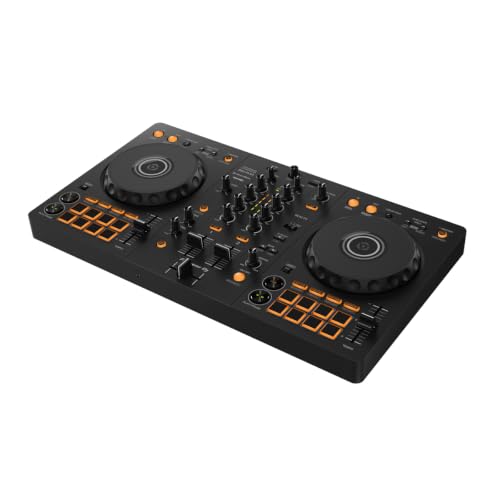
One pick on this list is not a conventional mixer at all, and it earns its place because of how many microphone searches actually end: a DJ who wants to talk over a livestream. The Pioneer DJ DDJ-FLX4 is a two-channel controller whose microphone input is designed for exactly that — plug in a mic, balance your voice against the music on the same device, and send the combined result to the stream. For the growing number of DJs broadcasting from a bedroom or a small studio, that single-device workflow removes the separate mixer, the extra cables and the routing puzzle entirely.
Strengths
- The microphone input is integrated into a streaming-first design: voice, music and effects are balanced on one device and sent to the stream together.
- Smart Fader and the beginner-friendly layout make it the easiest way here to sound competent on a first broadcast.
- Sixteen performance pads put cues, samples and effects under your fingers, which no conventional mixer on this list offers.
Trade-offs
- It is a controller, not a standalone mixer: it needs a computer and DJ software running to do anything at all.
- One microphone input is the limit — there is no second mic channel for a co-host or interview guest.
- If you never DJ, most of its surface — jog wheels, pads, tempo controls — is equipment you are paying for and not using.
| Detail | From the listing |
|---|---|
| Format | 2-channel DJ controller, 16 pads |
| Finish | Graphite |
| Features from listing | Smart Fader, streaming-ready |
| Microphone | Mic input for livestreaming from one device |
The rest of the design supports a first year of DJing honestly: Smart Fader helps early mixes stay musical, the layout mirrors the club standard closely enough that skills transfer, and the sixteen pads cover hot cues and samples. As a microphone solution it is deliberately simple — one input, straightforward level control — because on a DJ stream the voice is an announcement and hosting layer over the music, not a panel discussion.
The limits follow from the concept. With the computer off, it is a silent plastic surface; there is no mixing without software. And one microphone input means interviews and co-hosted shows belong on the conventional boards above. Buy it if DJing is the main act and the microphone is your hosting voice — a path many readers also explore through our guide to the Best Midi Dj Mixers — and buy a real mixer if the microphone is the main act and music is the support.
Best for: DJs who livestream and need their voice over the music from a single device / Not suited for: podcasters, singers and anyone whose microphone work does not involve DJ software

Pioneer DJ DJM-250MK2 2-Channel DJ Mixer
Badge: Best for DJ Booths with a Mic
The DJM-250MK2 represents the other traditional home of the microphone mixer: the DJ booth, where a microphone exists for announcements, hosting and hyping a room, and the mixer’s first loyalty is to two channels of music. Pioneer’s entry-level club mixer keeps the layout of its bigger siblings — the same logic of gains, EQs, channel faders and the Sound Color FX filter — and adds a microphone input so the host’s voice comes from the same surface. For bars, mobile DJs and home booths, that is precisely the right allocation of channels.
Strengths
- A proper standalone mixer: it works with turntables, players or a DVS setup with no computer required for the mixing itself.
- The microphone channel sits in a club-style layout, so announcements and hosting come from the same surface as the music.
- Sound Color FX and the included rekordbox DVS unlock make it a complete small-booth purchase rather than a starter fragment.
Trade-offs
- Two music channels and one microphone is a DJ booth, not a podcast studio — there is no channel-per-guest flexibility.
- No built-in multi-source USB streaming blend of the kind the streaming-first picks offer; recording and streaming setups are assembled around it.
- Vocalists and podcasters pay for DJ-specific hardware — crossfader, colour FX — that their work never touches.
| Detail | From the listing |
|---|---|
| Channels | 2-channel club-style workflow |
| Effects | Sound Color FX Filter |
| Software | Free rekordbox DVS unlock |
| Colour | Black |
The included rekordbox DVS unlock widens what the booth can do: control vinyl or CDs can drive digital files through the mixer, so a small setup grows from two physical sources to a full library without replacing the mixer. The build brief is club-style rather than studio-style, which shows in the priorities — the crossfader and per-channel filters are the stars, and the microphone is a well-made supporting input rather than the centre of the design.
That priority order is also its limitation for this guide’s wider audience. If your microphone is the product — a voice, a singer, an interview — the boards at the top of this list give it more channels, more company and more appropriate processing. If your music is the product and the microphone is the voice over it, this is the most booth-honest pick here, and the natural next read is our comparison of the Best Midi Dj Mixers Beginners for the controller route into the same job.
Best for: DJs, bars and mobile entertainers who need announcements over a two-channel music setup / Not suited for: podcasters, vocalists and anyone who needs more than one working microphone
Comparison Table
The table strips each pick down to the decisions that actually separate them: how many microphones they can serve, how they treat a computer, and the job they were built for. Prices are deliberately absent — check the live listing from any row.
| Pick | Channels / format | Computer path | Built for | Listing |
|---|---|---|---|---|
| FULUODE Audio Mixer 8 Channel, CT-80S | 8 channels | USB stereo mix recording | Live, karaoke, small bands | Check on Amazon |
| Riworal 6 Channel Audio Mixer with 16-Bit DSP | 6 channels | USB audio interface | Streaming and home recording | Check on Amazon |
| Pyle PMXU68BT 6 Channel Studio Audio Sound Mixer Board | 6 channels | USB audio interface | Portable live and studio work | Check on Amazon |
| Pyle PMXU48BT 4 Channel Studio Audio Sound Mixer Board | 4 channels | USB audio interface | Solo and duo setups | Check on Amazon |
| Pioneer DJ DDJ-FLX4 2-Channel DJ Controller | 2-channel controller | Computer required | DJ livestreaming with a mic | Check on Amazon |
| Pioneer DJ DJM-250MK2 2-Channel DJ Mixer | 2-channel DJ mixer | DVS via rekordbox | DJ booths and announcements | Check on Amazon |
How to Choose the Right Microphone Mixer
Start with a microphone census, taken honestly. Write down every microphone the board must serve on its busiest realistic day — not today’s format, but the format you are growing toward. A solo podcaster needs one channel. Add a co-host and it is two. A guest makes three. Then add the non-microphone sources: a laptop or phone playing music and clips usually wants a stereo pair, an instrument wants one more. The total is your minimum channel count, and it is why the eight-channel pick leads this guide despite most buyers starting with a single microphone: growth is the normal direction, and boards are annoying to replace.
Next, match the board to your microphone type. Dynamic microphones — the rugged, forgiving kind used on stages and in most podcast setups — plug into anything. Condenser microphones, the more sensitive studio-style kind, need 48V phantom power from the mixer or they stay silent. If you own or plan to own a condenser, phantom power is not a feature to note, it is a filter that removes boards from your list. Five of the six picks here provide it; the DJ controller’s single microphone input is designed for the dynamic handheld microphones DJs actually use.
Understand the USB path before you buy, because it is the most misunderstood part of small mixers. On boards of this class, USB carries the finished stereo mix to and from the computer: excellent for streaming, lessons, live capture and simple recording, and not a way to record each microphone to its own track for later surgery. If your production plan involves fixing one loud guest in editing, you need a multitrack interface, a different product category entirely — the boards in our guide to the Best Mid Range Production Aound Mixers discuss that boundary from the production side.
Finally, weigh effects and extras by whether your work is live. Reverb and DSP in the mixer are worth real money to streamers, karaoke hosts and live singers, because the audience hears the polished result in the moment and no editing session exists to add it later. For record-first workflows, effects matter less — software can add them — and channel count plus phantom power should take the budget instead. Bluetooth playback is a convenience for music sources only; never plan to run a live microphone through it, because its delay makes monitoring your own voice genuinely distressing.
How to Set Up a Microphone Mixer, Step by Step
Set up in the same order every time and most small-mixer problems never happen. First, with everything powered off, connect the microphones to the lowest-numbered channels and your music source to a stereo channel or playback input. Second, connect the main outputs to your speakers, or the USB cable to your computer if the audience is online. Third, set every channel gain low, every fader down, and the master fader down — a mixer should always wake up silent. Fourth, switch on phantom power only if a condenser microphone is connected, and only after the cables are in, to avoid thumps through the system.
Fifth, set gain one channel at a time: speak or sing at the loudest level the performance will reach while raising that channel’s gain until the level meter sits comfortably high without hitting its top, then back off a touch. Gain is the single most important skill in this entire guide — too little and the voice is hissy when you turn it up later, too much and it distorts in a way no fader can undo. Sixth, bring the master up, then each channel fader, and balance the blend by ear. Seventh, add reverb last, in small amounts: if you can clearly hear the effect, there is probably too much of it.
Care is mostly cable discipline and dust. Coil cables rather than wrapping them around your elbow, keep drinks a full arm’s length from the surface, and blow dust out of fader slots rather than spraying liquids into them. Store a portable board in a padded bag, not loose in a cable crate, and photograph your settings once a setup works — a phone picture of the surface is the fastest backup a small rig can have.
Problem: a condenser microphone produces no sound at all. → Check phantom power first; a condenser without 48V is a paperweight. Confirm the switch is on, the cable is a proper balanced microphone cable, and the channel gain is raised.
Problem: the voice distorts on loud words but sounds fine quietly. → The channel gain is too high. Distortion happens at the input, before the fader, so turn the gain down and the fader up — the opposite of the instinct most beginners follow.
Problem: a constant hum under everything. → Usually a ground or cable issue: try a different outlet for one device, replace the cheapest cable in the chain first, and keep audio cables away from power bricks and chargers.
Microphone Technique: the Half of the Sound No Mixer Can Fix
Every mixer in this guide can only polish what the microphone hands it, and microphone technique decides most of that. Distance is the big variable: a dynamic microphone wants a voice a few centimetres away and fairly consistent, while a condenser hears the whole room and punishes distance with echo and thinness. A singer who sways half a metre between verse and chorus will sound uneven on any board ever made; the fix is a mic stand, a marked position and practice, not a more expensive mixer.
Room sound is the other half. Bare walls, a desk against a window and a ceiling fan all print themselves onto a recording, and a small mixer’s reverb should be the seasoning on a decent room sound, not camouflage for a bad one. Soft furnishings, a rug, recording away from the room’s centre and simply closing a door improve a vocal more than any feature difference between the boards above. Buyers researching vocal setups for location work will find the same priorities, in the same order, in our guide to the Best Mid Range Production Field Mixers.
Common Buying Mistakes
- Counting channels instead of microphones. A “six-channel” board serving three microphones and a stereo laptop has one channel spare, not three. Count sources, not the number on the box.
- Forgetting phantom power. Buying a condenser microphone and a board that cannot power it is the classic silent-setup story. Check before either purchase, not after.
- Expecting multitrack recording from a stereo USB path. If separate tracks matter to your editing, that is an interface purchase. Discovering it after a four-person recording session is discovering it too late.
- Running a live microphone through Bluetooth. Bluetooth is for playback. Its delay is small for music and unbearable for monitoring your own voice.
- Buying a DJ surface for a talk format. One microphone input and a crossfader do not become a podcast studio. Match the surface to the job, as the badges in this guide try to make unavoidable.
Final Recommendation
For most buyers, the FULUODE CT-80S is the microphone mixer to get: eight channels, phantom power, reverb and USB recording cover live work, karaoke, worship and growing podcasts in one board — Check on Amazon. If your audience is on the other side of a computer rather than in the room, the Riworal six-channel board is the smarter first choice, because its USB interface and live DSP are aimed at exactly that job — Check on Amazon.
Choose the Pyle PMXU68BT if the board travels, the PMXU48BT if the format is a settled solo or duo and the budget should go to the microphone instead. Choose the DDJ-FLX4 or the DJM-250MK2 only when DJing is the main act and the microphone is the host’s voice over it. Every one of those is a defensible purchase; the only indefensible one is a board whose channel count, phantom power or USB behaviour you have not checked against your own setup.
Frequently Asked Questions
What is a microphone mixer, and how is it different from an audio interface?
A microphone mixer blends several microphones and sources together live, with hands-on controls, and sends out one combined result. An audio interface focuses on getting sound into a computer, often as separate tracks per input, with mixing done later in software. Small mixers like the ones here increasingly include a simple USB interface, but they still send the finished blend — the mixer decides the balance in the moment, the interface postpones it to editing.
How many channels do I need for a two-person podcast?
Four is the comfortable minimum: one channel per microphone, plus a stereo pair for a laptop or phone playing music, clips or a remote guest feed. A four-channel board does it with nothing spare; a six-channel board does it with room for a third voice later, which is why growing shows usually start at six.
Do I need phantom power?
Only if you use condenser microphones — they require 48V phantom power to work at all. Dynamic microphones, including most handheld stage and podcast microphones, do not need it and are unaffected by it. If there is any chance a condenser joins your setup, buy a board that provides phantom power now.
Can I record each microphone on its own track with these mixers?
No — and this is the most important expectation to set before buying. Boards in this class send one finished stereo mix to the computer over USB. Recording separate tracks per microphone requires a multitrack audio interface, a different category of product built for studio production.
Why does my microphone sound distorted even at low volume?
Almost always the channel gain is set too high, so the signal distorts at the input before any fader can help. Turn the gain down until loud speech stays clean, then use the fader and master to set listening level. Volume problems are solved at the fader; distortion problems are solved at the gain.
Is a DJ mixer or controller a good choice for podcasting?
Generally no. DJ surfaces offer one microphone input, limited vocal processing and controls designed for music. They are excellent when the microphone is a host voice over DJ music — the job the FLX4 and DJM-250MK2 in this guide are built for — and the wrong tool for interviews, panels or singing.
Should I use Bluetooth for a microphone?
No. Bluetooth introduces delay that makes hearing your own voice genuinely difficult, and it is designed for playback sources like a phone playing music. Microphones should always connect by cable to a microphone mixer.


