Disclosure: topratedkitchenware.com is reader-supported. When you buy through links on our site, we may earn an affiliate commission from Amazon and other retailers, at no extra cost to you.
Where to buy
The six picks below are the verified selection for this guide to best mini analog mixers. Mini and analog are the operative words: small boards and DJ mixers built around hands-on knobs, faders, and crossfaders rather than menus. One pick is honestly labelled as a digital controller alternative for laptop DJs, because it appears in searches for this keyword and serves some of the same buyers — but it is not an analog mixer, and its review says so. Each name links to its Amazon listing, where you can check the latest price on Amazon before you order.
- Riworal 7-Channel Audio Mixer
- Aveek 4-Channel Audio Mixer
- Numark M2 DJ Mixer
- Numark Scratch DJ Mixer
- Pioneer DJ DJM-250MK2 Mixer
- Pioneer DJ DDJ-FLX4 Controller
Read the full guide ↓ for the reasoning behind each pick, the honest trade-offs, and the checks that matter more than the label.
The appeal of the best mini analog mixers is control you can touch. No menus, no firmware, no pairing ritual: a gain knob, an EQ section, a fader, and a crossfader that answers instantly. For DJ work especially, that immediacy is the instrument — a scratch, a cut, a blend is a physical gesture, and a small analog-style board keeps the gesture honest. Mini matters for the same reason: these mixers live on crowded desks, in backpacks, and at the edge of turntable setups where a full console simply does not fit.
This guide mixes two families that share the keyword. The first is the compact console: small multi-channel boards from Riworal and Aveek that mix microphones and sources for streaming, karaoke, and small live work in an analog-style layout. The second is the classic 2-channel DJ battle mixer — Numark and Pioneer DJ hardware built around a replaceable crossfader, 3-band EQ, and turntable inputs. They solve different problems, and each review is explicit about which family its pick belongs to and who should buy the other kind instead.
Start by naming your sources. Two turntables or media players plus a microphone is a DJ mixer. A microphone, a phone, a keyboard, and a computer is a compact console. Buyers who blur that line end up with a beautiful crossfader and nowhere to plug a condenser microphone — or a streaming board and no way to scratch. The detailed reviews, and our companion Best Mini Audio Mixers guide, keep the two families straight.
Key Takeaways
- Mini analog means tactile control: knobs, faders, and crossfaders you operate by feel, in small footprints that fit real desks.
- Decide your family first — 2-channel DJ battle mixers (Numark, Pioneer DJ) and compact consoles (Riworal, Aveek) solve different problems.
- Crossfader quality is the DJ deciding factor: replaceable and slope-adjustable on the Numark M2, an Innofader on the Numark Scratch.
- Compact consoles win on inputs and streaming features; DJ mixers win on turntable workflow and performance controls.
- The Pioneer DJ DDJ-FLX4 here is a controller, not an analog mixer — included and labelled honestly for laptop-first buyers.
In this guide
Quick Picks
Two families, six picks. The badges name the job each unit does best, so DJ and streaming buyers can each find their shortlist fast.
| Pick | Badge | Best for | Link |
|---|---|---|---|
| Riworal 7-Channel Audio Mixer | Best Overall | Small live and streaming setups needing many inputs in a mini footprint | Check on Amazon |
| Aveek 4-Channel Audio Mixer | Best for Podcasting | Podcast and streaming desks with one or two microphones | Check on Amazon |
| Numark M2 DJ Mixer | Best Classic Scratch Mixer | Turntablists wanting a simple, rack-mountable 2-channel mixer | Check on Amazon |
| Numark Scratch DJ Mixer | Best for Performance DJs | Scratch DJs who also play from Serato DJ Pro | Check on Amazon |
| Pioneer DJ DJM-250MK2 Mixer | Best Club-Style Mixer | DJs who want the club-standard layout at home | Check on Amazon |
| Pioneer DJ DDJ-FLX4 Controller | Best Controller Alternative | Beginner laptop DJs who want pads, jog wheels and streaming in one unit | Check on Amazon |
How These Picks Were Chosen
This guide is research-led. Every console was verified against its listing for channel count, connectivity, phantom power, effects, and recording path, and the picks were compared on those verifiable facts rather than on brand reputation or unverifiable sound-quality claims. No hands-on testing is claimed: the judgements here reason from specifications, layout, and intended use, and each review states plainly where a budget console’s limits will show up in real sessions.
For this keyword, family fit outranked feature count. Each unit was classified by what it physically is — DJ mixer, compact console, or controller — and then judged inside its family: crossfader and EQ for the DJ hardware, input count and recording path for the consoles. The controller in the list is flagged as such rather than quietly passed off as an analog mixer.
The 6 Best Mini Analog Mixers
Check the family line in each verdict before the badge: the best DJ mixer here is the wrong purchase for a podcast desk, and vice versa.

Riworal 7-Channel Audio Mixer
Badge: Best Overall
As a compact console, this Riworal is the most complete mini mixer here: seven channels, phantom power, Bluetooth, MP3 and computer input, in a footprint that still qualifies as mini. For karaoke, stage-and-stream hybrids, and small live setups, it means every source gets a home and the computer recording path is built in. It takes the overall badge because most buyers typing this keyword want a small board that mixes real sources, and this one mixes the most.
Its boundary is the DJ booth. There is no battle-style crossfader to cut and scratch on, and a turntablist will feel that absence in the first minute. DJ buyers should read the Numark and Pioneer reviews below; console buyers can stop here with confidence.
Strengths
- The most console inputs in this guide, in a still-compact body
- Phantom power supports a proper streaming or vocal microphone
- Bluetooth and MP3 cover playback without extra devices
Trade-offs
- A console layout — no DJ crossfader workflow
- Seven channels tempt clutter on a small desk
- Shared controls assume one operator running a set-and-forget mix
Key specs from the listing
- Channels: 7
- Power: +48V phantom power
- Connectivity: USB audio interface, Bluetooth, MP3, computer input
Best for: Small live and streaming setups needing many inputs in a mini footprint / Not suited for: Turntablists who need a performance crossfader

Aveek 4-Channel Audio Mixer
Badge: Best for Podcasting
The Aveek is the podcaster’s pick in this guide: four channels, phantom power for a proper microphone, USB PC recording as the centre of the design, and a 99-effect DSP library for hosts who add reverb, echo, or character voices to a live stream. Bluetooth and USB playback handle clips and music beds without consuming a microphone input, which is exactly the economy a small desk needs.
Its ceiling is input count, reached the day a third microphone or a stereo instrument joins. It is also, honestly, a console rather than a DJ mixer — the DJ language in its listing refers to mixing sources, not to scratch performance. For the desk it describes, that is no criticism at all.
Strengths
- A deep DSP library for vocal polish and karaoke colour
- USB PC recording is the podcast workflow, built in
- Four channels is the right size for a focused desk
Trade-offs
- Inputs run out before the effects do
- A busy feature set on a small surface
- Not a DJ mixer despite the label language — no battle crossfader
Key specs from the listing
- Channels: 4
- Effects: 99 DSP programs
- Power: 48V phantom power
- Connectivity: Bluetooth, USB PC recording and playback
Best for: Podcast and streaming desks with one or two microphones / Not suited for: Multi-instrument live rigs

Numark M2 DJ Mixer
Badge: Best Classic Scratch Mixer
The M2 is the classic answer to this keyword: a 2-channel scratch mixer with 3-band EQ, a microphone input, and a crossfader that is both slope-adjustable and replaceable — the two properties that decide a battle mixer’s life. Adjustable slope lets the same fader cut sharply for scratches and fade gently for blends, and when the fader eventually wears, you replace the fader, not the mixer. It rack-mounts, it keeps the layout uncluttered, and it does the DJ job without pretending to be anything else.
That purity is also the limit. There is no USB path, no console-style input count, and no concession to streaming. Vinyl and media-player DJs who want the analog gesture, undiluted, will feel at home instantly; everyone else should be honest about which family they belong to before buying.
Strengths
- A replaceable crossfader extends the mixer’s working life
- Slope adjustment tailors cuts from sharp scratches to smooth blends
- Rack-mountable with a microphone input for a complete small booth
Trade-offs
- Two channels is the format — no third deck, no console inputs
- An analog workflow: no USB recording or software integration
- Battle layout gives DJs everything and streamers very little
Key specs from the listing
- Channels: 2
- EQ: 3-band
- Crossfader: Replaceable, slope-adjustable
- Extras: Microphone input, rack-mountable
Best for: Turntablists wanting a simple, rack-mountable 2-channel mixer / Not suited for: Digital DJs who need USB audio and software control

Numark Scratch DJ Mixer
Badge: Best for Performance DJs
Where the M2 is the classic, the Numark Scratch is the modern battle mixer. The Innofader crossfader is the headline — a component serious scratch DJs specify by name — and around it sit FX paddles for expressive, hands-on effects and eight performance pads for cues and routines. With Serato DJ Pro and a DVS license included, the same mixer anchors a vinyl setup, a digital library, or the hybrid most working DJs actually play.
Judge it as a performance instrument. Buyers who will never open the software are paying for depth they will not use, and the M2’s simplicity will suit them better. Buyers building routines — cuts, juggles, pad work — will find this is the pick that grows with their practice instead of grading it.
Strengths
- The Innofader is the crossfader scratch DJs ask for by name
- Performance pads and FX paddles bring modern routines to a battle layout
- Serato DJ Pro and DVS included bridge vinyl and digital libraries
Trade-offs
- Its best features need the software workflow to matter
- More mixer than a simple two-turntable setup requires
- Still two channels — performance depth, not input breadth
Key specs from the listing
- Channels: 2
- Crossfader: Innofader
- Software: Serato DJ Pro included, DVS license
- Controls: FX paddles, 8 performance pads
- Audio: 24-bit
Best for: Scratch DJs who also play from Serato DJ Pro / Not suited for: Analog purists avoiding software entirely

Pioneer DJ DJM-250MK2 Mixer
Badge: Best Club-Style Mixer
The DJM-250MK2’s argument is familiarity: a 2-channel, club-style workflow that mirrors the layout DJs meet in venues, shrunk for home and small-booth use. Practise on this and the gestures transfer. The Sound Color FX filter is the creative centrepiece — one knob per channel sweeping a filter that makes transitions musical with almost no learning curve — and the rekordbox DVS unlock lets turntables drive a digital library when the vinyl runs out.
It is a specialist’s mixer, proudly. There are two channels, an ecosystem assumption, and nothing here for a podcaster. For a DJ building club-ready habits at home, those are not compromises but the entire point of the product, and its review in our Best Mini Sound Mixers comparisons reaches the same conclusion from the live-sound side.
Strengths
- The club-style layout transfers directly to venue installations
- Sound Color FX gives one-knob expressive filtering per channel
- rekordbox DVS unlock connects turntables to a digital library
Trade-offs
- A focused 2-channel format with no expansion path
- Its workflow assumes the Pioneer DJ ecosystem
- Console buyers get no phantom-powered microphone channels
Key specs from the listing
- Channels: 2
- Effects: Sound Color FX filter
- Software: rekordbox DVS unlock
- Style: Club-style workflow
Best for: DJs who want the club-standard layout at home / Not suited for: Buyers needing more than two channels or console inputs
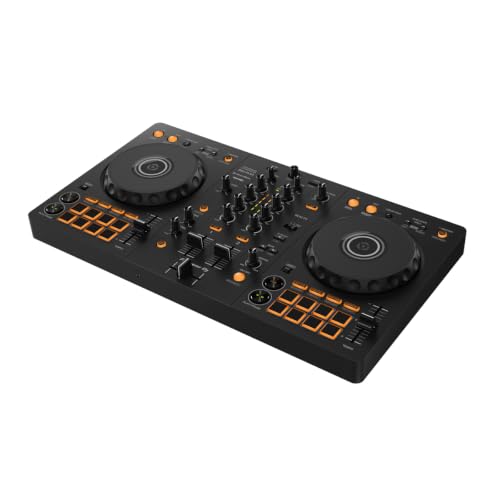
Pioneer DJ DDJ-FLX4 Controller
Badge: Best Controller Alternative
Honesty first: the DDJ-FLX4 is not an analog mixer, and this guide will not pretend otherwise. It is a 2-channel DJ controller — jog wheels, 16 pads, a Smart Fader that helps beginners land their first blends, and a microphone input aimed at livestreaming from one device. It belongs in this guide because a large share of ‘mini mixer’ searches are really beginners asking how to start DJing, and for a laptop-first beginner this controller, not a battle mixer, is the truthful recommendation.
If your plan involves turntables, vinyl, or a mixer that works with the computer off, walk back up this list to the Numark and Pioneer DJ mixers. If your plan is a laptop, a streaming service library, and first mixes this weekend, this is the pick — bought with open eyes about what it is.
Strengths
- The gentlest learning curve here, with Smart Fader assisting first mixes
- One device covers mixing, performance pads and a livestream microphone
- A growth path for beginners that the pure mixers do not offer
Trade-offs
- It is a controller, not an analog mixer — it needs a computer and software
- No standalone turntable workflow without the laptop
- Purists will miss the direct, powered-off simplicity of analog hardware
Key specs from the listing
- Channels: 2 decks
- Pads: 16
- Features: Smart Fader, streaming-ready
- Input: Microphone input for livestreaming
Best for: Beginner laptop DJs who want pads, jog wheels and streaming in one unit / Not suited for: Anyone specifically seeking an analog mixer
Comparison Table
Family first, then hardware: the table separates DJ mixers, consoles, and the controller so the comparison stays honest.
| Pick | Badge | Format | Standout trait | Link |
|---|---|---|---|---|
| Riworal 7-Channel Audio Mixer | Best Overall | 7-channel compact console | Seven channels with Bluetooth, MP3 and computer input | Check on Amazon |
| Aveek 4-Channel Audio Mixer | Best for Podcasting | 4-channel compact console | 99 DSP effects and USB PC recording in a small board | Check on Amazon |
| Numark M2 DJ Mixer | Best Classic Scratch Mixer | 2-channel DJ mixer | Replaceable, slope-adjustable crossfader and 3-band EQ | Check on Amazon |
| Numark Scratch DJ Mixer | Best for Performance DJs | 2-channel DJ mixer | Innofader crossfader, FX paddles and performance pads | Check on Amazon |
| Pioneer DJ DJM-250MK2 Mixer | Best Club-Style Mixer | 2-channel DJ mixer | Club-style workflow with Sound Color FX filter | Check on Amazon |
| Pioneer DJ DDJ-FLX4 Controller | Best Controller Alternative | 2-channel DJ controller | Smart Fader, 16 pads and livestream-ready microphone input | Check on Amazon |
How to Choose a Mini Analog Mixer
Name your performance gesture. If your hands cut, scratch, and blend between two sources, your deciding component is the crossfader: its feel, its slope adjustment, and whether it can be replaced when it wears. If your hands ride levels among several sources — microphones, a keyboard, playback — your deciding facts are preamp count and phantom power. Those two briefs share a keyword and almost no hardware, and choosing the gesture first is the whole game in this category.
Understand what ‘analog’ buys and costs. An analog-style mixer is immediate and independent: it works without a computer, its controls are exactly where your fingers left them, and it will do the same job in ten years. What it will not do is record itself, recall settings, or integrate with software libraries. The hybrid middle — DJ mixers with DVS and included software, like the Numark Scratch — exists precisely for players who want tactile hardware and a digital library at once.
Count your booth honestly. Two decks plus a microphone is the classic battle booth and every DJ mixer here serves it. Add a third source — a sampler, a second DJ, a livestream feed — and the 2-channel format breaks; that is the moment a compact console or a larger mixer from our Best Mixers 6 Mic Inputs guide becomes the right tool. Buyers who plan the booth on paper, source by source, rarely need to buy twice.
Finally, think about wear and repair. Crossfaders are consumables in scratch culture, which is why replaceable faders and named fader components matter more than any cosmetic feature. A mixer whose wear part can be swapped is a long-term instrument; one whose cannot is a countdown. The same logic applies to consoles: favour the board whose layout you can clean, cable, and operate in the dark of a real room.
How to Set Up a Mini Analog Mixer and Dial In the Crossfader
Setup order protects both the gear and the sound. The sequence below suits the DJ mixers; console buyers follow the same gain discipline per channel.
- Connect with everything powered down. Sources into channels, mixer out to speakers or amplifier, then power up in source-to-speaker order.
- Set channel gains before touching the faders. Play your loudest typical material and set gain so peaks are strong without clipping; faders are for performance, gain is for health.
- Centre the EQ, then learn it one band at a time. A 3-band EQ rewards restraint — small cuts teach you more than dramatic boosts.
- Set the crossfader slope for your style. Sharp for scratching and cuts, gradual for blends; on adjustable faders, test both ends with the same track.
- Balance the two channels at the gain stage. Matched levels mean the crossfader’s middle is a true blend, not a volume jump.
- Check the microphone separately. Booth microphones feedback easily; set its level with speakers at performance volume and your voice at real distance.
Maintain the tactile advantage: keep faders clean and dust-free, exercise rarely used knobs so they stay smooth, and store the mixer covered. Analog hardware rewards this minimal care with decades of identical behaviour — which is, after all, why you bought it.
Troubleshooting
Problem: one deck sounds much louder than the other → the gains are unmatched, not the faders; re-set both channel gains against the same reference track until the crossfader’s centre is an even blend.
Problem: scratches sound mushy and late → the crossfader slope is set for blending; switch or adjust it to the sharp end and confirm the fader is fully closing at each side.
Problem: a hum appears when turntables connect → a grounding or cable issue, most often at the turntable connection; reseat the cables, check the ground lead, and route audio away from power cables.
Vinyl, DVS, and Controllers: Three Ways to Play Two Decks
Two-deck DJing now comes in three dialects, and this guide contains all of them. Pure vinyl through an analog mixer is the original: tactile, self-contained, and limited to the records you own and carry. DVS keeps the turntables and the gesture but plays a digital library through control records, which is why the Numark Scratch and the Pioneer DJM-250MK2 build their software bridges so prominently — the mixer’s job expands from mixing audio to anchoring a hybrid rig. Controllers move the decks into software entirely and give the hardware over to pads, jog wheels, and assisted features.
None of the three is the authentic one; they are answers to different constraints. Vinyl answers a love of the object and the craft. DVS answers a working library too large to carry. Controllers answer budget, space, and the livestream era. The buyer’s task is to name their constraint honestly — collection, library, or laptop — and let it choose the dialect, rather than buying one dialect and envying another.
The Compact Console Desk: Streaming Without a Studio
The console half of this guide serves a different room: the desk where a creator records, streams, and occasionally performs. Its virtues are unglamorous and decisive — every source permanently connected, a condenser microphone on phantom power, a USB feed the computer simply sees, and playback for music and clips that does not consume an input. Set up once, that desk starts work in seconds, which is why the Riworal and Aveek boards belong in a guide nominally about analog mixers: their layout philosophy is the same hands-on, no-menu thinking, applied to sources instead of decks.
The desk’s discipline is labelling and restraint. Label every cable at the mixer end, resist filling every channel just because it exists, and keep effects on voice subtle enough that listeners notice clarity rather than processing. A mini console run that way outperforms a large board run casually, in the only metric the audience can hear.
Crossfader Care and the Economics of Replaceable Parts
A scratch DJ’s crossfader lives a harder life than any other control in audio: thousands of rapid, full-force traversals, in rooms with dust, drink vapour, and stage haze. Wear is not a defect but a schedule, and the economics follow from it. A mixer with a replaceable, slope-adjustable fader converts that wear into a small, planned parts cost. A mixer with a sealed fader converts it into a replacement mixer. Named fader components — the Innofader in this guide is the clearest example — also carry feel as a feature: lighter or firmer travel, tuned for the cuts a particular style demands.
Care extends the schedule cheaply. Keep the fader slot covered when the mixer travels, clean around it with dry air rather than liquids, and never force a gritty fader through its travel — grit is the sound of the wear schedule accelerating. Buyers who budget for one fader replacement across a mixer’s life almost always keep the mixer longer and play it better.
Turntable Setup for Mini DJ Mixers: Levels, Grounding, and Care
A DJ mixer only sounds as good as the turntables feeding it, and the setup details are old, known, and constantly skipped. Set each deck’s output level so both channels arrive at the mixer with matched strength; a blend built on mismatched decks is a volume ride, not a mix. Keep the ground lead connected — the hum it prevents is the sound of a shortcut — and route the audio cables away from power supplies, whose interference small phono signals invite. Styli deserve the same respect as faders: a worn or dirty stylus damages records and dulls every mix downstream of it.
Cartridge and slipmat choices complete the tactile chain. Scratch work wants a cartridge built to hold the groove under back-cueing pressure; blend work forgives more. Slipmats decide how the record answers your hand — slick for cuts, grippier for control. None of these decisions appears on a mixer listing, yet together they decide whether a good mini mixer feels like an instrument or an appliance. Set them once, deliberately, and the mixer’s own virtues finally become audible.
Learning to Scratch on a Mini Setup: A Practice Structure
Scratch technique is built in short, daily, structured sessions, and a mini setup is the ideal practice rig precisely because it is always assembled. Begin with the baby scratch — record moved, fader still — until the hand learns the sound’s shape, then add the fader in its sharpest slope setting for cuts and tears. Ten focused minutes on one technique outperforms an hour of random routine-playing, because the fader hand is building one clean motor pattern at a time. Record the sessions: the mixer’s output, however you capture it, is an unforgiving and therefore excellent teacher.
Progress has a known order — baby, cut, tear, transform, flare — and each step assumes the previous one’s cleanliness. The mini mixers in this guide support the whole curriculum; the replaceable-fader models support it longest, because practice volume is exactly what wears faders. Treat the fader as a consumable, the sessions as daily, and the recordings as mandatory, and a mini setup will carry a beginner further than a flagship board practised on monthly.
Small Booth, Big Crowd: Playing Out on Mini Gear
Mini DJ gear travels, and travelling exposes the difference between a setup and a system. The system includes the unglamorous layer: spare cables for every connection you make, a backup music source that does not depend on the main one, headphones you have tested that week, and a torch. Booth space at small venues is measured in centimetres, which is where the mini format stops being a compromise and becomes the qualification — the DJ whose rig fits the corner is the DJ who gets rebooked by the small rooms that dominate real working calendars.
Soundcheck discipline scales down, not away. Arrive early enough to hear your rig in the empty room at volume, set gains against the house system’s reality rather than your bedroom’s memory, and keep one hand’s worth of headroom in reserve for the moment the room fills and bodies absorb the top end. Mini gear run with full-size professionalism is not a lesser show; to the audience, it is simply the show.
Analog Warmth and Other Myths, Examined Calmly
Analog mixers attract mythology, and a buying guide serves its readers by separating the true claims from the decorative ones. True: an analog path is immediate, computer-independent, and free of latency and software failure modes; its controls are exactly where your hands left them; and it ages gracefully. Also true: the sound differences between a well-kept analog mini mixer and a good digital path are smaller than the differences made by gain staging, EQ discipline, and the source material itself. The romance is real, but it lives in the workflow and the gesture, not in magic the circuitry performs on mediocre technique.
That is, in the end, the strongest honest case for this category. You are buying a way of working — tactile, permanent, repairable — whose sound is as good as your hands make it. Buyers who want that bargain will be happy for decades. Buyers who wanted the mythology should buy the controller, the software, and the features, and be equally happy on honest terms. Readers furnishing the whole small room rather than just the booth will find the same permanence-first thinking in our Best Mini Stand Mixers guide on the kitchen side.
Needles, Cartridges, and the Front End Nobody Shops For
A DJ setup’s sound is decided before the mixer, at the cartridge, and the mini format does not exempt anyone from that physics. A cartridge tracks the groove; a worn stylus mistracks, and mistracking is both a sound problem and a record-damage problem, because the stylus that cannot follow the groove carves its own path through it. Replacement intervals are measured in hundreds of playing hours, and the honest habit is a log: a note in the record box when a stylus goes on, replaced on schedule rather than on suspicion. Scratch work shortens the schedule, because back-cueing is controlled mistracking by design.
Alignment is the other invisible variable. A cartridge mounted carelessly distorts on inner grooves and wears one channel’s sound thin; the few minutes with a protractor that alignment takes are repaid on every record. None of this is mixer shopping, and all of it is mixer hearing — the finest crossfader in this guide cannot demonstrate itself through a front end that is lying to it. Buyers building a mini booth should budget the front end first and let the mixer be the second purchase, however the search rankings order them.
Battle Routines: Building a Two-Minute Set That Holds Together
A routine is an argument made with records, and its construction follows the same rules as any argument: open with the strongest claim, develop without repetition, end before the idea does. For the beginner, that means choosing three techniques performed cleanly over eight performed approximately — the judges and the crowd both score cleanliness first, because it is the audible signature of control. Build the routine on the mixers in this guide exactly as you will perform it: same fader slope, same gains, same record order, because a routine is choreography and choreography does not transfer between different stages without rehearsal.
Recording every practice run remains the master habit. The routine you hear in your headphones while performing is not the routine the room hears; only the recording tells the truth about balance, timing, and the fader noise you did not notice making. Review it for one flaw per session and fix flaws serially. Six weeks of that discipline produces a two-minute set that holds together in public — which is to say, produces a DJ.
Playing Digital Files Through an Analog Heart
The hybrid rig — turntables, DVS, an analog-feeling mixer — exists because it resolves a real tension: the library is digital and effectively infinite, while the craft is physical and deliberately finite. Running it well means respecting both halves. The digital half wants organised libraries, analysed tracks, and cue points set in advance, because a DVS set performed while scrolling is a set performed at a screen. The physical half wants the same discipline as vinyl: gains matched at the mixer, fader maintained, records — control records included — kept clean, because the system reads their timecode through the same dirt that would dull a normal pressing.
Latency is the hybrid’s one physical tax, and it is managed by keeping the chain short and the computer honest: a machine that is not also running a household’s worth of background tasks, buffers set as low as stability allows, and software updated on your schedule rather than the manufacturer’s, never on show day. Managed that way, the tax falls below perception for all but the fastest scratch techniques — and for those, this guide’s pure analog path remains open, which is the hybrid era’s real luxury: both doors, honestly labelled.
The Booth as a Workspace: Ergonomics for Small Rigs
A mini booth’s ergonomics decide how long practice sessions last, and practice is where DJs are made. Decks and mixer at a height that keeps wrists neutral — standing, roughly counter height — because a rig set on a low table taxes the back within the hour and quietly shortens every session. Lighting matters more than aesthetics suggest: the labels, the fader positions, and the record’s surface should be readable without leaning, and a small, warm booth light outperforms the room’s overhead glare for reading vinyl.
Headphone discipline completes the workspace: one ear on the cue, one on the room, at volumes that protect the hearing the whole enterprise depends on. Booth monitors, where they exist, should be close and modest rather than distant and loud. The mini format’s gift is that this entire workspace fits a corner — but a corner arranged deliberately, at the right height, with light and air, is a studio; a corner where gear merely landed is storage that happens to make noise.
Second-Hand and Vintage Mini Mixers: A Buyer’s Caution
The mini analog category has a long history, and its second-hand market is full of both bargains and traps. The traps concentrate in the moving parts: crossfaders at the end of their travel life, potentiometers that crackle through the middle of their rotation where they have lived, and switches that work in the shop and fail under stage vibration. A used mixer should be tested through every control’s full travel, at volume, with a source playing — crackle that appears only in motion is exactly what a static demo hides.
The bargains are real for the same reason: analog mixers are repairable in a way software-era gear is not, and a serviced vintage unit with a fresh fader can outplay its price for years. Budget the service when you budget the purchase, favour models whose faders and parts remain available — the replaceable-fader philosophy in this guide applies doubly to used gear — and treat any seller who will not let you run the controls as information. The new picks in this guide exist for buyers who want the warranty instead of the adventure; both instincts are respectable.
The First Month with a Mini Analog Mixer: A Beginner’s Calendar
Week one belongs to setup and a single technique. Assemble the booth at the right height, gain-match the decks or sources, set the crossfader slope, and then practise one thing — the baby scratch for turntablists, clean level-riding for console users — in short daily sessions, recorded. Week two adds the second technique and the first honest listening: play the week’s recordings beside a reference you admire and name, in writing, the single largest gap. It will be timing or cleanliness, and both respond to the same medicine: slower practice, shorter sessions, more recordings.
Week three introduces performance conditions — standing, at volume, with the room’s distractions present — because skills practised seated and quiet evaporate under booth conditions. Week four assembles the month into a short set or a finished recording and plays it to one trusted listener, whose reaction is data rather than verdict. A beginner who runs that calendar owns, by its end, a setup that is truly set up and a practice structure that will carry every future technique. The mini mixer was never the project; it was the venue. The calendar is the project, and it fits in a month.
Common Buying Mistakes
- Buying a DJ mixer for a podcast desk. A crossfader cannot substitute for preamps and phantom power; name your sources first.
- Buying a console for scratching. Level faders are not performance crossfaders — the gesture decides the hardware.
- Ignoring fader replaceability. In scratch use the crossfader is a consumable; a sealed one shortens the mixer’s life.
- Calling a controller an analog mixer. Controllers need a computer and software; buy one for its own virtues, with open eyes.
- Setting levels with faders instead of gains. Mismatched gains make every blend a volume accident; gain-stage first, perform second.
- Filling every channel because it exists. On mini boards, spare capacity is flexibility — a permanently full mixer is a repatching schedule.
Final Recommendation
For most buyers behind this keyword, the compact console with the most usable inputs is the safest first board. Start with the Riworal 7-Channel Audio Mixer if you want the safest all-round choice in this list.
Turntablists should start at the Numark pair — classic simplicity or modern performance depth — and club-track DJs at the Pioneer DJ mixer. If your priorities lean the other way, the Aveek 4-Channel Audio Mixer and the Numark M2 DJ Mixer cover the two most common alternative briefs in this guide.
Whichever family you choose, buy it for the gesture your hands will actually make, set the gains before the faders, and keep the wear parts maintained. A mini analog mixer chosen that way stops being a purchase and becomes an instrument, which is the entire tradition this category comes from.
Related guides
Frequently Asked Questions
What is the difference between a DJ mixer and a compact console?
A DJ mixer mixes two decks through a performance crossfader, with EQ voiced for transitions and scratching. A compact console mixes several sources — microphones, instruments, playback — through channel faders, usually with phantom power and a USB recording path. They share the word ‘mixer’ and almost nothing else.
Why does crossfader slope adjustment matter?
Slope decides how abruptly sound cuts as the fader moves. A sharp slope makes scratches and cuts precise; a gradual slope makes blends smooth. An adjustable, replaceable crossfader — as on the Numark M2 — lets one mixer serve both techniques and lets the wear part be renewed instead of replacing the mixer.
Can I record from an analog DJ mixer?
Not by itself — a purely analog mixer has no USB path. You would route its output into a separate interface or recorder. The hybrid picks here solve it differently: DVS models work with software, consoles include USB recording, and the controller records inside its software by design.
Is the Pioneer DJ DDJ-FLX4 an analog mixer?
No. It is a DJ controller that works with a computer and software, included in this guide because beginners searching this keyword often need exactly what it offers: assisted first mixes, performance pads, and a livestream microphone input in one unit. Its review labels it honestly.
How many channels does a beginner DJ need?
Two. The entire craft of mixing, blending, and scratching is built on two decks, and every DJ mixer in this guide honours that format. Add channels when your booth adds sources — a third deck, a sampler, a live input — not before.
Which pick suits a streaming desk best?
The Riworal 7-channel console for multi-source desks, or the Aveek 4-channel board for a focused podcast setup. Both provide phantom power and USB recording, which are the two features a streaming desk cannot improvise around.


