Disclosure: topratedkitchenware.com is reader-supported. When you buy through links on our site, we may earn an affiliate commission from Amazon and other retailers, at no extra cost to you.
Where to buy
If you are shopping for best mixers with interface, the six models below are the shortlist this guide is built around. Prices and availability change often on Amazon, so use the links to check the latest price on Amazon before you buy. Orders are placed on Amazon, and each listing there carries the full manufacturer detail for that model.
- Best Overall: Riworal 7-Channel USB Audio Mixer — Check on Amazon
- FULUODE CT-80S 8-Channel Mixer — Check on Amazon
- TAVOSOP A4-G 4-Channel Mixer — Check on Amazon
- Pyle PMXU63BT 6-Channel Mixer — Check on Amazon
- Pioneer DJ DJM-250MK2 2-Channel DJ Mixer — Check on Amazon
- Pioneer DJ DDJ-FLX4 2-Channel DJ Controller — Check on Amazon
Read the full guide ↓
If you searched for best mixers with interface, you are probably picturing a creator comparing near-identical product names and wondering which boards genuinely include the computer interface and which merely mention USB playback. The fix is rarely a new microphone or a different app. It is a board that puts every source on its own fader, sends one clean mix to its destination, and lets you correct balance problems with your hands instead of a mouse. This guide is about finding a board where the interface is built in, so mixing and computer recording happen in one unit — what that actually requires, which boards deliver it, and how to set the winner up so it stays reliable.
The shortlist below spans compact four-channel boards for a single desk through eight, ten and twelve-channel consoles for bands and panels, because the right answer for best mixers with interface depends entirely on how many sources you run and where the mix has to go. Every pick was verified against its Amazon listing through the Creators API, and only models whose stated features genuinely serve this use case kept their place. Where a well-known style of board would be a poor fit, the reviews say so plainly.
Two habits will help you read the guide. First, count your sources honestly — microphones, instruments, a computer or console feed, a phone playing music — because channel count is the one specification you cannot upgrade later. Readers comparing setups often start with Best Mixers With Audio Interface before settling on a shape. Second, decide what the mix must feed: a stream, a recording, a room, or several of those at once. Inputs get the attention, but outputs decide whether a board actually works in your space.
Key Takeaways
- For best mixers with interface, channel count and a clean computer connection matter more than the longest effects list.
- Start with the Riworal 7-Channel USB Audio Mixer if you want the safest all-round answer in this shortlist.
- Condenser microphones need 48V phantom power — check it is listed before you buy.
- Nearly every board in this class sends a finished stereo mix to the computer, not separate tracks per channel.
- Gain staging — healthy level at each channel, balance on the faders — fixes most noise and clarity complaints.
- Buy two channels beyond your current source count; it is the cheapest upgrade you will ever make.
In this guide
Quick Picks
Six boards, six different answers to best mixers with interface. Badges are used consistently through the detailed reviews, so the pick that catches your eye here is easy to find again below.
| Badge | Pick | Headline features (from the verified listing) | Listing |
|---|---|---|---|
| Best Overall | Riworal 7-Channel USB Audio Mixer | 7 channels; USB audio interface | Check on Amazon |
| Best for Beginners | FULUODE CT-80S 8-Channel Mixer | 8 channels; Model CT-80S | Check on Amazon |
| Best for Larger Setups | TAVOSOP A4-G 4-Channel Mixer | 4 channels; 99 DSP effects | Check on Amazon |
| Most Versatile | Pyle PMXU63BT 6-Channel Mixer | 6 channels; Bluetooth | Check on Amazon |
| Best Compact Pick | Pioneer DJ DJM-250MK2 2-Channel DJ Mixer | 2 channels; Club-style DJ workflow | Check on Amazon |
| Best Premium | Pioneer DJ DDJ-FLX4 2-Channel DJ Controller | 2 channels; 16 performance pads | Check on Amazon |
How These Picks Were Chosen
This is a research-led guide, not a hands-on lab test, and it does not pretend otherwise. The shortlist was built by verifying candidate boards against their live Amazon listings through the Creators API — confirming each model, brand and stated feature set — and then filtering for genuine fit with finding a board where the interface is built in, so mixing and computer recording happen in one unit. Boards whose listings did not support the core job were dropped, however famous the name, and boards that survived were compared on channel count, computer connectivity, phantom power, effects provision and the clarity of their intended use.
Feature claims in the reviews come only from the verified listing data: channel counts, Bluetooth, phantom power, effects engines, playback and recording features exactly as the manufacturers state them. Where a listing is silent — exact output configurations, for example — the review says what class of board it is rather than inventing a specification. Readers cross-shopping neighbouring questions such as Best Mixers With Audio Interface Reddit will notice the same discipline: a board only appears where its stated features earn the place.
Badges were assigned after the comparison, not before it, and they reflect fit rather than a single league table: the best board for a solo streamer is a different object from the best board for a band, and pretending otherwise helps no one. Prices are deliberately excluded throughout, because listings in this category move constantly; the links throughout the guide exist so you can check the current position of each model on the day you actually buy.
Our picks for best mixers with interface, reviewed in full

Riworal 7-Channel USB Audio Mixer
Badge: Best Overall
The Riworal 7-Channel USB Audio Mixer is a seven-channel USB audio mixer console with built-in Bluetooth, an MP3 computer input and 48V phantom power, positioned for karaoke, DJ work, stage, streaming and studio sessions. In the context of finding a board where the interface is built in, so mixing and computer recording happen in one unit, that feature set lands in a specific place: it is built for a busy creator or small venue juggling mics, music and a computer feed, and the review below treats it on those terms rather than marking it down for jobs it never claimed to do.
Working with a board like this is mostly about the channel strip. Set gain so your loudest normal moment stays clean, use the EQ to solve one problem at a time — low-end muddiness from a microphone placed too close, harshness on a bright voice — and leave the fader for balance rather than rescue. Where this model lists effects, treat them as seasoning: a small amount of reverb flatters a singer, while spoken content for streams and podcasts usually sounds more professional kept close to dry. The honest limitation is the one in the trade-offs below, and it is worth reading before the strengths persuade you.
Strengths
- Seven channels is a sweet spot for panels, small bands and busy streams
- USB interface plus MP3 computer input covers recording and playback both ways
- 48V phantom power keeps condenser microphones fully supported
Trade-offs
- Seven channels still will not cover a large ensemble with stereo sources
- General-purpose positioning means fewer niche features for any single job
- More channels demand more careful gain staging from beginners
Key specs (from the verified listing): 7 channels; USB audio interface; Built-in Bluetooth; MP3 computer input; 48V phantom power; Listed for karaoke, DJ, stage, streaming and studio use.
Best for: a busy creator or small venue juggling mics, music and a computer feed / Not suited for: a solo user who wants the smallest possible one-mic setup

FULUODE CT-80S 8-Channel Mixer
Badge: Best for Beginners
The FULUODE CT-80S 8-Channel Mixer is an eight-channel sound-system mixer (the CT-80S) with reverb, an MP3 player, Bluetooth, a 48V phantom power supply and USB recording, aimed at studios, karaoke and live music rigs. In the context of finding a board where the interface is built in, so mixing and computer recording happen in one unit, that feature set lands in a specific place: it is built for a live-music or karaoke rig that needs eight channels and simple vocal polish, and the review below treats it on those terms rather than marking it down for jobs it never claimed to do.
Working with a board like this is mostly about the channel strip. Set gain so your loudest normal moment stays clean, use the EQ to solve one problem at a time — low-end muddiness from a microphone placed too close, harshness on a bright voice — and leave the fader for balance rather than rescue. Where this model lists effects, treat them as seasoning: a small amount of reverb flatters a singer, while spoken content for streams and podcasts usually sounds more professional kept close to dry. The honest limitation is the one in the trade-offs below, and it is worth reading before the strengths persuade you.
Strengths
- Eight channels suit full small bands and multi-mic events
- Reverb onboard sweetens vocals without external processors
- Bluetooth, MP3 playback and USB recording cover playback and capture in one unit
Trade-offs
- A sound-system footprint is overkill for a one-person desk setup
- Reverb is a single flavour of polish compared with full DSP libraries
- More inputs mean more cables, stands and setup time at every gig
Key specs (from the verified listing): 8 channels; Model CT-80S; Reverb effect; MP3 player; Bluetooth; 48V phantom power supply; USB recording; Listed for studio, karaoke and live music.
Best for: a live-music or karaoke rig that needs eight channels and simple vocal polish / Not suited for: a minimalist podcaster with one microphone and a laptop

TAVOSOP A4-G 4-Channel Mixer
Badge: Best for Larger Setups
The TAVOSOP A4-G 4-Channel Mixer is a four-channel board built around a 99-program DSP effects library, Bluetooth and USB-disk playback, 48V phantom power and direct USB recording, aimed squarely at beginners who stream. In the context of finding a board where the interface is built in, so mixing and computer recording happen in one unit, that feature set lands in a specific place: it is built for a first-time streamer or singer who wants effects and recording in one small board, and the review below treats it on those terms rather than marking it down for jobs it never claimed to do.
Working with a board like this is mostly about the channel strip. Set gain so your loudest normal moment stays clean, use the EQ to solve one problem at a time — low-end muddiness from a microphone placed too close, harshness on a bright voice — and leave the fader for balance rather than rescue. Where this model lists effects, treat them as seasoning: a small amount of reverb flatters a singer, while spoken content for streams and podcasts usually sounds more professional kept close to dry. The honest limitation is the one in the trade-offs below, and it is worth reading before the strengths persuade you.
Strengths
- 99 DSP effects give vocals reverb and presence without plug-ins
- 48V phantom power runs condenser microphones properly
- USB recording plus USB-disk playback covers both capture and walk-in music
Trade-offs
- Four channels is a hard ceiling for growing setups
- A large effects library invites over-processing if you stack presets carelessly
- Beginner positioning means fewer pro routing options than larger consoles
Key specs (from the verified listing): 4 channels; 99 DSP effects; Bluetooth and USB disk playback; 48V phantom power; USB recording; Listed as suitable for beginners and live streaming (model A4-G).
Best for: a first-time streamer or singer who wants effects and recording in one small board / Not suited for: an engineer who needs deep routing, subgroups or many simultaneous inputs

Pyle PMXU63BT 6-Channel Mixer
Badge: Most Versatile
The Pyle PMXU63BT 6-Channel Mixer is a six-channel board with Bluetooth, a USB computer input, a built-in MP3 player, 48V phantom power, three-band EQ per channel and a 16-bit DSP effects section, pitched at bands and small studios. In the context of finding a board where the interface is built in, so mixing and computer recording happen in one unit, that feature set lands in a specific place: it is built for a small band, house-of-worship team or panel host who needs six real inputs, and the review below treats it on those terms rather than marking it down for jobs it never claimed to do.
Working with a board like this is mostly about the channel strip. Set gain so your loudest normal moment stays clean, use the EQ to solve one problem at a time — low-end muddiness from a microphone placed too close, harshness on a bright voice — and leave the fader for balance rather than rescue. Where this model lists effects, treat them as seasoning: a small amount of reverb flatters a singer, while spoken content for streams and podcasts usually sounds more professional kept close to dry. The honest limitation is the one in the trade-offs below, and it is worth reading before the strengths persuade you.
Strengths
- Six channels handle a small band, panel or multi-mic setup comfortably
- Three-band EQ on the channels shapes voices and instruments at the board
- Built-in MP3 player plus Bluetooth covers break music without extra devices
Trade-offs
- Six channels still run out for a full band with stereo keys and playback
- Onboard 16-bit effects are useful, not a substitute for studio plug-ins
- More channels means a bigger footprint on a small streaming desk
Key specs (from the verified listing): 6 channels; Bluetooth; USB computer input; Built-in MP3 player; 48V phantom power; 3-band EQ; 16-bit DSP effects; Listed as band and studio ready (model PMXU63BT).
Best for: a small band, house-of-worship team or panel host who needs six real inputs / Not suited for: a minimalist desktop setup with a single microphone

Pioneer DJ DJM-250MK2 2-Channel DJ Mixer
Badge: Best Compact Pick
The Pioneer DJ DJM-250MK2 2-Channel DJ Mixer is a two-channel, club-style DJ mixer from Pioneer DJ with a Sound Color FX filter on each channel and a free rekordbox DVS unlock, built for turntable and media-player battles rather than multi-mic work. In the context of finding a board where the interface is built in, so mixing and computer recording happen in one unit, that feature set lands in a specific place: it is built for a DJ who mixes two decks and wants club-standard feel and DVS control, and the review below treats it on those terms rather than marking it down for jobs it never claimed to do.
Working with a board like this is mostly about the channel strip. Set gain so your loudest normal moment stays clean, use the EQ to solve one problem at a time — low-end muddiness from a microphone placed too close, harshness on a bright voice — and leave the fader for balance rather than rescue. Where this model lists effects, treat them as seasoning: a small amount of reverb flatters a singer, while spoken content for streams and podcasts usually sounds more professional kept close to dry. The honest limitation is the one in the trade-offs below, and it is worth reading before the strengths persuade you.
Strengths
- Sound Color FX filter makes transitions and tension builds effortless
- rekordbox DVS unlock lets turntablists control digital files from vinyl
- Club-style layout is instantly familiar to working DJs
Trade-offs
- Two channels only — it is a DJ battle mixer, not a multi-source console
- No multi-mic preamp count for panels, bands or podcast roundtables
- DJ-first layout wastes space if you never touch a crossfader
Key specs (from the verified listing): 2 channels; Club-style DJ workflow; Sound Color FX filter per channel; Free rekordbox DVS unlock included.
Best for: a DJ who mixes two decks and wants club-standard feel and DVS control / Not suited for: a podcaster or band needing several microphone inputs at once
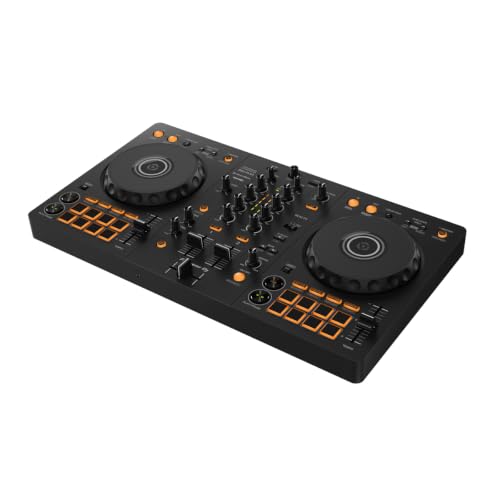
Pioneer DJ DDJ-FLX4 2-Channel DJ Controller
Badge: Best Premium
The Pioneer DJ DDJ-FLX4 2-Channel DJ Controller is a two-channel DJ controller with 16 performance pads, a Smart Fader that assists clean transitions, streaming-ready output and a microphone input designed for livestreaming from a single device. In the context of finding a board where the interface is built in, so mixing and computer recording happen in one unit, that feature set lands in a specific place: it is built for a beginner DJ or streamer who wants to mix music and talk over it from one unit, and the review below treats it on those terms rather than marking it down for jobs it never claimed to do.
Working with a board like this is mostly about the channel strip. Set gain so your loudest normal moment stays clean, use the EQ to solve one problem at a time — low-end muddiness from a microphone placed too close, harshness on a bright voice — and leave the fader for balance rather than rescue. Where this model lists effects, treat them as seasoning: a small amount of reverb flatters a singer, while spoken content for streams and podcasts usually sounds more professional kept close to dry. The honest limitation is the one in the trade-offs below, and it is worth reading before the strengths persuade you.
Strengths
- Smart Fader helps beginners land smooth transitions early
- Microphone input is built for livestreaming, so talking over music is simple
- 16 pads put cues, loops and samples under your fingers
Trade-offs
- It is a controller — it needs DJ software and a computer to make sound
- Two decks only, so four-deck routines are off the table
- Mic input serves one voice, not a multi-guest panel
Key specs (from the verified listing): 2 channels; 16 performance pads; Graphite finish; Smart Fader for assisted transitions; Streaming-ready design; Microphone input for livestreaming from one device.
Best for: a beginner DJ or streamer who wants to mix music and talk over it from one unit / Not suited for: an engineer recording several separate microphones simultaneously
Comparison Table
| Pick | Badge | Channels | Best for | Listing |
|---|---|---|---|---|
| Riworal 7-Channel USB Audio Mixer | Best Overall | 7 channels | a busy creator or small venue juggling mics, music and a computer feed | Check on Amazon |
| FULUODE CT-80S 8-Channel Mixer | Best for Beginners | 8 channels | a live-music or karaoke rig that needs eight channels and simple vocal polish | Check on Amazon |
| TAVOSOP A4-G 4-Channel Mixer | Best for Larger Setups | 4 channels | a first-time streamer or singer who wants effects and recording in one small board | Check on Amazon |
| Pyle PMXU63BT 6-Channel Mixer | Most Versatile | 6 channels | a small band, house-of-worship team or panel host who needs six real inputs | Check on Amazon |
| Pioneer DJ DJM-250MK2 2-Channel DJ Mixer | Best Compact Pick | 2 channels | a DJ who mixes two decks and wants club-standard feel and DVS control | Check on Amazon |
| Pioneer DJ DDJ-FLX4 2-Channel DJ Controller | Best Premium | 2 channels | a beginner DJ or streamer who wants to mix music and talk over it from one unit | Check on Amazon |
Read the table by your source list, not by badge envy. If your count of microphones, instruments and feeds fits a smaller board with room to spare, the smaller board will serve you better every day. Comparisons with Best Mixers For Synth usually come down to exactly that arithmetic.
How to Choose the Right Board for Best mixers with interface
Count channels like an engineer. Every simultaneous source needs a channel: each microphone, each instrument, each stereo feed counted honestly. Then add headroom — one or two spare channels — because setups grow and a full board cannot. The spread in this guide, from four channels to twelve, exists because a solo streamer and a working band are both legitimate answers to the same search.
Match the computer connection to the job. If the mix must reach a computer — for streaming, recording or calls — the board needs a stated USB audio interface, PC recording interface or USB recording feature, not merely USB playback. Playback from a stick is a music feature. Confusing the two is the most common and most avoidable disappointment in this category, and it is why the verified listing language is quoted so carefully throughout this guide.
Check phantom power against your microphones. Dynamic microphones run anywhere; condensers need 48V phantom power, which most boards here provide. If you sing, stream or record with a condenser — or plan to — treat phantom power as non-negotiable, and remember it travels on XLR cables, so budget for proper leads. Shoppers weighing Best Mixers For Synths hit this same checkpoint, because the microphone you already own quietly narrows the mixer shortlist.
Weigh effects by content type. Sung content benefits from onboard reverb, echo and delay; spoken content mostly does not. A 99-program DSP library is a real asset for karaoke and live vocals and near-irrelevant for a talk podcast, where clean gain and gentle EQ do the work. Buy the effects your content will actually broadcast.
Think in tiers, not totals. This category separates into a compact tier for desks and solo work, a mid tier for small groups and panels, and a large tier for bands and events. Each step up buys channels and routing, and costs desk space and setup time. Position yourself in the tier your regular session needs — the specific model can then be chosen on layout and the features you will touch weekly.
How to Set Up and Run Your Mixer, Step by Step
- Connect in order. Power off, microphones and sources in, speakers or headphones last, then power on — this protects ears and equipment from connection thumps.
- Set channel gain first. With the fader down, bring gain up while the source performs at its loudest normal level until the signal is strong and clean, then stop. Gain is where clean sound is made.
- Balance with faders. Bring channels up one at a time into a blend, voices foremost, music and effects underneath.
- Shape sparingly with EQ. Fix one problem per channel — muddiness, harshness, thinness — with small moves, and re-check after each.
- Add effects last. Dial in reverb or echo for singers and entertainment segments; keep speech close to dry.
- Set the destination. Send the mix to speakers, the computer or both, then make a short test recording and listen on headphones before the real session.
Problem: the recording or stream sounds hissy → what to do. Raise channel gain and lower the master or software input to compensate; hiss usually means the signal was too weak at the channel and boosted later. Check for unbalanced cables on microphone runs and replace them with XLR leads.
Problem: a microphone feeds back or rings → what to do. Lower that channel or its monitor feed, move the speaker or microphone so the speaker aims away from the capsule, and trim the ringing frequency on the channel EQ. Small placement changes beat large volume cuts.
Problem: the computer does not see the mixer → what to do. Swap to a known data USB cable, plug directly into the computer instead of a hub, and select the mixer explicitly in both the operating system and the app. After system updates, expect to re-select it once.
Cleaning and care are unglamorous and decisive: keep drinks off the board, dust faders with a soft brush rather than liquid cleaners, coil cables loosely, and transport the mixer in a padded case if it travels. Operators comparing routines across Best Mixers For Twitch tend to converge on the same advice, because small consoles die from spills and cable abuse far more often than from electronics.
USB Playback, USB Recording and a Real Interface — Know the Difference
Three different features hide behind the word USB on mixer listings, and confusing them is the most common buying error in this category. USB playback means the board plays files from a stick or drive. USB recording means it can capture the mix to a device or computer. A true built-in interface means the board works as the computer’s audio device in both directions — your mix goes in, and computer audio can return for monitoring. The shortlist here was built from models whose titles state an audio interface, a PC recording interface or USB recording, not playback alone.
Why does the distinction matter? Because a streamer who buys a playback-only board discovers on setup day that the computer cannot hear the mixer at all. Read listings the way this guide read them: look for the words audio interface, PC recording or USB recording tied to a computer, and treat a bare mention of USB next to MP3 playback as a music feature, not a connection to your stream or DAW.
Two Boards in This List Play by Different Rules
Most of this shortlist follows the streaming-and-recording pattern: several channels, phantom power, USB to the computer. The two Pioneer DJ entries break the pattern deliberately. The DJM-250MK2 is a two-channel DJ battle mixer whose interface serves rekordbox DVS — turntables controlling digital files — while the DDJ-FLX4 is a controller that needs DJ software and repays it with performance pads and assisted transitions. Neither is a failed version of the others; they are interfaces aimed at a different desk.
Choose by the session you actually run. If your inputs are microphones, instruments and a computer feed, the console-style boards fit. If your inputs are two decks and your output is a dancefloor or a DJ livestream, the Pioneer pair fit — and the DDJ-FLX4’s microphone input and streaming-ready design make it a genuine crossover for DJ streamers who talk over their sets.
However you arrived at this shortlist — including via neighbouring searches such as Best Mixers For Twitch Streaming — the deciding questions stay the same: how many sources, which destinations, and which features will you touch every single session? Answer those three and the right board in this guide identifies itself.
One more consideration that separates a satisfying purchase from a frustrating one is the order in which you evaluate a board. Start with the session you run most often and walk it physically across the top panel: where does the microphone land, where does the music come in, which knob do you reach for when something is too loud, and can you reach it without looking? Mixers are played like instruments during a live show, and the board whose layout matches your habits will sound better in your hands than a nominally superior board you keep fumbling. Every model in this shortlist follows a recognisable channel-strip logic, so the differences are of degree — control spacing, labelling clarity, how the master section is organised — but those degrees are what you live with for years.
It is also worth being honest about the role of effects in a buying decision. A long DSP list is genuinely useful for singers and karaoke, where reverb and echo are part of the product the audience hears. For speech — podcasts, panels, spoken streams — the same library mostly sits unused, and the deciding factors become preamp cleanliness, EQ that behaves predictably and a headphone output quiet enough to judge your own mix. Read the reviews in this guide with your own ratio in mind: the more of your work is sung, the more weight the effects sections deserve; the more is spoken, the more weight belongs on gain staging, phantom power and layout.
Cables and connectors deserve a paragraph of their own because they quietly determine reliability. Microphones belong on balanced XLR cables, which reject the hum and interference that unbalanced leads collect, especially near power supplies and lighting. Instruments and line sources can use standard line inputs, and computer connections should use the shortest good-quality data cable you own. None of this is glamorous, and none of it appears in feature lists, but a board is only ever as dependable as the worst cable plugged into it — a truth every experienced operator in every forum thread eventually repeats.
Finally, think about the second year of ownership rather than the first week. Will the board still fit when you add the source you are already half-planning? Is the layout one a friend or bandmate can run when you are the one on stage? Can it move between your desk, a rehearsal room and a small venue without a different supporting cast of adapters each time? The shortlists in this guide deliberately span compact four-channel boards through ten- and twelve-channel consoles so that the answer can be yes at several sizes — choose the size your second year needs, and the first week will take care of itself.
Monitoring deserves its own decision, because what you hear while mixing quietly determines every choice you make. Headphones plugged into the board give you the mix without the room — essential for streamers in untreated spaces and for anyone recording late at night — while speakers reveal how the mix behaves in real air, which is what a live audience actually hears. Most experienced operators use both: headphones for detail and problem-hunting, speakers for balance and tone. Whichever you lean on, keep the monitor level consistent from session to session. Mixing at a different loudness each time makes EQ decisions incomparable, because human hearing judges bass and treble differently at different volumes — a quiet mix always sounds thinner than the same mix played loud, and chasing that illusion with EQ is how good recordings get ruined politely and slowly.
Recording levels are the other quiet discipline. Digital recording punishes two errors asymmetrically: clipping is forever, while a slightly conservative level costs almost nothing, because modern recordings can be raised in editing with negligible penalty. Set each channel so the loudest genuine moment — the laugh, the shout, the chorus hit — stays safely below the top of the range, and then leave it alone. The urge to ride gains continuously during a session usually means the original staging was timid; fix it at the next break rather than performing the faders for the recording. A test recording, listened to all the way through on headphones, remains the cheapest insurance in the entire process, and the operators who skip it are reliably the ones telling stories about the perfect take that clipped.
Room sound is the ingredient no mixer can add or remove, and it deserves honesty in any buying decision. A lively room — hard walls, bare floor, high ceiling — flatters singing and punishes speech intelligibility; a dead room does the reverse. Your board’s EQ can trim the symptoms at the margins, but placement does the heavy lifting: microphones closer to the source and further from reflective walls, speakers aimed at listeners rather than at the ceiling. If your recordings sound distant, the answer is almost never a different mixer; it is a shorter distance between the microphone and the mouth, the instrument or the amplifier. Spend on that geometry first — it is free — and let the board do the job it is actually built for.
The last judgement is about the ecosystem around the board rather than the board itself. A mixer anchors a small economy of microphones, stands, cables, headphones and cases, and its real cost and real value both live in that system. A board that matches the microphones you own, the computer you record to and the room you work in will outperform a theoretically superior board that fights all three. That is the principle behind every shortlist in this guide: verified features, matched to a stated job, at a size your routine can absorb. Choose on that basis and the purchase tends to disappear into the work — which is the highest compliment any piece of audio equipment can earn.
A word about learning curve, because it quietly decides whether a mixer gets used or shelved. The first session with any board should be deliberately small: one microphone, one playback source, one destination, and no audience. Walk the signal through slowly, name each control out loud as you touch it, and make your mistakes where they cost nothing. By the third session the layout becomes physical memory — your hand finds the mute, the fader and the master without your eyes leaving the performer or the screen. Buyers sometimes interpret a rich feature set as a rich learning burden, but on the channel-strip boards in this guide the core path is identical from the smallest model to the largest: gain, EQ, fader, master. Everything else is an extra you can adopt one at a time, in the order your own sessions demand it.
Support and longevity round out the judgement. A mixer is a long-lived purchase compared with the computers and phones around it, and the practical questions are mundane: are the controls standard enough that a borrowed cable or a substitute power supply will save a session, does the layout make sense to a second operator, and can the board be cleaned, cased and carried without drama? The established names in this shortlist carry the advantage of familiarity — engineers and community forums know their layouts — while the value-focused boards repay their owners in channel count and features per unit of budget. Neither virtue is imaginary. Weigh them by how you work: shared and borrowed rigs favour the familiar, fixed personal rigs can happily favour the generous.
Common Buying Mistakes
- Buying exactly today’s channel count. The first guest, instrument or console feed then has nowhere to go. Two spare channels is the standard insurance.
- Confusing USB playback with a USB interface. A board that plays files from a stick may not connect to a computer at all. Read the listing language before buying.
- Skipping phantom power. A condenser microphone without 48V phantom power is silent. Check the listing, not the product photos.
- Fixing balance in software. If the mixer sends a stereo mix, the balance is final. Set levels at the board, where your hands are.
- Drowning speech in effects. Reverb that flatters a singer makes a podcast sound like a bathroom. Keep talk dry; season singing.
- Ignoring the cable budget. Proper XLR leads and a good USB data cable are part of the purchase. Cheap cables manufacture problems that get blamed on boards.
Final Recommendation
Start with the Riworal 7-Channel USB Audio Mixer — Check on Amazon. It is the pick whose stated features line up most completely with finding a board where the interface is built in, so mixing and computer recording happen in one unit, and it leaves the fewest obvious gaps for the typical buyer behind this search. If your source count runs the other way — more channels than the first pick offers, or a deliberately different format — the TAVOSOP A4-G 4-Channel Mixer is the alternative to weigh next: Check on Amazon.
Whichever board you choose, do the unglamorous parts well: gain stage each channel, keep speech close to dry, make a test recording before the session that matters, and label the channels you use. Those habits, more than any single feature, are what separate the setups people praise from the ones they post complaints about. Readers still torn between neighbouring shortlists, such as Best Mixers For Vocals and Best Mixers For Xlr, should decide by source count first — it settles most arguments in this category on its own.
Frequently Asked Questions
What is the difference between a mixer with an interface and one with just USB?
A bare USB mention may only mean file playback from a stick. An interface means the computer recognises the mixer as an audio device, so your mix records or streams over USB and computer audio can return for monitoring. The wording on the listing — audio interface or PC recording — is the tell.
Can I stream with a mixer whose USB is playback only?
Not directly. You would need to route the analog main outputs into a separate interface, which defeats the purpose. For streaming, choose a board whose listing states USB recording or an audio interface, as the shortlist models do.
Do interface mixers need drivers?
Most in this class are class-compliant and work with the operating system’s built-in USB audio support. If a specific model offers a manufacturer driver for extra features, install it from the maker’s site before first use.
Is the Pioneer DDJ-FLX4 a mixer with an interface?
It is a DJ controller with a built-in audio interface and a microphone input, designed to work with DJ software on a computer. For DJ performance and DJ livestreams it fills the same one-box role; for multi-microphone recording, a console-style board fits better.
Can an interface mixer send audio back from the computer?
Yes — that two-way behaviour is part of being an interface. Computer playback typically returns on a dedicated channel or input pair, which is how streamers bring game sound or backing tracks into the same fader balance.
What should I check first when my computer does not see the mixer?
The cable and the port: use a known data cable, plug directly into the computer rather than a hub, then confirm the mixer is selected in both the operating system sound settings and your app. Most ‘dead interface’ reports end at one of those three steps.


