Disclosure: topratedkitchenware.com is reader-supported. When you buy through links on our site, we may earn an affiliate commission from Amazon and other retailers, at no extra cost to you.
Where to buy
If you are shopping for the best espresso machines for office, the six models below are the shortlist this guide is built around. Listings change often on Amazon, so use the links to check the current listing before you buy. Orders are placed on Amazon, and each listing there carries the full manufacturer detail for its model.
- Best Overall for Offices: De’Longhi PrimaDonna Aromatic — Check on Amazon
- Philips 5500 Series — Check on Amazon
- Philips 2300 Series — Check on Amazon
- De’Longhi Rivelia (White) — Check on Amazon
- De’Longhi Magnifica Duo — Check on Amazon
- De’Longhi Magnifica Evo — Check on Amazon
Read the full guide ↓
The best espresso machines for office use have to solve a problem home machines never face: the people using them did not choose them, cannot be trained on them, and will judge them entirely on whether a decent coffee appears quickly at 9 a.m. without a manual, a queue, or a mess left for someone else. That is why this guide looks only at fully automatic machines — built-in grinder, one-touch drinks, automatic milk frothing — and judges them on office criteria: walk-up simplicity, menu breadth for a group with mixed tastes, speed at peak moments, and cleaning routines robust enough to survive shared responsibility.
Office coffee is also a small piece of workplace economics and morale. A machine the team likes gets used constantly, replaces expensive coffee runs, and quietly becomes part of the office’s daily rhythm; a machine that confuses people or produces a dirty milk system by Wednesday gets bypassed, and the money spent on it is wasted. The reviews below therefore weigh the unglamorous heavily — how milk is stored and rinsed, how clearly the interface speaks to a first-time user, how the periodic cleaning programs work — alongside the headline recipe counts.
Scale is the first sorting question, and this list spans it: a three-preset machine for a small team room, mid-sized models for a typical office kitchen, and a thirty-eight-recipe flagship for a larger workplace that wants one machine to serve everyone. If your space is really a business open to the public rather than a workplace, our guides to Best Espresso Machines For Small Coffee Shop and Best Espresso Machines For Small Business cover that different duty cycle. For offices, read the Quick Picks, then the reviews of the two models closest to your team size.
Key Takeaways
- Office machines must be walk-up simple: every pick here is fully automatic with one-touch drinks and automatic milk frothing.
- The PrimaDonna Aromatic is the office flagship in this list — thirty-eight recipes and hot and cold frothing behind one touchscreen.
- Speed at the morning peak matters: the Philips 5500’s QuickStart and twenty presets suit a busy shared kitchen.
- Milk is the office risk point — systems live in fridges, need rinsing after use, and need one named person to own the weekly wash.
- Regular and decaf both on tap is a real office need; the Rivelia’s swappable hoppers answer it without bean waste.
- Small offices should not overbuy: the three-preset Philips 2300 covers a short team drink list with the least upkeep.
In this guide
Quick Picks
An office espresso machine is a shared appliance, and shared appliances live or die on three things: whether anyone can walk up and make a drink without instruction, whether the machine keeps up when several people want coffee in the same half hour, and whether the cleaning routine survives being everybody’s job and therefore nobody’s job. The six fully automatic machines below all grind, brew, and froth at one touch, which is the baseline an office needs. This table ranks them for office life — menu breadth for mixed tastes, start speed for the morning rush, and upkeep designs that tolerate a shared kitchen.
| Pick | Badge | Why it earns its place |
|---|---|---|
| De’Longhi PrimaDonna Aromatic | Best Overall for Offices | Thirty-eight one-touch recipes and hot and cold frothing cover an entire office’s tastes from one touchscreen machine. |
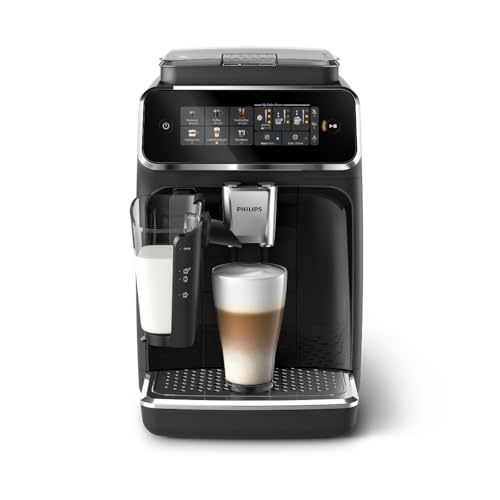
| Philips 5500 Series | Best for Fast Starts | QuickStart, twenty hot and iced presets, and LatteGo milk handling make it the fastest friendly option for busy shared kitchens. |
| Philips 2300 Series | Best for Small Offices | Three presets and LatteGo simplicity make it the natural fit for a small office or a team room with a short drink list. |
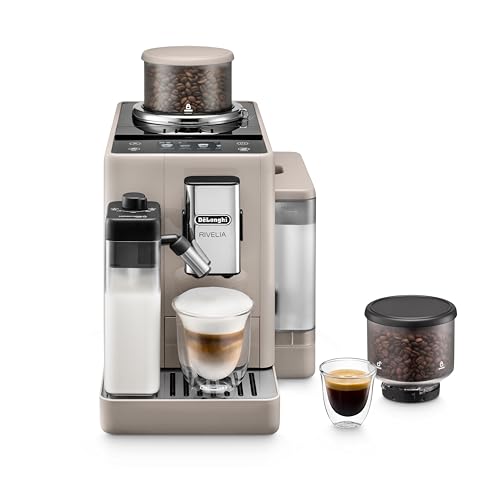
| De’Longhi Rivelia (White) | Best for Shared Preferences | Swappable bean hoppers let an office keep regular and decaf ready at once, with eighteen recipes in a clean white finish. |
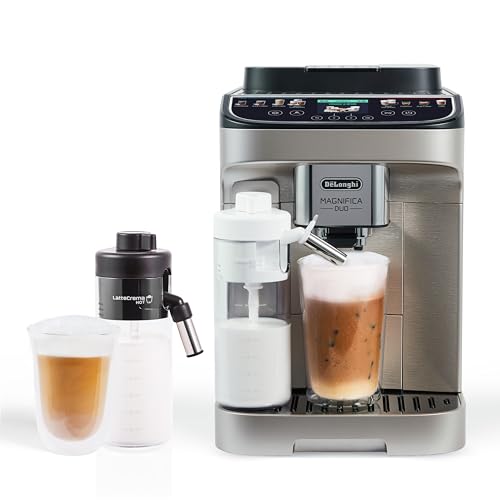
| De’Longhi Magnifica Duo | Best for Menu Variety | Twenty recipes and hot and cold milk drinks behind a touchscreen that any colleague or guest can operate. |
| De’Longhi Magnifica Evo | Best for a Personal Signature Drink | A saved signature drink and seven core recipes suit a small office where one or two main users have exact orders. |
How These Picks Were Chosen
We built this shortlist by comparing verified listings of fully automatic machines against office requirements rather than home ones. For each model we recorded its recipe menu, its milk system and how that system is cleaned and stored, its start and serving speed features where the listing states them, its interface type, and its periodic cleaning programs. Machines that required technique — manual steaming, separate grinders, tamping — were excluded regardless of coffee quality, because an office machine that needs skill is an office machine that most of the office cannot use.
We also assessed each machine for what might be called the Wednesday test: what does ownership look like midweek, when the novelty has worn off? Milk containers need fridge discipline, grounds containers fill faster in an office than in any home, and descaling arrives sooner under office volume. Models whose designs simplify those routines — combined or guided cleaning, milk systems built for easy handling, interfaces that prompt clearly — earned their places here as much as the menu leaders did. The comparison with home duty in our guide to Best Espresso Machines For Regular Home Production is instructive: the same machine can be generous at home and strained in an office, purely through volume and sharing.
Consistent with our house rules, this guide prints no prices and no scores, and claims nothing about a model that its listing does not support. Office buyers in particular should confirm current listing details — exact model, included accessories, and the manufacturer’s stated cleaning provisions — before committing, because an office purchase is usually a shared decision that has to be defended to whoever holds the budget. What the guide does give you is a defensible shortlist: six machines, honestly differentiated by the office jobs they do best.
The 6 Best Espresso Machines for Office Use
Each review judges its machine as a shared workplace appliance: who in the office it serves, how it handles the morning peak and the milk routine, and where its limits show under office volume. Badges match the Quick Picks table.

De’Longhi PrimaDonna Aromatic
Badge: Best Overall for Offices
Strengths
- Thirty-eight one-touch recipes is the broadest menu here — every office taste from straight espresso to flavored milk drinks in one machine.
- Hot and cold milk frothing means iced drinks are covered in summer without a second appliance.
- A touchscreen interface is the most walk-up-friendly control style for colleagues and guests who have never used the machine.
Trade-offs
- It is the flagship of this list, and an office should buy it because the team will use its range, not for its spec sheet.
- A thirty-eight-drink menu and hot-and-cold milk system mean the most upkeep in this guide; assign the cleaning to a named owner.
- For a five-person office it is simply more machine than the job requires.
Key specs from the listing: Fully automatic espresso machine; 38 one-touch recipes; hot and cold milk frother; built-in grinder; touchscreen display. (Listing details as provided by De’Longhi.)
For an office that wants one machine to answer every taste in the building, the PrimaDonna Aromatic is the obvious flagship. Thirty-eight one-touch recipes is a menu that absorbs the whole spectrum of office orders — the purist’s espresso, the team’s lattes and cappuccinos, flavored variations, and, thanks to a frother that works hot and cold, the iced drinks that offices increasingly demand through summer. Presenting all of it through a touchscreen is the right call for a shared machine: a guest or a new starter can browse pictures and names rather than decode buttons, and the first drink succeeds without a colleague’s help.
The office case for breadth is really a case against fragmentation. A machine that cannot make someone’s drink sends that person out to a café, and a workplace that wants its coffee machine to be the coffee solution needs the menu to have no obvious gaps. The PrimaDonna’s built-in grinder keeps everything on fresh beans, and its repertoire means the office bean order stays simple even while the drinks stay varied.
The responsibilities scale with the capability, and a sensible office will plan for them: this machine’s milk system has the most to rinse in this guide, its grounds and water will cycle fastest under office volume, and its periodic cleaning needs a named owner rather than a hopeful rota. None of that is a flaw — it is the normal cost of a flagship shared appliance. Buy the PrimaDonna when your office is large or varied enough to use its menu weekly, assign its upkeep to someone specific, and it will carry the office’s coffee life single-handedly.
Best for: larger offices and varied teams that want one machine to cover every taste, hot and cold / Not suited for: small offices that would use a fraction of its menu and feel its upkeep most

Philips 5500 Series
Badge: Best for Fast Starts
Strengths
- QuickStart shortens the wait for the first drink, which is exactly when office queues form.
- Twenty hot and iced presets cover a mixed team’s tastes, with strength, milk, and cup size adjustable per drink.
- LatteGo milk handling is designed to be simple to use, store, and clean — critical for a shared milk system.
Trade-offs
- Twenty presets still need a first week of dialing in for the team’s common drinks.
- LatteGo’s milk container needs a dedicated fridge spot and shared rinsing discipline.
- Heavy offices making drinks back-to-back all day should check whether one machine meets their volume, whatever the model.
Key specs from the listing: Fully automatic espresso machine, model EP5544/94; LatteGo milk system; 20 hot and iced coffee presets; customizable coffee strength, milk, and cup size; QuickStart; ceramic grinder; 15 bars pump pressure. (Listing details as provided by Philips.)
The Philips 5500 is the office pragmatist’s pick, built around the two moments that decide shared-machine happiness: how fast the first drink arrives, and how painless the milk is. QuickStart addresses the morning peak directly — the machine is ready sooner, the first drinks flow sooner, and the informal queue at the kitchen counter stays short. Twenty hot and iced presets then cover a mixed team’s tastes with room to spare, and per-drink adjustment of strength, milk, and cup size means colleagues are not locked into a single house style.
LatteGo is the other half of the argument. In a shared kitchen, a milk system must survive contact with people who did not read its manual: it should be obvious how it attaches, where it lives (the fridge), and how it washes. LatteGo is designed around exactly that handling simplicity, and in an office that design philosophy is worth more than an extra ten recipes. The ceramic grinder platform, rated in the listing at 15 bars, keeps the coffee side consistent behind the convenience.
The 5500’s limits are matters of scale and discipline rather than design. A very large office running drinks continuously should think about total volume honestly — no single countertop machine is a café — and the LatteGo container still needs its fridge spot and its rinsing routine owned by the team. For the broad middle of offices, though — a dozen to a few dozen coffee drinkers with mixed tastes — the 5500 is the machine in this guide we would install first and worry about least.
Best for: busy shared kitchens that need fast starts, twenty presets, and the easiest milk handling / Not suited for: very large offices expecting café-level continuous volume from a single countertop machine

Philips 2300 Series
Badge: Best for Small Offices
Strengths
- Three presets keep a small office’s choices foolproof: nobody can get lost in this menu.
- LatteGo milk system keeps the shared-milk routine as simple as this category offers.
- Ceramic grinder, adjustable strength and cup size, and a hot water function cover a small team’s real needs, including tea.
Trade-offs
- Three presets is a short menu for a varied team; tastes beyond it have nowhere to go.
- It is sized for a small office — a growing team will outgrow its pace and menu.
- Simpler adjustment than the 5500; colleagues who love fine-tuning drinks should look up the range.
Key specs from the listing: Fully automatic espresso machine, model EP2330/14; LatteGo milk system; 3 coffee presets; ceramic grinder; customizable coffee strength and cup size; hot water function; 15-bar pressure. (Listing details as provided by Philips.)
Not every office is a floor of fifty people. The Philips 2300 is in this guide for the five-to-fifteen-person workplace — the studio, the small practice, the team room — where the drink list is short, the kitchen is small, and the machine’s worst enemy would be complexity. Three presets, chosen well, cover what small teams actually drink; the LatteGo system keeps milk drinks one-touch and the cleanup minimal; and the ceramic grinder with adjustable strength and cup size means the few drinks it makes, it makes properly.
The hot water function earns a specific mention for small offices, because in a small kitchen every appliance should do double duty: tea drinkers and top-ups are served by the same machine, which keeps a kettle’s worth of counter free. The 2300’s focused brief also makes it the easiest machine here to keep clean by rota — there is simply less machine to maintain, and its routines are short enough that they actually happen.
Its ceiling is the honest trade: a growing team will feel three presets quickly, and an office that entertains clients with varied orders will want a longer menu. But right-sizing is a virtue in office purchasing, and the 2300 is the right size for a real and common kind of workplace. If that is your office, buy the machine that fits it rather than the flagship that flatters it — and if the team doubles, the step up to the 5500 keeps you in the same LatteGo world your colleagues already know.
Best for: small offices and team rooms with a short drink list and limited counter space / Not suited for: larger or growing teams with varied tastes and client entertaining to cover

De’Longhi Rivelia (White)
Badge: Best for Shared Preferences
Strengths
- Swappable bean hoppers keep regular and decaf both ready — the classic office two-crowd problem solved mechanically.
- Eighteen one-touch recipes is a generous shared menu without flagship complexity.
- The white finish suits bright office kitchens and looks clean and intentional in a client-facing space.
Trade-offs
- The hopper system needs a cupboard home for the spare hopper, and someone must own the swapping routine.
- Eighteen recipes is plenty for an office, but there is no cold-foam option for iced-drink specialists.
- Two Rivelia finishes exist in this guide; the white one’s appeal is partly aesthetic, so weigh it as such.
Key specs from the listing: Automatic espresso machine with milk frother, white finish (one of 4 unique colors); removable bean hoppers; 18 one-touch recipes; built-in grinder. (Listing details as provided by De’Longhi.)
Every office has the same two people: the one who drinks regular and the one who drinks decaf, often wanting a drink at the same moment. The Rivelia’s removable, swappable bean hoppers are the only feature in this guide that solves that standoff properly — regular beans in one hopper, decaf in the other, swapped in moments with no scooping, no waste, and no cross-contaminated compromise drinks. For offices, where both crowds are present every day, that is not a novelty; it is the difference between a machine everyone uses and a machine half the office works around.
The rest of the Rivelia package suits shared use well: eighteen one-touch recipes is a generous office menu, the automatic frother makes milk drinks a button press for any colleague, and the built-in grinder keeps both hoppers’ beans fresh-ground. This white finish also has a practical office virtue — it looks bright and deliberate in a modern kitchen, including client-facing spaces where a hulking black appliance would jar.
Plan the small logistics and the Rivelia runs happily in an office: a cupboard spot for the spare hopper, a shared understanding of which hopper is fitted, and the standard milk rinsing routine with a named owner. Offices whose bean life is single-roast gain nothing from its signature feature and should look at the Duo or the 5500 instead. But for the two-beans office — which is most offices, once you ask around — the Rivelia is the machine in this list designed around your actual problem.
Best for: offices split between regular and decaf drinkers who both want fresh-ground drinks / Not suited for: single-bean offices, which gain nothing from swappable hoppers

De’Longhi Magnifica Duo
Badge: Best for Menu Variety
Strengths
- Twenty one-touch recipes behind a touchscreen gives a mid-to-large office real variety with walk-up simplicity.
- Hot and cold milk frothing covers the office year, from winter cappuccinos to summer iced lattes.
- Built-in grinder and automatic operation keep the whole office on fresh beans with no technique to teach.
Trade-offs
- Twenty recipes is broad, but the flagship PrimaDonna still out-menus it for very large, varied offices.
- Hot and cold milk capability adds parts to the shared rinse routine, which needs an owner.
- Touchscreen-only control will not suit an office that prefers physical buttons for accessibility reasons.
Key specs from the listing: Automatic espresso machine with milk frother, silver finish; 20 one-touch recipes; hot and cold milk frother; built-in grinder; touchscreen display. (Listing details as provided by De’Longhi.)
The Magnifica Duo is the strong all-rounder for a mid-to-large office: twenty one-touch recipes behind a touchscreen, a milk frother that works hot and cold, and a built-in grinder, in a silver machine that asks nothing of its users beyond choosing a drink. The touchscreen deserves emphasis for office use — it is the interface a first-time user, a visiting client, or a new hire can operate unaided, and in a shared kitchen that self-service quality is worth more than any single recipe on the menu.
Twenty recipes hits a practical office sweet spot. It is broad enough that the team’s regular orders are all present — the espresso drinkers, the latte loyalists, the iced-coffee crowd in summer — without the flagship’s upkeep weight. The hot-and-cold frother similarly covers the office year in one appliance, ending the seasonal workaround of a separate iced-coffee gadget appearing on the counter in June.
Where the Duo asks for office discipline is where every capable automatic does: milk parts rinsed and refrigerated properly, grounds and water attended to at office pace, and descaling done when prompted rather than postponed by a committee of none. Give it a named owner for those routines and the Duo will serve a busy office kitchen for years. Offices that want the extra menu breadth and presence of the PrimaDonna should step up deliberately; offices that want a little less machine should look at the Evo below — but as a central recommendation for the typical workplace, the Duo is hard to argue with.
Best for: mid-to-large offices wanting touchscreen simplicity and a full hot-and-cold menu / Not suited for: offices wanting a saved per-person signature feature or the flagship’s extra menu breadth

De’Longhi Magnifica Evo
Badge: Best for a Personal Signature Drink
Strengths
- The signature-drink feature lets a main user save an exact order and recall it in one touch — perfect for an office manager or a founder’s exact coffee.
- Seven one-touch recipes cover the core office menu without menu fatigue.
- A complete automatic package — grinder, frother, personalization — in a silver machine suited to a smaller office.
Trade-offs
- Seven recipes is a focused menu; a large office with wide tastes will find it narrow.
- Its personalization shines for one main user rather than giving every colleague a profile.
- Silver finish only in this listing, which may not match every office kitchen.
Key specs from the listing: Automatic espresso machine with milk frother, silver finish; 7 one-touch recipes; built-in grinder; craft a personalized signature drink feature. (Listing details as provided by De’Longhi.)
The Magnifica Evo’s office niche is specific and real: the small office or executive suite where one or two people drink most of the coffee and have exact preferences. Its signature-drink feature lets that main user craft a personalized drink — their strength, their size, their milk — and recall it in one touch every time. In a founder’s office, a small practice, or a home-office-turned-headquarters, that single saved order can be the feature the machine is bought for, with seven one-touch recipes covering everyone else’s core drinks around it.
The Evo is otherwise a complete, sensibly sized automatic: built-in grinder, automatic frother, and a silver finish that sits comfortably in a professional kitchen. Its seven-recipe menu keeps choices quick at the counter — an underrated office virtue, since a short menu means no colleague hovering and scrolling while a queue forms behind them.
Its limits are the mirror of its strengths. A larger office with wide and shifting tastes will find seven recipes narrow, and the personalization is at its best for one main user’s drink rather than a building full of profiles. Offices should also note it is the finish and feature set of a focused machine, not a flagship. But small workplaces are not failed large ones — they have their own right answers, and for the small office built around one or two serious coffee drinkers, the Evo’s signature-drink idea is the most personal machine in this guide. Readers setting up that kind of space may also enjoy our guide to Best Espresso Machines For Travel, which covers the portable end of the coffee spectrum for colleagues who split time between office and road.
Best for: small offices and executive suites built around one or two main users with exact orders / Not suited for: large, varied offices where seven recipes and one signature profile are not enough

Comparison Table
For office buyers, compare on the shared-use axes: how many tastes the menu covers, how the milk system behaves in a shared kitchen, and what signature feature — QuickStart, swappable hoppers, a saved signature drink — matches your workplace’s actual pattern.
| Pick | Drink menu | Milk system | Stands out for | Listing |
|---|---|---|---|---|
| De’Longhi PrimaDonna Aromatic | 38 one-touch recipes | Hot and cold milk frother | Maximum menu breadth for a whole office’s tastes | Check on Amazon |
| Philips 5500 Series | 20 hot and iced presets | LatteGo milk system | QuickStart speed plus easy shared milk handling | Check on Amazon |
| Philips 2300 Series | 3 coffee presets | LatteGo milk system | Small-office simplicity with minimal upkeep | Check on Amazon |
| De’Longhi Rivelia (White) | 18 one-touch recipes | Automatic milk frother | Regular and decaf on tap from swappable hoppers | Check on Amazon |
| De’Longhi Magnifica Duo | 20 one-touch recipes | Hot and cold milk frother | Touchscreen variety for mid-to-large offices | Check on Amazon |
| De’Longhi Magnifica Evo | 7 one-touch recipes plus a saved signature drink | Automatic milk frother | One main user’s exact drink, recalled in a touch | Check on Amazon |
How to Choose an Espresso Machine for an Office
Size the machine to your team honestly, in both headcount and drinks per day. A small team making fifteen drinks a day and a floor making a hundred are different duties wearing the same name. Count the morning peak specifically — how many drinks will be wanted inside the busiest thirty minutes — because that peak, not the daily average, is what makes an office machine feel fast or frustrating. The models in this guide scale from the three-preset Philips 2300 for a small team room to the PrimaDonna for a large, varied office; matching the tier to your peak is the single most valuable decision in office coffee.
Milk deserves its own paragraph in any office decision, because milk is where shared machines fail socially before they fail mechanically. Milk drinks are usually the office majority, so the milk system must be fridge-based, quick to rinse, and hard to misuse — the qualities LatteGo is designed around, and that the De’Longhi automatic frothers also aim at with their own systems. Decide in advance where the milk container lives, who rinses it, and who owns the weekly wash; write it into the kitchen routine like any other shared duty. An office that cannot sustain that small discipline should weight its choice toward the simplest milk system on the shortlist.
Beans are the third office decision, and it is about crowds, not connoisseurship. Most offices contain both regular and decaf drinkers, and the default solutions — a second cheap machine, a jar of compromise, pre-ground decaf going stale — are all quietly unsatisfying. The Rivelia’s swappable hoppers are the clean answer where both crowds are daily. Where the office drinks one bean, keep it simple, but buy that bean fresh and in rhythm with consumption; a built-in grinder fed stale beans wastes the machine’s main advantage. Offices near the boundary of public service should also read our guide to Best Espresso Machines For Restaurants to see where workplace duty ends and hospitality duty begins — the requirements genuinely differ.
Interface and cleaning design decide whether the machine stays loved. Prefer touchscreens or clearly labeled one-touch controls for any machine that guests or new starters will use, and look at the periodic programs: guided cleaning and, where offered in this category, combined cleaning and descaling reduce the knowledge the office must hold in someone’s head. Before buying, nominate the machine’s owner — the person who orders beans and descaler, empties what others forget, and runs the programs when prompted. Every successful office machine in the world has that person; every neglected one lacks them.
Finally, place and provision the machine like the shared appliance it is. It needs counter space with room to fill water and beans, a nearby fridge shelf for milk, a bin within reach for grounds, and cups stored beside it — ideally including the travel mugs staff will fill from it. Confirm the exact model’s current listing details before purchase, including what is included in the box, so the office is not surprised by an accessory it assumed was standard. A little provisioning thought turns a good machine into the office’s favorite appliance; its absence turns the same machine into a source of small daily frictions.
How to Set Up and Run an Office Espresso Machine Fairly
An office machine’s first week sets its culture. Install it in the kitchen’s natural coffee spot, run the first-use setup from the manual, and make the calibration drinks with the beans the office will actually use, adjusting strength so the standard drinks taste right before anyone’s first real morning depends on them. Then do the step most offices skip: put a small laminated card beside the machine with the three things a first-time user needs — how to make a basic drink, where the milk lives, and what to do when the grounds light comes on. Thirty words of signage prevent most shared-machine problems ever existing.
- Position the machine with counter room to fill water and beans, a fridge shelf assigned to its milk container, and cups stored within reach.
- Run the manual’s first-use rinse, fill with the office beans, and calibrate the core drinks — espresso, a long coffee, and the standard latte — to the team’s taste.
- Set up the milk system, label the container with its opening date as your office hygiene rules require, and refrigerate it between uses.
- Post a short instruction card: basic drink steps, milk location and rinsing, and who to tell when supplies run low.
- Nominate the machine’s owner for beans, milk, descaler, and the periodic cleaning programs, and put descaling in a shared calendar.
- Agree the shared courtesies: rinse after milk drinks, empty the drip tray when you see it full, and never leave the machine dry or switched off mid-routine.
Weekly office care mirrors home care at a faster tempo: the milk system gets its full wash on schedule, the grounds container and drip tray are emptied before they demand it, and the dispensing area is wiped where milk and coffee splash. Periodic cleaning and descaling programs should be run when prompted — office volume brings those prompts sooner, and postponing them in a shared setting is how a good machine acquires a bad reputation it does not deserve. Keep a small stock of the manufacturer’s cleaning products in the cupboard so a prompt never waits on a delivery.
Review the setup quarterly with fresh eyes. Are the beans right and fresh? Is the milk routine actually happening, or has it quietly become one person’s unpaid extra job — in which case rotate or recognize it? Has the team grown into the machine’s menu or out of it? Offices change, and the machine that was right for twelve people may need a sibling at thirty. A short, honest review keeps the office’s coffee — and the goodwill around it — in good health.
Troubleshooting
Problem: The milk smells or tastes off by midweek → audit the routine before the machine: milk must be refrigerated in its container between uses, rinsed after drinks, and washed fully on schedule; in shared kitchens the routine, not the hardware, is almost always the fault.
Problem: A queue forms every morning despite a capable machine → check the peak pattern — stagger team habits if you can, use QuickStart models’ faster readiness, and make sure the machine is filled with water and beans the night before so the first user is not doing setup.
Problem: Nobody knows how to run the cleaning program when it prompts → the machine’s named owner should run it once while a second person watches, and the steps should join the instruction card; shared knowledge is the fix for shared appliances.
Office Coffee Economics: Machine, Beans, and the Café Alternative
The office coffee calculation is usually made emotionally — the team wants good coffee — but it survives financial scrutiny better than most perks. A heavily used automatic machine turns beans and milk into drinks at a per-cup cost far below café prices, and it returns the time staff would spend on coffee runs. The honest accounting includes the machine, beans, milk, cleaning products, and eventual servicing, spread across the drinks it will actually make — which is why usage honesty matters: a flagship’s economics work in a busy office and collapse in a quiet one, while a right-sized machine like the 2300 or 5500 pays its way in either.
There is also a retention-and-rhythm value that spreadsheets miss. A good office machine becomes a gathering point — the informal meeting before the meeting — and that social function is part of why workplaces keep investing in coffee across every economic weather. Buy the machine your office will genuinely gather around, keep it clean and stocked, and it earns its counter space in ways beyond the cup. Our guide to Best Espresso Machines For Regular Home Production offers the domestic mirror of this calculation for staff weighing a matching machine at home.
Accessibility and Guests: The Walk-Up Test
The true test of an office machine is the person who has never seen it: the new starter on day one, the client waiting for a meeting, the colleague from another floor. Walk-up machines share recognizable traits — a screen or buttons that name drinks plainly, no preparatory steps hidden in a manual, and a milk system that does not require a technique. Every model in this guide passes the basic test by being fully automatic, but the touchscreen models — the PrimaDonna and the Duo — pass it most gracefully, because browsing named drinks is the interaction every adult already knows from their phone.
Offices can help any machine pass better. Keep cups, beans, and milk visibly provisioned so a guest is never opening cupboards; keep the instruction card current; and keep the machine’s area clean, because people judge the drink by the station it came from. A well-kept mid-range machine will impress a client more than a neglected flagship — which is, in the end, the most office-appropriate buying advice in this guide: choose the machine your workplace will keep up, and keep it up.
Common Buying Mistakes
The first office mistake is buying for headcount on paper instead of drinks at peak — the machine that copes all day but queues every morning will be resented daily. The second is leaving milk discipline to chance: shared milk systems need a named owner and a posted routine, or they become the reason the office goes off its own machine. The third is under-provisioning — no beans buffer, no descaler in the cupboard, no spare milk — so the machine stands idle or uncleaned at the exact moments it is wanted most.
The fourth mistake is overbuying for prestige: a flagship in a six-person office impresses nobody after the first week and costs upkeep forever. The fifth is ignoring the decaf crowd, who quietly stop using a machine that makes their drink an afterthought; hopper-swapping models exist because that crowd is real. And the sixth is skipping the instruction card — thirty words beside the machine that prevent the confused first use, the milk left out, and the grounds light ignored. Office coffee success is mostly these small, unglamorous decisions made well.
Final Recommendation
For most offices, our recommendation is the De’Longhi PrimaDonna Aromatic where the team is large or varied, because its thirty-eight recipes and hot-and-cold frothing leave no office taste unserved — but read the alternative below before deciding, because office size changes everything.
Start with the De’Longhi PrimaDonna Aromatic if you want the safest all-round choice from this list. It is the one machine here that a whole workplace can share without compromise, provided its upkeep is assigned to a named owner from day one.
If that first choice does not fit your kitchen, the Philips 5500 Series is the alternative we would look at next. It swaps the flagship’s breadth for QuickStart speed and LatteGo milk handling — the two features busy shared kitchens feel most — while still offering twenty presets for mixed tastes. Choose the Philips 2300 for a small office with a short drink list, the Rivelia in white if your office runs on regular and decaf in equal measure, the Magnifica Duo for touchscreen variety in a mid-sized office, and the Magnifica Evo where one main user’s exact signature drink is the point.
Frequently Asked Questions
How big an office does each type of machine suit?
As a rough guide from this list: the Philips 2300 suits a small office or team room, the Evo and Rivelia suit small-to-mid offices, the Duo and Philips 5500 suit mid-sized offices with mixed tastes, and the PrimaDonna suits larger or highly varied workplaces. Judge by drinks at the morning peak, not just headcount.
Who should clean and maintain the office machine?
A named person, agreed in advance — not a hopeful rota of everyone. Daily courtesies (rinsing after milk drinks, emptying a full drip tray) belong to all users, but the weekly milk-system wash, descaling programs, and supply ordering need one owner, ideally with a backup who has watched the routine once.
Can one machine serve both regular and decaf drinkers?
Yes — the De’Longhi Rivelia in this guide is designed for it, with removable bean hoppers that swap between regular and decaf in moments. On other machines, changing beans means emptying the hopper, which is why mixed offices so often end up with one crowd underserved.
What about tea drinkers and people who do not drink coffee?
Both Philips models here include a hot water function, which covers tea and other hot drinks from the same machine. Keeping tea supplies beside the machine makes the coffee station a drinks station for the whole office rather than a coffee-only club.
How do we stop queues forming in the morning?
Provision the night before — water filled, beans topped up, milk in the fridge — so the first user makes drinks instead of doing setup. Models with faster readiness, like the Philips 5500’s QuickStart, help at the peak. If queues persist as the team grows, that is the honest signal to consider a second machine rather than a bigger complaint.
Are automatic machines hygienic enough for a shared office?
Yes, with the routines this guide describes: milk refrigerated in its container and rinsed after use, milk-touching parts washed on schedule, and cleaning and descaling programs run when prompted. The risk in shared settings is never the machine type — it is an unowned routine, which is a management choice, not a hardware flaw.
Should our office buy the biggest menu available?
Only if the team’s tastes are genuinely that wide. Menu breadth is valuable exactly to the extent that drinks on it get made weekly. A mid-sized office usually lives inside twenty recipes; the PrimaDonna’s thirty-eight earns its place in larger, more varied workplaces. Right-sizing saves money and upkeep without costing anyone their drink.