Disclosure: topratedkitchenware.com is reader-supported. When you buy through links on our site, we may earn an affiliate commission from Amazon and other retailers, at no extra cost to you.
Where to buy
Three picks in this guide to the best midi dj mixers beginners are linked to their Amazon listings — the controller most beginners should start on, the mixer-first route, and the step-up — because those are the listings verified for this guide. The other three are guide-only picks, described in full for comparison with no store link and no image. Prices move often in this market, so check the latest price on Amazon for a linked pick rather than trusting any figure printed in a guide.
- Best Overall: Pioneer DJ DDJ-FLX4 2-Channel DJ Controller — Check on Amazon
- Best Mixer-First Route: Pioneer DJ DJM-250MK2 2-Channel DJ Mixer — Check on Amazon
- Best Step-Up Pick: Numark Scratch 2-Channel DJ Scratch Mixer — Check on Amazon
- Best Battle-Style Controller: Pioneer DJ DDJ-REV1 (guide-only pick — described in full below, no store link)
- Best Guided Learning: Hercules DJControl Inpulse 500 (guide-only pick — described in full below, no store link)
- Best Analog Starter (No MIDI): Numark M2 2-Channel Scratch DJ Mixer (guide-only pick — described in full below, no store link)
Read the full guide ↓
Choosing the best midi dj mixers beginners can start on is really choosing a first teacher. A beginner MIDI setup has to do three things at once: make real DJing possible today, forgive the mistakes of the first hundred hours, and teach skills that survive the upgrade to professional gear. The six picks in this guide cover the honest shapes of that beginning — a forgiving all-in-one controller, a battle-styled controller for scratch-minded learners, a guided-learning controller, a real mixer for beginners who start with decks, a step-up mixer for the committed, and one respected analog mixer included, clearly labelled, because beginners keep almost buying it by mistake.
A definition before the badges, because this category’s name misleads more beginners than any other. MIDI is the control language between a surface and DJ software: pads that fire cues, controls the software obeys. A beginner MIDI setup therefore always involves a computer running DJ software — the surface is the instrument’s hands, the software is its library and brain. Every pick here except the labelled analog exception lives in that world, and the guide keeps the exception visible precisely so its difference can teach you something before money moves.
Key Takeaways
- Most beginners should start on a controller, not a mixer: it is the complete instrument — decks, mixer, sound card and MIDI surface — in one purchase.
- MIDI means the surface controls the software. Any “beginner DJ mixer” without pads, USB and software is an analog mixer, whatever the search results imply.
- The FLX4 is this guide’s default start: forgiving assistance now, club-transferable skills later, streaming built in.
- Beginners who already own decks should start with a real mixer (the DJM-250MK2) and DVS — the hub-first path is legitimate when the spokes already exist.
- The Numark Scratch is the buy-once step-up; buy it first only if commitment and budget are both proven, not hoped.
- The analog M2 is a good mixer and a wrong answer for software beginners — it is in this guide, unlinked, so you can recognise the trap.
In this guide
Quick Picks
Six ways to begin, badged by the beginner they suit. Three picks are linked and three are guide-only, for the verification reason explained above — the badges and the detailed reviews treat all six with the same honesty.
| Badge | Pick | Standout trait |
|---|---|---|
| Best Overall | Pioneer DJ DDJ-FLX4 2-Channel DJ Controller | The beginner controller: Smart Fader, 16 pads and a mic input for streaming |
| Best Mixer-First Route | Pioneer DJ DJM-250MK2 2-Channel DJ Mixer | A real club-style mixer with DVS unlock — for beginners starting with decks |
| Best Step-Up Pick | Numark Scratch 2-Channel DJ Scratch Mixer | Serato DJ Pro and DVS included, Innofader and pads — the second mixer, bought once |
| Best Battle-Style Controller | Pioneer DJ DDJ-REV1 | A beginner controller laid out like a battle rig — jog wheels in scratch position |
| Best Guided Learning | Hercules DJControl Inpulse 500 | A teaching controller with beatmatch guides and structured lessons built in |
| Best Analog Starter (No MIDI) | Numark M2 2-Channel Scratch DJ Mixer | A classic first scratch mixer for vinyl-only beginners — included with its limitation labelled |
How These Picks Were Chosen
This guide is research-led, and its selection rule for beginners was educational before it was technical: a pick had to make a first year of DJing go well. That meant genuine MIDI surfaces only — controllers and mixers whose controls converse with DJ software — plus one deliberately labelled analog exception. It also meant excluding the streaming and PA consoles that crowd beginner searches under “DJ mixer” titles: they have no crossfader, no pads and no MIDI, they teach no DJ skill at all, and two such consoles from the assigned pool were left out of this guide entirely, with the reasoning recorded in the sources file.
Within the genuine category, picks were arranged as a learning landscape rather than a ladder: the default controller, the battle-styled controller, the guided-learning controller, the mixer-first route for deck owners, the step-up for the committed, and the analog contrast. The three linked picks were verified against their listings for this guide, and their spec boxes contain only what those listings state. The guide-only picks are described qualitatively from established product knowledge — no invented specifications, no prices anywhere, and no hands-on lab claims.
Prices are not printed because they change too often to print honestly; each linked pick’s live listing is one click away. The judgements rest on verified features, on the well-documented shape of beginner DJing — where learners stall, what they outgrow, what they regret — and on a bias this guide will state openly: for a first purchase, forgiveness beats ceiling. A beginner who is still playing in month six will outgrow any of these happily; a beginner who quit in month two outgrew nothing but the hobby.
The 6 Best Midi Dj Mixers for Beginners, Reviewed in Detail
Badges match the Quick Picks table. Read the “not suited for” lines as carefully as the praise — in beginner gear, the wrong match is usually a good product bought by the wrong tribe.
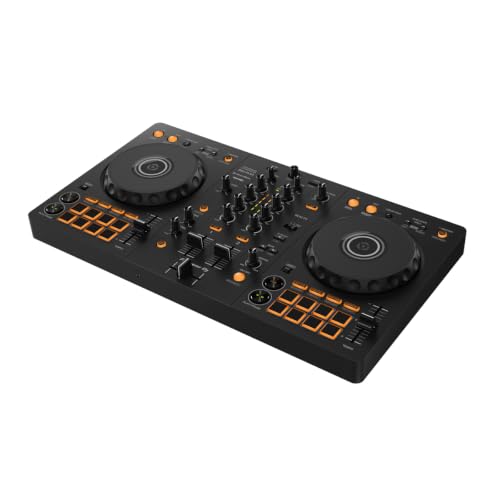
Pioneer DJ DDJ-FLX4 2-Channel DJ Controller
Badge: Best Overall
Beginners searching for the best midi dj mixers beginners usually need one thing more than they need a mixer: a first setup that teaches real skills without punishing early mistakes. The Pioneer DJ DDJ-FLX4 is that setup, and it leads this guide because its own listing reads like a beginner syllabus — a two-channel controller with sixteen performance pads, a Smart Fader that helps first mixes stay musical, streaming readiness, and a microphone input for broadcasting from one device. Every control on it is a MIDI control, so nothing you learn here is a dead end: cues, loops, pads and mixing translate directly to the bigger surfaces in this category.
Strengths
- It is a true MIDI controller: every control speaks to the software, so the skills you learn are software-DJ skills from the first session.
- Smart Fader quietly handles the hardest beginner problem — keeping two tracks musical while you learn — so early sets sound encouraging instead of discouraging.
- The microphone input and streaming-ready design mean your first broadcasts need no extra mixer, interface or routing puzzle.
Trade-offs
- It only works with a computer and software running; there is no standalone mixing when the laptop is closed.
- Two channels is the format — enough to learn on, and a ceiling you will meet in a year or two of growth.
- It is a controller, not a mixer: DJs who fall in love with turntables will eventually move to a mixer-based rig and this becomes the portable spare.
| Detail | From the listing |
|---|---|
| Format | 2-channel DJ controller, 16 pads |
| Finish | Graphite |
| Features from listing | Smart Fader, streaming-ready |
| Microphone | Mic input for livestreaming from one device |
The design intelligence is in what it forgives. Beatmatching by ear is a month-three skill; Smart Fader and the software’s sync tools let month-one sets sound like music anyway, which keeps beginners practising long enough to actually acquire the month-three skills. The layout deliberately mirrors the club-standard arrangement, so the muscle memory built at a bedroom desk transfers to booth gear later instead of needing to be unlearned.
Its ceiling is honest and distant enough not to matter yet: two channels, software always required, and a controller’s inherent limit — it is one integrated instrument rather than a hub for turntables. A beginner who outgrows an FLX4 has become a DJ, which is the outcome the purchase was for. Start here unless you already know turntables are your destination, in which case read the mixer-first pick next.
Best for: first-time DJs learning software DJing, streaming and performance basics in one purchase / Not suited for: vinyl-first beginners and anyone who wants a setup that works with the laptop closed

Pioneer DJ DJM-250MK2 2-Channel DJ Mixer
Badge: Best Mixer-First Route
Some beginners know from the first day that their hands belong on decks — they have turntables, or a family member’s media players, or simply the certainty that vinyl-style control is the craft they want. For them, the correct first purchase is a real mixer, and the DJM-250MK2 is the beginner-shaped one: a two-channel, club-style Pioneer mixer with a Sound Color FX filter and a free rekordbox DVS unlock in the box, so a laptop library can be driven from control vinyl or CDs through a surface that works exactly like the booths it imitates.
Strengths
- A genuine standalone mixer at the centre of a real rig: turntables or players plug in, and the mixing happens in hardware, not in a laptop’s mood.
- The included rekordbox DVS unlock means a digital library can be played from control vinyl or CDs — the beginner-with-decks path, complete in one box.
- Club-style layout means the skills transfer directly to the booths most working DJs eventually stand in.
Trade-offs
- It is only the centre of the rig: decks, headphones and a computer for DVS are separate purchases, so the true starting cost is higher than a controller’s.
- Its MIDI conversation is narrower than a performance controller’s — it is a mixer first, and pad-driven performance is not its language.
- A beginner without decks yet is buying a hub for equipment they do not own; the controller pick is the honest start for them.
| Detail | From the listing |
|---|---|
| Channels | 2-channel club-style workflow |
| Effects | Sound Color FX Filter |
| Software | Free rekordbox DVS unlock |
| Colour | Black |
The learning experience differs from a controller’s in a way that suits this beginner. The mixer always works — no software open, no driver mood — and the discipline of gain, EQ and channel faders is learned as physical craft. DVS then adds the digital library without changing the hands, which is the historic path a generation of DJs walked, preserved here at an entry scale.
Price the whole rig before choosing this road: the mixer is the hub, and hubs need spokes. A beginner with no decks is usually better served by the FLX4’s completeness, while a beginner with decks already in the house will find this the most durable first purchase in the guide — and the natural companion read is our wider Best Midi Mixers survey, where this mixer’s category neighbours live.
Best for: beginners who already own or are committed to turntables or media players / Not suited for: beginners starting from zero equipment, who need the whole instrument in one box

Numark Scratch 2-Channel DJ Scratch Mixer
Badge: Best Step-Up Pick
Every beginner guide needs one pick labelled honestly as the second purchase, and the Numark Scratch is this one. It is a complete Serato performance instrument — Serato DJ Pro and a DVS license included, an Innofader crossfader, eight performance pads, FX paddles and 24-bit audio — and it is listed here, linked, because a significant minority of beginners are not really beginners: they are returning DJs, musicians with fast hands, or buyers who know themselves well enough to buy once. For them, starting on a step-down surface is the expensive route.
Strengths
- The most complete software bundle in this guide: Serato DJ Pro and the DVS license included, so the step-up has no hidden second invoice.
- Eight performance pads and FX paddles deliver the full MIDI performance vocabulary — the techniques a beginner watches in videos, available on the surface.
- The Innofader crossfader is built for scratch technique, the skill that outgrows beginner crossfaders first.
Trade-offs
- It costs a beginner real commitment money for capabilities — battle performance, DVS depth — that the first months will not use.
- Serato-centred: a beginner leaning toward rekordbox should step up inside that ecosystem instead.
- Like the 250MK2, it is a mixer: decks and the rest of the rig are separate, so its true rig cost exceeds its listing.
| Detail | From the listing |
|---|---|
| Channels | 2-channel DJ scratch mixer |
| Crossfader | Innofader crossfader |
| Software | Serato DJ Pro included, DVS license |
| Performance | FX paddles, 8 performance pads |
| Audio | 24-bit audio |
For everyone else, its role in this guide is to define the ceiling of the beginner tier so the other picks can be judged against it. The FLX4 teaches the same software language in a forgiving, complete package; the Scratch speaks it at full fluency. The distance between them — pads used fully, DVS mastered, a crossfader that rewards advanced technique — is roughly the distance of a first year or two of practice, and there is no shame in either direction of travel.
Choose it now if your budget comfortably absorbs the whole rig around it and your commitment is proven rather than hoped. Choose it later, with this guide’s blessing, if it is not — the second-hand market for beginner controllers exists precisely because the sensible path is staged. Our main Best Midi Mixers guide takes the Scratch as its overall pick and develops the comparison from there.
Best for: committed beginners, returning DJs and fast learners who would rather buy once / Not suited for: uncertain first-timers, for whom the controller route risks far less money
Pioneer DJ DDJ-REV1
Badge: Best Battle-Style Controller
The DDJ-REV1 exists because “beginner” splits into tribes, and one tribe wants to scratch. Pioneer arranged this controller like a battle rig — jog wheels positioned and sized for scratch technique, mixer section in the middle, performance pads where a battle DJ’s hands expect them — and paired it with Serato DJ Lite so a first setup teaches the open-format vocabulary from day one. For a beginner whose heroes are turntablists, that layout is not a cosmetic preference; it is the difference between practising the real movements and approximating them.
Strengths
- Its layout imitates a turntable-and-battle-mixer rig, so beginners drawn to scratch culture learn on a surface shaped like their destination.
- A true MIDI controller for Serato DJ Lite, with a natural upgrade path inside the same software family.
- Pads and performance controls are placed for the techniques open-format beginners actually practise first.
Trade-offs
- Battle layout is a specialisation: beginners headed for long club-style blends may prefer the FLX4’s club arrangement.
- Like every controller, it is silent without a computer and software.
- Guide-only pick: described for comparison with no store link and no image, per this guide’s verification standard.
Against the FLX4, the choice is philosophical rather than technical. The FLX4’s club-style layout and Smart Fader optimise for getting mixes to sound good quickly; the REV1 optimises for hand technique and battle fluency, with a steeper first month as the price. Both are genuine MIDI controllers, both teach transferable skills, and both will be outgrown at roughly the same level — by which point the beginner is a DJ with a style, choosing a step-up that matches it.
It is covered here as a guide-only pick, without a link, because this guide links only the listings verified for it. Within a beginner shortlist, it is the one to research further if scratching is the point of the exercise rather than a party trick at the end of it.
Best for: beginners whose goal is scratch and open-format technique from the start / Not suited for: beginners aiming at smooth club-style blending, who will learn faster on the FLX4 layout
Guide-only pick: covered here for comparison, with no store link and no product image, because we only link listings we can verify.
Hercules DJControl Inpulse 500
Badge: Best Guided Learning
Some beginners do not need a cheaper controller; they need a teacher attached to one. The Hercules DJControl Inpulse 500 is the category’s clearest attempt at that: a two-channel MIDI controller with beatmatch guide lights that show where the tempo and alignment need to go, backed by a learning ecosystem of structured lessons. For a beginner practising alone, without a mentor in the room, that feedback loop — try, see, correct — compresses the most frustrating month of learning DJing into something considerably kinder.
Strengths
- Beatmatch guidance lights and a structured learning ecosystem make it the most explicitly educational controller in the category.
- A full MIDI controller in its own right — the training wheels are additions, not substitutes for real controls.
- Its software pairing is aimed at beginners, with a gentler first-run experience than pro platforms assume.
Trade-offs
- Its ecosystem is its own; a beginner graduating to club-standard software will change platforms as well as hardware.
- The teaching features have a natural expiry date — valuable for months, invisible thereafter.
- Guide-only pick: no store link and no image, in line with this guide’s verification rule.
It is important to say what it is not: it is not a toy that stops being a controller where the lessons end. The surface is a real performance surface, and a beginner who masters beatmatching on it has mastered beatmatching. The honest trade-off is ecosystem gravity: its home software is a beginner platform, and the graduate’s next step involves adopting the professional software world as well as new hardware, where the Pioneer and Numark picks start inside that world from the beginning.
Choose it if the learning structure is the thing you are actually buying — for a young beginner, a self-taught adult with limited practice time, or anyone who knows they stall without feedback. It is presented here without a link, under the same verification policy as the other guide-only picks.
Best for: self-taught beginners who learn best with structure, feedback and lessons / Not suited for: beginners already certain they want the club-standard ecosystem from day one
Guide-only pick: covered here for comparison, with no store link and no product image, because we only link listings we can verify.
Numark M2 2-Channel Scratch DJ Mixer
Badge: Best Analog Starter (No MIDI)
The M2 closes this guide the way a good teacher closes a lesson: with the exception that proves the rule. It is a genuinely good first scratch mixer — beginners have learned on its 3-band EQ, its mic input and its forgiving, replaceable crossfader for years — and it contains no MIDI whatsoever. A beginner who wants to DJ from two turntables and a crate of vinyl needs nothing more than this and speakers. A beginner who wants to DJ from software gets, from this mixer, exactly silence where the cues should be.
Strengths
- A proven first scratch mixer: 3-band EQ, a microphone input and a replaceable, slope-adjustable crossfader in a rack-mountable body.
- Completely computer-free — two turntables and this mixer are a whole, working, honest DJ rig.
- The replaceable crossfader suits beginners perfectly: the part a learner wears out first is a spare part, not a funeral.
Trade-offs
- No MIDI and no USB at all: it cannot run DJ software, so it fails this guide’s title test completely — it is here as the labelled exception, not a recommendation for software beginners.
- No DVS without an added interface, at which point software beginners should simply buy a software-native surface.
- Covered prose-only by design: a fine mixer that must not be linked under a MIDI heading.
| Detail | From the listing |
|---|---|
| Channels | 2-channel scratch DJ mixer, rack-mountable |
| EQ | 3-band EQ |
| Microphone | Mic input |
| Crossfader | Replaceable, slope-adjustable crossfader |
That is why it appears here without a link and with its limitation in its badge. Search results for beginner MIDI mixers surface analog bargains constantly, because the word “mixer” is doing two jobs at once, and the cheapest way to ruin a first month of DJing is to buy the wrong one confidently. If the M2’s spec box above looks like everything you need, then your ambition is analog, and you should follow it happily — through analog listings, with this guide’s respect. If it looks like something is missing, you have understood MIDI, and the picks above are your list.
One middle path deserves naming: beginners unsure which tribe they belong to should start with the FLX4, because a controller can imitate an analog workflow inside software far better than an analog mixer can imitate software. Indecision is itself a specification, and it points at the most flexible tool.
Best for: vinyl-only beginners building a first turntable rig on a budget / Not suited for: software beginners — this is the one pick in the guide that cannot run your library
Guide-only pick: covered here for comparison, with no store link and no product image, because we only link listings we can verify.
Comparison Table
The beginner decision in one view: what each pick is, what it needs around it, and the tribe it teaches best. The listing column reflects this guide’s verification policy.
| Pick | Type | Needs around it | MIDI? | Listing |
|---|---|---|---|---|
| Pioneer DJ DDJ-FLX4 2-Channel DJ Controller | DJ controller | A computer and speakers | Yes — full control surface | Check on Amazon |
| Pioneer DJ DJM-250MK2 2-Channel DJ Mixer | DJ mixer | Decks, computer for DVS, speakers | Partly — DVS hub, mixer first | Check on Amazon |
| Numark Scratch 2-Channel DJ Scratch Mixer | DJ scratch mixer | Decks, computer, speakers | Yes — pads, FX, DVS | Check on Amazon |
| Pioneer DJ DDJ-REV1 | DJ controller | A computer and speakers | Yes — battle layout | Guide-only pick |
| Hercules DJControl Inpulse 500 | DJ controller | A computer and speakers | Yes — guided learning | Guide-only pick |
| Numark M2 2-Channel Scratch DJ Mixer | Analog DJ mixer | Turntables and speakers only | No MIDI at all | Guide-only pick |
How to Choose the Best Midi Dj Mixers Beginners Actually Need
Start by naming your tribe, because beginner DJing has three and they buy differently. The software tribe wants to mix a digital library with modern tools — they should start on a controller, full stop. The deck tribe has turntables or players already, or burns for them — they start with a mixer and DVS. The scratch tribe cares about one technique above all — they choose battle-shaped surfaces in either form. Every regret in beginner DJing is a tribe mismatch: the software beginner who bought an analog mixer, the deck beginner who bought a controller and missed their records, the scratch beginner on a surface shaped for blending.
Then price the rig, not the item. A controller’s listing is close to its true cost: add speakers or good headphones and a laptop you already own. A mixer’s listing is the hub of a rig — decks, cartridges or media, the computer, the speakers — and the honest total is several times the mixer alone. Beginners routinely compare a controller’s price to a mixer’s price and conclude the mixer is the grown-up bargain; the grown-up bargain is the setup whose total you can actually fund this month, because an unfunded rig teaches nothing in a cupboard.
Weigh assistance features without embarrassment. Sync, Smart Fader, beatmatch guides and structured lessons are not cheating; they are scaffolding, and scaffolding is how skills get built before they are load-bearing. The test of a beginner surface is whether its help can be switched off gradually — assistance you can retire as your ears grow is a curriculum, while assistance you cannot is a crutch with a price tag. The picks in this guide pass that test in different dialects, and the wider category context sits in our Best Midi Mixers survey.
Finally, plan the second purchase while making the first. Every pick here has a known next step — controller to performance mixer, beginner mixer to step-up, guided platform to professional software — and a first purchase whose ecosystem leads where you want to go saves a library migration later. Choose the software world (Serato or rekordbox) as deliberately as the hardware; your organised library will outlive your first surface, and it should not have to move house when the surface does.
Your First Mix: a Beginner Session, Step by Step
Set up once, properly, and the first session can be about music. Connect the controller or mixer to the computer by USB, select it inside the DJ software as the audio device, and plug headphones into the surface — not the laptop — because cueing (previewing the next track privately) is the foundational DJ act and it happens on the hardware. Load two tracks you know well and love; familiarity is a teaching aid, because you will hear your mistakes against music your memory can correct.
The first skill is not beatmatching; it is structure. Play track one. With track two cued in your headphones, find its first strong beat and set a cue point there. Start it in time with track one, listen in the headphones to whether it drifts, and nudge it back — with jog wheels, tempo, or the assistance features your surface offers, without shame. Then practise the exchange itself: EQ down the outgoing track’s bass as the new track’s bass arrives, ride the crossfader or channel faders across, and let the new track own the room. Repeat with the same two tracks until the exchange is boring; boring is what competence feels like from inside.
Add one technique per session thereafter — a loop, a pad-fired cue jump, a filter sweep — and record your practice sets. Listening back is the fastest teacher a beginner has, because the mix you remember performing and the mix you actually performed are cousins, not twins. Care for the rig as you go: cables coiled, the surface covered, the laptop’s library backed up. A beginner’s library is months of work wearing a disguise as a folder.
Problem: the two tracks drift apart no matter what you do. → Their tempos differ more than your nudging can hold. Match tempos first — by ear with the tempo faders, or with sync while your ear learns — and start the incoming track on a strong shared beat. Drift is arithmetic before it is talent.
Problem: you cannot hear the next track in your headphones. → The cue mix is set to the master output. Find the cue/master blend control on the surface and turn it toward cue, and confirm the track’s cue button is lit. Every beginner meets this silence once.
Problem: the mix sounds muddy when both tracks play. → Two basslines are fighting. Turn the outgoing track’s low EQ down as the new one enters — the bass swap is the single most useful mixing habit a beginner can build.
Controllers vs Mixers: the First Decision, Made Properly
Beginners inherit a false war from DJ culture: controllers versus mixers, as if one were real DJing and the other a rehearsal for it. The truth is duller and more useful. A controller is a complete software instrument — decks, mixer, sound card and MIDI surface in one USB box — optimised for learning, portability and value. A mixer-based rig is a modular system — separate decks feeding a central mixer — optimised for component quality, upgrade paths and the vinyl tradition. Both play real sets in real venues every night of the week.
For a beginner, the practical differences are three. Completeness: the controller works the day it arrives; the mixer rig works when its last component does. Cost shape: the controller concentrates spending; the rig spreads it across pieces that can be upgraded one at a time. Skill shape: the controller teaches the software’s whole language at once; the rig teaches physical craft first and software second. None of those is a verdict — they are a matching exercise against your budget, your patience and your tribe, and the picks in this guide were arranged so each tribe finds its honest answer. The grown-up version of the same argument, at performance level, runs through our Best Midrange Audio Mixers coverage.
One more difference rarely gets mentioned and matters at 1 a.m. in a bedroom studio: failure modes. A controller rig has essentially one failure mode — the computer — and one cable between it and the surface. A modular rig has a failure mode per connection, which is wonderful for a working DJ with spares and miserable for a beginner diagnosing silence at midnight with a tutorial paused on screen. Beginners underestimate how much of learning is momentum, and momentum is what simple, reliable setups protect. When the rig grows, it should grow because your sets demand it, not because complexity was mistaken for seriousness.
The First-Year Roadmap: What to Learn, in What Order
Beginners improve fastest when the order of learning is deliberate, because DJ skills stack: each one assumes the previous. The first month belongs to structure and cueing — loading tracks, setting cue points, starting on the beat, hearing drift and correcting it. Nothing else matters until exchanges between two tracks are reliable, and the temptation to skip ahead to effects is the beginner’s most expensive impulse, because effects applied to an unstructured mix are decoration on a building with no frame.
Months two to four belong to EQ and phrasing: the bass swap until it is reflex, counting bars so exchanges land where the music breathes, and building the habit of recording every practice set and listening back with a notebook. This is also when a beginner’s library discipline forms — organising by energy and key awareness rather than by download date — and it quietly determines the ceiling of year two more than any hardware choice in this guide.
The second half of the first year belongs to personality: loops and pads as musical tools rather than tricks, a personal transition vocabulary, reading a room even if the room is a livestream chat, and the first honest assessment of tribe — whether the sets you love making are blends, battles or open-format journeys. That assessment, made from evidence, is what should choose your step-up purchase when the beginner surface starts to feel small. The roadmap is the same on every pick in this guide; only the surface under it changes, which is why the first purchase matters less than beginners fear and the practice matters more.
Common Buying Mistakes
- Buying an analog mixer for software DJing. The canonical beginner error, preserved in this guide as the M2: a good mixer, no MIDI, a silent first month. Verify pads, USB and software before any mixer purchase.
- Comparing a mixer’s price to a controller’s price. The mixer is a hub awaiting spokes. Price the whole rig you will actually assemble, or the comparison is fiction.
- Refusing assistance features on principle. Sync and smart tools are scaffolding. Beginners who use them to survive month one are playing in month six; purists who quit are not playing at all.
- Buying the step-up first to “save money”. Sometimes right, usually a way to spend performance money before knowing if the hobby survives contact with practice. Buy once only when commitment is evidence-based.
- Neglecting headphones and speakers in the budget. Cueing is impossible without headphones on the surface, and a rig you cannot hear properly teaches you to mix badly with great confidence.
Everything in this guide reduces, in the end, to a single piece of beginner economics: the money is not the risk, the momentum is. A modest surface bought this week and played daily for a year produces a DJ; a perfect surface researched for six months and played nervously produces a former beginner with excellent product knowledge. Let the badges narrow the field to your tribe, let the budget be honest about the whole rig, and then let the practising start — the gear debate is only ever the prologue.
Final Recommendation
For most beginners, the answer is the Pioneer DJ DDJ-FLX4: a complete MIDI instrument that forgives the first hundred hours, teaches transferable skills, streams from day one and asks for nothing else in the box — Check on Amazon. If you already own decks, skip the controller entirely and start with the DJM-250MK2 as the hub of a DVS rig — Check on Amazon.
Choose the REV1 if scratching is your religion, the Inpulse 500 if structured guidance is how you learn, and the Numark Scratch if your commitment is proven and buying once is genuinely cheaper for you. Leave the M2 to the vinyl beginners it serves well. Whichever surface you choose, choose it this week and practise next week — the best beginner mixer is the one under your hands while the enthusiasm is still loud.
Frequently Asked Questions
Should a beginner buy a DJ controller or a mixer?
A controller, unless you already own turntables or media players. A controller is the complete instrument — decks, mixer, sound card and MIDI surface — in one purchase that works the day it arrives. A mixer is the centre of a rig whose other components cost several times the mixer itself. Deck owners are the honourable exception: for them, a mixer with DVS is the correct first purchase.
What does MIDI mean for a beginner DJ?
It means your surface controls the DJ software: pads fire cue points and samples, controls adjust the software’s effects and loops, and your library lives in the laptop. Every beginner controller and software mixer in this guide is a MIDI device. The warning that follows: an analog mixer has no MIDI and cannot run DJ software at all, however DJ-shaped it looks.
Is using sync cheating for a beginner?
No. Sync and tools like Smart Fader are scaffolding that keeps early sets musical while your ears develop. The professional skill is knowing what a good mix sounds like and choosing the right tracks in the right order — sync only handles tempo arithmetic. Use the assistance, practise with it off sometimes, and retire it gradually as your beatmatching becomes reliable.
How much should a beginner spend on a first setup?
Enough to buy a genuine MIDI surface from a real DJ brand, and not so much that the rest of the rig — headphones, speakers, music — goes unfunded. In practice that means a beginner controller for most people. Spending step-up money first only makes sense when your commitment is already proven by practice on borrowed or rented gear.
Can I stream my DJ sets as a beginner?
Yes, and one pick here is built for it: the DDJ-FLX4 has a microphone input and a streaming-ready design, so your voice and music reach the stream from one device. Streaming early is genuinely good practice — an audience, even a tiny one, teaches set-building faster than bedroom repetition alone.
When will I outgrow a beginner controller?
Typically after a year or two of regular practice, when you want more performance depth, a second setup for gigs, or a mixer-based rig. Outgrowing your first surface is the success condition, not a failure of the purchase — and beginner controllers hold their value well precisely because the next beginner is always arriving.
What else do I need besides the controller or mixer?
Headphones that plug into the surface for cueing, speakers or a good monitoring option, a computer that runs the DJ software comfortably, and music — a library you own or a streaming service the software supports. Budget for the headphones and speakers alongside the surface; a rig you cannot hear properly cannot teach you to mix.


