Disclosure: topratedkitchenware.com is reader-supported. When you buy through links on our site, we may earn an affiliate commission from Amazon and other retailers, at no extra cost to you.
Where to buy
This guide to the best midi mixers links the three picks whose listings were verified for it — a complete DJ control surface, a Serato mixer-commander and a DVS hub — and covers the other three as guide-only picks, described in full with no store link and no image, because we link only what we have verified. Prices in this market move often, so check the latest price on Amazon for a linked pick rather than trusting any figure printed in a guide.
- Best Overall: Pioneer DJ DDJ-FLX4 2-Channel DJ Controller — Check on Amazon
- Best DJ Mixer with MIDI: Numark Scratch 2-Channel DJ Scratch Mixer — Check on Amazon
- Best DVS Hub: Pioneer DJ DJM-250MK2 2-Channel DJ Mixer — Check on Amazon
- Best Premium: Pioneer DJ DJM-S11 (guide-only pick — described in full below, no store link)
- Best for DAW Mixing: Akai Professional MIDImix (guide-only pick — described in full below, no store link)
- Best Analog Contrast (No MIDI): Numark M2 2-Channel Scratch DJ Mixer (guide-only pick — described in full below, no store link)
Read the full guide ↓
The best midi mixers come in two dialects that share a name and almost nothing else, and untangling them is this guide’s first job. In the DJ dialect, a MIDI mixer is a surface that plays DJ software — pads firing cues, controls mapped to loops and effects, a crossfader at the centre of a performance. In the production dialect, it is a fader surface that mixes tracks inside a DAW, moving the software mixer’s sliders with real fingers. Both are genuine MIDI devices, because MIDI is a control language rather than a sound: no audio travels through it, only instructions. The six picks below cover both dialects honestly — three linked, three guide-only — plus one excellent analog mixer included, unlinked and clearly badged, because it marks the exact border where MIDI stops.
That border matters commercially, not just semantically. Search results for MIDI mixers cheerfully include audio mixers with USB recording (which move sound, not control), streaming consoles with no performance controls at all, and analog mixers from before the conversation started. Two such consoles from this guide’s assigned pool were excluded entirely rather than dressed up as picks, and the reasoning is recorded in the sources file. What remains is the real category: surfaces that talk to software, judged by how fluently they talk, what they cost the rest of your rig, and which dialect your work speaks.
Read the reviews in that spirit. Each pick is placed on the category map before it is praised: what it controls, what it needs around it, and what it cannot do at all. The linked picks carry verified specification boxes drawn from their own listings; the guide-only picks are described in the qualitative terms their reputations support, without invented numbers; and the analog pick’s specification box is printed in full precisely because it is the most instructive object in the guide — a complete, respectable mixer specification in which the word MIDI never appears, because the thing itself never appears either.
Key Takeaways
- MIDI carries control, not audio: a MIDI mixer is a surface whose knobs, faders and pads instruct software — in a DJ program or a DAW.
- The category has two dialects — DJ performance surfaces and DAW fader surfaces — and the first buying decision is which one your work speaks.
- Three picks here are linked (a complete controller, a Serato mixer, a DVS hub); three are guide-only, including the premium reference and the DAW standard.
- A USB audio mixer is not automatically a MIDI mixer: recording a stereo feed to a computer involves no control conversation at all.
- The analog M2 is included unlinked as the border marker — a good mixer with zero MIDI, so the category edge is visible before money crosses it.
- Mapping depth is the premium feature: the more a surface can be reassigned, the longer it survives software’s evolution.
In this guide
Quick Picks
Six surfaces that map the whole category — both dialects, the premium ceiling, and the analog border. Badges match the detailed reviews, and the listing policy is the one explained above.
| Badge | Pick | Standout trait |
|---|---|---|
| Best Overall | Pioneer DJ DDJ-FLX4 2-Channel DJ Controller | A complete MIDI control surface for DJ software — decks, mixer, pads, mic input |
| Best DJ Mixer with MIDI | Numark Scratch 2-Channel DJ Scratch Mixer | A real mixer at the centre of a MIDI rig — Serato included, pads, DVS, Innofader |
| Best DVS Hub | Pioneer DJ DJM-250MK2 2-Channel DJ Mixer | Club-style mixer with rekordbox DVS unlock — the bridge between decks and software |
| Best Premium | Pioneer DJ DJM-S11 | Touchscreen battle mixer with the deepest MIDI mapping in the DJ category |
| Best for DAW Mixing | Akai Professional MIDImix | A compact USB MIDI fader surface for mixing tracks in a DAW, not for DJing |
| Best Analog Contrast (No MIDI) | Numark M2 2-Channel Scratch DJ Mixer | A fine scratch mixer with zero MIDI — the boundary of the category, labelled |
How These Picks Were Chosen
This guide is research-led, and its selection rule was definitional: a pick had to be a genuine MIDI control surface — hardware whose controls send MIDI that software obeys — in either the DJ or the DAW dialect, or be included openly as the labelled analog exception. That rule excluded products that keyword searches constantly misfile here: audio mixers whose USB port only records a stereo blend, and streaming consoles with no performance controls and no MIDI implementation. Two pool consoles were excluded on exactly those grounds, and the exclusion is documented in this guide’s sources file rather than silently absorbed.
The surviving category was arranged by the decisions buyers face: the complete integrated surface, the modular command-centre mixer, the DVS bridge for deck-based DJs, the premium ceiling, the DAW dialect’s standard-bearer, and the border case. The three linked picks were verified against their listings for this guide; their spec boxes contain only what those listings state. Guide-only picks are described qualitatively from established product knowledge, with no invented specifications and no prices, and no hands-on lab claims are made anywhere in the guide.
Prices are omitted deliberately — they move too often to print honestly — and each linked pick’s live listing is one click from its name. The judgements rest on verified features for linked picks, category knowledge for guide-only picks, and the recurring regrets of MIDI buyers: dialect confusion at purchase, audio mixers mistaken for control surfaces, and premium mapping depth bought by users who never open a mapping editor. Readers whose work is audio-first rather than control-first will find the neighbouring territory mapped in our Best Midrange Audio Mixers coverage.
The 6 Best Midi Mixers, Reviewed in Detail
Badges match the Quick Picks table. Linked picks carry verified spec boxes; guide-only picks are described qualitatively, and the analog pick’s verified spec box is included deliberately — it is the fastest way to learn what “no MIDI” looks like on paper.
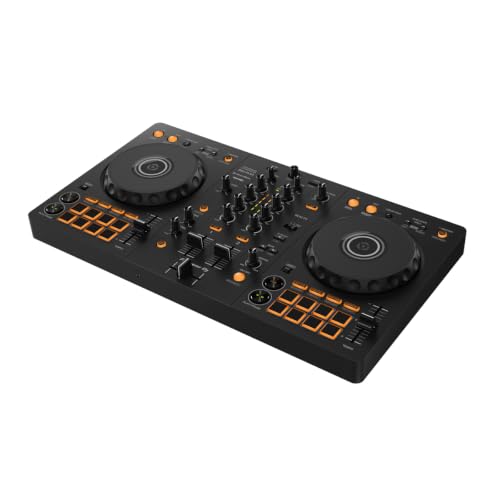
Pioneer DJ DDJ-FLX4 2-Channel DJ Controller
Badge: Best Overall
Ask what a MIDI mixer is, in its purest current form, and the honest answer is a control surface: hardware whose every knob, fader and pad sends MIDI messages that software obeys. The Pioneer DJ DDJ-FLX4 is that idea complete in one unit — a two-channel DJ controller whose sixteen pads, jog wheels and mixer section exist entirely to play DJ software, with a microphone input and streaming-ready design rounding out a surface aimed at how DJing is actually done now. It leads this guide because it is the most widely useful true MIDI mixer a buyer can purchase without first deciding which sub-tribe of MIDI they belong to.
Strengths
- Every control is a MIDI control: jog wheels, faders, knobs and sixteen pads all converse with the software, which is the definition of this category in one box.
- It is a complete instrument — decks and mixer sections integrated — so the MIDI surface needs no other hardware to be useful.
- Smart Fader and the streaming-ready design, including a microphone input, make it the most approachable serious MIDI surface here.
Trade-offs
- It exists only with a computer and DJ software running; there is no standalone audio mixing at all.
- Its MIDI world is DJ software; producers wanting a fader surface for a DAW mixer should look at the MIDImix pick below.
- Two channels of mixer section is the format — multi-deck and multi-source producers will map around it or outgrow it.
| Detail | From the listing |
|---|---|
| Format | 2-channel DJ controller, 16 pads |
| Finish | Graphite |
| Features from listing | Smart Fader, streaming-ready |
| Microphone | Mic input for livestreaming from one device |
Its virtues for this category are architectural. Because the decks and mixer are one surface, the MIDI conversation is total: there is no part of the performance the software cannot see, and no audio path that bypasses it. Mappings can reshape the surface around a personal technique, and assistance features like Smart Fader sit inside the same conversation, helping early mixes while the hands learn. For livestreaming DJs, the microphone input folds the voice into the same single-device workflow.
The limits are the category’s limits, worn openly: no computer, no music. And its mixer section is a DJ mixer — two channels, performance-shaped — not a studio surface; producers whose MIDI mixing means balancing DAW tracks should read down to the MIDImix before deciding which dialect of MIDI they actually speak. As a default answer to this guide’s title, though, nothing here is more complete.
Best for: DJ software users who want one complete, mappable MIDI surface for performance and streaming / Not suited for: DAW producers needing a track-mixing surface, and anyone wanting hardware that works alone

Numark Scratch 2-Channel DJ Scratch Mixer
Badge: Best DJ Mixer with MIDI
If the FLX4 is MIDI as a complete instrument, the Numark Scratch is MIDI as a command centre: a real two-channel scratch mixer — audio genuinely passes through it, turntables and players genuinely plug into it — whose eight performance pads, FX paddles and controls simultaneously direct Serato DJ Pro. Its listing bundles the software and a DVS license, adds 24-bit audio, and centres everything on an Innofader crossfader, which is the component scratch DJs judge a mixer by. For DJs whose rig is modular, this is the MIDI mixer in the traditional sense of both words.
Strengths
- It is a genuine mixer — audio passes through it, decks plug into it — whose pads, FX paddles and controls simultaneously run the software: both halves of the MIDI mixer idea in one chassis.
- Serato DJ Pro and the DVS license are included, so the software side of the rig is settled in the same purchase.
- The Innofader crossfader gives the surface a professional performance centre that pure controllers approximate rather than replicate.
Trade-offs
- It needs the rest of a rig — decks or DVS media, a computer, speakers — so its listing price is the centre of a larger total.
- Its MIDI fluency is Serato-shaped; other software worlds are served by other picks in this guide.
- Two channels, battle layout: a performance instrument, not a multi-source studio surface.
| Detail | From the listing |
|---|---|
| Channels | 2-channel DJ scratch mixer |
| Crossfader | Innofader crossfader |
| Software | Serato DJ Pro included, DVS license |
| Performance | FX paddles, 8 performance pads |
| Audio | 24-bit audio |
The distinction matters because it decides what survives an upgrade. A controller is replaced whole; a mixer at the centre of a rig persists while decks, media and laptops rotate around it. The Scratch’s MIDI layer — pads firing cues and samples, paddles riding software effects — is what lifts it out of the analog mixer category entirely and into this guide, and the bundled licenses remove the unlock arithmetic that complicates rival purchases.
Its demands are equally clear: it is the middle of a rig, not the whole of one, and its Serato-centred world should be a deliberate adoption rather than an accident of purchase. DJs comparing the two linked philosophies in this guide — integrated surface versus command-centre mixer — are really choosing how they want to grow, and the comparison section below exists to make that choice legible. The performance-first development of this pick is what the rest of this guide keeps returning to.
Best for: modular-rig DJs who want a true mixer running Serato with pads, DVS and a pro crossfader / Not suited for: one-box buyers and non-Serato households

Pioneer DJ DJM-250MK2 2-Channel DJ Mixer
Badge: Best DVS Hub
The DJM-250MK2 represents the third dialect of MIDI-era mixing: the bridge. It is a club-style two-channel mixer in the traditional mould — Sound Color FX filter, hardware mixing that works with no computer present — whose included rekordbox DVS unlock lets control vinyl or CDs drive a digital library through it. The software becomes the library and the display; the hands stay on decks and a real mixer. For the large population of DJs whose technique is deck-based and whose crates have become files, that bridge is not a compromise but the destination.
Strengths
- The included rekordbox DVS unlock turns turntables or media players into controllers for a digital library, with the mixer as the permanent hub.
- A true standalone mixer underneath the digital layer: the analog craft of gain, EQ and faders works with the computer off.
- Club-style layout makes its skills — and its mappings — transferable to the booths its bigger siblings occupy.
Trade-offs
- Its MIDI layer is thinner than the performance picks’: it is a mixer with a software bridge, not a pad-driven performance surface.
- DVS needs control media, decks and a computer — the rig around it is a real investment beyond the mixer.
- rekordbox is its home; Serato-first DJs should start from the Scratch instead.
| Detail | From the listing |
|---|---|
| Channels | 2-channel club-style workflow |
| Effects | Sound Color FX Filter |
| Software | Free rekordbox DVS unlock |
| Colour | Black |
Judged as a MIDI surface it is deliberately modest, and this guide will not inflate it: there are no performance pads here, and its software conversation runs through DVS rather than through a forest of mappable controls. What it offers instead is permanence and transferability — a hub that behaves like the club standard, in booths and bedrooms alike, with a digital path that does not ask its owner to relearn their hands.
Choose it when the decks are the point and the software is the library. Choose the Scratch when the surface itself must perform, and the FLX4 when the whole rig should fit in one bag. Those three sentences are, in miniature, the whole modern MIDI mixer market — and the reason this guide links exactly those three.
Best for: deck-based DJs who want their turntables or players to drive a rekordbox library / Not suited for: pad performers and buyers wanting a complete one-box MIDI instrument
Pioneer DJ DJM-S11
Badge: Best Premium
The DJM-S11 is the premium expression of the DJ branch of MIDI mixers: a two-channel battle mixer with a touchscreen in its centre, performance pads, and MIDI mapping deep enough that professional DJs rebuild its behaviour around their own technique, across both major software platforms. It is covered here without a link, as the reference point that shows where the category’s ceiling sits — in screen integration, mapping depth and crossfader refinement, rather than in channel count, which stays at the battle-standard two.
Strengths
- A touchscreen on the mixer collapses the distance between surface and software — browsing, waveforms and settings at the point of performance.
- Extensive MIDI mappability across the major DJ platforms lets advanced users rebuild the surface around their technique.
- Battle-grade crossfader and pads make it a competitive instrument, not merely a connected one.
Trade-offs
- Premium pricing for refinement and depth, in a two-channel format — the money does not buy channels.
- Its depth is wasted on default-mapping users; it rewards the DJs who customise.
- Guide-only pick: no store link and no image, per this guide’s verification standard.
For most buyers its function in this guide is calibration. If your sets are two-deck, cue-driven and fader-led, the distance between the S11 and the linked picks will rarely appear in your work, and the honest purchase is below. If you compete, customise mappings per routine, or perform at a level where the laptop screen has become a genuine obstacle, the S11 is the surface that removes it. Premium tiers are best bought from evidence of need, and this one is no exception.
Best for: advanced and professional battle DJs who customise mappings and perform with screens / Not suited for: default-mapping users and anyone whose budget has louder needs elsewhere in the rig
Guide-only pick: covered here for comparison, with no store link and no product image, because we only link listings we can verify.
Akai Professional MIDImix
Badge: Best for DAW Mixing
Half the people searching this keyword are not DJs, and the MIDImix is their pick. In production language, a MIDI mixer is a fader surface for a DAW: rows of physical sliders and knobs, sending MIDI messages that move the software mixer’s tracks, pans and sends. The Akai MIDImix became the standard-bearer of that idea for laptop producers — a compact USB surface, closely integrated with Ableton Live, that restores the oldest mixing pleasure there is, riding several faders at once with actual fingers, to a screen-bound workflow.
Strengths
- It is the other true meaning of “MIDI mixer”: a bank of physical faders and knobs that mix tracks inside music-production software.
- Compact and USB-powered in concept, it brings hands-on balance and pan control to laptop production without a desk of equipment.
- Its Ableton Live integration made it a standard first control surface for producers.
Trade-offs
- It makes no sound at all: it is a pure controller, useless without a computer and DAW, and irrelevant to DJ performance.
- Small faders are for balance, not for scratch technique or live DJ transitions.
- Guide-only pick: described for comparison with no store link and no image, per this guide’s standard.
It shares this guide with DJ surfaces because the protocol and the phrase are shared, and the most useful thing a guide can do is separate the dialects cleanly. The MIDImix cannot DJ: no crossfader culture, no cue workflow, no decks. The DJ picks cannot mix a DAW session with anything like its fader-per-track directness. Neither fact is a criticism; they are the map of the category, and a buyer who knows which dialect they speak has done most of the shopping already.
Producers should also note its honest scale: it is a laptop-class surface, with the short faders and compact spacing that portability imposes, and it is covered here in prose without a link under the same verification policy as the other guide-only picks. For hands-on DAW balance on the move, it remains the reference design.
Best for: music producers who want physical faders for DAW tracks, especially in Ableton Live / Not suited for: DJs of any kind — this surface has no DJ workflow in it
Guide-only pick: covered here for comparison, with no store link and no product image, because we only link listings we can verify.
Numark M2 2-Channel Scratch DJ Mixer
Badge: Best Analog Contrast (No MIDI)
The M2 closes this guide as its border marker. It is a respected two-channel scratch mixer — rack-mountable, 3-band EQ, microphone input, a replaceable and slope-adjustable crossfader — and it contains no MIDI whatsoever. It cannot fire a cue, move a software fader or tell a DAW anything. Placed beside the five genuine MIDI surfaces above, its spec box teaches the category faster than any essay: everything on it is about audio, and nothing on it is about control.
Strengths
- As an analog mixer it is genuinely good: 3-band EQ, mic input and a replaceable, slope-adjustable crossfader in a rack-mountable body.
- It needs no computer, no drivers and no software — the anti-fragile option in a category built on all three.
- Its replaceable crossfader makes its highest-wear part a service item.
Trade-offs
- No MIDI, no USB, no software conversation of any kind — by this guide’s title, it is the one pick that does not belong, included to mark the border.
- Producers and software DJs get nothing from it that their software does not already require a surface to express.
- Prose-only by deliberate policy: linking it under a MIDI heading would misdescribe a good product.
| Detail | From the listing |
|---|---|
| Channels | 2-channel scratch DJ mixer, rack-mountable |
| EQ | 3-band EQ |
| Microphone | Mic input |
| Crossfader | Replaceable, slope-adjustable crossfader |
It earns its unlinked place for the same reason it earns respect: plenty of buyers searching “MIDI mixer” are one wrong click from an analog bargain, and plenty of analog DJs are one wrong click from a controller they will hate. The M2 serves the second group’s real needs — two turntables, real records, no laptop — completely. It is simply not an answer to this guide’s question, and a guide that linked it as one would be lying with a URL.
If its spec list reads like exactly what you wanted, follow that instinct toward analog listings and enjoy a simpler rig. If it reads like a list of missing things, you are a MIDI buyer, and the five picks above are your shortlist — with the Best Midrange Audio Mixers category waiting when your needs grow past performance into production.
Best for: analog vinyl DJs who want a solid, serviceable scratch mixer and no software / Not suited for: every MIDI buyer — DJs in software and producers in DAWs alike
Guide-only pick: covered here for comparison, with no store link and no product image, because we only link listings we can verify.
Comparison Table
The whole category in one view: dialect, what the surface controls, and whether MIDI is present at all. The listing column reflects this guide’s verification policy.
| Pick | Dialect | Controls | MIDI? | Listing |
|---|---|---|---|---|
| Pioneer DJ DDJ-FLX4 2-Channel DJ Controller | DJ — integrated surface | DJ software, complete | Yes — every control | Check on Amazon |
| Numark Scratch 2-Channel DJ Scratch Mixer | DJ — modular mixer | Serato, pads and DVS | Yes — performance layer | Check on Amazon |
| Pioneer DJ DJM-250MK2 2-Channel DJ Mixer | DJ — DVS bridge | rekordbox library via decks | Bridge — DVS-led | Check on Amazon |
| Pioneer DJ DJM-S11 | DJ — premium battle | Serato and rekordbox, deep mapping | Yes — touchscreen tier | Guide-only pick |
| Akai Professional MIDImix | DAW — fader surface | DAW track mixer | Yes — pure controller | Guide-only pick |
| Numark M2 2-Channel Scratch DJ Mixer | Analog — none | Nothing; audio only | No MIDI at all | Guide-only pick |
How to Choose a MIDI Mixer
Choose your dialect first, because it is really a choice of software. DJ surfaces serve Serato, rekordbox and their relatives, and their controls are shaped for performance: pads, cue workflows, crossfaders. DAW surfaces serve Ableton Live, Logic, Cubase and their relatives, and their controls are shaped for mixing: faders per track, pans, sends, transport. A surface from one dialect is not a compromise in the other — it is a foreign language. Most buyers know their dialect instinctively once it is named; the ones who do not should buy for the software they will open daily, because the surface is only ever that software’s hands.
Next, decide your architecture. Integrated surfaces (the FLX4 pattern) put decks and mixer in one unit: complete, portable, replaced whole. Modular rigs (the Scratch and 250MK2 patterns) put a mixer at the centre of separate decks: more total cost, component-level upgrades, and a hub that survives several laptops. Neither is the advanced option; they are different shapes of commitment, and the right one is the one whose upgrade path matches how you actually spend — a little at a time on components, or in occasional whole-surface leaps.
Then weigh the depth of the MIDI conversation itself. Ask three questions of any candidate: what do its controls do in the software by default, can the mapping be edited, and does the price include the software or its unlock? Surfaces whose answers are “a lot, yes, and included” age gracefully; surfaces with fixed, shallow mappings are peripherals with an expiry date. Premium depth — the S11’s touchscreen tier — is worth its money only to users who will actually remap and perform at that level, a judgement this guide applies as firmly to its premium pick as to its budget logic elsewhere.
Finally, apply the border test that this guide applied to its own pool: if a product’s USB connection only carries audio to a recorder, it is an audio mixer, and no title wording changes that. The Best Mini Analog Mixers category exists for small audio surfaces that make no MIDI claim; buy there happily if audio is the job, and buy here when control is. One sentence summarises the whole section: choose the software, choose the dialect, choose the architecture — and let the surface be the last decision, because it is the one that expresses all the others.
How to Set Up and Map a MIDI Surface
Setup is a sequence, and order matters. Install the software first, connect the surface by USB second, and open the software last, so it meets the hardware on arrival. Confirm the surface is selected as both the audio device and the MIDI control device — the two selections are separate, and a surface can be audible while being control-deaf if only the first is done. Play something immediately and touch everything once: every control that moves something on screen is a confirmed conversation, and the first session is the cheapest time to find the one that is not.
Mapping deserves a beginner’s patience and an expert’s discipline. Live with the default mapping for several sessions before editing it; defaults encode the accumulated habits of thousands of users, and most early frustrations are vocabulary problems, not layout problems. Then change one thing at a time, aimed at a friction you have genuinely felt — a loop size your sets always need, a track fader your hand hunts for — and save each version with a date. Keep the factory mapping untouched and exported; it is your recovery point when an experiment goes wrong the night before a performance.
Care is the unglamorous half of ownership. Keep the surface covered when idle, because faders and pads collect dust exactly where they move; keep drinks behind the working area; and treat the computer as part of the instrument — backed-up library, managed storage, a spare USB cable in the bag. A MIDI rig fails socially before it fails electronically: the setup that is ready in five minutes gets used daily, and daily use is where the value of every pick in this guide actually lives.
Problem: the software plays audio but ignores the controls. → The MIDI side is not connected even though the audio side is. Check the software’s controller or MIDI settings and select the surface there explicitly; the two connections are configured separately.
Problem: a control moves the wrong thing after remapping. → A mapping conflict — two assignments on one message. Return to the saved default, re-apply your changes one at a time, and test after each. Version discipline turns this from a crisis into a two-minute repair.
Problem: noticeable delay between a pad press and the sound. → Latency lives in the audio buffer. Lower the buffer size in the software’s audio settings until response feels immediate, backing off one step if crackles appear, and connect the surface directly rather than through a hub.
MIDI Mixers vs Audio Mixers: Where the Line Really Is
The line is a question: does the product give orders, or only carry sound? An audio mixer takes signals in, blends them and sends the blend onward — to speakers, to a recorder, to a computer as one stereo feed. A MIDI mixer takes gestures in — a fader moved, a pad struck — and sends instructions onward, while the sound itself is made and mixed inside software. The two products can look like siblings on a shelf, share channel counts and even share names across a brand’s range, and they remain different species: one is plumbing, the other is a keyboard for software.
Hybrid products complicate the picture usefully. The Scratch in this guide is both: a real audio mixer whose performance layer speaks MIDI fluently. The DJM-250MK2 is an audio mixer with a DVS bridge to software. Recognising hybrids for what they are — and pricing each half honestly — is the advanced form of the border test, and it is why this guide describes each pick’s exact position rather than awarding the category label wholesale. Buyers who discover, through this section, that their need is actually a small audio mixer should follow it without embarrassment: the honest neighbouring shelf is our coverage of the Best Midrange Audio Mixers, where no control claims are made at all.
Latency and Feel: Why Two MIDI Surfaces Differ Under the Hands
Specifications make MIDI surfaces sound interchangeable — the same protocol, the same messages — and hands know better within a minute. The differences live in latency and in physical feel. Latency is the delay between a gesture and its audible result, governed mostly by the software’s audio buffer and the computer’s load. At performance settings it shrinks to a few milliseconds and disappears from consciousness; at careless settings it turns pad work mushy and scratch timing into guesswork. Every surface in this guide can achieve the good end of that range on a healthy computer, which is why the setup section treats buffer discipline as part of the instrument.
Feel is the other half, and it is why crossfaders have brand names and pads have reputations. A scratch DJ plays the crossfader as an instrument, thousands of movements a set, and the difference between a fader built for that and one merely present is the difference between a mixer that disappears and one that argues. Pad response, knob resistance, the spacing that lets a hand work in the dark — these are the specifications that never appear in a spec box, and they are the honest reason premium surfaces cost what they do. Buyers who can should touch before they buy; buyers who cannot should weight the judgements of performers in their own dialect more heavily than any feature list, including the ones in this guide.
The encouraging truth is that the floor of the category is high. Even the accessible surfaces here respond fast enough and feel coherent enough to learn on properly, because MIDI itself is a mature, lightweight protocol that modern computers handle trivially. What grows with price is not basic competence but refinement — and refinement, in a surface you touch for years, is a legitimate thing to buy once your technique can feel it.
Common Buying Mistakes
- Mistaking a USB audio mixer for a MIDI mixer. Recording a blend to a computer is an audio path, not a control path. If no control on the surface moves anything in software, it is not a MIDI mixer.
- Buying across dialects. A DAW fader surface cannot DJ and a DJ surface cannot mix your album. Name your software first; the surface follows.
- Ignoring the software arrangement. Included, unlocked or sold separately changes the real first-year price of every surface here. Read that sentence of any listing twice.
- Remapping everything on day one. Defaults are accumulated wisdom. Learn the vocabulary first, then edit surgically, with versions saved.
- Paying for premium depth you will never open. Touchscreens and deep mapping are real value to the users who use them, and expensive furniture to those who do not. Buy your actual habits.
A closing thought on longevity, because it is this category’s quiet selling point. Software changes monthly and laptops change yearly, but a well-chosen MIDI surface speaks a protocol older than most of its users and stable enough to outlive several generations of both. The surface is therefore the one part of a software rig that rewards buying properly the first time — not necessarily expensively, but correctly: the right dialect, the right architecture, and controls your hands enjoy. Everything else in the rig is consumable; the surface is the heirloom.
Final Recommendation
For most buyers, the Pioneer DJ DDJ-FLX4 is the MIDI mixer to start from: a complete, mappable performance surface for DJ software with streaming built in, and nothing else required to begin — Check on Amazon. If your rig is modular and Serato is your world, the Numark Scratch is the command-centre answer, software and DVS included — Check on Amazon.
Take the DJM-250MK2 if decks and rekordbox define your setup, research the DJM-S11 when your technique demonstrably needs the premium tier, and take the MIDImix if your MIDI mixing happens in a DAW rather than a DJ booth. Let the M2 stand as the parting lesson of the whole guide: the category is defined by a conversation with software, and the best MIDI mixer is the one whose conversation your work actually speaks.
Frequently Asked Questions
What is a MIDI mixer, in plain terms?
A surface of knobs, faders and pads that controls software by sending MIDI messages — instructions, not sound. In DJ software it fires cues, loops and effects and moves the mixer; in a DAW it moves track faders, pans and sends. The sound itself is made inside the computer; the MIDI mixer is how your hands reach it.
Is a USB audio mixer a MIDI mixer?
Not necessarily — and often not at all. Many USB mixers only send a stereo audio blend to a computer for recording or streaming; no control on them moves anything in software. A MIDI mixer must have controls the software obeys. Check what the controls do, not what the connector is called.
Which is better for DJing: a controller or a MIDI mixer?
They are different architectures for the same software. A controller integrates decks and mixer into one surface — complete and portable. A MIDI DJ mixer sits at the centre of separate decks — modular and upgradeable, with a hub that outlives laptops. Choose by how you want to build and grow the rig, not by which sounds more professional.
Can a MIDI mixer work without a computer?
Pure MIDI surfaces, no — they are controllers for software and are silent alone. Hybrid DJ mixers are the exception: models like the DJM-250MK2 mix audio in hardware with the computer off, while their digital features wait for the laptop. If standalone operation matters, a hybrid mixer is the only honest route.
What is MIDI mapping, and should a beginner care?
Mapping is assigning a surface control to a software function — this pad fires that cue, this knob rides that effect. Beginners should care mostly that mapping exists and can grow with them; the right first move is to learn the default mapping, then change one thing at a time as real frictions appear, saving versions as you go.
Why are some picks in this guide not linked?
Because this guide links only listings verified for it — here, the FLX4, the Numark Scratch and the DJM-250MK2. The other picks are real, category-defining products described from established knowledge so the comparison is complete, and they are presented without links or images rather than linked on trust. The analog M2 is additionally unlinked on principle: it has no MIDI, and linking it under this title would misdescribe it.
Do I need a MIDI mixer for music production?
Only if you mix with your hands. A DAW fader surface like the MIDImix covered here makes balancing tracks tactile and fast, especially several faders at once. Plenty of producers mix entirely with a mouse; the surface is an ergonomic upgrade, not a requirement — which is exactly why it should be bought for your habits, not for a specification list.


