Disclosure: topratedkitchenware.com is reader-supported. When you buy through links on our site, we may earn an affiliate commission from Amazon and other retailers, at no extra cost to you.
Where to buy
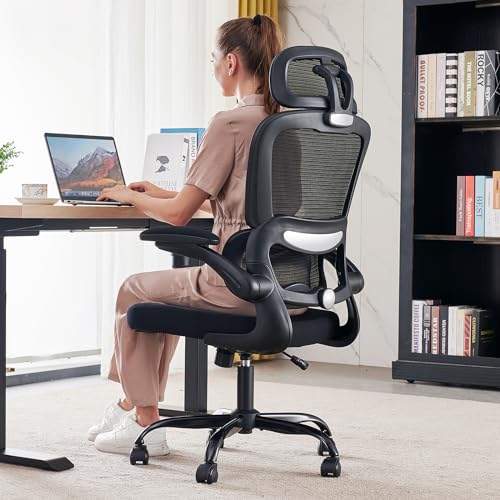
Building a shortlist of the best chairs ergonomic list readers actually finish is harder than it looks, because almost every desk chair now claims lumbar support somewhere in its description. If you only open one listing, start with the TRALT Office Chair Ergonomic Desk Chair with Lumbar Support, Black, the pick that fits the widest range of readers in this guide.
- TRALT Office Chair Ergonomic Desk Chair with Lumbar Support, Black — the balanced first ergonomic buy: lumbar support, headrest and flip-up arms.
- ELABEST X100 Ergonomic Mesh Office Chair with Footrest — the big-and-tall mesh chair with a footrest and highly adjustable arms.
- MIMOGLAD Ergonomic Office Chair with Dual Lumbar Support and Footrest — the deep-recline executive chair with three tilt-lock positions and dual lumbar support.
- COMHOMA Office Chair with Flip-up Armrests and Adaptive Lumbar Support — the compact breathable-mesh chair whose lumbar support adapts as you move.
- Staples Dexley Ergonomic Mesh Task Chair, Black — the mesh task chair from a familiar office-supply name, built for everyday desk use.
- MOLENTS Ergonomic Office Chair, BIFMA X5.1 Certified, Obsidian Black — the certified wide-seat mesh chair with adjustable lumbar support and 3D arms.
Read the full guide ↓ for how each pick was chosen, where it shines, where it falls short, and which one belongs in your room.
Building your best chairs ergonomic list: what actually separates the chairs
Every best chairs ergonomic list should be judged the same way: not by how impressive the chair looks in a product photo, but by how many of its adjustments match the way you actually sit for six, eight or ten hours at a time. Ergonomics is not a single feature. It is the combination of a backrest that meets your lower back where it actually curves, a seat you can set at a height that lets your feet rest flat, armrests that support your elbows without lifting your shoulders, and a tilt mechanism that lets you change position instead of freezing into one posture all afternoon.
The six chairs below were chosen to cover the real spread of ergonomic buying: a straightforward lumbar-support chair for a first home office, a big-and-tall mesh chair with a footrest for readers who work and unwind in the same seat, a deep-recline executive chair with three tilt-lock positions, a compact mesh chair with adaptive lumbar support, a familiar retail name in mesh task seating, and a certified wide-seat chair for readers who want a standards badge behind the comfort claims. None of them is perfect, and the trade-offs under each review are written to be believed, not skimmed.
A note on method before the picks: this is a research-led guide. The chairs were compared on their verified specifications — stated weight capacities, tilt ranges, armrest and lumbar adjustability, materials and certifications — and on the patterns that show up again and again in owner feedback for this class of chair. Where a chair asks you to accept a compromise, the review says so plainly. Comfort is personal, but a chair that cannot be adjusted to your body is a gamble no badge can rescue.
Finally, a framing point that matters for this whole category: an ergonomic chair supports comfortable working posture; it does not treat back conditions, and no chair in this guide is a medical device. Think in terms of fit, adjustability and honest all-day comfort, and use the buying-guide section later in this article to match the adjustment list to your own desk, your own height and your own working day.
Key Takeaways
- Adjustability beats padding: lumbar height or depth adjustment, seat height and movable armrests matter more than thick foam.
- The TRALT chair is the safest first ergonomic buy; the MIMOGLAD is the pick if you recline between tasks.
- Mesh backs (ELABEST, COMHOMA, Dexley, MOLENTS) suit warm rooms and readers who dislike foam heat build-up.
- Stated capacities in this list run from 330 lbs to 350 lbs where the maker publishes them — check the figure against your needs.
- Flip-up armrests (TRALT, COMHOMA, ELABEST) are the small-space feature: the chair rolls fully under the desk when you finish.
In this guide
Quick Picks
Six ergonomic desk chairs, six different answers to the same long day. Badges are used consistently here and in the detailed reviews, so you can jump straight to the chair that matches your situation.
| Pick | Badge | Standout point | Listing |
|---|---|---|---|
| TRALT Office Chair Ergonomic Desk Chair with Lumbar Support, Black | Best Overall | Lumbar support plus a headrest and flip-up armrests in one straightforward package | Check on Amazon |
| ELABEST X100 Ergonomic Mesh Office Chair with Footrest | Best for Big and Tall | Adjustable 3D lumbar support with 5D flip-up arms and a footrest | Check on Amazon |
| MIMOGLAD Ergonomic Office Chair with Dual Lumbar Support and Footrest | Best for Reclining | 90°/120°/145° tilt lock with dual lumbar support and a footrest | Check on Amazon |
| COMHOMA Office Chair with Flip-up Armrests and Adaptive Lumbar Support | Best Compact Pick | Adaptive lumbar support in a breathable mesh, space-saving frame | Check on Amazon |
| Staples Dexley Ergonomic Mesh Task Chair, Black | Best Familiar Name | Straightforward mesh task seating with lumbar support from a known retailer brand | Check on Amazon |
| MOLENTS Ergonomic Office Chair, BIFMA X5.1 Certified, Obsidian Black | Best Certified Pick | BIFMA X5.1 certification with a wide seat and adjustable lumbar support | Check on Amazon |
If you are torn between two rows, read the detailed reviews for those two and ignore the rest — the strengths and trade-offs lists are written to decide exactly that kind of tie.
How These Picks Were Chosen
The pool for this guide was limited to chairs whose ergonomic claims are concrete and checkable: a named lumbar system, a stated capacity, a defined tilt mechanism or a recognised certification. Chairs that promised comfort with adjectives instead of mechanisms were left out. Each surviving pick was then read against the questions ergonomic buyers actually ask: Can the lumbar support be positioned, or is it fixed where the designer guessed your back would be? Do the armrests move out of the way? Does the chair fit a smaller room, a taller reader, a warmer climate?
Every ASIN in this article comes from a verified product pool, and the specifications quoted in the mini spec boxes are taken from the verified listing data for that exact chair — nothing is borrowed from a similar model. Prices and ratings are deliberately absent: both change constantly, and a guide that prints them is out of date before it is useful. Use the Check on Amazon links to see the live position for the exact configuration you are considering.
One more honesty note: ergonomic benefit is fit-dependent. Two readers of different heights can sit in the same chair and have opposite experiences, because the lumbar pad lands in different places. That is why the reviews below keep returning to adjustment ranges rather than declaring a single winner for every body.
The 6 Best Ergonomic Chairs in Detail

TRALT Office Chair Ergonomic Desk Chair with Lumbar Support, Black
Badge: Best Overall
Strengths
- Lumbar support and headrest cover the two contact points readers ask about most
- Flip-up armrests let the chair roll fully under the desk
- 330 lb stated capacity gives most buyers comfortable margin
Trade-offs
- Lumbar support is built in rather than deeply adjustable
- Single-chair configuration only — no colour or size variants in the verified listing
- A typing-focused chair; no footrest for lounging
Mini spec box
- Stated capacity: 330 lbs
- Lumbar: Built-in lumbar support
- Headrest: Yes
- Armrests: Flip-up
- Colour: Black
The TRALT earns Best Overall because it answers the standard ergonomic brief without forcing you into a speciality: lumbar support for the lower back, a headrest for calls and reading, and flip-up armrests that solve the small-room problem in one motion. It suits the first-time home-office buyer who wants the chair to disappear under the desk at the end of the day and be correctly supportive at the start of the next one.
In daily use the pattern that matters is how little thinking the chair asks for. The support is simply there when you sit back; the arms are there when you type and gone when you push in close or park the chair. The honest limitation is adjustability depth: readers who already know they need lumbar height or depth tuning should look at the dual and adaptive systems further down this list instead.
Living with the TRALT ergonomic desk chair day to day, the detail that keeps surfacing is its flip-up armrests with headrest. The verified specification underlines why: The verified listing sets out stated capacity — 330 lbs; lumbar — built-in lumbar support; headrest — yes.. That combination shapes who the chair suits in practice — not the buyer chasing the longest feature list, but the reader whose routine matches what this design actually does well. lumbar support and headrest cover the two contact points readers ask about most is the strength owners lean on most, and it tends to be the reason the chair is still in daily use a year after the novelty of everything else has worn off.
Fit notes for this pick are simple to state and worth stating exactly: it is made for first ergonomic chair buyers and small home offices, and its design makes no secret of that. Readers inside that description can buy with confidence; readers outside it are not being warned off the chair so much as pointed toward the pick in this guide whose fit notes describe them instead. That is the quiet purpose of a six-pick guide — not to crown one chair, but to make sure every reader leaves matched to the chair whose strengths are the ones their own room, routine and body will actually use, and whose trade-offs land on the things they personally will never miss.
Best for: first ergonomic chair buyers and small home offices / Not suited for: readers who need highly tunable lumbar depth

ELABEST X100 Ergonomic Mesh Office Chair with Footrest
Badge: Best for Big and Tall
Strengths
- The most adjustable armrests in this list — and they still flip up
- Adjustable lumbar support can be positioned rather than accepted
- Mesh back plus footrest covers work hours and downtime in one chair
Trade-offs
- Big-and-tall proportions may overwhelm petite readers
- Footrest chairs take more floor space when extended
- Mesh feel is firmer than padded upholstery
Mini spec box
- Back: Breathable mesh
- Lumbar: Adjustable 3D lumbar support
- Armrests: 5D flip-up
- Footrest: Yes
- Positioning: Big and tall
The ELABEST X100 is the maximalist of the list: mesh back, adjustable 3D lumbar support, 5D flip-up arms and a footrest, sized for big-and-tall readers. It suits the hybrid worker whose chair is also their gaming and viewing seat, and who wants one purchase to cover all three postures.
The arms deserve the headline. Five-direction adjustment sounds like a spec-sheet flourish until you switch between a keyboard, a controller and a notebook in one evening — each wants your elbows somewhere different. The limitation is scale: smaller readers may find the seat and back proportions generous to a fault, and the extended footrest needs a room that can spare the depth.
It is worth pausing on how the ELABEST X100 mesh chair handles the ordinary week rather than the showroom minute. The verified listing sets out back — breathable mesh; lumbar — adjustable 3d lumbar support; armrests — 5d flip-up.. None of that photographs dramatically, and all of it decides whether a chair becomes furniture or becomes a regret listed for sale. The honest counterweight sits in its trade-offs: big-and-tall proportions may overwhelm petite readers. Buyers who can live with that sentence will get on with this chair; buyers who cannot should keep reading, because another pick in this guide was chosen to answer exactly that objection.
Fit notes for this pick are simple to state and worth stating exactly: it is made for taller and larger readers who work and relax in one chair, and its design makes no secret of that. Readers inside that description can buy with confidence; readers outside it are not being warned off the chair so much as pointed toward the pick in this guide whose fit notes describe them instead. That is the quiet purpose of a six-pick guide — not to crown one chair, but to make sure every reader leaves matched to the chair whose strengths are the ones their own room, routine and body will actually use, and whose trade-offs land on the things they personally will never miss.
Best for: taller and larger readers who work and relax in one chair / Not suited for: petite readers or very tight desk nooks
Readers who shortlist one chair from this section usually open the ELABEST X100 mesh chair listing first to confirm the current configuration, then come back for the comparison table.

MIMOGLAD Ergonomic Office Chair with Dual Lumbar Support and Footrest
Badge: Best for Reclining
Strengths
- Three genuine working postures from one tilt mechanism
- Dual lumbar support spreads contact across the lower back
- Highest stated capacity in this list at 350 lbs
Trade-offs
- Executive proportions need a bigger footprint than a task chair
- Deep recline plus footrest is wasted on pure typists
- More mechanisms mean more bolts to check at assembly
Mini spec box
- Stated capacity: 350 lbs
- Tilt lock: 90° / 120° / 145°
- Lumbar: Dual lumbar support
- Armrests: 3D adjustable
- Footrest: Yes
- Headrest: Adjustable
The MIMOGLAD is built around a simple observation: a working day is not one posture. Its tilt locks at upright for typing, mid for calls and reading, and deep — with the footrest out — for genuine breaks, while dual lumbar support keeps your back in contact with the chair in all three. It suits readers who take their breaks in the same chair they work in.
The 350 lb stated capacity is the highest in this guide, and the 3D armrests and adjustable headrest complete a chair that asks few compromises of larger readers. The honest cost is size and complexity: this is an executive footprint, and readers in genuinely small rooms should measure before they fall for the recline.
The MIMOGLAD ergonomic chair also earns its place by what it refuses to be. It does not chase every adjustment, every material or every posture; it commits to three-position tilt lock, 350 lbs capacity and builds the chair around that commitment. The verified listing sets out stated capacity — 350 lbs; tilt lock — 90° / 120° / 145°; lumbar — dual lumbar support.. In a market addicted to feature inflation, that focus is a genuine virtue — the parts that exist are the parts that matter for its intended sitter, and there is less to loosen, confuse or fail across the years of daily use it is bought for.
Fit notes for this pick are simple to state and worth stating exactly: it is made for readers who work, read and rest in one chair, and its design makes no secret of that. Readers inside that description can buy with confidence; readers outside it are not being warned off the chair so much as pointed toward the pick in this guide whose fit notes describe them instead. That is the quiet purpose of a six-pick guide — not to crown one chair, but to make sure every reader leaves matched to the chair whose strengths are the ones their own room, routine and body will actually use, and whose trade-offs land on the things they personally will never miss.
Best for: readers who work, read and rest in one chair / Not suited for: small rooms or minimalists who never recline

COMHOMA Office Chair with Flip-up Armrests and Adaptive Lumbar Support
Badge: Best Compact Pick
Strengths
- Adaptive lumbar follows posture changes without manual tuning
- Breathable mesh suits warm rooms and long afternoons
- Flip-up arms keep the footprint desk-friendly
Trade-offs
- No headrest or footrest in the verified configuration
- Adaptive support cannot be dialled to a precise position
- Compact proportions may feel narrow to larger readers
Mini spec box
- Back: Breathable mesh
- Lumbar: Adaptive lumbar support
- Armrests: Flip-up
- Colour: Black
The COMHOMA takes the opposite route to the MIMOGLAD: instead of asking you to tune the lumbar support, its adaptive system moves with you. Sit upright, shift, lean — the support follows. For readers who share a chair or who simply never touch adjustment levers after assembly day, that set-and-forget character is the entire appeal.
Breathable mesh and flip-up arms make it the natural small-room, warm-room pick of the six. The trade-off is control: if you know exactly where you want support and want it locked there, an adjustable system serves you better, and there is no headrest for readers who lean back to think.
Consider the second year of owning the COMHOMA mesh desk chair, because that is where chairs in this class separate. The first month is novelty; the second year is habit. The verified listing sets out back — breathable mesh; lumbar — adaptive lumbar support; armrests — flip-up.. Habits form around reliability — a mechanism that behaves the same on a tired evening as on the first morning, a surface that still looks presentable after real life has happened to it. adaptive lumbar follows posture changes without manual tuning is the quality most likely to still be earning its keep at that point, long after the unboxing details are forgotten.
Fit notes for this pick are simple to state and worth stating exactly: it is made for shared desks, warm rooms and set-and-forget buyers, and its design makes no secret of that. Readers inside that description can buy with confidence; readers outside it are not being warned off the chair so much as pointed toward the pick in this guide whose fit notes describe them instead. That is the quiet purpose of a six-pick guide — not to crown one chair, but to make sure every reader leaves matched to the chair whose strengths are the ones their own room, routine and body will actually use, and whose trade-offs land on the things they personally will never miss.
Best for: shared desks, warm rooms and set-and-forget buyers / Not suited for: readers who want precise manual lumbar tuning

Staples Dexley Ergonomic Mesh Task Chair, Black
Badge: Best Familiar Name
Strengths
- A known office-supply name many buyers already trust
- Mesh task format is proven for everyday desk use
- Uncomplicated design with nothing exotic to maintain
Trade-offs
- Fewer headline adjustments than the newer rivals here
- No footrest or deep-recline theatre
- Readers wanting a headrest should look at the TRALT or MIMOGLAD
Mini spec box
- Back: Mesh
- Lumbar: Lumbar support
- Base: Swivel
- Colour: Black
- Positioning: Home offices and workstations
The Dexley is the conservative choice in the list, and that is a genuine virtue for many buyers: a mesh task chair with lumbar support and a swivel base from a retailer whose name has sat in offices for decades. It suits the reader who wants everyday desk seating without learning a new brand’s adjustment vocabulary.
Set against the newer rivals it offers fewer flourishes — no footrest, no multi-position recline story — but the core ergonomic brief is covered and the design is deliberately unexotic. If your priority is a chair your whole household already understands, this is the one; if your priority is adjustability per se, the ELABEST and MIMOGLAD go further.
For households deciding between this pick and the next one down the page, the deciding question is usually situational rather than technical: where will the chair sit, who will use it most, and which of its strengths matches that reality? The verified listing sets out back — mesh; lumbar — lumbar support; base — swivel.. Matched well, the Staples Dexley mesh task chair disappears into daily life in the best sense — used constantly, thought about rarely. Matched badly, even an excellent chair becomes the wrong chair, which is why this guide spends as many words on fit as on features.
Fit notes for this pick are simple to state and worth stating exactly: it is made for buyers who prefer a familiar office-supply brand, and its design makes no secret of that. Readers inside that description can buy with confidence; readers outside it are not being warned off the chair so much as pointed toward the pick in this guide whose fit notes describe them instead. That is the quiet purpose of a six-pick guide — not to crown one chair, but to make sure every reader leaves matched to the chair whose strengths are the ones their own room, routine and body will actually use, and whose trade-offs land on the things they personally will never miss.
Best for: buyers who prefer a familiar office-supply brand / Not suited for: feature hunters who want footrests and deep recline

MOLENTS Ergonomic Office Chair, BIFMA X5.1 Certified, Obsidian Black
Badge: Best Certified Pick
Strengths
- BIFMA X5.1 certification backs the build claims with a standard
- Wide seat suits readers who feel pinched by standard task chairs
- Adjustable lumbar and 3D arms cover the core ergonomic brief
Trade-offs
- Wide seat may leave petite readers short of back contact
- Certification covers build standards, not personal fit
- Mesh-and-black executive look is the only verified style
Mini spec box
- Certification: BIFMA X5.1
- Lumbar: Adjustable lumbar support
- Armrests: 3D adjustable
- Seat: Wide seat
- Back: Mesh
- Colour: Obsidian Black
The MOLENTS leads with something rare in this price-conscious class: a named certification. BIFMA X5.1 is a recognised office-chair standard, and while it cannot guarantee the chair fits your back, it does mean the structure has been tested against a published benchmark rather than a marketing claim. Add a wide seat, adjustable lumbar support and 3D arms, and this is the evidence-minded buyer’s pick.
The wide seat is the practical headline — readers who cross their legs, shift often or simply feel confined by standard task chairs will notice it immediately. Petite readers should note the flip side: a seat wide enough to celebrate can leave a smaller frame reaching for back contact, in which case the TRALT’s tidier proportions fit better.
One more practical angle on the MOLENTS ergonomic chair: it is the kind of purchase that rewards thirty seconds of measurement before ordering. The verified listing sets out certification — bifma x5.1; lumbar — adjustable lumbar support; armrests — 3d adjustable.. Check the space it will occupy, the doorway it must pass and the floor it will stand on, and the chair that arrives will be the chair the reviews describe. Skip those thirty seconds and even the best-matched pick in this guide can become a logistics story instead of a furniture success.
Fit notes for this pick are simple to state and worth stating exactly: it is made for evidence-minded buyers and readers who want a wide seat, and its design makes no secret of that. Readers inside that description can buy with confidence; readers outside it are not being warned off the chair so much as pointed toward the pick in this guide whose fit notes describe them instead. That is the quiet purpose of a six-pick guide — not to crown one chair, but to make sure every reader leaves matched to the chair whose strengths are the ones their own room, routine and body will actually use, and whose trade-offs land on the things they personally will never miss.
Best for: evidence-minded buyers and readers who want a wide seat / Not suited for: petite readers who need close back contact
Comparison Table
Read this table across, not down: the type and key-feature columns show how differently six chairs can all honestly call themselves ergonomic.
| Pick | Type | Key feature | Listing |
|---|---|---|---|
| TRALT Office Chair Ergonomic Desk Chair with Lumbar Support, Black | Ergonomic desk chair | Flip-up armrests with headrest | Check on Amazon |
| ELABEST X100 Ergonomic Mesh Office Chair with Footrest | Mesh ergonomic chair with footrest | 3D lumbar + 5D flip-up arms | Check on Amazon |
| MIMOGLAD Ergonomic Office Chair with Dual Lumbar Support and Footrest | Executive ergonomic chair | Three-position tilt lock, 350 lbs capacity | Check on Amazon |
| COMHOMA Office Chair with Flip-up Armrests and Adaptive Lumbar Support | Compact mesh desk chair | Adaptive lumbar support | Check on Amazon |
| Staples Dexley Ergonomic Mesh Task Chair, Black | Mesh task chair | Lumbar support, swivel base | Check on Amazon |
| MOLENTS Ergonomic Office Chair, BIFMA X5.1 Certified, Obsidian Black | Certified mesh office chair | BIFMA X5.1 certified, wide seat | Check on Amazon |
How to Choose an Ergonomic Chair That Actually Fits You
Start with the lumbar question. Fixed lumbar padding suits the average back the designer imagined; adjustable lumbar support — in height, depth or tension — suits yours. If you have ever slid a cushion behind your lower back in a dining chair, you already know which camp you are in. Dual or adaptive systems, like the ones on the MIMOGLAD and COMHOMA below, spread support across more of the back and forgive more variation in posture.
Measure your desk before the chair. Seat height must let your feet rest flat with your knees at roughly a right angle, and the chair’s armrests must clear your desktop or flip up out of the way. Readers comparing setups across rooms often browse Best Chairs For 50 Desk for desk-height pairings before they commit to a chair. A chair that cannot roll under the desk will eat floor space in a small room every single day.
Match the back material to your room. Breathable mesh keeps air moving and suits warm offices and long summer afternoons; padded and upholstered backs feel plusher in a cool room and read more executive. Neither is objectively better — but buying mesh for a cold basement office, or thick foam for a sun-facing room, is a mismatch you will feel daily.
Check the stated capacity and seat width honestly. Capacities in this guide run to 330 and 350 lbs on the chairs that publish them. Buy with margin: a chair used near its limit all day ages faster, and a wide seat (the MOLENTS below is the example) matters as much to comfort as the number itself. Readers who sit very long days may also want to compare Best Chairs For 300 Pounds 10 Hours A Day before deciding.
Decide what the footrest and recline are for. A footrest chair is a work-and-rest chair: excellent if you read, watch or take calls in the same seat, unnecessary if you only type. Tilt-lock positions matter the same way — one lock is a typing chair, three locks (upright, mid, deep) is a chair that changes with your task list.
How to Set Up an Ergonomic Chair in Ten Minutes
Step 1 — set seat height first. Sit down, feet flat on the floor, and adjust until your knees sit at about a right angle and your thighs are level or sloping very slightly down. Every other adjustment is built on this one. Step 2 — position the lumbar support. Move the pad or tension until it fills the small of your back when you sit back fully; you should feel contact, not a push. Step 3 — set the armrests. Raise them until your elbows rest with your shoulders relaxed and level; if your shoulders climb, the rests are too high.
Step 4 — tune the tilt. Unlock the backrest, lean back, and set the tension so the chair supports you without either throwing you backwards or demanding a push. Lock it upright for focused typing, unlock it for reading. Step 5 — finish at the desk. Roll in: your screen’s top should sit near eye level (raise the monitor, not your shoulders), and your keyboard should let your forearms rest roughly level. Readers furnishing a whole workstation sometimes cross-check Best Chairs Ever Made for the non-desk seating in the same room.
Cleaning and care. Mesh backs want a vacuum brush and an occasional wipe with a barely damp cloth; foam and fabric seats want spills blotted, never soaked. Tighten the under-seat bolts after the first month — assembly hardware settles — and check caster wheels for hair and grit whenever the chair starts to feel reluctant to roll.
Troubleshooting. Problem: the chair sinks slowly during the day → the gas lift is at the end of its life; it is a replaceable cylinder on most chairs in this class, and confirming your model’s cylinder size on the listing is the first step. Problem: a new chair squeaks when you lean → work each bolt a quarter-turn tighter and add a drop of lubricant to the tilt pivot. Problem: the lumbar pad feels wrong everywhere → your seat height is probably off; reset height first, then reposition the pad.
What “ergonomic” does and does not promise
Ergonomic has become the most stretched word in chair marketing, so it is worth being precise about what a chair on this list can honestly do. It can hold your lower back in contact with support instead of leaving a gap. It can let you change posture — upright, reclined, feet up — so no single position carries the whole day. It can put your elbows, feet and eyes at heights that do not force your shoulders and neck to compensate. That is a real and worthwhile list, and it is the standard these six chairs were judged against.
What it cannot do is diagnose, treat or prevent a medical condition, and this guide deliberately keeps the framing at comfort and fit. If a chair’s description anywhere promises therapy, discount the promise and read the mechanism instead: adjustable lumbar, honest capacity, movable arms. The mechanism is the part that shows up in your room. Readers who like to compare across seating types will find the broader context in Best Chairs Foot Stools — a reminder that even the best desk chair is only one seat in a house that needs several kinds.
Ergonomic chairs for shared and shifting workspaces
Households where two or three people share one desk chair should weight adjustability even more heavily than solo buyers. A chair with flip-up arms, a wide seat-height range and lumbar support that repositions in seconds (the TRALT and COMHOMA patterns) survives the daily hand-off; a chair dialled in for exactly one body becomes an argument. The same logic applies to hybrid workers who split the week between a desk and a kitchen table: the chair has to fit two heights of work surface, not one.
It also helps to think about where the chair parks. In a small apartment the best ergonomic chair is the one that disappears under the desk at night, which is why three of the six picks flip their armrests up. Floor protection is the quiet final detail: hard casters on hardwood will mark it over a year, so budget a chair mat or soft-wheel swap into the plan from day one rather than after the first scratch.
Who Should Buy Which: Three Common Scenarios
Scenario one — the straightforward household purchase. This is the reader the TRALT Office Chair Ergonomic Desk Chair with Lumbar Support, Black was chosen for: first ergonomic chair buyers and small home offices. Its badge in this guide — Best Overall — is the short version of the argument; the long version is that its standout quality, lumbar support plus a headrest and flip-up armrests in one straightforward package, answers the need directly rather than approximately. If this scenario sounds like your household, you can stop comparing and start measuring: confirm the space, check the listing’s current configuration, and order with the returns window as your safety net.
Scenario two — the specific-need purchase. This is the reader the COMHOMA Office Chair with Flip-up Armrests and Adaptive Lumbar Support was chosen for: shared desks, warm rooms and set-and-forget buyers. Its badge in this guide — Best Compact Pick — is the short version of the argument; the long version is that its standout quality, adaptive lumbar support in a breathable mesh, space-saving frame, answers the need directly rather than approximately. If this scenario sounds like your household, you can stop comparing and start measuring: confirm the space, check the listing’s current configuration, and order with the returns window as your safety net.
Scenario three — the second-room or second-chance purchase. This is the reader the MOLENTS Ergonomic Office Chair, BIFMA X5.1 Certified, Obsidian Black was chosen for: evidence-minded buyers and readers who want a wide seat. Its badge in this guide — Best Certified Pick — is the short version of the argument; the long version is that its standout quality, bIFMA X5.1 certification with a wide seat and adjustable lumbar support, answers the need directly rather than approximately. If this scenario sounds like your household, you can stop comparing and start measuring: confirm the space, check the listing’s current configuration, and order with the returns window as your safety net.
More Angles on Building an Ergonomic Shortlist
Weight the return window as a feature in its own right. A chair can match every specification on paper and still meet your back in the wrong place, because lumbar curves are individual. Buying from a listing with a workable returns route turns the first fortnight at your desk into the real test — sit full working days, not ten-minute trials, before you decide the chair has earned its place.
Think about the second year, not just the first week. Foam compresses, mesh relaxes and armrest pads wear at the elbow point. Chairs with replaceable cylinders, standard caster fittings and wipe-clean surfaces age more gracefully than sealed designs. A quick parts check on the listing — are casters and cylinders standard sizes? — tells you more about long-term value than any launch-day claim.
Sound is an underrated ergonomic factor in shared homes. A chair that creaks through every posture change will announce your working hours to the whole household and, worse, to everyone on your calls. Mesh-and-metal designs in this class tend to stay quieter than all-plastic frames; whatever you choose, tighten the assembly bolts after the first month, which is when most new-chair noises appear and when they are easiest to cure.
Finally, resist the urge to buy the chair with the longest feature list. Features you never adjust are weight, cost and failure points. The right ergonomic chair is the one whose three or four adjustments match the three or four ways your body and your working day actually vary — everything beyond that is decoration.
Common Buying Mistakes
Buying the badge instead of the fit. “Ergonomic” on the box means nothing until the lumbar pad lands on your back. Prioritise adjustment ranges over labels.
Ignoring armrest clearance. A chair that cannot roll under your desk because of fixed armrests will dominate a small room and annoy you daily. Flip-up arms exist for exactly this reason.
Setting the chair once and never again. Posture needs change between typing, calls and reading. A chair left locked upright for a year is a chair whose best feature was never used.
Skipping the capacity check. Buying at or above a chair’s stated limit shortens its life and voids your comfort argument. Choose with margin.
Judging comfort in ten minutes. Showroom-soft foam often feels worst at hour six. Use the returns window and full working days to decide.
Final Recommendation
For most readers building a best chairs ergonomic list into a single purchase, the TRALT is the chair to beat: honest lumbar support, a headrest, flip-up arms and a 330 lb stated capacity in a chair that disappears under the desk at night. Readers who work and relax in one seat should step up to the MIMOGLAD for its three-position recline and footrest, or the ELABEST if mesh breathability matters more. Warm-room and shared-desk households are best served by the COMHOMA or the MOLENTS, and anyone who simply wants a known retail name in mesh should take the Dexley.
When you are ready to order, the safest single click in this guide is the MIMOGLAD Ergonomic Office Chair with Dual Lumbar Support and Footrest: confirm the configuration and the delivery terms on the listing, and you have the pick this guide would send most readers to first.
Frequently Asked Questions
What makes a chair ergonomic rather than just comfortable?
Adjustability matched to your body: lumbar support that can be positioned, seat height that lets your feet rest flat, armrests that support without lifting your shoulders, and a tilt that lets you change posture. Comfort is the result; adjustment is the mechanism.
Is mesh or foam better for long working days?
Mesh breathes and suits warm rooms and readers who run hot; foam feels plusher and suits cooler rooms. Both appear in this list, and the right answer is your room and your preference, not a universal rule.
Do I need a footrest on an office chair?
Only if the chair doubles as your reading, viewing or call chair. Pure typists rarely use one; hybrid workers who relax in the same seat use it daily. Two picks here include footrests for that reason.
How much weight capacity should I look for?
Buy with margin above your weight. This list includes chairs stating 330 lbs and 350 lbs; a chair used near its limit every day will age faster and feel less stable.
Can an ergonomic chair fix my back pain?
No chair in this guide is a medical device, and none should be bought as a treatment. A well-fitted chair supports comfortable posture during work; anything beyond comfort framing deserves a conversation with a clinician, not a product page.
How long should an ergonomic chair last?
In this class, several years of daily use is a fair expectation if bolts are re-tightened after the first month and casters and cylinders — both standard, replaceable parts — are maintained.