Disclosure: topratedkitchenware.com is reader-supported. When you buy through links on our site, we may earn an affiliate commission from Amazon and other retailers, at no extra cost to you.
Where to buy
A 50 desk — a fifty-inch desk — leaves no room for a chair with ambitions: the best chairs for 50 desk setups are the ones whose armrests fold away so the chair tucks fully under the desktop, whose width leaves you legroom and floor, and whose support survives a full working day in a compact footprint. From the verified pool, three chairs state that tuck-away evidence — flip-up arms on the TRALT, the GTPLAYER and the ELABEST X100 — and those three carry this guide’s store links. The other three pool chairs are wide executive designs built for spacious offices; they are reviewed in full as prose-only picks with no link, because at a fifty-inch desk their width is not a luxury, it is the problem.
- Daeorio High-Back Big and Tall Leather Chair with Footrest — a wide executive recliner with a footrest and lumbar support — a lot of chair, honestly too much chair for fifty inches of desk (covered in full below as a prose-only pick: no store link in this guide.)
- FOKESUN Ergonomic Office Chair with Footrest — a long-hours chair with 350 lb capacity, 2D lumbar and 3D arms — impressive spec, but its arms adjust rather than fold away (covered in full below as a prose-only pick: no store link in this guide.)
- GTPLAYER PU Leather Office Chair with Memory Foam — memory foam comfort and 90-degree flip-up arms in a mid-back chair that behaves in small rooms
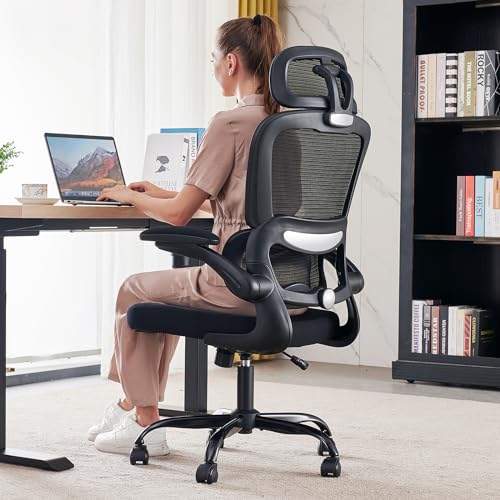
- TRALT Ergonomic Office Chair with Headrest — lumbar support, a headrest and flip-up arms, with a stated 330 lb capacity — the complete compact-desk package
- ELABEST X100 Ergonomic Mesh Office Chair with Footrest — a big-and-tall mesh chair with 5D flip-up arms, 3D lumbar and a footrest — everything, and it still tucks
- MIMOGLAD Ergonomic Office Chair with Dual Lumbar Support — dual lumbar support, three tilt locks and a stated 350 lb capacity — a superb large-desk chair with an executive footprint (covered in full below as a prose-only pick: no store link in this guide.)
Read the full guide ↓ for how each chair earned its place, what separates the strong picks from the compromises, and which one fits your situation.
The best chairs for 50 desk setups are chosen by a tape measure before they are chosen by a back. A fifty-inch desk is a compact workstation — wide enough for a monitor, a laptop and real work, small enough that the chair’s width, arm design and tuck depth decide whether the setup feels like a cockpit or a squeeze. The governing question is brutally simple: when you stand up and push the chair in, does it disappear under the desk, or does it stay in the room arguing with your knees, your drawers and your doorway?
This guide applies that test to six ergonomic chairs from the verified pool. Three pass it with evidence: each states flip-up armrests, the single feature that lets a supportive chair park itself fully under a compact desktop — the TRALT with its headrest and lumbar support, the GTPLAYER with memory foam and mid-back manners, and the ELABEST X100, a big-featured mesh chair whose 5D flip-up arms rescue it for small desks. Three fail it honestly: wide executive chairs with footrests and fixed or 3D arms, built generously for generous rooms. They are reviewed in full as prose-only picks, because a chair can be excellent and still be wrong for fifty inches. Readers whose compact desk is part of a longer-hours setup should also read Best Chairs For 8 Hours A Day, where the same chairs are judged purely on endurance.
Everything here is comfort and fit guidance — how a chair and a small desk live together across a working day. Measure your desk’s knee space before you fall for any chair, including ours: the listings state designs, but your desktop’s underside holds the deciding vote.
Key Takeaways
- Flip-up armrests are the deciding feature at a 50-inch desk: they let a full ergonomic chair tuck completely under the desktop.
- The TRALT is the balanced pick — lumbar support, headrest and flip-up arms in a footprint a compact desk can absorb.
- The ELABEST X100 proves a feature-rich chair can still fit: its 5D flip-up arms fold away despite the mesh chair’s big-and-tall ambitions.
- Three pool chairs are prose-only here: the wide executive designs from Daeorio, FOKESUN and MIMOGLAD are built for bigger rooms, and their width works against a 50-inch desk.
- Measure the knee box under your desk — width between legs or drawers, and height to the desktop underside — before ordering anything.
- A compact setup is a system: chair tuck, monitor position and cable discipline together decide whether fifty inches feels spacious.
In this guide
Quick Picks
| Pick | Badge | Best for | Where to check it |
|---|---|---|---|
| Daeorio High-Back Big and Tall Leather Chair with Footrest | Prose-Only: Too Wide | spacious offices and large desks where width is welcome | Prose-only pick |
| FOKESUN Ergonomic Office Chair with Footrest | Prose-Only: Arms Do Not Fold | large desks and long-hours sitters who never need to tuck the chair away | Prose-only pick |
| GTPLAYER PU Leather Office Chair with Memory Foam | Best Compact All-Rounder | bedroom offices and small studies with a 50-inch desk | Check on Amazon |
| TRALT Ergonomic Office Chair with Headrest | Best Overall for 50 Desk | full-time work at a 50-inch desk, including larger sitters | Check on Amazon |
| ELABEST X100 Ergonomic Mesh Office Chair with Footrest | Best Fully Loaded Fit | larger sitters and long days at a compact desk | Check on Amazon |
| MIMOGLAD Ergonomic Office Chair with Dual Lumbar Support | Prose-Only: Executive Footprint | dedicated offices with large desks and long recline breaks | Prose-only pick |
How These Picks Were Chosen
We filtered the verified pool on stated space behavior before comparing comfort. The evidence we required for a link was explicit: flip-up or fold-away armrests in the listing, the feature that determines whether a chair parks under a desktop. Three chairs stated it. The other three stated the opposite profile — big-and-tall or executive width, footrests, fixed or multi-axis arms that do not fold away — and for a fifty-inch brief, that profile is a mismatch we will not link past.
Among the qualifying chairs we then compared the working-day factors: lumbar design, headrest provision, seat cushioning, back material, and how much chair remains in the room when it is tucked. We also weighed honest footprint: a chair can have flip-up arms and still be a large object, so the ELABEST’s size is flagged even as its arms earn its link.
This is research-led guidance from manufacturer listing data, not hands-on testing. Arm designs and headline features are reported as the listings state them; exact widths and heights are yours to verify against your desk’s knee box, and the buying guide below tells you precisely how.
The Best Chairs for 50 Desk Setups: What Fits and What Does Not
Daeorio High-Back Big and Tall Leather Chair with Footrest
Badge: Prose-Only: Too Wide
Strengths
- High-back, wide executive build with lumbar support is genuinely comfortable in a spacious office
- Reclining design with a footrest gives it real break-time range
- Leather-style upholstery presents a formal, executive look
Trade-offs
- Its own listing calls it big, tall and wide — the opposite of the compact brief
- No flip-up arms are stated, so it cannot tuck fully under a compact desktop
- A footrest mechanism adds depth exactly where a small room has none to spare
| Design | High-back, big and tall, wide executive |
|---|---|
| Extras | Footrest, reclining |
| Support | Lumbar support |
| Upholstery | Leather-style |
| Color | Black |
| Flip-up arms | Not stated |
There is nothing wrong with this chair except the address it is being sent to. As an executive seat in a roomy office it makes a complete case: high back, wide seat, lumbar support, a recline and a footrest for the thinking pauses. Its listing is admirably honest about its dimensions of character — big, tall, wide — and a buyer with a six-foot desk and a door that swings clear will be well served by it.
At a fifty-inch desk, every one of those virtues inverts. Width crowds the knee box, fixed arms stop the chair at the desktop’s edge instead of under it, and the footrest’s hardware claims floor the room does not have. We review it in full so the comparison is honest, and we link it nowhere in this guide: the kindest thing a guide can do with a good chair in the wrong size is say so.
In its proper habitat — a study with a wide desk, a door that clears its recline, an operator who thinks with their feet up — the Daeorio is a genuinely pleasurable chair, and nothing in this guide should follow it there as a criticism. Fit verdicts are addresses, not grades. If your next workspace is bigger, keep its name; the wide seat and lumbar support will be waiting, and they will be the right answer at the right desk size.
Best for: spacious offices and large desks where width is welcome / Not suited for: 50-inch desks and compact workspaces
FOKESUN Ergonomic Office Chair with Footrest
Badge: Prose-Only: Arms Do Not Fold
Strengths
- Designed for long hours with a stated 350 lb capacity and BIFMA testing
- 2D lumbar, headrest and a 3-position tilt lock give it a deep adjustment menu
- Footrest and generous sizing suit a dedicated, spacious workstation
Trade-offs
- 3D arms move in several directions but do not flip up — the chair cannot fully tuck under a compact desk
- Its long-hours, wide-format design assumes floor space a 50-inch setup rarely has
- Prose-only here on fit grounds only; as a large-desk chair its specification is strong
| Stated capacity | 350 lb |
|---|---|
| Lumbar | 2D adjustable |
| Armrests | 3D adjustable, with headrest |
| Tilt | 3-position tilt lock |
| Testing | BIFMA-tested |
| Extras | Footrest |
The FOKESUN is the hardest exclusion in this guide, because its specification is genuinely strong: a stated 350 lb capacity, BIFMA testing, two-dimensional lumbar adjustment, a headrest, tilt lock and a footrest, all aimed at long hours. In our long-shift research it is exactly the profile that earns respect, and a reader with a large desk should keep it on their list.
But this guide’s question is fifty inches, and the FOKESUN’s arms answer it wrongly. Three-dimensional arms adjust up, down, forward and sideways — everything except the one motion a compact desk needs, which is folding up and away so the chair slides home under the desktop. Without that motion, the chair lives permanently in front of the desk, in the room’s traffic. Fit is the brief, so it is prose-only here — a compliment to its spec, and a refusal to mis-sell its size.
The FOKESUN deserves its footnote in every long-hours conversation: BIFMA testing and a stated 350 lb capacity are the kind of evidence this guide series exists to reward, and at a larger desk it would carry a link and a leading badge. Its exclusion here is the narrowest in the guide — one missing motion in its arms. Readers whose desks are even slightly generous should measure before accepting our verdict; fifty inches is the brief, not a law of nature.
Best for: large desks and long-hours sitters who never need to tuck the chair away / Not suited for: 50-inch desks where tuck-under parking matters

GTPLAYER PU Leather Office Chair with Memory Foam
Badge: Best Compact All-Rounder
Strengths
- 90-degree flip-up arms give it the full tuck-under parking a 50-inch desk demands
- Memory foam seat brings executive comfort to a home-office footprint
- Mid-back design keeps the chair’s visual and physical bulk down in a small room
Trade-offs
- Mid-back support ends lower than the high-back picks — head and shoulder support is limited
- PU leather breathes less than mesh across long, warm days
- Rocking function is pleasant but it is a simpler mechanism than the tilt systems on pricier chairs
| Armrests | 90-degree flip-up |
|---|---|
| Seat | Memory foam |
| Back | Mid back, ergonomic |
| Upholstery | PU leather |
| Motion | Flexible rocking |
| Color | Black |
The GTPLAYER is the compact-desk natural: its arms flip up a full ninety degrees, so at the end of the day the chair slides under a fifty-inch desktop and the room gets its floor back. Between those bookends it is a comfortable, unpretentious work chair — memory foam under you, a mid-back behind you, and a gentle rocking motion for the thinking pauses that punctuate real desk work.
Its limits are the mid-back’s limits: support stops where a high-back continues, and PU leather runs warmer than mesh by hour six of a summer day. Neither matters much in a bedroom-office or a small study where the chair’s first job is to fit. For the classic compact setup — one desk, one chair, one room that also does something else — this is the easiest recommendation in the guide.
A month in, the GTPLAYER’s memory foam is the feature its owners describe with the most affection — the seat learns the sitter, and the first sit of the day feels like a continuation rather than a negotiation. Its flip-up arms also make it the chair most likely to be borrowed for the dining table at a dinner party, because it parks and presents like a civilized guest. In small homes, that double life is a genuine part of its value.
Best for: bedroom offices and small studies with a 50-inch desk / Not suited for: sitters who want high-back and head support

TRALT Ergonomic Office Chair with Headrest
Badge: Best Overall for 50 Desk
Strengths
- Flip-up armrests deliver the tuck-under fit, while the headrest and lumbar support keep full ergonomic credentials
- Stated 330 lb capacity gives larger sitters a compact-desk option that does not ask them to compromise
- The specification reads like a bigger chair’s — nothing essential was cut to make it fit
Trade-offs
- Verify the chair’s width against your desk’s knee box; capacity and compactness still need your measurement
- Upholstered comfort runs warmer than the mesh ELABEST on long days
- Its feature list makes it the considered purchase rather than the impulse one
| Stated capacity | 330 lbs |
|---|---|
| Armrests | Flip-up |
| Support | Lumbar support, headrest |
| Format | Ergonomic desk chair |
| Color | Black |
The TRALT is what happens when a chair refuses the usual compact compromise. The flip-up arms satisfy the fifty-inch rule — chair in, chair away, floor clear — while the headrest and lumbar support satisfy the working day, and a stated 330 lb capacity means the chair does not reserve its good manners for smaller sitters. It is the most complete specification in this guide that still respects a small desk.
Treat the measurement duty seriously even here: capacity is stated, but your desk’s knee-box width is yours alone to check, and a chair this capable deserves the thirty seconds with a tape measure. Matched to a fifty-inch desk, the TRALT is the pick we would buy first — the rare compact-desk chair that asks its owner to give up nothing but floor space.
The TRALT’s headrest is the feature that converts skeptics: compact-desk chairs usually delete it, and its presence changes phone calls, reading and thinking pauses from neck exercises into rests. The stated capacity also gives the chair a second life as the household’s guest-and-everything chair, since almost any visitor can sit in it confidently. It is the pick in this guide with the fewest asterisks, and asterisks are what small-space buying is usually made of.
Best for: full-time work at a 50-inch desk, including larger sitters / Not suited for: ultra-tight knee boxes — verify width before ordering

ELABEST X100 Ergonomic Mesh Office Chair with Footrest
Badge: Best Fully Loaded Fit
Strengths
- 5D flip-up arms are the headline: a big, adjustable chair that can still fold its arms away and tuck under a compact desk
- Adjustable 3D lumbar support and breathable mesh suit the longest days in this guide
- Footrest and big-and-tall design bring break-time and larger-sitter range the other linked picks cannot match
Trade-offs
- It is the largest linked chair here — arms fold, but the chair itself is a substantial object; measure carefully
- Feature density means more setup time to dial in
- Gaming and executive styling is busier than a minimal home office may want
| Armrests | 5D flip-up |
|---|---|
| Lumbar | Adjustable 3D lumbar support |
| Back | Mesh |
| Extras | Footrest |
| Design | Big and tall |
| Format | Gaming and executive computer chair |
The X100 is the exception that tests the rule, and passes: a big-and-tall mesh chair with a footrest and a lumbar system adjustable in three dimensions should not fit a compact-desk guide at all — until you reach its arms, which flip up in a five-dimensional fit of good manners and let the whole production slide under a fifty-inch desktop. If your body needs the big chair and your room needs the small footprint, this is the reconciliation.
Be honest about the remaining bulk: folded arms shrink the chair’s width at desk height, but its seat, back and presence are still executive-scale, and the knee-box measurement is non-negotiable. Dialled in — and it rewards twenty minutes of dialling — it offers the longest-day comfort in this guide, mesh breathability included. It is the fully loaded pick, for the reader who wants everything and has measured for it.
Living with the X100 teaches a small lesson in setup economics: twenty minutes of adjustment on day one returns a chair that needs only seconds of daily attention thereafter — arms up, slide home, arms down, sit. The mesh also makes it the linked pick that stays pleasant in a sun-warmed small room where upholstery would hold the afternoon’s heat. It is the most chair that fifty inches can honestly hold, and it knows it.
Best for: larger sitters and long days at a compact desk / Not suited for: the very smallest rooms — measure the knee box twice
MIMOGLAD Ergonomic Office Chair with Dual Lumbar Support
Badge: Prose-Only: Executive Footprint
Strengths
- Dual lumbar support and a reclining backrest with three tilt-lock positions is a deep ergonomic menu
- Stated 350 lb capacity with 3D armrests and a headrest suits larger sitters at large desks
- Footrest completes a genuine work-and-rest executive package
Trade-offs
- 3D armrests adjust but do not flip away, so the chair cannot tuck under a 50-inch desktop
- Executive scale: width, recline range and footrest all assume a room that can hold them
- Prose-only on fit alone — judged as a chair, it is one of the strongest specifications in the pool
| Stated capacity | 350 lbs |
|---|---|
| Lumbar | Dual lumbar support |
| Tilt | 90, 120 and 145 degree tilt lock |
| Armrests | 3D adjustable, with headrest |
| Extras | Footrest, reclining backrest |
The MIMOGLAD’s specification reads like a wish list: dual lumbar support, three tilt-lock angles up to a full recline, a stated 350 lb capacity, 3D arms, a headrest and a footrest. At a large desk in a dedicated office it would be a leading recommendation, and readers upsizing their workspace should remember its name — it anchors our thinking in Best Chairs For 911 Dispatch, where chairs serve rotating professionals around the clock.
At fifty inches, its virtues are landlocked. Arms that adjust in three dimensions but never fold away keep the chair parked in the room rather than under the desk, and its recline and footrest assume clearance a compact setup cannot promise. We review it fully, praise it honestly, and link it not at all in this guide — because the brief is a measurement, and the measurement says no.
The MIMOGLAD’s afterlife in this guide is as a benchmark: its dual lumbar and triple tilt lock are what the linked chairs are implicitly compared against, and at a bigger desk it leads our dispatch research outright. Excluding it here is the guide keeping its word — the brief was a measurement. Readers planning a workspace upgrade should treat its review as a preview of their next, larger setup rather than a rejection.
Best for: dedicated offices with large desks and long recline breaks / Not suited for: 50-inch desks and shared, multi-use rooms
Comparison Table
| Pick | Badge | Key features | Link |
|---|---|---|---|
| Daeorio High-Back Big and Tall Leather Chair with Footrest | Prose-Only: Too Wide | Wide executive recliner with footrest — prose-only for a 50-inch desk | Prose-only pick |
| FOKESUN Ergonomic Office Chair with Footrest | Prose-Only: Arms Do Not Fold | Long-hours chair, 350 lb stated, 3D arms — prose-only on tuck fit | Prose-only pick |
| GTPLAYER PU Leather Office Chair with Memory Foam | Best Compact All-Rounder | Memory foam, flip-up arms, mid-back PU leather chair | Check on Amazon |
| TRALT Ergonomic Office Chair with Headrest | Best Overall for 50 Desk | Flip-up arms, headrest, lumbar support, stated 330 lb capacity | Check on Amazon |
| ELABEST X100 Ergonomic Mesh Office Chair with Footrest | Best Fully Loaded Fit | Mesh big-and-tall chair, 5D flip-up arms, 3D lumbar, footrest | Check on Amazon |
| MIMOGLAD Ergonomic Office Chair with Dual Lumbar Support | Prose-Only: Executive Footprint | Dual lumbar, 350 lb stated, tilt lock, footrest — prose-only on fit | Prose-only pick |
How to Choose a Chair for a 50 Desk
Measure the knee box before anything else. Under your fifty-inch desktop there is a three-dimensional space — width between the desk’s legs, drawers or modesty panel; height from floor to the desktop’s underside; depth from the front edge to the wall or panel. Your chair must live in that box when parked: its width between the legs, its arm height under the underside, its base within the depth. Write the three numbers down and hold every listing against them. This single act prevents nearly every compact-desk disappointment.
Then make flip-up arms your filter, as this guide did. Armrests are where compact setups are won and lost: a fixed arm that meets the desktop edge stops the chair a foot out into the room, forever. Flip-up arms convert the same chair into one that parks flush, freeing the floor for feet, feet-up breaks, and the room’s other life. If a listing does not state flip-up or fold-away arms, assume the chair does not park — the three prose-only chairs here are the worked example.
Within the chairs that fit, choose by your working day. Mesh breathes for long, warm hours; memory foam cushions shorter, focused days; a headrest rewards readers and callers who lean back; stated capacities — the TRALT’s 330 lb is the compact class’s generous example — matter to larger sitters exactly as much at a small desk as at a large one. Do not let the desk’s size talk you out of the support your body needs; the linked picks prove both are available together.
Finally, budget a little floor for reality. A chair that tucks perfectly but whose base spans the whole knee box leaves your feet nowhere to go, and a chair parked flush that cannot swivel out past a drawer unit will fight you daily. Leave turning room, keep cables off the floor the casters cross, and treat the setup as a small room that happens to contain a desk — the mindset behind every good compact workspace, and the same fit-first logic as Best Chairs For 31 Kitchen Island applies at the other end of the home.
How to Set Up a Chair and a 50-Inch Desk as One Workspace
Assemble and adjust in the right order: chair first, then desk relationship. Set seat height so your feet rest flat with the desk’s edge at elbow height when your arms hang relaxed. Position the lumbar support against the small of your back in your real working posture — slouched test-sits produce lying adjustments. Set armrests just under your elbows for typing, then flip them up and park the chair fully: this is the moment to discover any knee-box conflict, while returns are still easy.
Run the compact-desk daily rhythm. Park the chair under the desk whenever you leave — it keeps walkways clear, protects the chair’s arms from passing knocks, and makes a small room feel reset rather than occupied. Keep the floor under the desk ruthlessly clear: a bag, a shoe pile or a cable nest in the caster zone will be run over, tripped on and cursed daily. Route cables along the desk’s back edge and down one leg, the route your chair never travels.
Maintain the moving parts that make compact life possible. Flip mechanisms and arm pivots collect dust and lose their crispness; a monthly wipe and a check that each arm still locks in both positions keeps the tuck-away habit effortless. Tighten the chair’s bolts on the same schedule — a chair that slides in and out of a knee box daily works its hardware harder than one that sits in an open office.
Problem: the chair parks but your knees hit the drawer unit → the knee box, not the chair, is undersized for sitting; pull the chair’s working position out a few inches and angle the desk’s drawer side away from your dominant leg, or move the unit. Problem: flipped-up arms still catch the desktop underside → lower the seat a notch for parking, or accept a three-quarter tuck; do not force the arms past the edge, which is how pivots break. Problem: the room still feels crowded with the chair parked → audit what else lives on the floor; in fifty-inch setups the chair is rarely the real squatter.
Why Flip-Up Arms Are the Whole Ballgame at Fifty Inches
Every compact-desk feature list is a distraction from the one feature that decides daily life: whether the chair parks. A chair that parks disappears — the room breathes, the floor clears, the desk becomes a table again for the evening. A chair that cannot park is a permanent resident of the room’s middle, and at fifty inches of desk, the room is usually small enough that the resident is always in someone’s way.
Flip-up arms are the mechanism of that disappearance, and they cost the chair nothing when down: the linked picks here pair them with headrests, lumbar systems, memory foam and even a big-and-tall mesh build. So the compact buyer’s rule is absolute — no flip, no deal — and any chair that asks you to forgive fixed arms at a small desk is asking you to forgive it every single day.
Small Desk, Full Workday: Making Fifty Inches Enough
A fifty-inch desk holds a working day comfortably when the vertical and the parked dimensions are exploited. The monitor goes on a stand or arm so its footprint returns to the desk as usable surface; the chair parks beneath; the floor stays clear. What remains is a workstation that feels deliberate rather than diminished — the same psychology as a well-run ship’s cabin, where everything has a place because everything must.
The other half is honesty about overflow: if your work genuinely needs dual monitors, a printer and reference books open at once, no chair choice will save the setup, and the desk — not the seating — is the upgrade to save for. Until then, the chairs linked here prove that support, capacity and even a footrest can live at fifty inches, provided the arms know how to fold. For the seating side of even longer compact-desk days, Best Chairs For 300 Pounds 10 Hours A Day applies the same evidence-first discipline to the heaviest brief we cover.
The Fifty-Inch Ecosystem: Monitor, Light and Chair as One Budget
Money spent on a compact workstation should be allocated as a system, because each part rescues the others. A monitor arm returns desk surface that makes the whole setup feel a size larger. A small, well-placed lamp removes the need for a big desk to hold one. And the chair — the subject of this guide — either parks and frees the room, or does not and taxes it. Of the three, the chair is the only one you touch all day, which is why it should take the largest share of both budget and decision effort.
The order of purchase matters too: chair first, because its parked dimensions define the space the rest must fit; monitor arm second; accessories last, in the space that remains. Buyers who reverse the order end up with a beautiful desk arrangement orbiting a chair that does not fit it — the compact-workspace version of building the garage before measuring the car.
When the Desk Is Also a Dining Table, Dressing Table or Life
Fifty-inch desks in small homes rarely have a single job. The same surface hosts work by day, dinner for two on Friday, a sewing project on Sunday. The chair’s flip-up arms are what make these transitions graceful — the workstation dismantles in ten seconds, and the room’s evening self is not spent apologizing to a parked office chair in the middle of it.
Protect the transitions with one habit: a tray or box that holds the day’s work kit — laptop stand, notebook, charger — and lifts it off the desk in one motion. The chair parks, the tray lifts, the table sets. Multi-use rooms succeed on choreography, and the chairs linked in this guide are the ones whose arms know the steps.
The Upgrade Path: What to Improve After the Chair
Once the chair fits and parks, a compact workstation reveals its next bottleneck in order. Usually it is light: a small desk lamp that lives at the back corner, aimed at the work and not the screen, changes evening work more than any other accessory at this scale. Then it is the monitor’s height — a stand or arm that brings the screen to eye level and returns its footprint to the desk. Then cable discipline, which is free and merely requires deciding that the floor under the desk is a road, not a drawer.
Notice what is not on the list: a bigger desk, bought in frustration at problems that were never the desk’s. The fifty-inch setup, chaired correctly and lit and lifted properly, holds a professional day with room to spare — and the money not spent on replacement furniture is the compact home’s quiet dividend. Upgrade in the order the bottlenecks announce themselves, and stop when the setup disappears beneath the work. That disappearance is the finished state every workstation in this guide series is aiming at.
Sharing a Compact Desk: Two People, One Fifty-Inch Surface
In many small homes the fifty-inch desk is shared — partners on opposite shifts, a parent and a student, roommates with a treaty. Sharing raises the chair stakes: the chair must fit two bodies’ preferences, or at least adjust between them quickly, and it must park perfectly because the desk’s second user inherits whatever the first left behind. The linked picks were chosen with this in mind — flip-up arms for the park, lumbar and headrest designs that tolerate re-tuning, and in the TRALT’s case a stated capacity that covers almost any second user.
Give the treaty a settings card: each user’s seat height and lumbar position, noted once and taped inside a drawer. Thirty seconds of adjustment at each handover keeps both users in a chair that feels personally theirs, which is the difference between a shared desk that works and a shared desk that is quietly resented. Small homes run on such courtesies, and the chair — adjusted, parked, ready — is where the courtesy becomes physical.
Common Buying Mistakes
- Shopping by the chair’s looks instead of its parked size. At a 50-inch desk, the parked chair is the one you live with most. Flip-up arms first, upholstery second.
- Never measuring the knee box. Width, height and depth under the desktop decide fit. Three numbers, one minute, no returns.
- Assuming 3D arms tuck like flip-up arms. They adjust in place; they do not fold away. The distinction is the whole ballgame, as two prose-only chairs here demonstrate.
- Buying the wide executive chair for a small room. Big-and-tall comfort is real — in rooms that fit it. At fifty inches, width is a cost charged daily.
- Letting the floor under the desk become storage. Bags and cable nests in the caster zone make a compact setup feel broken. The floor is the chair’s road; keep it clear.
- Skipping the park test during the return window. Flip the arms, slide the chair home, sit and work a full day before you decide. Fit reveals itself in use, not in unboxing.
Final Recommendation
Start with the TRALT: it is the complete compact-desk chair — flip-up arms for the tuck, headrest and lumbar for the day, and a stated 330 lb capacity that refuses to make larger sitters compromise. Choose the GTPLAYER if your setup is a bedroom office that values memory-foam comfort and mid-back modesty, and the ELABEST X100 if you need the big-and-tall, mesh, footrest specification and have measured your knee box to prove it fits.
Leave the three prose-only executives to the larger rooms they were designed for, with our genuine respect — and if your next move is a bigger desk rather than a smaller chair, their names belong at the top of that shopping list instead. Either way, the fifty-inch discipline you practiced here — measure, filter on fit, then compare comfort — is the same discipline that runs through Best Chairs For A Classroom and every other seating problem where the room, not the catalogue, is in charge.
To check the current listing for a shortlist pick, use these links: the Best Compact All-Rounder pick, GTPLAYER PU Leather Office Chair with Memory Foam, here on Amazon; the Best Overall for 50 Desk pick, TRALT Ergonomic Office Chair with Headrest, here on Amazon; the Best Fully Loaded Fit pick, ELABEST X100 Ergonomic Mesh Office Chair with Footrest, here on Amazon.
Frequently Asked Questions
What chair size fits a 50-inch desk?
The chair must fit your desk’s knee box when parked: narrower than the space between the desk’s legs or drawers, with armrests that clear the desktop’s underside — which is why flip-up arms matter — and a base that sits within the desk’s depth. Measure those three dimensions under your desk and compare them with the listing before ordering.
Why are flip-up armrests so important for a small desk?
Because they decide whether the chair parks under the desktop or lives in the middle of the room. Fixed arms stop the chair at the desk’s edge; flip-up arms fold away and let the chair slide fully home, freeing the floor. In a compact setup that difference is felt every time you enter, leave or cross the room.
Can a big-and-tall chair work at a 50-inch desk?
Yes, with the right arms and honest measuring: the ELABEST X100 is a big-and-tall mesh chair whose 5D flip-up arms let it tuck, and the TRALT pairs a stated 330 lb capacity with flip-up arms. What does not work is a wide chair with fixed arms, however comfortable — width plus fixed arms is the combination a compact desk cannot absorb.
Is a mid-back chair enough for full-time work?
For many sitters, yes — the GTPLAYER’s memory foam and mid-back support suit focused desk days, especially in smaller rooms where a high back is visual bulk. If you lean back to read, call or think for long stretches, a headrest design like the TRALT or the ELABEST will serve you better across the day.
Why are some chairs in this guide not linked?
Three pool chairs — the Daeorio, FOKESUN and MIMOGLAD — are wide executive designs whose arms do not fold away. They are strong chairs for large desks, and they are reviewed in full, but linking them for a fifty-inch brief would mis-sell their size. Prose-only status here is a fit verdict, not a quality verdict.
How do I keep a compact workspace feeling spacious?
Park the chair under the desk whenever you leave it, keep the floor in the caster zone completely clear, route cables along the desk’s back edge, and lift the monitor onto a stand so its footprint becomes desk surface again. Small setups feel spacious through discipline, not dimensions — the same principle that makes Best Chairs For A Doctors Reception Room work in tight professional spaces.