Disclosure: topratedkitchenware.com is reader-supported. When you buy through links on our site, we may earn an affiliate commission from Amazon and other retailers, at no extra cost to you.
Where to buy
The six picks below answer the best mixers dj usb question in both of its real meanings: DJ performance and live events. Each name links to its Amazon listing, where you can check the latest price on Amazon and confirm the configuration before you buy.
- Pioneer DJ DJM-250MK2 2-Channel DJ Mixer
- Pioneer DJ DDJ-FLX4 2-Channel DJ Controller
- Riworal 6-Channel Audio Mixer with 16-Bit DSP
- FULUODE 8-Channel Audio Mixer (CT-80S)
- Pyle 6-Channel Bluetooth Audio Mixer (PMXU68BT)
- Pyle 4-Channel Bluetooth Audio Mixer (PMXU48BT)
Read the full guide ↓ for the reasoning behind each pick, the honest trade-offs, and the technique notes that make the difference in daily use.
The best mixers dj usb shoppers find share three letters and two completely different jobs, and telling them apart is the whole value of this guide. In one job, USB connects a DJ’s world: a true mixer with a digital vinyl path, or a controller that turns a laptop into a complete DJ rig. In the other, USB makes a live-sound board into a recording and streaming interface for microphones, events, and karaoke. The six verified picks below cover both jobs honestly — two Pioneer performance tools, and four live boards from Riworal, FULUODE, and Pyle — with each review stating plainly which job its product is for, and which it is not.
Every pick links to its Amazon listing so you can check the latest price on Amazon and confirm the exact configuration before buying. The guidance is research-led, built from verified listings and manufacturer specifications, with no invented figures and no hands-on claims. Readers whose interest is the music rather than the microphones will find the production side of the same world in Best Mixers Edm and the wider electronics context in Best Mixers Electronic.
The one-sentence version: performing DJs should shop the first two picks and ignore the rest; hosts, streamers, and events should shop the last four and ignore the first two — except to understand what they are not buying. Everything below is the reasoning, the technique, and the traps, including the commonest trap of all: buying a live board to DJ on, or a DJ controller to run a wedding’s microphones, and discovering the mismatch in front of an audience.
Key Takeaways
- Decide the job first: DJ performance (decks, blends, crossfader) and live events (microphones, playback, recording) need different machines that share a keyword.
- The DJM-250MK2 is the only true DJ mixer here; the DDJ-FLX4 is a controller — the right first purchase for most beginners, but it needs a laptop.
- On the live boards, USB means interface: recording and streaming to a computer, plus Bluetooth for cable-free playback.
- Channel count is destiny on a live board — count your microphones and instruments, add one, and buy that size.
- Reverb and DSP effects serve voices at events; they are not DJ performance tools, and no live board here has a crossfader workflow.
- Brand depth divides the list: Pioneer and Pyle bring long support histories; the value boards ask you to test within the return window.
In this guide
Quick Picks
| Pick | Badge | Best for | Link |
|---|---|---|---|
| Pioneer DJ DJM-250MK2 2-Channel DJ Mixer | Best True DJ Mixer | Club-style 2-channel mixer with DVS unlock | Check on Amazon |
| Pioneer DJ DDJ-FLX4 2-Channel DJ Controller | Best for Beginners | The controller most new DJs should actually buy | Check on Amazon |
| Riworal 6-Channel Audio Mixer with 16-Bit DSP | Best for Karaoke and Streaming | Six channels with reverb and Bluetooth | Check on Amazon |
| FULUODE 8-Channel Audio Mixer (CT-80S) | Best for Live Events and Bands | Eight channels with USB recording | Check on Amazon |
| Pyle 6-Channel Bluetooth Audio Mixer (PMXU68BT) | Best Mid-Size All-Rounder | Six channels, Bluetooth, and USB interface | Check on Amazon |
| Pyle 4-Channel Bluetooth Audio Mixer (PMXU48BT) | Best Compact Pick | Four channels for solo hosts and small rooms | Check on Amazon |
How These Picks Were Chosen
Picks were selected from the verified listings assigned to this keyword and assessed within their true categories rather than against a single blended standard — because a DJ mixer and a live console are not better or worse versions of each other, they are different instruments. DJ tools were judged on layout authenticity, performance controls, and the software and DVS paths their listings state. Live boards were judged on channel count against event formats, phantom power, interface and playback connectivity, and effects appropriate to voices. Every specification quoted comes from the product’s own listing.
Two honesty rules shaped the list’s presentation. First, the controller is called a controller, in its heading, its review, and its verdict — the beginner it suits deserves to know it needs a laptop before the box arrives, not after. Second, no live board is described as a DJ mixer without the qualification that its DJ role is playback and microphone hub duty. The keyword may blur the categories; the guide must not, because the reader discovers the truth at the worst possible moment — during the event — if it does.
Brand history was weighed openly. Pioneer’s DJ line and Pyle’s long affordable-audio presence earned the confidence their reviews express; the newer value brands are recommended for fit, with an explicit instruction to test inside the return window. The research is desk research throughout — verified listings and stated specifications — and performance language is framed around design and intended use, not fabricated bench tests.
One further judgement ran through the selection: the cost of the wrong category exceeds the cost difference between any two picks here. A mid-priced live board bought for DJ performance is entirely wasted money; a controller bought for a microphone-heavy event likewise. The guide therefore spends its authority on the category decision first and the model decision second, which is the order that protects the reader’s budget.
The selection also reflects how these purchases actually unfold over time, which the production-focused coverage in Best Mixers Edm illustrates from the studio side: a first device is rarely the last, and its resale, backup, and second-room value are part of its real worth. Every pick here was tested against that future — could this board serve a second role when the main rig grows? The controller becomes the travel rig, the small live board becomes the ceremony or second-room system, the true DJ mixer simply remains the mixer. Purchases that survive their own upgrade path are the ones this guide is willing to sign.
The Best Mixers DJ USB Shoppers Actually Need — Performance and Live Picks Reviewed

Pioneer DJ DJM-250MK2 2-Channel DJ Mixer
Badge: Best True DJ Mixer
Strengths
- A genuine club-style 2-channel DJ layout — the workflow every venue mixer shares, in miniature
- Sound Color FX filter per channel is the performance effect DJs actually reach for
- The listing includes a free rekordbox DVS unlock, so laptop-and-vinyl digital setups are covered
Trade-offs
- Two channels is the classic battle-and-mixing format — four-deck ambitions need a bigger mixer
- It is a mixer, not a controller: it needs sources (turntables, players, or a laptop setup) to make music
- Sits in a professional tier that casual party use may never justify
| Channels | 2 channels |
|---|---|
| Effects listed | Sound Color FX filter |
| Software listed | rekordbox DVS unlock included |
| Style listed | Club-style workflow |
Most products answering to the name DJ mixer with USB are really small live-sound boards with a USB port, and they fill the rest of this list honourably. The DJM-250MK2 is the other thing: a true DJ mixer, built by the company whose large mixers define club booths, in the classic two-channel performance format. If your question is the DJ question — two sources, a crossfader, blends and cuts — this is the only pick here that answers it in its native language, and it does so with the layout discipline that makes skills transferable to any booth in the world.
The Sound Color FX filter is the headline performance feature: one knob per channel that sweeps a filter as you turn it, the single most-used creative control in modern DJing, present here without menus or shift layers. The USB side of the brief is answered by the included rekordbox DVS unlock, which lets a laptop running digital vinyl control sit at the centre of a turntable setup — the bridge between the vinyl tradition and the digital library that most working DJs actually live on.
The limits are the format’s limits, stated plainly. Two channels means two sources at once; the four-deck, sampler-heavy performance styles belong to larger mixers. And a mixer is not a music source: budget for the players, turntables, or DVS setup that feeds it, because the mixer alone is silent. Buyers whose real need is an all-in-one box should read the next pick first.
For the DJ who practises at home and plays out — bedrooms, bars, and booths — this is the guide’s professional recommendation: the smallest purchase that is unambiguously the real thing, from the brand the booths themselves use, with the DVS path included rather than sold back to you later.
Best for: Practising and performing DJs working with two sources / Not suited for: buyers wanting an all-in-one music source, or events needing many microphones
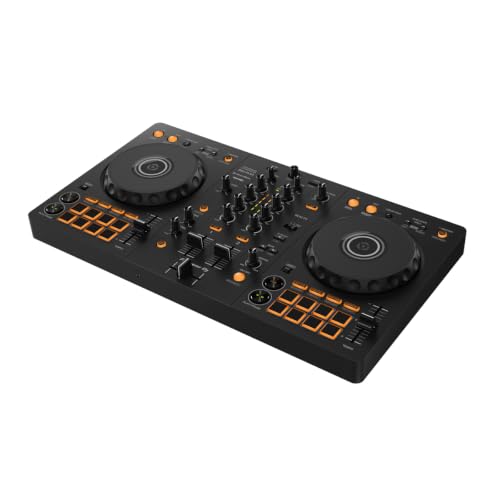
Pioneer DJ DDJ-FLX4 2-Channel DJ Controller
Badge: Best for Beginners
Strengths
- An all-in-one USB controller: connect a laptop and the music, the mixer section, and the performance pads are all here
- Smart Fader and a beginner-first layout make first mixes achievable in an evening
- Streaming-ready design and a mic input cover the livestream-from-one-device use case
Trade-offs
- It is a controller, not a standalone mixer — it needs a computer and software to function
- Two channels and a compact layout will be outgrown by advancing performers
- No use at all for microphone-heavy live events; it is a DJ performance tool
| Channels | 2 channels |
|---|---|
| Pads listed | 16 pads |
| Features listed | Smart Fader, streaming-ready, mic input |
| Colour listed | Graphite |
Honesty first, because this pick depends on it: the DDJ-FLX4 is a DJ controller, not a mixer, and it appears in this guide because a large share of the people searching this keyword actually need one. A controller is the mixer, the decks, and the sound interface in a single USB device that works with a laptop — which is precisely what a beginner, a bedroom producer, or a streamer means by a DJ USB setup, whether or not they know the vocabulary yet. Pioneer’s FLX4 is the current reference point for that need.
The design is a tutorial disguised as hardware. The layout mirrors the club standard in miniature, so skills transfer upward; Smart Fader assists the first blends by managing levels and tempo as you crossfade, training wheels that come off as the rider improves; and the sixteen pads put cues and samples under the fingers from day one. The listing’s streaming-ready note and mic input answer the modern reality that many first performances are broadcasts from a bedroom, with the microphone for the host’s voice running through the same single device.
The boundaries are equally clear. Without a computer and DJ software, the FLX4 is a handsome paperweight — it has no standalone mixing life. Its two channels and compact controls are a beginning, not a destination, and a performer who progresses will eventually want either a larger controller or the true mixer above. For event work with several microphones — weddings with speeches, karaoke, church halls — it is simply the wrong category, and the boards below exist for that world.
Judged as what it is, it may be the most satisfying purchase in this guide: the lowest-friction route from no setup to a real, recordable, streamable DJ practice. Beginners should start here and let their ambitions, once proven, argue for the DJM above.
Best for: Beginner DJs, bedroom performers, and streamers / Not suited for: standalone use without a computer, or microphone-heavy events

Riworal 6-Channel Audio Mixer with 16-Bit DSP
Badge: Best for Karaoke and Streaming
Strengths
- Six channels cover microphones, instruments, and playback for small events in one board
- Reverb effect and 16-bit DSP give voices the polish karaoke and streaming audiences expect
- Bluetooth plus USB interface duty covers both wireless playback and computer recording
Trade-offs
- A live-sound board, not a DJ performance mixer — there is no crossfader workflow here
- Brand depth is shallower than the Pioneer and Pyle names in this guide
- Effects are a seasoning for voices; music DJs will find them beside the point
| Channels | 6 channels |
|---|---|
| DSP listed | 16-bit DSP |
| Effects listed | Reverb effect |
| Phantom power | +48V |
| Connectivity listed | Bluetooth, USB audio interface |
Cross the line from DJ performance to events — karaoke nights, streamed sing-alongs, small parties with speeches and singers — and the tool changes shape. This six-channel Riworal is that tool: a live-sound mixer whose USB interface serves the computer doing the streaming or recording, whose Bluetooth takes backing tracks from any phone, and whose reverb exists because a dry karaoke vocal sounds exposed and a touched one sounds like a performance.
Six channels is the right size for the format: two or three microphones for singers and hosts, a keyboard or guitar, and playback, with phantom power available for a condenser microphone if the stream’s host voice matters — and on a stream, the host voice is the product. The board’s layout follows the standard live pattern, so any musician or venue volunteer can run it without a manual, which is the operative requirement at real events.
Do not buy it for DJ performance. There is no crossfader-centric workflow, no per-channel performance filter, no DVS path; a DJ asked to perform on it would be working around the tool all night. That is not a defect — it is a category line, and this guide draws it brightly because the keyword blurs it. Buy this for voices and events; buy the Pioneer picks for decks and blends.
Brand depth is the standing caveat for the value boards in this guide: Riworal’s support history is shorter than the established names, so test the board across a full event during the return window and keep the paperwork. Judged on fit for the karaoke-and-streaming brief, it is the most purpose-shaped option here.
Best for: Karaoke hosts, streamers, and small events built around voices / Not suited for: DJ performance mixing

FULUODE 8-Channel Audio Mixer (CT-80S)
Badge: Best for Live Events and Bands
Strengths
- Eight channels handle a small band, several vocalists, and playback without rationing inputs
- USB recording captures the event or the set while the board runs it
- Bluetooth and an MP3 player cover interval music and backing tracks from any source
Trade-offs
- The largest board here — more to carry, learn, and set up than a DJ or solo host needs
- No DJ performance features; this is a live console through and through
- A newer brand, so audition support and returns before an important event depends on it
| Channels | 8 channels |
|---|---|
| Phantom power | 48V |
| Connectivity listed | Bluetooth, MP3 player, USB recording |
| Listed uses | Studio, karaoke, live music |
When the event outgrows voices-and-a-laptop — a live band at a wedding, a school production, a multi-act community show — the mixer question becomes a channel-count question, and this eight-channel FULUODE is the guide’s answer. Eight inputs absorb drums-adjacent percussion, guitars, keyboards, several vocalists, and a playback channel, with 48V phantom power for the condenser microphones that capture choirs, strings, and room ambience.
The USB recording function earns its place at events: the same board that runs the room captures the performance, which is the difference between a show that exists once and a show the performers can hear, share, and learn from. Bluetooth and the built-in MP3 player handle the unglamorous intervals — walk-in music, backing tracks, the playlist during the buffet — without tying up a laptop that has other jobs.
Everything about the board says live console rather than DJ tool, and the DJ reader should pass it by without regret, just as the band reader should pass the two-channel Pioneer. Its size is its cost: more to transport, more strips to manage, more training for a volunteer operator. Events that will never pass five inputs should buy the smaller Pyle below and pocket the difference.
As with the other value boards, buy it with the return window in mind and run a full rehearsal through it before the event that matters. For the organiser whose problem is genuinely eight channels of live sound with a recording to take home, it is the fit this list offers.
Best for: Live bands, productions, and events needing eight inputs plus recording / Not suited for: DJs or solo hosts, who need far less board

Pyle 6-Channel Bluetooth Audio Mixer (PMXU68BT)
Badge: Best Mid-Size All-Rounder
Strengths
- Six channels with a USB audio interface cover the small-event and home-studio overlap neatly
- Bluetooth playback frees the music source from cables and adapters
- Pyle’s long presence in affordable audio means a deeper support footprint than the newest brands
Trade-offs
- A generalist board: it serves DJs only as a playback-and-mic hub, not as a performance mixer
- Six channels ceiling out for band work — the FULUODE above exists for that step
- Analog workflow means settings are manual and must be labelled to be repeatable
| Channels | 6 channels |
|---|---|
| Connectivity listed | Bluetooth, USB mixer audio interface |
| Listed uses | Studio recording |
| Format listed | Portable digital DJ mixing console |
The Pyle PMXU68BT occupies the sensible middle of this guide: a six-channel board with Bluetooth and a USB audio interface, from a brand that has sold affordable audio long enough to have a real support footprint. Its natural home is the overlap zone — the home studio that records to a computer, the small venue that needs microphones and playback, the mobile host whose events mix speeches, singers, and a laptop of music.
For the DJ-adjacent reader, its honest role is hub rather than instrument: it can take a controller or a laptop’s output, add microphones for the host and the toasts, and send a clean mix to the speakers and the recording at once. Wedding and party hosts, for whom the night is announcements and music in alternation, will find this the most practical board on the page. Performance DJs should return to the top of the list; the crossfader is not here.
Six channels is a real ceiling — a band will want the eight-channel board — and the analog workflow asks for the usual discipline: label the strips, photograph the settings, and the board will behave identically at every event. Within those terms, the Pyle is the all-rounder recommendation for readers whose events are mixed programmes rather than pure DJ sets or pure bands.
It is also the natural step-up for a karaoke or streaming setup that has outgrown the smallest boards but does not need eight channels: same category as the Riworal, with the brand-depth argument in Pyle’s favour and the effects argument in the Riworal’s. The reader’s priority — polish for voices, or provenance — decides between them cleanly.
Best for: Mobile hosts, small venues, and home studios with mixed programmes / Not suited for: performance DJing or full band work

Pyle 4-Channel Bluetooth Audio Mixer (PMXU48BT)
Badge: Best Compact Pick
Strengths
- Four channels match the solo host’s real needs: a microphone or two, music playback, and a spare
- Bluetooth and USB interface cover wireless music and computer recording in the smallest footprint here
- The simplest board in the guide to learn, carry, and set up — a one-person rig
Trade-offs
- Four channels is a hard ceiling — a second singer plus a band is already too much
- No DJ performance features, as with all the live boards here
- Small boards tempt buyers to underbuy for events that are still growing
| Channels | 4 channels |
|---|---|
| Connectivity listed | Bluetooth, USB mixer audio interface |
| Listed uses | Studio recording |
| Format listed | Portable digital DJ mixing console |
The smallest board in the guide is the right board for a definable and common job: the solo host. A podcaster who records guests, a solo singer with backing tracks, a celebrant or MC with a microphone and a laptop of music, a small room that needs one voice and one playlist — all of them need exactly what the PMXU48BT offers: four channels, Bluetooth for the music, a USB interface for the computer, and a setup one person can carry and run alone.
Its virtue is the absence of friction. Fewer strips mean faster soundchecks, fewer wrong knobs for a nervous operator, and a board that lives in a small bag rather than a flight case. For the streamer starting out, it covers the microphone, the game or music feed, and the recording path in one purchase, at the compact end of the range — the audio equivalent of the FLX4’s beginner logic in the controller world.
The ceiling is absolute, and the review will not soften it: the fifth input does not exist. Events grow — a second vocalist, a guitarist joining the singer, a panel discussion — and when they do, this board is replaced rather than expanded. Buy it when the format is stable and solo, and it will serve for years; buy it for a growing event and you will buy twice, which the guide’s mid-size picks exist to prevent.
Within its brief it is the easiest recommendation on the page after the two Pioneers: a known brand, the essential connections, and nothing to intimidate a first-time operator. Small, in audio, is a feature — when small is what the job actually is.
Best for: Solo hosts, podcasters, and small rooms with a stable, simple format / Not suited for: growing events or any multi-musician setup
Comparison Table
| Pick | Type | Standout trait | Watch out for | Link |
|---|---|---|---|---|
| Pioneer DJ DJM-250MK2 2-Channel DJ Mixer | DJ mixer | True club-style layout plus DVS unlock | Needs external music sources | Check on Amazon |
| Pioneer DJ DDJ-FLX4 2-Channel DJ Controller | DJ controller | All-in-one USB DJ setup for beginners | Requires a laptop and software | Check on Amazon |
| Riworal 6-Channel Audio Mixer with 16-Bit DSP | Audio mixer | Reverb and interface for voice-led events | No DJ crossfader workflow | Check on Amazon |
| FULUODE 8-Channel Audio Mixer (CT-80S) | Audio mixer console | Eight channels with USB recording | Size and learning curve | Check on Amazon |
| Pyle 6-Channel Bluetooth Audio Mixer (PMXU68BT) | Audio mixer | Bluetooth plus USB interface in a proven line | Generalist, not a performance tool | Check on Amazon |
| Pyle 4-Channel Bluetooth Audio Mixer (PMXU48BT) | Audio mixer | One-person rig with interface and Bluetooth | Hard four-channel ceiling | Check on Amazon |
How to Choose: The Category Fork Comes First
Begin with the category fork, and be brutally specific about your next event rather than your imagined one. If it involves two music sources being blended, scratched, or mixed live by a DJ, you are in performance territory: the DJM-250MK2 if you own or plan sources and want the real booth workflow, the DDJ-FLX4 if you are starting out and want the laptop to be the library. If the event involves microphones being heard clearly — speeches, singers, karaoke, worship, panels — you are in live-board territory, and the only remaining question is size.
Size a live board by counting simultaneous inputs at the busiest moment, then adding one spare. A solo host with a microphone and playback needs four channels. Karaoke and streaming with a few voices needs six. A band or production needs eight. The spare is not luxury; it is the guest vocalist, the extra instrument, the backup microphone when the main one fails mid-event. Boards bought at exactly the count are boards replaced within a year.
Then verify the USB job you actually need. Recording a set or a service means the board must present itself to a computer as an audio interface — the live picks here do, and the DJ picks reach the computer through DVS or controller software instead. Streaming adds a monitoring requirement: you must be able to hear what the stream hears, which is a headphones-and-levels discipline covered in the how-to section. Bluetooth, where listed, is for playback convenience — walk-in music and backing tracks — and never a substitute for wired connections for the critical sources.
Finally, weigh the ecosystem you are buying into. DJ skills and libraries live in software — the rekordbox path named in the Pioneer listings is a real commitment with real benefits — and live-event reliability lives in spares and familiarity. Buy the tool whose surrounding world you are willing to inhabit, because you will inhabit it every time you set up.
How to Set Up, Gain-Stage, and Troubleshoot a USB Rig
For DJ setups, the chain is source, mixer or controller, speakers, and the discipline is gain. Set each channel’s gain so the loudest part of the track sits comfortably below distortion, keep the master in its calm middle range, and let the speakers do the final work. Controller users should map nothing on day one: learn the default layout, the browser, and clean blends first, because the fundamentals are the performance. Record your practice sets through the USB path from the beginning — listening back is the fastest teacher in DJing, and the recording is already built into every setup in this guide.
For live boards, set up in a fixed order: sources connected with levels down, channel gains set on the loudest expected moment, a line check of every microphone and playback source, then the master brought up. Label every strip with tape — vocal, guitar, laptop, spare — because at an event, nobody remembers an unlabelled board, including the person who set it up. If the board feeds a stream or recording, check that feed on headphones separately; the stream’s audience hears a different balance from the room’s, and the recording level must be set on the loudest item, not the speech.
Problem: distortion on the recording or stream while the room sounds clean. One stage is being driven too hard — usually the channel gain compensating for a low source. Turn the source up if it has its own level, bring the channel gain to a healthy middle, and re-check with the loudest moment of the programme.
Problem: Bluetooth playback drops or lags at an event. Wireless is a convenience layer, not a foundation: move the source closer and line-of-sight to the board, and keep a wired cable in the kit for the sources that matter. The professional habit is Bluetooth for walk-in music, cable for the first dance.
Problem: feedback from event microphones. It is geometry before it is settings: speakers in front of microphones, microphones close to mouths, gain no higher than the distance requires. Walk the microphone through the room during setup and learn where it feeds back before the audience teaches you.
After the event, the five-minute discipline: levels down, cables coiled loosely, strips’ labels left in place, settings photographed. The next setup starts from a known state instead of an archaeological dig, and that — more than any feature in this guide — is what reliable operators are made of.
Mixer, Controller, or Interface: The Vocabulary That Saves Money
Three devices hide inside this keyword, and naming them precisely is worth real money. A DJ mixer blends audio sources with performance controls — crossfader, per-channel EQ and filter — and makes no sound of its own. A DJ controller combines decks, mixer section, and audio interface in one USB device that is inert without a computer and software. A live mixer with USB is a microphone-and-instrument console that also serves as the computer’s audio interface for recording and streaming. Each is the correct purchase for its job and a costly error for the others’.
The confusion is understandable: all three have knobs, all three say mixer somewhere in their marketing, and search results — as this series’ neighbouring keywords show, from kitchen machines to the boards in Best Mixers Churches — blend categories without mercy. The reader’s defence is to shop by the event description, not the product name: name the sources, name the audience, name the recording, and the correct category selects itself. Only then does the model comparison in this guide become the right argument to have.
Streaming the Set: What USB Actually Buys You
For performers and hosts alike, the modern event has two audiences — the room and the stream — and USB is the bridge between them. A controller sends its performance to the computer that broadcasts it; a live board sends the room’s mix to the streaming or recording software. In both cases the discipline is identical: monitor the outgoing feed on headphones, set its level on the loudest moment, and test the complete chain before the audience arrives, because a stream’s failure is silent in the room and total online.
The boards and tools here were chosen with that second audience in mind — mic inputs for the host’s voice, interfaces that present cleanly to a computer, playback paths for the media a stream runs on. Streamers building a first rig should also read the cost discipline in this guide’s mistakes section: the stream rewards reliability and a good microphone far more than it rewards a larger board, and the audience at home cannot see your equipment — only its failures.
From Bedroom to Booth: A Realistic Upgrade Path
DJ equipment is one of the few categories where the upgrade path is a genuine ladder rather than a restart. The controller teaches layout, library management, and blend fundamentals; those skills transfer directly to the true mixer, whose booth layout is the same language at professional scale; and the live boards remain useful alongside both, because the performing DJ is constantly hired for events that also need microphones. Nothing in a sensible first purchase here is wasted by ambition — the FLX4 becomes the backup and travel rig, the small Pyle becomes the ceremony system.
The path fails only when the first purchase is in the wrong category for the buyer’s actual next year. A year of bedroom DJ practice on a live board teaches almost nothing transferable; a year of event hosting attempted through a controller teaches mostly improvisation. Buy for the year you are actually about to have, and the ladder works. Buy for an imagined year, and even excellent equipment becomes furniture.
Common Buying Mistakes
The category error is the expensive one, and it opens this list because it opens most returns in this keyword: a live board bought to DJ on, discovered at the first party to have no crossfader workflow; or a controller bought to run an event’s microphones, discovered to have one mic input and a laptop dependency. Both products were good. Both purchases were wrong. The fork in the buying-guide section exists to be taken seriously.
The second mistake is underbuying channels for events. Hosts count the microphones they own rather than the inputs the event will demand, forget the playback channel and the spare, and meet the difference on the day. Count the busiest moment, add one, and let the board be slightly too big — an unused channel is silent; a missing one is a crisis.
Third: trusting wireless for the critical path. Bluetooth playback is a delight for walk-in music and a liability for the moment that matters. The cable for the important source belongs in every kit, tested, every time.
Fourth: gain chaos — every stage turned up to compensate for another stage turned down, producing noise, distortion, and a board nobody can predict. Set each stage to do a moderate amount of work, as the how-to section describes, and the whole chain becomes calm. Most bad sound at small events is gain structure, not equipment quality.
Finally, do not skip the rehearsal rule for value-brand boards: run the full event once, at home, inside the return window. A board that survives a rehearsal will survive the event; a board whose flaw appears at the rehearsal has cost you an afternoon instead of an audience.
Final Recommendation
Performing DJs: start with the DDJ-FLX4 if you are beginning — it is the complete, laptop-based rig that teaches the craft — and step up to the DJM-250MK2 when your sources and ambitions become the real booth workflow. Between them they cover the honest DJ reading of this keyword, from first mix to working setup.
Hosts, streamers, and events: choose by channel count — the Pyle PMXU48BT for solo work, the six-channel boards for voices and mixed programmes, the FULUODE for bands — and let USB do the recording and streaming it is there for. Check the latest price on Amazon on the day, verify the channel count and connections against your event’s busiest moment, and run the rehearsal. The right category, calmly set up, is what an audience experiences as good sound.
Related guides
- Best Usb Multi Channel Recording Mixers
- Best Sub 100 Usb Mixers
- Best Usb Mixers For Fl Studio
- Best Usb Mixers For Streaming Ps4
Frequently Asked Questions
What does USB actually do on a DJ mixer?
It depends on the device. On a true DJ mixer like the DJM-250MK2, USB supports the digital vinyl path — the listing includes a rekordbox DVS unlock — so a laptop library can be controlled from turntables. On live boards, USB makes the mixer a computer audio interface for recording and streaming. On a controller, USB is the whole connection: music, control, and audio pass through the one cable to the laptop.
Is a DJ controller the same as a mixer?
No, and the distinction matters before purchase. A controller combines decks, a mixer section, and an interface in one device that only works with a computer and DJ software. A standalone mixer blends external sources — turntables, players, laptops — without needing a computer at its centre. Beginners usually want the controller; performers with sources want the mixer. This guide labels each pick accordingly.
How many channels do I need for an event?
Count the simultaneous inputs at the busiest moment — every microphone, instrument, and playback source — then add one spare. Solo hosts typically need four channels, karaoke and mixed programmes six, and bands or productions eight. Buying exactly the count leaves nothing for the guest, the backup microphone, or the failure that only happens live.
Can I DJ a party with one of the live boards?
You can play music through one and run microphones over it — which is what many party hosts actually need — but you cannot perform DJ mixing on one: there is no crossfader workflow or per-channel performance filter. If the party needs blends and performance, buy a DJ tool; if it needs music plus speeches and singers, a live board is the correct and cheaper answer.
Which pick is best for streaming?
For DJ streaming, the DDJ-FLX4, whose listing highlights streaming readiness and a mic input for the host voice from one device. For voice-led streaming — karaoke, talk, events — a live board with a USB interface, sized to your microphones: the Riworal for voice polish with reverb, or the Pyle boards for straightforward reliability. In all cases, monitor the outgoing feed on headphones and set levels on the loudest moment.
Do these mixers work for recording a band or a service?
The live boards with USB interface or recording functions can capture a stereo mix of the event to a computer — suitable for archives, demos, and streams. That is a mix recording, not multitrack studio recording; capturing each channel separately for later mixing is a different class of equipment. For most events, the honest stereo capture from a well-run board is exactly what is needed.
What else should I budget for besides the mixer?
For DJs: the sources or software the setup depends on, headphones you trust, and the cables to connect everything twice over. For events: microphones first — they decide more of the sound than the board — plus stands, spare cables, and console tape for labelling. In both worlds, the unglamorous accessories prevent more failures than any upgrade to the mixer itself.


