Disclosure: topratedkitchenware.com is reader-supported. When you buy through links on our site, we may earn an affiliate commission from Amazon and other retailers, at no extra cost to you.
Where to buy
All six products in this guide to the best mixers for making beats are current Amazon listings with API-verified data. This is an audio guide — mixers and DJ hardware for beat production — and every pick was checked for a real role in a beat-making rig before it earned a link. Buy for the workflow you actually use: sampling, performance or sub-mixing hardware into your DAW.
- Riworal 7-Channel Audio Mixer — Check on Amazon
- Aveek 4-Channel Audio Mixer — Check on Amazon
- Numark M2 2-Channel Scratch DJ Mixer — Check on Amazon
- Numark Scratch DJ Mixer
- Pioneer DJ DJM-250MK2 2-Channel DJ Mixer
- Pioneer DJ DDJ-FLX4 2-Channel DJ Controller
Read the full guide ↓
The best mixers for making beats are not one product category but three, and this guide is honest about that from the first paragraph. Beat production uses ‘mixer’ to mean a DJ mixer for sampling and scratching records into a DAW, a controller for performing and triggering, or a small console for gathering hardware — samplers, synths, drum machines — into the computer. The six picks here span those roles deliberately, from Pioneer and Numark DJ hardware to compact USB consoles. One clarification for lost searchers: if you arrived here hunting Best Mixers For Making Cookies or Best Mixers For Malibu Coconut Rum, those are kitchen stand mixers — this guide is about the audio kind, and the beats are musical.
What unites the picks is a job in the production chain: getting sound into the session with character, or performing it back out with control. A scratch mixer shapes samples before they are ever recorded; a console sub-mixes a hardware rig so a beat arrives in the DAW as a performance rather than a pile of stems; a controller turns arrangement ideas into played gestures. Producers building a first rig should decide which of those jobs is actually missing from their setup — that decision, not a feature table, is what the reviews below are organised around.
Key Takeaways
- Decide the mixer’s job first: sampling/scratching front end, hardware sub-mixer, or performance controller — the picks split along exactly those lines.
- DVS (digital vinyl systems) on the Numark Scratch and Pioneer DJM-250MK2 let turntables control your digital library for sampling and scratching.
- The USB consoles here print a stereo sub-mix to the DAW — a performance-first workflow, not multitrack tracking.
- Crossfader quality is a production spec when you sample: replaceable and adjustable faders (Numark M2) survive heavy hands.
- Phantom power on the consoles keeps a condenser microphone available for recording your own sounds and vocals into beats.
In this guide
Quick Picks
| Pick | Badge | Channels / format | Why it is here | Link |
|---|---|---|---|---|
| Riworal 7-Channel Audio Mixer | Best Console for Hardware Rigs | 7 channels | Seven channels gather samplers, synths and a drum machine into one stereo feed. | Check on Amazon |
| Aveek 4-Channel Audio Mixer | Best Compact DAW Front End | 4 channels | Four channels, 99 DSP effects and USB PC recording for a tight desk rig. | Check on Amazon |
| Numark M2 2-Channel Scratch DJ Mixer | Best Classic Scratch Mixer | 2 channels | A replaceable, slope-adjustable crossfader built for cutting samples the traditional way. | Check on Amazon |
| Numark Scratch DJ Mixer | Best for Sampling and DVS | 2 channels | Innofader, Serato DVS and performance pads — the modern sampling battle station. | Check on Amazon |
| Pioneer DJ DJM-250MK2 2-Channel DJ Mixer | Best Club-Standard Feel | 2 channels | Club-layout mixing with Sound Color FX and rekordbox DVS for performance-minded producers. | Check on Amazon |
| Pioneer DJ DDJ-FLX4 2-Channel DJ Controller | Best Controller for Beginners | 2 channels, 2 decks | A 16-pad controller with Smart Fader that turns arrangement ideas into played performances. | Check on Amazon |
How These Picks Were Chosen
Each pick was verified through Amazon’s Creators API on 2026-11-20 — ASIN, exact listing title and official image confirmed — and only verified picks carry links. The shortlist was then built by production role rather than by product type, because beat-making is a workflow before it is a category: two DJ mixers for the sampling and scratching tradition, one Pioneer mixer and one controller for the performance tradition, and two USB consoles for the hardware-gathering tradition. Specifications quoted in the reviews — crossfader types, DVS inclusions, channel counts, DSP figures — come from the verified listings, not from brand folklore.
This is a research-led guide, not a claim of studio testing, and it keeps one limit in plain view: the consoles here send the DAW a stereo mix, so producers who need every hardware voice on its own track should be shopping for a multitrack interface instead. Within the stereo, performance-first philosophy — which is how a great deal of hip-hop and electronic music has always been made — these six tools cover the realistic range of budgets and ambitions, and the reviews say plainly which tradition each one serves.
The 6 Best Mixers for Making Beats

Riworal 7-Channel Audio Mixer
Badge: Best Console for Hardware Rigs
Strengths
- Seven channels sits neatly between the compact boards and the full eight-channel models
- USB, Bluetooth, MP3 and computer input give it the widest playback menu in this group
- Phantom power keeps condenser microphones on the table
Trade-offs
- An odd channel count means planning the stereo pairs takes a moment’s thought
- Playback flexibility does not add processing — effects are not the stated strength
- Like the other Riworal board here, controls are closely spaced
| Channels | 7 channels |
|---|---|
| Connectivity | USB audio interface, Bluetooth, MP3, computer input |
| Phantom power | +48V phantom power |
This seven-channel Riworal board is the playback maximalist of the group: a USB audio interface with Bluetooth, MP3 and computer input all listed, plus +48V phantom power for condenser microphones. Seven channels is an in-between size that suits setups which outgrew four or five inputs but do not need a full eight — an extra microphone, a stereo keyboard and a media source can coexist without eviction fights. The variety of playback routes is the real story: whatever device the music lives on, this board probably has a way to hear it. Effects are not the stated headline, so its case rests on inputs, phantom power and source flexibility.
In a beat rig, seven channels is working room: a sampler, a drum machine, a synth and a microphone can stay patched, with the USB feed printing the combined performance into the DAW as a stereo beat sketch or a finished foundation. That commit-as-you-go method suits producers who arrange by playing rather than by drawing, and the playback flexibility (Bluetooth, MP3, computer input) doubles as a quick reference-check path. It will not multitrack your hardware, and it does not pretend to; its argument is that a balanced, hands-on sub-mix, recorded with intent, is how beats have always been born.
The seven-channel Riworal’s daily character is flexibility without fuss: whichever device today’s material lives on — laptop, phone, stick — has a way in, and the channel count means yesterday’s patch is still valid when today’s source arrives. Owners of media-rich setups will recognise the value immediately; the board behaves like a well-run front desk, receiving everything politely. Phantom power keeps the recording microphone ready, and the USB path to the computer is the simple stereo arrangement it appears to be. It asks only that you label its channels, because with this many routes in, memory alone will eventually lose track.
Best for: hardware-rich producers sub-mixing a rig into the DAW / Not suited for: producers needing multitrack recording of each device

Aveek 4-Channel Audio Mixer
Badge: Best Compact DAW Front End
Strengths
- 99 DSP effects in a four-channel frame is generous processing for the size
- USB PC recording is built in rather than bolted on, which suits desk-based work
- Compact enough to live permanently on a desk or in a small gig bag
Trade-offs
- Four channels is the ceiling, full stop
- A deep effects menu on a small board means some settings live behind shared controls
- Not the choice when the input list is still growing
| Channels | 4 channels |
|---|---|
| Effects | 99 DSP effects |
| Connectivity | USB PC recording, Bluetooth, USB playback |
| Phantom power | 48V phantom power |
Aveek’s four-channel mixer pairs the two features desk-based creators ask for most: USB PC recording and a deep effects section — 99 DSP effects, with Bluetooth and USB playback alongside and 48V phantom power for condenser microphones. In a four-channel frame that combination is aimed at one or two people making finished-sounding audio at a desk: a treated vocal, a guitar or keyboard, music playback and a recording path to the computer, all in one small unit. The effects depth means the polish happens on the board rather than in software, which simplifies streaming and live-to-tape workflows. The ceiling is equally clear: four channels, and no honest way around it.
The compact Aveek fits the desk-bound producer: a microphone for recording found sounds and vocal chops, one hardware piece, the computer return — and 99 DSP effects for dressing a sound on its way into the session. Printing a drum loop through a touch of board effect, or a vocal chop with its space already chosen, is a legitimate production aesthetic, and this little board makes it a one-box habit. Four channels caps the rig size, so it suits focused setups and producers who work one sound at a time rather than conducting a hardware orchestra.
The little Aveek’s daily appeal is the ratio of capability to footprint: it sits in the corner of a desk that has other jobs, yet the voice that passes through it sounds produced, thanks to an effects library that belongs on a larger board. The working pattern it encourages — find your effect, set your gain, leave everything alone — suits creators and home recordists who want audio to be a solved problem rather than a hobby. USB recording and playback cover the computer relationship completely at this scale, and the whole unit can be moved, lent or packed in a minute when the desk needs to be something else.
Best for: desk producers recording one sound at a time with printed character / Not suited for: large hardware collections

Numark M2 2-Channel Scratch DJ Mixer
Badge: Best Classic Scratch Mixer
Strengths
- A purpose-built scratch layout: the crossfader is replaceable and its slope is adjustable
- Rack-mountable, which almost nothing else in this group offers
- 3-band EQ and a mic input cover the classic two-deck plus microphone formula
Trade-offs
- Two channels only — it is a DJ battle-style tool, not a multi-source console
- No USB audio interface is stated in the listing title
- No built-in effects beyond the EQ and crossfader craft
| Channels | 2 channels |
|---|---|
| Format | Rack-mountable scratch mixer |
| EQ | 3-band EQ |
| Crossfader | Replaceable, slope-adjustable crossfader |
| Inputs | Mic input |
The Numark M2 is an unapologetically traditional scratch mixer: two channels, 3-band EQ, a microphone input, rack-mountable construction, and a crossfader that is both replaceable and slope-adjustable. Those last two details are the tell of a mixer designed for heavy hands — scratch DJs wear crossfaders out, and being able to swap the fader and set its cut-in curve to taste is the difference between a tool and a toy. The rack-mountable format suits permanent installs in small venues and home rigs alike. There is no USB interface in the listing and no effects section; the M2’s craft is EQ, level and the crossfader, practised properly.
The M2 is the traditionalist’s sampling tool: two turntable channels, honest 3-band EQ for carving a sample’s tone before it is recorded, and a crossfader you can replace when your cutting hand wears it out — with a slope adjustment to set the cut exactly where your technique wants it. Producers raised on the classic workflow, sampling from vinyl through a battle mixer into the DAW, will find nothing here they do not recognise and nothing missing that they actually use. It offers no USB and no software; it is the analogue front end, and it is proud of it.
Living with the M2 is a tactile experience: the crossfader is the centre of its world, and its replaceable design acknowledges a truth about scratch DJs — faders are consumables, and a mixer that treats them that way respects its owner. The slope adjustment lets you set the cut from a smooth blend to a near-instant switch, and finding your setting is a small rite of passage. Rack-mounting gives it a permanent home in a furniture rack or a small venue install, and the 3-band EQ covers the tone-shaping that two-deck mixing actually involves. It is a specialist’s tool that has not forgotten it will be used hard.
Best for: vinyl samplers and scratch traditionalists / Not suited for: software-first producers wanting DVS and pads

Numark Scratch DJ Mixer
Badge: Best for Sampling and DVS
Strengths
- The Innofader crossfader is a serious scratch component, not a token fader
- Serato DJ Pro and a DVS license are included, so the digital vinyl workflow starts out of the box
- FX paddles and eight performance pads put live remixing controls under the fingers
Trade-offs
- Built around Serato, so software loyalty is part of the purchase
- Two channels keeps it in DJ territory rather than general mixing duty
- Performance features reward practice — it is not a set-and-forget board
| Channels | 2 channels |
|---|---|
| Crossfader | Innofader crossfader |
| Software | Serato DJ Pro included, DVS license |
| Performance | FX paddles, 8 performance pads |
| Audio | 24-bit audio |
The Numark Scratch is a battle mixer built for the digital era: an Innofader crossfader at its centre, Serato DJ Pro included with a DVS license, FX paddles, eight performance pads and 24-bit audio. The DVS license is the unlock that matters — it lets timecode vinyl or CDs on ordinary decks control Serato’s digital library, blending turntable feel with a laptop’s catalogue. The pads bring cue points and performance tricks onto the mixer itself, and the FX paddles deliver the momentary, expressive effects control scratch and party DJs reach for. It is a focused instrument: two channels, deep performance features, and a software ecosystem it expects you to join.
The Numark Scratch modernises the sampling station: the Innofader delivers the cut, the included Serato DJ Pro and DVS license let your turntables control digital files — so the sample library becomes anything you own, not only what is pressed on vinyl — and the eight performance pads put cue points and chops under your fingers for live rearrangement. For producers who perform their beats as much as they program them, this is the most complete single box here: mixer, interface-class audio path and performance surface in one battle-ready unit.
Day to day, the Numark Scratch feels like a performance instrument that happens to be a mixer: the pads invite play, the FX paddles beg to be flicked at transitions, and the Innofader’s cut becomes part of your technique rather than a setting you tolerate. The included Serato ecosystem means the digital side arrives complete — software, DVS license, a library workflow — so the unit’s personality is coherent from the first session. Its 24-bit audio path keeps the digital chain clean. Owners should expect it to shape their habits: this mixer wants to be played, nightly, and it rewards exactly that relationship.
Best for: sampling and performance producers in the Serato ecosystem / Not suited for: producers outside the Serato world

Pioneer DJ DJM-250MK2 2-Channel DJ Mixer
Badge: Best Club-Standard Feel
Strengths
- Club-style layout means the skills learned on it transfer to the mixers installed in venues
- The Sound Color FX filter is a genuinely musical one-knob performance tool
- rekordbox DVS unlock is included, opening the digital vinyl route
Trade-offs
- Two channels, deliberately — this is a focused DJ mixer, not a utility console
- The Pioneer ecosystem (rekordbox) is the assumed home software
- No performance pads, so cue juggling lives on the decks or controller instead
| Channels | 2 channels |
|---|---|
| Workflow | Club-style 2-channel layout |
| Effects | Sound Color FX filter |
| Software | Free rekordbox DVS unlock |
Pioneer DJ’s DJM-250MK2 distils the club mixer formula into two channels: the layout mirrors the larger mixers installed in venues, the Sound Color FX filter puts a sweepable, musical effect on a single knob per channel, and a free rekordbox DVS unlock opens digital vinyl control inside Pioneer’s ecosystem. For a DJ, the transferable layout is the quiet superpower — muscle memory built at home on this mixer works on the club-standard surfaces found in booths. It deliberately omits performance pads and extra channels; the design bet is that clean EQ, a great filter and a familiar layout beat feature sprawl for the mixing itself.
The DJM-250MK2 brings the club-standard layout into the production room, which matters for producers who also play out: the beat you perform in the booth and the beat you build in the studio share one muscle memory. The Sound Color FX filter is a genuine production tool — sweeps and dubs performed by hand print beautifully into a DAW — and the rekordbox DVS unlock keeps digital files under turntable control for sampling. Two focused channels, no pads, no sprawl: it is the choice for producers whose beats come from two decks and two hands.
The DJM-250MK2’s daily pleasure is familiarity: every control is where club-standard layout says it should be, so practice at home compounds directly into competence on installed venue mixers — a transfer effect no other pick here offers in the same way. The Sound Color FX filter becomes a signature gesture with use, a single-knob sweep that marks transitions as yours. The rekordbox DVS unlock keeps the digital library under turntable control inside Pioneer’s world. It is a focused, almost austere tool, and DJs who value transfer and touch over feature sprawl tend to keep mixers like this for years.
Best for: DJ-producers who play out and build in the studio / Not suited for: pad-based finger drummers
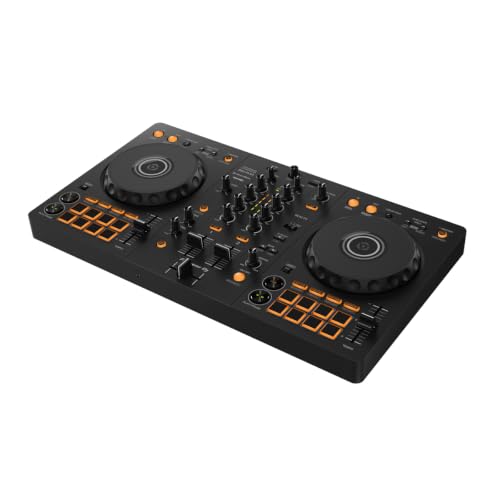
Pioneer DJ DDJ-FLX4 2-Channel DJ Controller
Badge: Best Controller for Beginners
Strengths
- Smart Fader helps first mixes sound smooth while the underlying skills develop
- Sixteen pads and two full decks make it a complete performance instrument, not just a mixer
- A mic input and streaming-ready design suit the modern bedroom-to-broadcast path
Trade-offs
- It is a controller: it needs a computer and software running to make sound
- No standalone mixer inputs for external decks the way a true DJ mixer offers
- The jog-and-pad layout is a DJ instrument, not a general-purpose mixing console
| Channels | 2 channels, 2 decks |
|---|---|
| Pads | 16 pads |
| Finish | Graphite |
| Features | Smart Fader, streaming-ready, mic input for livestreaming |
The DDJ-FLX4 is a two-channel DJ controller rather than a standalone mixer: sixteen pads, two decks, Smart Fader assistance, streaming-ready design and a microphone input for livestreaming, all in Pioneer’s graphite finish. Smart Fader is the beginner-friendly headline — it helps transitions blend smoothly while beatmatching skills are still developing — and the pad count gives cue juggling and performance play real room. Because it is a controller, the computer and DJ software are part of the instrument; in return the whole setup is one USB-connected unit that can also carry a livestream with a mic. It is the modern, software-centred way into DJing in this group.
The DDJ-FLX4 approaches beat-making from performance: sixteen pads for triggering and finger-drumming ideas, Smart Fader to keep transitions musical while skills develop, and a microphone input that even covers talk-over and livestreamed beat sessions. As a production tool it shines at the arrangement stage — trying structures live, recording a performed pass into the DAW, discovering the version of the beat that programming alone would not have found. It needs the computer and software to exist at all, which in a DAW-centred studio is no hardship, and for beginners it is the friendliest on-ramp in this group.
Living with the FLX4 means living in software, comfortably: updates add features, the pads and Smart Fader keep early sessions sounding better than your technique yet deserves, and the whole rig packs into a backpack with the laptop it needs. The microphone input quietly extends its life beyond beginner status — streamed sets, talk-over practice, a friend’s party — and the graphite finish survives the bag-and-desk cycle gracefully. Its daily discipline is the laptop itself: keep the software organised and the library analysed, and the controller simply delivers. For the software-native generation of DJs, this is what a mixer looks like now.
Best for: beginners and performance-first arrangers / Not suited for: standalone hardware-only rigs
Comparison Table
| Pick | Channels | Computer connection | Effects | Link |
|---|---|---|---|---|
| Riworal 7-Channel Audio Mixer | 7 channels | USB audio interface, Bluetooth, MP3, computer input | See review | Check on Amazon |
| Aveek 4-Channel Audio Mixer | 4 channels | USB PC recording, Bluetooth, USB playback | 99 DSP effects | Check on Amazon |
| Numark M2 2-Channel Scratch DJ Mixer | 2 channels | See review | See review | Check on Amazon |
| Numark Scratch DJ Mixer | 2 channels | See review | See review | Check on Amazon |
| Pioneer DJ DJM-250MK2 2-Channel DJ Mixer | 2 channels | See review | Sound Color FX filter | Check on Amazon |
| Pioneer DJ DDJ-FLX4 2-Channel DJ Controller | 2 channels, 2 decks | See review | See review | Check on Amazon |
How to Choose a Mixer for Making Beats
Start by naming the tradition your beats come from, because the right mixer follows from it. Sample-based producers who dig through records need a DJ mixer with a serious crossfader and, ideally, DVS so the digital library is as playable as the vinyl — that is the Numark Scratch and DJM-250MK2 territory, with the M2 as the analogue purist’s version. Hardware producers with samplers and synths need channels and a USB feed — the two consoles here. Performance-minded producers need pads and a controller — the DDJ-FLX4. Buying across traditions is how rigs end up with an expensive box doing a job it was never shaped for.
Crossfader specifications deserve a producer’s attention, not just a DJ’s. When you sample, the fader is a sampling instrument: its cut-in point decides whether a chop sounds tight or lazy, and its durability decides whether it still feels right after a year of daily cutting. Replaceable, slope-adjustable faders (the M2) and the Innofader (the Numark Scratch) exist precisely because heavy hands destroy lesser faders. If scratching and cutting are core to your sound, weight this specification above almost everything else on the page; if they are not, spend the same money on channels or effects instead.
For the console route, be clear-eyed about the stereo commitment. Sub-mixing hardware to a stereo feed and printing it is a philosophy — balances and effects chosen in the moment, takes that are performances — and it has produced decades of great records. It is not a lesser version of multitracking; it is a different discipline with different strengths, mainly speed and commitment. The seven-channel Riworal suits the fuller rig, the four-channel Aveek the focused desk, and both keep phantom power available for the microphone that records the vocal chop, the live percussion or the room sound that makes a beat yours. Producers whose questions are really about kitchen stand mixers — Best Mixers For Making Pizza Dough and friends — are, again, in the wrong aisle entirely.
Finally, match the software ecosystem before the hardware seduces you. The Numark Scratch is a Serato instrument; the Pioneer pair speak rekordbox (and the FLX4 serves the mainstream DJ apps); the consoles are gloriously neutral, feeding any DAW. A producer’s library, cues and habits live in that software, so the mixer that speaks your existing language will make beats sooner than the technically superior one that demands a migration. Choose the tradition, then the ecosystem, then the box — in that order — and the purchase tends to survive contact with your actual workflow.
How to Set Up a Mixer-Based Beat Workflow
Whichever tradition you chose, the setup pattern is the same: sources into the mixer, mixer into the DAW, monitoring you can trust. The steps below use a sampling rig as the example and note the console variation.
- Patch your sources: turntables or media players into the DJ mixer’s channels (or hardware instruments into the console’s channels), and the mixer’s main output toward the computer — directly by USB where the mixer offers it.
- In the DAW, select the mixer or interface as the audio input, create a stereo track, and set levels so the loudest sample peak stays below clipping; headroom is cheaper than re-recording.
- Set your monitoring so you hear the mixer directly while tracking — latency while cutting or playing kills the feel that makes a performance worth printing.
- For DVS setups, calibrate the timecode signal in the DJ software before the session, not during it, and confirm both decks track cleanly in both directions.
- Record a test pass of the full chain — a scratch, a hardware pattern, a pad performance — and listen back on your usual monitors before committing to real takes.
- Label the mixer channels with the sources they permanently carry; a beat rig that needs repatching is a beat rig that gets used less.
Gain staging is the unglamorous production skill this workflow rewards. A sample carved with EQ at the mixer, gained properly, and printed at a healthy level arrives in the DAW ready to work; the same sample recorded too hot is distorted forever, and recorded too quietly brings its noise floor up with every later boost. Spend the extra minute at the mixer and the mix stage gets noticeably easier — this is the practical core of the sampling tradition, far more than any particular box.
Commit in layers. Print the performed pass, but also keep the DAW session organised so a better take can replace it: the philosophy is commitment, not carelessness. Many producers print the sub-mix or scratch pass as the foundation, then overdub the one or two elements that need independence — a lead vocal, a bassline — on their own tracks. The mixer gives the beat its performed heart; the session keeps just enough flexibility to finish the record.
Troubleshooting
Problem: scratches sound loose and the cut feels late → check the crossfader curve or slope setting first; a soft curve is designed for blending, not cutting, and switching it is the fix, not new hardware.
Problem: DVS decks drift or the software loses tracking → recalibrate the timecode, clean the stylus and confirm the input is set to the correct line/phono level for your setup.
Problem: the printed hardware sub-mix is unbalanced and cannot be fixed → it was mixed at the board, so the fix is a better-performed pass: adjust the console balances and re-print; this is the stereo workflow working as designed.
Sampling Through a DJ Mixer: Why the Old Workflow Endures
Software can slice audio with surgical precision, yet producers keep routing samples through DJ mixers — because the mixer is an instrument in the sampling process, not just a doorway. EQ carves the sample’s character before recording, the crossfader performs chops that a mouse draws stiffly, and the whole gesture happens at the speed of the idea. The M2 represents that workflow in its purest form; the Numark Scratch keeps the gesture and adds a digital library through DVS, which is why both ends of the tradition appear in this guide.
There is also a sound argument. A sample that passes through a real mixer’s EQ and gain stages arrives with a coherence that plug-in chains often chase afterwards. None of this makes the software route wrong — it makes the mixer route a deliberate aesthetic, chosen by producers who want their beats to carry the marks of having been played. If that sentence sounds like your music, the DJ mixers here are production equipment, full stop.
Performing the Arrangement: Controllers in the Beat Workflow
The DDJ-FLX4 represents the third tradition: the beat arranged by performance. Sixteen pads invite finger-drummed patterns and live cue juggling; a performed arrangement pass, recorded into the DAW, often discovers transitions and breakdowns that step-programming never suggests. For beginners the Smart Fader lowers the cost of experimenting, which matters — arrangement is a skill built by trying versions, and tools that make trying cheap get used.
The honest limit is dependence: a controller is silent without its computer and software, so it belongs to DAW-centred studios rather than standalone hardware rigs. Within those studios it earns its place not as a mixer substitute but as the instrument that turns a loop library into a performance — and many beats are, at heart, exactly that.
Building a Beat Station That Stays Set Up
The difference between producers who finish beats and producers who collect gear is usually a patch bay’s worth of friction: the rig that must be assembled is the rig that gets used on weekends only. A mixer-centred beat station attacks that friction directly — sources permanently patched, the DAW path always live, a test recording one click away — so that sitting down to work and making a sound are the same event. Every pick in this guide serves that permanence in its own tradition: the consoles hold the hardware, the DJ mixers hold the decks, the controller holds the laptop’s attention.
Protect the permanence with small rituals: label the channels, keep the one good cable for the computer connection, leave the rig powered-down in its ready state rather than half-dismantled, and end sessions by setting up the next one. It sounds like housekeeping because it is — and housekeeping, compounded daily, is what a body of work is actually made of. Choose the box that fits your tradition, then make it boring to start and impossible to ignore.
Producers should also think about what the mixer does to their sound’s identity, because each tradition in this guide leaves fingerprints. Samples cut through a battle mixer carry the performance in their timing; hardware printed through a console carries the balance decisions of the moment it was played; arrangements performed on a controller carry a human looseness that grid editing irons out. None of these is a flaw — they are the signatures listeners actually recognise across a producer’s catalogue. Choosing a mixer is therefore partly choosing which fingerprints your beats will have, and that is a more interesting, more honest way to make the decision than any specification comparison.
Ears Before Gear: Reference Habits for Beat-Makers
Every tradition in this guide is ultimately judged the same way: by playing your beat next to a record you admire, on the same system, at the same level, and listening for the honest gap. Build that comparison into the station’s routine — a reference playlist one channel or one click away, a fixed monitoring level, a notebook for what the gap actually consists of this month. Producers are often surprised to find the gap is rarely ‘my mixer’; it is arrangement space, sample choice, the discipline of muting three elements that felt essential. The mixer earns its keep in that process by making the comparison effortless and the printing of improved versions immediate.
There is a second reference habit worth stealing from engineers: check the beat somewhere else before calling it done — a car, a phone speaker, a friend’s room. Beats are consumed in the wild, and a station that only ever sounds perfect at the desk is a station optimised for the wrong environment. The boards here make export and playback painless enough that the wild check can be a habit rather than an event. Gear choices fade; reference habits compound. If this guide leaves you with one purchase-independent upgrade, let it be that one.
A closing note on taste in purchases: producers often ask which of these boxes ‘sounds best’, and the honest answer is that at this level they sound far more alike than their workflows feel. Sound differences exist, but they are small next to the difference between a rig you play daily and a rig you admire weekly. So choose by the hands, not by the brochure — by the fader you want to cut on, the channels you want permanently live, the surface that makes you start without thinking. The beats will record the decision faithfully, which is all any of us can ask of a tool.
And when the beat is done, bounce it and live with it for a day before judging. The station you built — mixer, DAW, references, notebook — exists to make that cycle fast: perform, print, listen in the wild, adjust one thing, print again. Producers who run that loop weekly improve in a way that gear discussions cannot simulate, and they usually discover that the mixer they already own was sufficient all along. That discovery is not a disappointment; it is the moment the tool disappears and the music is the only thing left in the room.
Common Buying Mistakes
- Buying a DJ mixer for a hardware sub-mixing job, or a console for scratching — tradition mismatch is the expensive error here.
- Ignoring crossfader quality when sampling and cutting are central to your sound.
- Expecting the USB consoles to multitrack; they print a stereo performance by design.
- Choosing a Serato or rekordbox box against your existing library and habits.
- Recording samples too hot at the mixer and trying to un-distort them in the DAW.
- Confusing the search entirely — if your ‘mixer’ question involves Best Mixers For Malibu Rum, you want the drinks kind of mixer, not this guide.
Final Recommendation
Match the pick to the tradition and this group resolves itself: sampling and scratching producers should start with the Numark Scratch for its DVS completeness, traditionalists with the M2, and DJ-producers who play out with the DJM-250MK2. Hardware gatherers should take the seven-channel Riworal for a full rig or the compact Aveek for a focused desk, and beginners or performance-first arrangers will get making music fastest with the DDJ-FLX4.
There is no wrong tradition here — only mismatched purchases. Decide how your beats actually get made, buy the box shaped for that work, and spend the saved deliberation time where it belongs: making the next beat.
Frequently Asked Questions
Do I need a DJ mixer to make beats, or a normal mixer?
It depends on the tradition. If you sample and scratch from records or files, a DJ mixer with a quality crossfader (and DVS for digital libraries) is the tool. If you gather hardware instruments into the DAW, a small console is the tool. Many producers eventually use both for different jobs.
What is DVS and why do two picks include it?
DVS — digital vinyl system — lets timecode records on ordinary turntables control digital audio files in software like Serato or rekordbox. For beat-makers it means your entire digital sample library becomes scratchable and samplable with turntable feel. The Numark Scratch includes Serato DJ Pro and a DVS license; the DJM-250MK2 includes a rekordbox DVS unlock.
Can the console picks record each instrument separately?
No. The Riworal and Aveek consoles send the DAW their stereo mix. That performance-first workflow is a deliberate, classic way to make beats; if you need every device on its own track, shop for a multitrack interface instead.
Is the DDJ-FLX4 a mixer?
It is a DJ controller — a performance surface that works with a computer and DJ software rather than a standalone mixer. In a DAW-centred beat workflow it serves as the arrangement and performance instrument, which is why it belongs in this guide with its role stated plainly.
How important is the crossfader for sampling?
Central, if cutting and scratching are part of your sound. Cut-in adjustability and replaceability (Numark M2) or a premium fader like the Innofader (Numark Scratch) decide both the feel of your chops and how long the mixer survives daily use.
I actually wanted a stand mixer for baking — where do I go?
Different search entirely: guides such as Best Mixers For Making Hair Product cover mixers for making things at home, from cosmetics to baking. This guide is audio-only — though we wish your projects, and your beats, equal success.


