Disclosure: topratedkitchenware.com is reader-supported. When you buy through links on our site, we may earn an affiliate commission from Amazon and other retailers, at no extra cost to you.
Where to buy
All six of the best mackie audio mixers below are genuine Mackie consoles sold on Amazon, where you can check the latest price on Amazon for each model. This guide stays strictly on the audio side of the Mackie name — mixing consoles for live sound, streaming, podcasting and recording. If you arrived here from broader mixer research, the value-focused console shortlist at Best Low Cost Dj Mixers makes a useful comparison point.
- Mackie ProFX10v3+ 10-Channel Mixer — Best Overall
- Mackie ProFX12v3 12-Channel Mixer — Best for Small Bands
- Mackie ProFX16v3 16-Channel Mixer — Best for Larger Groups
- Mackie ProFX6v3 6-Channel Mixer — Best Compact Pick
- Mackie Mix12FX 12-Channel Compact Mixer — Best Simple Large-Format Value
- Mackie Mix8 8-Channel Mixer — Best for Beginners
Read the full guide ↓ for the detailed review, strengths and trade-offs, and best-for verdict on every pick.
Searching for the best mackie audio mixers means searching inside one of live sound’s most familiar names. Mackie built its reputation on small analog consoles that working musicians could afford, carry and trust, and the current range still follows that logic: the ProFX line for creators and bands who record as well as perform, and the simpler Mix Series for groups who need capable live mixing without the recording feature set. This guide compares six genuine Mackie boards — from six channels to sixteen — on preamps, effects, recording paths and the jobs each size honestly fits.
The Mackie decision is really two decisions. First, family: ProFX if your mixer must feed a computer, add effects and serve a stream or a recording as well as a room; Mix Series if the job is live sound alone and simplicity is a virtue. Second, size: count your simultaneous sources honestly, add a spare, and buy that number. Everything else — Bluetooth generations, effects engines, multitrack capture — refines a choice those two decisions have already made.
A note on scope, because the word mixer travels. These are audio consoles, every one of them; readers whose mixer question was about the bar cart rather than the stage will find that shelf covered separately at Best Low Sugar Mixers. Here the focus is sound: Onyx preamps, GigFX effects, USB recording, and which Mackie belongs in your rig.
Key Takeaways
- Choose the family first: ProFX for USB recording, effects and creator workflows; Mix Series for straightforward live mixing.
- Onyx preamps on the ProFXv3 boards are the range’s clean-gain advantage for quiet voices and acoustic instruments.
- Channel counts here run from 6 to 16 — buy for your busiest simultaneous line-up, plus one spare channel.
- Only the ProFX16v3 in this guide is listed with multitrack USB recording; the other USB boards send the main stereo mix.
- The plus-generation ProFX boards add Bluetooth playback; v3 boards keep playback wired, which many live users prefer anyway.
In this guide
Quick Picks
Six genuine Mackie consoles, ordered by the job they do best. Badges match the detailed reviews exactly, so the shortlist and the deep dive cannot disagree.
| Badge | Pick | Why it earns its place |
|---|---|---|
| Best Overall | Mackie ProFX10v3+ 10-Channel Mixer | Ten channels with Bluetooth, USB recording and the GigFX+ effects engine — the most current, complete Mackie small mixer here. |
| Best for Small Bands | Mackie ProFX12v3 12-Channel Mixer | Twelve channels, Onyx preamps and the GigFX engine — the working small-band board in the range. |
| Best for Larger Groups | Mackie ProFX16v3 16-Channel Mixer | Sixteen channels and multitrack USB recording — the pick for bands, churches and venues that capture everything. |
| Best Compact Pick | Mackie ProFX6v3 6-Channel Mixer | Onyx preamps and GigFX effects in a six-channel desk-friendly body — the creator’s Mackie. |
| Best Simple Large-Format Value | Mackie Mix12FX 12-Channel Compact Mixer | Twelve channels with integrated effects in the simpler Mix Series — capacity without the ProFX recording focus. |
| Best for Beginners | Mackie Mix8 8-Channel Mixer | Eight channels, Mix Series simplicity, nothing to hide behind — the easiest Mackie to learn on. |
How These Picks Were Chosen
Every pick in this guide is a Mackie audio mixer verified against its published listing — model, channel count and feature set checked against the manufacturer’s own naming. That verification matters for this keyword more than most: mixer is a word shared with kitchen appliances and drink products, and Mackie is an audio brand, so any shortlist containing anything other than consoles has failed its basic job. The six boards here span both Mackie small-mixer families and the full useful size range, from the six-channel ProFX6v3 to the sixteen-channel ProFX16v3.
Comparison within the range used the specifications Mackie publishes: preamp type, effects provision, USB behaviour — stereo mix versus the ProFX16v3’s listed multitrack capture — Bluetooth by generation, and the applications each model is listed for. Ordering reflects how completely each board serves its named job, not a claim that bigger is better; the Mix8’s simplicity is a genuine recommendation for the right room, and it is presented that way.
This is research-led guidance rather than a laboratory test report, and prices are deliberately absent because Mackie street pricing moves with promotions and configurations — the Check on Amazon links show the current figure for each board. Readers narrowing the brand further often read this guide alongside the differently ordered companion at Best Mackie Mixers, which weights the same six-model family toward general buyers rather than audio-first ones.
The 6 Best Mackie Audio Mixers, Reviewed in Detail

Mackie ProFX10v3+ 10-Channel Mixer
Badge: Best Overall
Strengths
- Bluetooth playback joins the ProFX formula, so break music and backing tracks arrive without a cable
- USB recording with multiple modes suits streaming, podcasting and capturing band practice
- GigFX+ effects give vocals and instruments a broad palette of polish from inside the board
Trade-offs
- Ten channels is more surface than a solo podcaster will ever use
- The plus-generation feature set rewards reading the manual before the first session
- Buyers on the tightest budgets should compare the simpler Mix Series picks below
At a glance: 10 channels (ProFX10v3+); Bluetooth playback; USB recording; GigFX+ effects engine; Analog mixer; Listed for live streaming, podcasting and band practice.
The ProFX10v3+ is where Mackie’s small-mixer line currently points, and its listing tells the story plainly: an analog mixer built simultaneously for live streaming, podcasting and band practice. Those three jobs used to need three different buying decisions. The plus generation folds them together — Bluetooth for playback, USB recording for capture, and the GigFX+ effects engine for polish — on a ten-channel surface that can take a small band’s worth of inputs without borrowing a second board.
Ten channels is the meaningful number. It is the point where a mixer stops rationing: two or three microphones, a keyboard, a guitar path, a stereo playback source, and still a spare. For a podcaster that headroom means a co-host and a guest never require repatching. For a band it means practice can be recorded as it sounds in the room. The USB recording path is designed for exactly that dual life — the board mixes the room and hands the result to the computer, so a rehearsal, a stream and a live set share one setup.
The consideration is simply proportionality. A solo creator with one microphone and one laptop will use a third of this board, and the smaller ProFX6v3 below delivers the same preamp family and effects philosophy in a footprint that suits a desk better. But for anyone whose input list is growing — and input lists almost always grow — the ProFX10v3+ is the Mackie in this guide least likely to be outgrown, which is why it leads the list.
Best for: Streamers, podcasters and small bands who want one current board for live and recorded work / Not suited for: A buyer who needs only two inputs and the smallest possible footprint

Mackie ProFX12v3 12-Channel Mixer
Badge: Best for Small Bands
Strengths
- Onyx mic preamps are the range’s calling card for clean, low-noise vocal and instrument capture
- Twelve channels cover a full small band plus playback without input rationing
- GigFX effects engine provides vocal and instrument polish inside the board
Trade-offs
- No Bluetooth on this generation, so phone playback needs a cable or an adapter path
- Twelve channels make for the second-largest footprint in this guide
- Content creators who prioritise wireless playback may prefer the plus-generation picks
At a glance: 12 channels (ProFX12v3); Onyx mic preamps; GigFX effects engine; USB connection; Analog mixer; Listed for recording, live sound and content creation.
If the ProFX10v3+ is the range’s all-rounder, the ProFX12v3 is its workhorse for live line-ups. Twelve channels is a full small band: lead and backing vocals, keys, guitars, a bass path, playback for the songs the band does not play, and the spare channel that saves the night when something unexpected appears. The listing names recording, live sound and content creation together, and the board’s design — analog mixing, USB connection, built-in effects — serves all three from one surface.
The Onyx preamps deserve their reputation in this class. A preamp’s job is to raise a microphone’s tiny signal cleanly, and the audible difference shows up exactly where small gigs struggle: quiet singers, spoken word in reverberant rooms, and acoustic instruments that cannot simply be played louder. Cleaner gain means less hiss when a channel is pushed and a mix that stays intelligible at modest volumes — the difference between a set people lean into and a set people talk over.
Know the one generational gap: this v3 board predates Bluetooth in the ProFX line, so phone playback arrives by cable. For many bands that is no hardship — a cable is the most reliable connection in the building — but streamers who run their whole break-music workflow from a phone should weigh the plus-generation picks. On pure mixing capacity for live players, this remains the natural centre of the Mackie range.
Best for: Small bands, houses of worship and venues mixing several voices and instruments live / Not suited for: A streamer whose playback depends on Bluetooth convenience
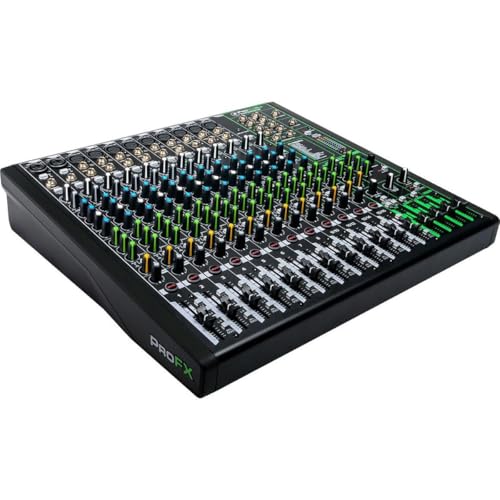
Mackie ProFX16v3 16-Channel Mixer
Badge: Best for Larger Groups
Strengths
- Sixteen channels handle full bands, church teams and venue line-ups without a sub-mixer
- Multitrack recording over USB captures channels separately while you mix the room
- GigFX effects cover vocals and instruments across a large input count
Trade-offs
- The largest board here — it needs a proper table or stand position, not a desk corner
- More channels mean longer soundchecks and more gain decisions per event
- Solo creators will use a fraction of its capacity; smaller picks suit them better
At a glance: 16 channels (ProFX16v3); USB recording, including multitrack per the listing; GigFX effects; Analog mixer; Listed for bands, churches and small venues.
The ProFX16v3 exists for the moment a group’s input list outgrows good intentions. Sixteen channels is a worship team with several vocalists and a full band, a school production with wireless microphones across the stage, a venue hosting acts back to back. The listing names bands, churches and small venues, and that targeting is honest: these are the users for whom a spare channel is not a luxury but the difference between a smooth changeover and an audible scramble.
Its second headline changes the recording conversation entirely. Where most small mixers send only the finished stereo mix to a computer, this board is listed as recording multitrack over USB while you mix the room — each channel captured separately, available afterwards for rebalancing, editing or rescue. A live mix is a compromise made in real time; multitrack capture lets a volunteer engineer revisit that compromise on Tuesday, lift the vocal that got buried, and produce a recording the live audience never heard but the band will love.
The costs are size and ceremony. Sixteen channels take space, cabling and soundcheck time, and a board this size in a one-microphone podcast setup is furniture, not a tool. Buy it for the line-up you actually field. Groups anywhere near its channel count will find it the most capable Mackie in this guide, and the multitrack path gives recordings a future the stereo-only boards cannot match.
Best for: Bands, churches and small venues that mix many inputs and want them recorded separately / Not suited for: Desk-based streamers and podcasters with one or two inputs

Mackie ProFX6v3 6-Channel Mixer
Badge: Best Compact Pick
Strengths
- Onyx mic preamps bring the range’s clean vocal capture to a compact board
- GigFX effects engine included despite the small footprint
- Six channels fit a creator rig — microphone, guest, playback, spare — without desk sprawl
Trade-offs
- Six channels cap band use at acoustic duos and trios
- No Bluetooth on this generation, so playback is a wired connection
- Growing podcasts with several in-room guests will outgrow it; see the ten- and twelve-channel picks
At a glance: 6 channels (ProFX6v3); Onyx mic preamps; GigFX effects engine; USB connection; Professional analog mixer format.
The ProFX6v3 is the Mackie most home creators should look at first, because it refuses the usual compact-board bargain. Small mixers often save money at the preamp, the one component a voice cannot hide from. This board keeps the Onyx preamps and the GigFX effects engine of its larger siblings and simply reduces the channel count to six — a number that maps neatly onto creator reality: your microphone, a guest or co-host microphone, a stereo playback source, and a spare.
In daily use that restraint is a feature. The board fits a desk, sets up in minutes, and presents a surface a beginner can learn completely — every knob earns its place. For a solo performer the same six channels cover a vocal, an instrument, backing playback and a spare, which is the entire acoustic-gig brief. USB carries the mix to streaming and recording software, so the board serves the stream on weekdays and the coffeehouse set on weekends without a change of workflow.
The ceiling is arithmetic. A third in-room podcast guest, a second instrument, a stereo keyboard — each is reasonable, and together they exceed six channels. Creators whose format is visibly heading that way should buy the headroom of the ProFX10v3+ or ProFX12v3 now. Creators whose format is stable will find this the sweet spot of the range: the Mackie sound and effects, sized for a desk.
Best for: Podcasters, streamers and solo performers who want Mackie preamps without a big board / Not suited for: Bands or teams needing more than a handful of simultaneous inputs

Mackie Mix12FX 12-Channel Compact Mixer
Badge: Best Simple Large-Format Value
Strengths
- Twelve channels at Mix Series simplicity suits teams who need inputs more than recording features
- Integrated effects cover basic vocal polish without external processors
- A published 20Hz–30kHz frequency response signals full-range handling for music and voice
Trade-offs
- The Mix Series is a live-mixing line; buyers wanting USB multitrack or plus-generation features should choose ProFX
- An older, simpler design means fewer modern conveniences than the v3 and v3+ boards
- Effects are integrated and shared rather than a deep per-channel effects system
At a glance: 12 channels (Mix12FX); Integrated effects; Analog audio mixing; Frequency response listed as 20Hz–30kHz; Black finish.
Mackie’s Mix Series answers a different question from the ProFX line. ProFX asks how a mixer can also record, stream and process. Mix asks how simply and affordably a lot of sources can be combined well — and the Mix12FX is that answer at twelve channels. School assemblies, community theatre, church overflow rooms, rehearsal spaces: these environments need inputs, reliability and a surface a rotating cast of volunteers can operate, and they need them without a recording studio’s feature list.
The integrated effects cover the one processing job live voice almost always needs — a touch of space and polish on the main microphone — without an external processor to buy, patch and protect. The published frequency response, spanning the full range of human hearing, reflects the board’s straightforward brief: pass music and voice completely, colour them as little as possible, and let the operator’s level decisions do the work.
Choose it with clear eyes about what it is not. There is no plus-generation Bluetooth or multitrack story here; if capturing the performance matters as much as presenting it, the ProFX boards above are the right family. If the job is live mixing for a group, on a surface any volunteer can learn in one rehearsal, the Mix12FX is the sensible, capacious pick — and readers comparing the whole brand in one place will find it reappears in the companion shortlist at Best Mackie Mixers.
Best for: Community groups, schools and venues that need many inputs and straightforward live mixing / Not suited for: Creators whose workflow centres on USB recording features

Mackie Mix8 8-Channel Mixer
Badge: Best for Beginners
Strengths
- Eight channels give a beginner genuine headroom without a large-board price or footprint
- A deliberately simple surface makes it an excellent first board for learning gain and balance
- Mackie build approachability suits shared spaces — classrooms, clubs and rehearsal rooms
Trade-offs
- No integrated effects in this model per its listing, so vocal polish must come from elsewhere
- Simpler feature set than the ProFX line for recording-focused buyers
- Buyers who know they need effects built in should step to the Mix12FX or a ProFX pick
At a glance: 8 channels (Mix8); Mix Series compact mixer; Black finish; Analog mixing.
The Mix8 is the board to hand someone who is learning. Eight channels is enough to mix a real event — several microphones, a playback source, an instrument — while the Mix Series surface keeps every control visible and purposeful. There is no menu, no hidden layer, no effects bank to get lost in. A student, a new volunteer or a first-time band engineer can be taught gain, pan and level on this board in a single session and retain all of it, because the board itself teaches the fundamentals in their purest form.
That simplicity has a practical second benefit in shared spaces. Boards in classrooms, clubs and rehearsal rooms are operated by whoever is available, and the Mix8’s straightforward layout minimises the damage an untrained hand can do to a mix. Set the gains sensibly, mark the fader positions for a regular event with a strip of tape, and successive operators can reproduce a working sound quickly — an unglamorous virtue that matters more, week after week, than any headline feature.
The honest gaps follow from the same simplicity. The listing for this model does not include integrated effects, so a lead vocal gets no built-in reverb from this board, and recording-focused creators will miss the ProFX line’s USB-and-effects workflow. Treat the Mix8 as what it is — a clear, capable, eight-channel live mixer — and it is the easiest recommendation in this guide to live with. It also makes a natural first step before the wider range explored at Best Low Cost Dj Mixers for DJ-leaning setups.
Best for: Beginners, schools and small groups learning live mixing on a forgiving, capable board / Not suited for: Streamers who need built-in effects and a USB recording workflow in one box
Comparison Table
The Mackie range side by side. All six are analog consoles; they differ in channel count, effects, and how — or whether — they record to a computer.
| Pick | Badge | Key attributes | Availability |
|---|---|---|---|
| Mackie ProFX10v3+ 10-Channel Mixer | Best Overall | 10 channels; Bluetooth; USB recording; GigFX+ effects | Check on Amazon |
| Mackie ProFX12v3 12-Channel Mixer | Best for Small Bands | 12 channels; Onyx preamps; GigFX effects; USB | Check on Amazon |
| Mackie ProFX16v3 16-Channel Mixer | Best for Larger Groups | 16 channels; multitrack USB; GigFX effects; largest here | Check on Amazon |
| Mackie ProFX6v3 6-Channel Mixer | Best Compact Pick | 6 channels; Onyx preamps; GigFX effects; compact body | Check on Amazon |
| Mackie Mix12FX 12-Channel Compact Mixer | Best Simple Large-Format Value | 12 channels; integrated effects; Mix Series simplicity | Check on Amazon |
| Mackie Mix8 8-Channel Mixer | Best for Beginners | 8 channels; simplest surface here; no listed effects | Check on Amazon |
How to Choose the Right Mackie Audio Mixer
Family before features. If a computer is part of your workflow — streaming, podcast recording, capturing rehearsals — you are shopping the ProFX family, full stop. Its USB connection and GigFX effects exist for exactly that dual live-and-recorded life. If no computer is involved and the board will be run by whoever is available, the Mix Series’ simpler surface is not a compromise; it is the correct engineering choice for the room. Many buyers waste money crossing this line in both directions.
Size by simultaneous sources. Count what must be live at once on your busiest day: vocal microphones, instruments, stereo playback, a laptop. Add one spare for the guest, the extra microphone, the thing that breaks. Solo creator: six channels. Small band or growing podcast: ten or twelve. Worship team, school production, venue work: sixteen. A Mackie bought one size up typically serves for years; a board bought one size small is replaced within one.
Preamps and effects, honestly weighed. The Onyx preamps on ProFXv3 boards earn their keep with quiet sources — soft voices, acoustic instruments, spoken word in lively rooms — where cheaper gain gets hissy as it is pushed. If your sources are loud and close-miked, the difference narrows. Effects follow a similar logic: GigFX polish is genuinely useful on lead vocals and solo instruments in live and streamed mixes, and largely irrelevant to a board mixing announcements and playback in a hall, where the Mix Series’ restraint is fine.
Recording depth is the final fork. A stereo USB feed captures the mix as the room heard it — perfect for streams, archives and quick demos. The ProFX16v3’s listed multitrack capture preserves each channel separately, which suits bands and churches producing recordings after the event. Decide which future you are actually building toward. And whichever board you choose, budget for the unglamorous essentials alongside it: enough microphone cables, a spare, and a case or cover if the board travels. The mixer is the centre of the rig, not the whole of it.
How to Set Up a Small Live and Streaming Rig with a Mackie Mixer
Step 1 — Position and connect. Place the mixer where the operator stands or sits for the whole event, with the main outputs running to powered speakers or the house system. Keep the board’s power supply and cable runs tidy and out of walkways. Power up sources first, mixer second, speakers last; shut down in reverse. On Mackie boards the layout rewards this discipline — inputs grouped logically, master section clearly separated — so a calm setup becomes a repeatable routine.
Step 2 — Gain stage every channel. For each microphone and instrument: fader at its unity mark, gain low, then have the performer play or speak at true performance level while you raise gain to a strong, clean signal short of clipping. Quiet talkers in rehearsal become louder in performance, so leave a margin. Only after every channel’s gain is set should faders be used to build the balance. This order — gain for cleanliness, faders for balance, master for the room — is the entire foundation of live mixing, and it is identical on a Mix8 and a ProFX16v3.
Step 3 — Add effects like seasoning. On ProFX boards, bring the GigFX return up slowly under the lead vocal until the voice gains warmth and space, then stop before the effect is consciously audible as echo. Acoustic instruments usually need less than voices; announcements and spoken word in reverberant halls often need none at all, because the room is already providing it.
Step 4 — Feed the computer. Connect USB, select the Mackie as the input in your streaming or recording software, and record a loud thirty-second test. On the ProFX16v3, decide deliberately whether the session wants the stereo mix or multitrack capture, and set the recording software’s inputs accordingly before the event, not during it.
Troubleshooting. Problem: hiss under a quiet singer → the gain is being pushed at the fader instead of the preamp; return the fader to unity and set proper input gain, and move the microphone closer to the singer. Problem: feedback rings when the vocal rises → lower that channel’s gain, move the microphone behind the speaker line, and reduce the ringing EQ band rather than the whole mix. Problem: the stream hears the room but the recording sounds dry and separate → confirm whether you are capturing the main mix or individual channels, and match the software routing to the intention.
Maintenance is unglamorous and effective: dust covers when the board sits idle, cables coiled without tight kinks, connectors seated fully rather than forced. Churches and schools running the same event weekly should tape-mark fader positions for their standard setup — a two-minute habit that makes any volunteer a competent operator. The beverage sense of the word mixer occasionally sends readers to this page by mistake; that guidance lives at Best Low Sugar Mixers For Vodka and has no bearing on a mixing console.
ProFX or Mix Series: Reading Mackie’s Two Small-Mixer Families
The families differ in philosophy more than quality. ProFX assumes a hybrid life: the same board mixes a room and feeds a computer, with effects as part of the performance. Its natural homes are creator desks, band rehearsal rooms that record, and small venues that stream. Mix Series assumes a live-only life, optimising for a surface anyone can run and a price that lets an organisation buy the channel count it needs. Its natural homes are classrooms, community halls, houses of worship and rehearsal spaces.
Neither family is the other’s budget version, and choosing between them by price alone produces the two classic regrets: the creator who bought a Mix board and immediately needed USB recording, and the school that bought a ProFX and uses a tenth of it while volunteers fear the rest. Name your workflow first. The family follows, and within the family, size is a simple counting exercise.
What Onyx Preamps and GigFX Actually Buy You
A preamp amplifies a microphone’s signal by a large factor before anything else touches it, so its noise floor becomes part of every recording and every loudspeaker feed. Onyx preamps are Mackie’s answer: clean gain that stays quiet when a soft-spoken guest or a fingerpicked guitar needs a lot of it. The benefit is not magic tone; it is the absence of hiss and strain at the exact moments small systems usually reveal both.
GigFX is the complementary half: a built-in effects engine offering the reverbs, delays and vocal treatments that make a live or streamed voice sound finished. Used lightly, effects place a voice in a space; used heavily, they place it in a cave. The skill is restraint, and it transfers to every console you will ever run. Together, clean gain and tasteful effects are most of what listeners mean when they say one small setup sounds professional and another does not.
Mackie Mixers for Churches and Schools: A Practical Word
Houses of worship and schools are the environments Mackie’s range quietly serves best, because their real requirements match the design philosophy: many inputs, rotating operators, zero tolerance for a setup that only one person understands. For these rooms the buying advice compresses into three rules. Buy the channel count of your busiest service or assembly, plus a spare. Prefer the board the most people can be taught to run — which is why the Mix Series appears in this guide beside the more capable ProFX line. And standardise the setup: the same microphones in the same channels every week, fader positions marked, a one-page operating note taped inside the cupboard door.
Recording changes the calculation only when someone owns it. A streamed service or a recorded concert is a genuine ProFX argument — the USB path makes it a one-cable habit — but a recording nobody maintains is a feature nobody uses. Organisations should name the person before they buy the capability. Where that person exists, the ProFX12v3 and ProFX16v3 reward them weekly; where they do not, the Mix12FX will be run well by everyone, which is worth more than a multitrack archive nobody produces.
Understanding Analog Mixing in a Digital Age
Every board in this guide is an analog mixer, some with digital additions — USB connections, effects engines — at the edges. That architecture is a deliberate strength for live work. An analog surface is immediate: every control shows its state, every adjustment is a hand movement, and nothing waits for a menu, a boot sequence or a firmware decision. For volunteers, students and performers mixing themselves, that immediacy is not nostalgia; it is operational safety.
The digital edges earn their place where they solve real problems. USB turns the finished mix into a stream or a recording without an interface rack. Built-in effects replace outboard processors that small rooms cannot house or staff. The ProFX16v3’s multitrack capture borrows the recording studio’s best trick — decide later — for live groups. The mature way to read this range is not analog versus digital, but a stable analog core with digital help exactly where help helps. Buyers who grasp that read every specification in this guide more clearly afterwards.
A Note on Generations: v3, v3+ and the Mix Series Timeline
Mackie’s naming rewards a moment’s decoding. The ProFXv3 boards are the established generation: Onyx preamps, GigFX effects, USB stereo recording, wired playback. The v3+ boards are the current refresh: Bluetooth playback joins the feature set, effects move to GigFX+, and models such as the ProFX12v3+ add multi-mode USB behaviour for streaming-shaped workflows. The Mix Series runs on a parallel, simpler track where the design has barely needed to change, because straightforward live mixing was already the right answer when it launched.
None of this makes an older generation a mistake. A v3 board bought for wired live work loses nothing by lacking Bluetooth it would never use, and a Mix Series board’s age is irrelevant to a hall that needs twelve clear channels. Buy the generation whose additions match your workflow — wireless playback and streaming modes for the hybrid creator, proven simplicity for the live-only room — and let other buyers chase the newest badge for its own sake.
Live Sound Etiquette: Running Someone Else’s Room
Many Mackie boards earn their keep in rooms their owner does not control — the borrowed hall, the school gym, the church across town — and a short etiquette keeps those invitations coming. Arrive with your own cables, tape and headphones rather than assuming the room provides them. Photograph any house settings before you touch a knob, and restore them when you leave. Label your channels on the board with removable tape, and remove the tape afterwards. Keep your operating volume inside the room’s expectations; the fastest way to lose a venue is to be the loudest memory it has.
During the event, mix for the audience’s ears rather than the stage’s. Walk the room at least once while someone else performs or a playback track runs, because the balance at the mixer is rarely the balance at the back wall. Note what you changed and why, on paper, if the engagement repeats — next month’s setup then starts from knowledge instead of archaeology. None of this appears on a specification sheet, yet it decides more repeat bookings than any preamp. A Mackie run with this discipline makes its owner look like the professional in the building, whatever the board cost.
A Final Word on Buying Once, Buying Right
Audio gear punishes indecision more than it punishes modesty. The buyer who counts sources honestly, names the workflow plainly and buys the Mackie that matches both will typically keep that board for years, through line-ups and rooms the original purchase never imagined. The buyer who shops by badge size or by the longest feature list owns a succession of almost-right mixers. This guide’s six boards contain no wrong answers — only answers fitted to different rooms. Fit, in the end, is the whole of the Mackie question, and it is why the range has remained the small-mixer default for so long: somewhere between six channels and sixteen, in one of two families, sits the board that behaves as if it were specified for your exact night. Count, decide, and buy that one.
The Short Version for Busy Buyers
If the whole guide must collapse into one paragraph, it is this. Decide whether a computer is part of your music-making; that answer chooses ProFX or Mix. Count your simultaneous sources and add one; that answer chooses your size. Respect the preamps if your sources are quiet, respect the effects if your voices carry the show, and respect multitrack only if someone will genuinely use the recordings. Then set the board up with the gain discipline in the how-to section, mark what works, and get on with the music — which was, after all, the point of buying a Mackie in the first place.
Common Buying Mistakes
- Buying a Mix Series board for a streaming workflow, then discovering the recording features live in the ProFX family.
- Counting channels by the people in the group rather than by simultaneous sources — keyboards and playback are sources too.
- Setting balance with faders while gains are random, then fighting hiss and distortion all night.
- Drowning vocals in effects because the GigFX bank is there; if the echo is obvious, it is too much.
- Assuming every USB mixer records multitrack — in this range that listed capability belongs to the ProFX16v3.
- Ignoring the physical setup: a sixteen-channel board bought for a desk corner helps no one.
Final Recommendation
For most audio buyers, Mackie ProFX10v3+ 10-Channel Mixer is the Mackie to start from: current-generation features, Bluetooth, USB recording and enough channels for a growing rig. Bands and worship teams mixing bigger line-ups should move directly to Mackie ProFX12v3 12-Channel Mixer for its twelve Onyx-equipped channels, while desk-based creators will be happier with Mackie ProFX6v3 6-Channel Mixer, which keeps the preamps and effects and drops the footprint. Buy the family that matches your workflow and the size that matches your busiest day, and a Mackie will repay you the way it has repaid working musicians for decades: by simply being ready.
Related guides
Frequently Asked Questions
Are Mackie mixers audio mixers or kitchen mixers?
Audio. Mackie makes mixing consoles for live sound, recording, streaming and podcasting — every product in this guide is a genuine Mackie audio board. The brand does not make kitchen appliances, so any listing suggesting otherwise is a miscategorised product, not a Mackie.
What is the difference between ProFX and Mix Series?
ProFX boards add USB recording, the GigFX effects engine and creator-focused features for hybrid live-and-recorded work. Mix Series boards are simpler live mixers: many channels, straightforward controls, and no recording-centred feature set. Choose by workflow, not by price.
Which Mackie mixer is best for podcasting?
For one or two hosts, the ProFX6v3 offers Onyx preamps and effects in a desk-sized board. For panels, guests and growth, the ProFX10v3+ adds channels, Bluetooth playback and flexible USB recording. Both send the finished mix to your recording software over USB.
Which Mackie records multitrack?
Of the boards in this guide, the ProFX16v3 is listed as recording multitrack over USB while you mix the room, capturing channels separately for later editing. The other USB-equipped picks send the main stereo mix, which suits streaming and straightforward recording.
Do I need phantom power with a Mackie mixer?
Only condenser microphones need +48V phantom power; dynamic stage microphones do not. If you record or stream with a condenser microphone, confirm phantom power on your chosen model as part of setup — it is a standard provision on the creator-focused boards in this range.
How many channels does a small church or school need?
Count every simultaneous source on the busiest service or assembly — vocalists, instruments, playback, presentation audio — and add a spare. Most small worship teams land at twelve to sixteen channels, which is why the ProFX12v3, Mix12FX and ProFX16v3 all appear in this guide.
Can a beginner learn on a Mackie mixer?
Yes — the Mix8 is arguably the best teacher in the range precisely because it does less: gain, balance and level with nothing hidden. The ProFX boards add effects and recording, which beginners grow into quickly with the setup method in this guide.


