Disclosure: topratedkitchenware.com is reader-supported. When you buy through links on our site, we may earn an affiliate commission from Amazon and other retailers, at no extra cost to you.
Where to buy
Every board among the best mackie mixers below is a genuine Mackie console sold on Amazon — audio consoles for live sound, streaming, podcasting and recording — where you can check the latest price on Amazon for the model that fits your line-up. Mackie makes audio gear only; if a mixer search of yours was headed for the kitchen or the bar cart, this is the stage-and-studio shelf, and the drink side is covered separately at Best Low Sugar Mixers.
- Mackie ProFX16v3 16-Channel Mixer — Best Overall
- Mackie ProFX6v3 6-Channel Mixer — Best Compact Pick
- Mackie Mix12FX 12-Channel Compact Mixer — Best for Groups on a Simpler Brief
- Mackie Mix8 8-Channel Mixer — Best for Beginners
- Mackie ProFX12v3+ 12-Channel Mixer — Best for Streaming
- Mackie ProFX10v3 10-Channel Mixer — Best for Small Gigs
Read the full guide ↓ for the detailed review, strengths and trade-offs, and best-for verdict on every pick.
The search for the best mackie mixers is a search inside a single, well-defined family — and that is its pleasure. Mackie’s small consoles divide cleanly into the ProFX line, built for performers and creators who record and stream as well as play live, and the Mix Series, built for groups who need honest live mixing on a surface anyone can run. Six genuine Mackie boards, from six channels to sixteen, cover every realistic version of the question, and this guide orders them by the job each does best rather than by size alone.
Two ideas organise everything that follows. The first is workflow: a board that feeds a computer is a different purchase from a board that only feeds speakers, and Mackie sells both, deliberately. The second is arithmetic: a mixer should be bought by counting simultaneous sources — voices, instruments, playback — and adding one spare. Get those two decisions right and the rest of the range explains itself; get them wrong and even an excellent board will feel like the wrong one.
Effects, preamps and recording modes are compared pick by pick below, with the trade-offs stated as plainly as the strengths. Readers who want the same family examined from a pure audio-engineering angle will find it at Best Mackie Audio Mixers; this guide weights the choice the way most buyers actually make it — by group size, by room, and by whether a computer is part of the act.
Key Takeaways
- All six picks are genuine Mackie audio consoles — Mackie does not make kitchen or drink mixers.
- ProFX means USB recording and GigFX effects for creators and gigging acts; Mix Series means simpler live-only mixing.
- Sizes run 6 to 16 channels; buy for your busiest simultaneous line-up plus one spare.
- The v3+ generation adds Bluetooth and multi-mode USB; v3 boards keep playback wired.
- Multitrack recording over USB is the ProFX16v3’s listed distinction — the rest send the main stereo mix.
In this guide
Quick Picks
Six Mackie boards, six briefs. The badges below are repeated in the detailed reviews, so the board you shortlist here is the board you read about there.
| Badge | Pick | Why it earns its place |
|---|---|---|
| Best Overall | Mackie ProFX16v3 16-Channel Mixer | The flagship of this shortlist: sixteen channels, GigFX effects and multitrack USB recording for groups that do it all. |
| Best Compact Pick | Mackie ProFX6v3 6-Channel Mixer | The range’s essentials — Onyx preamps, GigFX effects, USB — in the smallest ProFX body. |
| Best for Groups on a Simpler Brief | Mackie Mix12FX 12-Channel Compact Mixer | Twelve channels and integrated effects, minus the recording focus — live mixing for groups, kept simple. |
| Best for Beginners | Mackie Mix8 8-Channel Mixer | Eight honest channels and the clearest surface in the range — where new engineers should start. |
| Best for Streaming | Mackie ProFX12v3+ 12-Channel Mixer | Twelve channels with Bluetooth, GigFX+ and multi-mode USB recording — the streamer-and-band flagship format. |
| Best for Small Gigs | Mackie ProFX10v3 10-Channel Mixer | Ten channels, USB recording and GigFX — the gigging middleweight for small acts that also stream. |
How These Picks Were Chosen
Shortlisting for a single-brand guide is an exercise in verification and coverage. Verification, because the Mackie name attracts miscategorised listings: every pick here was confirmed as a genuine Mackie audio console against its published model data — ProFX or Mix Series, with the channel count and feature set the listing claims. Coverage, because a brand guide fails if it only shows one corner of the range: the six boards span both families, three generations of the ProFX line, and sizes from a six-channel desk board to a sixteen-channel group console.
Ordering within the guide follows fitness for the most common buyer briefs — overall capability, compact creation, group simplicity, beginner clarity, streaming, and small-gig work — using the specifications Mackie publishes for each model: preamps, effects engines, USB behaviour and Bluetooth by generation. Where a specification is not published for a model, the reviews say less rather than invent more; you will find no borrowed numbers here.
This remains research-led guidance, built from manufacturer data and the established reputation of the range among working users, not a claim of bench testing. Prices are omitted because they shift with promotions; each Check on Amazon link shows the live figure. Readers cross-shopping beyond one brand will find the value end of the wider console market compared at Best Low Cost Dj Mixers, which makes a useful sanity check before committing to any single badge.
The 6 Best Mackie Mixers, Reviewed in Detail
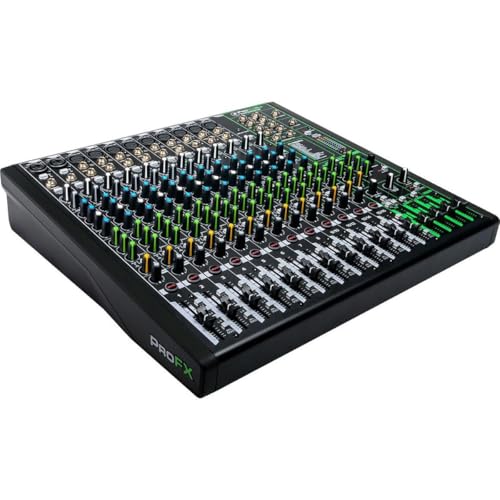
Mackie ProFX16v3 16-Channel Mixer
Badge: Best Overall
Strengths
- Sixteen channels end input rationing for bands, worship teams and venue line-ups
- Multitrack USB recording captures each channel separately while the live mix happens
- GigFX effects give every vocal and instrument access to polish from one engine
Trade-offs
- The biggest board here, in size, setup time and learning curve alike
- Groups with a handful of sources will leave most of it permanently idle
- Its capability justifies itself only if the line-up or the recording habit is real
At a glance: 16 channels (ProFX16v3); USB recording, including multitrack per the listing; GigFX effects; Analog mixer; Listed for bands, churches and small venues.
Leadership of this list goes to the board that can say yes to the most situations, and in Mackie’s small-mixer range that is the ProFX16v3. Sixteen channels absorb the full reality of group music-making — multiple vocalists, a complete band, playback, presentation audio — with the spare capacity that separates a calm soundcheck from a negotiation. Its listing aims it at bands, churches and small venues, the three environments where running out of inputs is a public event rather than a private inconvenience.
The multitrack USB recording is the capability that lifts it above a merely large mixer. While the operator mixes the room, the board captures channels separately to a computer, preserving the option to rebalance, edit and produce the performance afterwards. A Sunday service becomes a midweek recording project; a gig becomes material the band can actually release. No other board in this guide is listed with that combination of live capacity and per-channel capture.
Proportionality is the only caution, and it is a serious one. This is a board for a table of its own, a soundcheck with a running order, and an operator who wants its depth. A two-person podcast buying it is purchasing furniture. But for the groups it names, the ProFX16v3 is the Mackie that ends the upgrade conversation — which is precisely what a best-overall pick should do.
Best for: Established bands, churches and venues that mix large line-ups and record them / Not suited for: Solo creators and small podcast desks

Mackie ProFX6v3 6-Channel Mixer
Badge: Best Compact Pick
Strengths
- Onyx preamps deliver the range’s clean vocal gain without a large board
- GigFX effects are fully present despite the compact size
- Six channels match creator and solo-performer rigs almost exactly
Trade-offs
- Band use stops at duos and trios before channels run out
- Playback is wired on this generation; there is no Bluetooth
- A fast-growing multi-guest podcast will need the larger ProFX boards
At a glance: 6 channels (ProFX6v3); Onyx mic preamps; GigFX effects engine; USB connection; Professional analog mixer format.
Compact boards usually ask for a compromise somewhere audible. The ProFX6v3’s argument is that it does not: the Onyx preamps stay, the GigFX effects engine stays, USB stays — only the channel count shrinks, to the six that a creator rig actually uses. A host microphone, a guest microphone, stereo playback, an instrument or a spare: the arithmetic of podcasting, streaming and solo performance fits inside this board with nothing wasted and nothing missing.
That fit shows up in daily friction, or rather its absence. The board lives on a desk without dominating it, travels to a small gig without a logistics conversation, and presents a surface that can be learned completely in an afternoon. For a solo musician it covers voice, instrument and backing tracks with polish from the effects engine; for a streamer it keeps the microphone sounding like the point of the exercise, which it is.
Its limit is the same number that makes it appealing. Six channels is a ceiling, and formats grow: a second guest, a co-host with an instrument, a stereo keyboard. Buyers who can already see that growth on their calendar should buy the ten- or twelve-channel ProFX boards instead and skip a replacement cycle. Buyers with a stable format get the range’s best size-to-capability ratio here.
Best for: Podcasters, streamers and solo musicians who want the full Mackie creator feature set, compactly / Not suited for: Anyone mixing a full band live

Mackie Mix12FX 12-Channel Compact Mixer
Badge: Best for Groups on a Simpler Brief
Strengths
- Twelve channels serve assemblies, rehearsals and community events without a sub-mixer
- Integrated effects handle the lead-vocal polish most live groups actually need
- A full-range published frequency response suits music and speech alike
Trade-offs
- No ProFX-style USB recording story, so capture needs a separate solution
- An older, simpler generation without Bluetooth or multitrack features
- Effects are shared and integrated rather than a deep creative effects system
At a glance: 12 channels (Mix12FX); Integrated effects; Analog audio mixing; Frequency response listed as 20Hz–30kHz; Black finish.
Plenty of mixing happens where no recording ever will: the school assembly, the community concert, the rehearsal room, the hall that hosts a different group every night of the week. The Mix12FX is Mackie’s answer for those rooms — twelve channels so the inputs are never the problem, integrated effects so the lead voice can have its polish, and a surface simple enough that tonight’s operator can be taught it during setup.
The design restraint is deliberate and valuable. Every feature omitted — multitrack capture, Bluetooth generations, deep effects editing — is a feature a volunteer cannot misconfigure in front of an audience. What remains is the complete live-mixing job: gains, balances, a shared effect, and a main output that behaves predictably. The published full-range frequency response underlines the point; the board’s ambition is fidelity and clarity, not processing.
Groups whose ambitions include recording or streaming their events should step into the ProFX family, where that workflow lives. Groups whose ambition is a hall that always sounds clear, whoever is running it, will find the Mix12FX sized and priced for exactly their reality. It is the group-work pick of this guide, and in shared spaces that is high praise.
Best for: Schools, community groups and venues mixing live events with rotating operators / Not suited for: Creators building a recording or streaming workflow

Mackie Mix8 8-Channel Mixer
Badge: Best for Beginners
Strengths
- Eight channels are enough for real events, so beginners learn on genuine work, not a toy
- The uncluttered Mix Series layout makes gain and balance easy to teach and to remember
- Well suited to shared ownership in classrooms, clubs and rehearsal spaces
Trade-offs
- No integrated effects are listed for this model, so vocals run dry or need external help
- No USB recording workflow for creators who want to capture sessions
- Confident users wanting effects and recording should choose a ProFX board
At a glance: 8 channels (Mix8); Mix Series compact mixer; Black finish; Analog mixing.
Ask experienced engineers where good habits form and they rarely name a flagship. They name a simple board, honestly laid out, on which gain, balance and listening could be learned without a manual open beside it. The Mix8 is that board in Mackie’s current range. Eight channels make it a real mixer — a small group, several microphones, playback and an instrument fit comfortably — while the Mix Series surface keeps the entire signal path visible at a glance.
For organisations the virtue compounds. A classroom, club or rehearsal room does not have an engineer; it has whoever arrived first. On the Mix8, a sensible setup can be tape-marked and reproduced by the next operator in minutes, and there is little enough complexity for little to go wrong. Beginners, meanwhile, learn the transferable fundamentals — the same gain discipline and balance judgement used on the largest consoles — rather than one product’s menu system.
The trade-offs are stated plainly by its own listing: no integrated effects are offered here, and there is no USB recording workflow. A singer who needs reverb, or a creator who needs capture, belongs in the ProFX section of this guide. A buyer who needs eight channels of clear, teachable, dependable live mixing has found the range’s most approachable board — the one many owners keep even after they eventually add a bigger one.
Best for: Beginners, teachers and small groups who value a board anyone can learn to run / Not suited for: Streamers needing built-in effects and USB capture

Mackie ProFX12v3+ 12-Channel Mixer
Badge: Best for Streaming
Strengths
- Bluetooth playback integrates phones and tablets into a twelve-channel live rig
- Multi-mode USB recording adapts the board to streaming, capture and live-plus-recording days
- GigFX+ effects provide the current generation’s broadest polish palette in this guide
Trade-offs
- A lot of board for a solo desk setup; smaller ProFX picks fit creators better
- The current-generation feature set asks for a proper read of the manual
- Bands who never record may find the simpler twelve-channel Mix12FX sufficient
At a glance: 12 channels (ProFX12v3+); Bluetooth playback; USB recording, multi-mode per the listing; GigFX+ effects engine; Analog mixer; Listed for streamers and small bands.
The ProFX12v3+ is the board for the increasingly normal act that is simultaneously live and broadcast: a small band playing to a room and a stream, a streamer hosting guests in person, a venue whose audience is half in seats and half online. Its listing names streamers and small bands together, and the feature set explains why — twelve channels for the line-up, Bluetooth for effortless playback, GigFX+ for the polish, and multi-mode USB recording so the board can present itself to a computer the way each job requires.
Multi-mode recording is the detail to understand. Different software and different days want different things from a mixer: sometimes the finished stereo mix, sometimes a feed shaped for a stream while the room hears another balance. A board that can change its USB behaviour turns one setup into several workflows without repatching a single cable — the kind of flexibility that separates a rig that copes from a rig that fights its owner weekly.
Size remains the honest cost: twelve channels of current-generation Mackie is a commitment of desk or table space, and a solo podcaster will use a quarter of it. But for the hybrid live-and-streamed brief — now the default for working small acts — this is the most completely aimed board in the range, and the streaming pick of this guide by a clear margin. Buyers comparing it against the wider market often also scan Best Low Cost Dj Mixers for the value-tier alternatives.
Best for: Streamers with live elements and small bands who record or broadcast what they play / Not suited for: A minimalist one-microphone desk setup
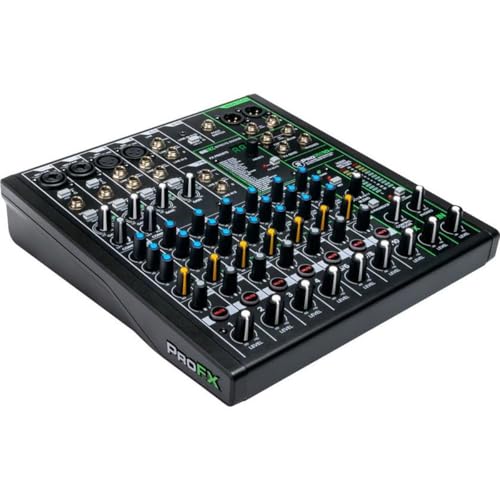
Mackie ProFX10v3 10-Channel Mixer
Badge: Best for Small Gigs
Strengths
- Ten channels hit the small-gig sweet spot: full duo or trio plus guests and playback
- USB recording built in, so rehearsals and streams are captured from the same setup
- GigFX effects cover vocal and instrument polish without external processors
Trade-offs
- Predates Bluetooth in the line, so phone playback is a wired affair
- Groups that grow past ten simultaneous sources will meet its ceiling
- Buyers wanting the newest generation’s modes should compare the v3+ picks
At a glance: 10 channels (ProFX10v3); USB recording; GigFX effects; Analog mixer; Listed for small gigs, rehearsals and streams.
Ten channels is the size working small acts keep arriving at, and the ProFX10v3 was built squarely for them — its listing names small gigs, rehearsals and streams, the exact triangle of a modern duo’s or trio’s week. Vocals for each singer, instruments, a stereo playback path for the tracks the act does not play live, and a spare: the board holds the whole show, then records the rehearsal through its built-in USB path so the show can get better.
The GigFX engine earns its place in this brief because small acts have no engineer. The polish a sound technician would add from a rack — space on the lead vocal, a little life on an acoustic guitar — has to live inside the board, preset and ready, and that is what a built-in effects engine provides. Combined with disciplined gain staging, it is how a three-person act sounds like a produced one in a room that seats eighty.
Its generation shows in one respect: no Bluetooth, so the phone that holds the break music plugs in by cable. Many gigging users count that a reliability feature rather than a lack. Buyers for whom wireless playback is non-negotiable should choose a v3+ board; buyers who gig, rehearse and stream with a line-up in the single digits will find the ProFX10v3 the range’s most natural fit — a judgement explored from the audio-first angle at Best Mackie Audio Mixers.
Best for: Small gigging acts, rehearsal rooms and streamers who need real headroom in a portable board / Not suited for: Large line-ups or buyers who insist on Bluetooth playback
Comparison Table
The family side by side. The pattern to notice: channel count and recording depth rise together through the ProFX line, while the Mix Series trades recording features for simplicity at the same sizes.
| Pick | Badge | Key attributes | Availability |
|---|---|---|---|
| Mackie ProFX16v3 16-Channel Mixer | Best Overall | 16 channels; multitrack USB; GigFX; flagship capacity | Check on Amazon |
| Mackie ProFX6v3 6-Channel Mixer | Best Compact Pick | 6 channels; Onyx preamps; GigFX; smallest ProFX | Check on Amazon |
| Mackie Mix12FX 12-Channel Compact Mixer | Best for Groups on a Simpler Brief | 12 channels; integrated effects; live-only focus | Check on Amazon |
| Mackie Mix8 8-Channel Mixer | Best for Beginners | 8 channels; clearest layout; live mixing only | Check on Amazon |
| Mackie ProFX12v3+ 12-Channel Mixer | Best for Streaming | 12 channels; Bluetooth; multi-mode USB; GigFX+ | Check on Amazon |
| Mackie ProFX10v3 10-Channel Mixer | Best for Small Gigs | 10 channels; USB recording; GigFX; gigging size | Check on Amazon |
How to Choose the Right Mackie Mixer
Start with the room, not the catalogue. A podcast desk, a rehearsal room, a church hall and a gigging stage make different demands, and Mackie’s range is organised around them. Desk and creator work points to the six- and ten-channel ProFX boards. Gigging acts live at ten and twelve. Groups — worship teams, schools, venues — live at twelve and sixteen, choosing between ProFX recording depth and Mix Series simplicity. Naming your room first eliminates half the range correctly.
Then count sources like an engineer. Every simultaneous input counts: each vocalist, each instrument, the playback laptop, the presentation feed, the guest who appears twice a year. Add one spare. The total is your channel count, and it is better discovered now than mid-event. Remember that stereo sources and future guests are the two most common undercounts, and that a board one size too big is a mild inconvenience while a board one size too small is a replacement purchase.
Decide what recording means to you. Three honest answers exist. None: choose Mix Series and enjoy the simplicity. The finished mix: any USB ProFX board, capturing the performance as heard — ideal for streams, archives and demos. Every channel separately: the ProFX16v3’s listed multitrack path, for groups who produce recordings after events. Each answer is respectable; the mistake is buying one while planning another.
Weigh the generational details last. Bluetooth playback on the v3+ boards is a genuine convenience for phone-driven workflows and a non-event for cable-preferring live acts. GigFX and GigFX+ effects matter where vocals carry the show and matter little for speech-and-playback duties. Onyx preamps reward quiet, detailed sources. None of these should override the room, the count and the recording decision — they refine a shortlist those three have already built. Finally, leave budget for cables, a spare microphone lead and a cover; the best-chosen Mackie still depends on the humble ring around it.
How to Set Up a Small Live and Streaming Rig
Step 1 — Build the physical setup. Position the mixer at the operator’s station, run main outputs to the powered speakers or house system, and keep signal cables away from power supplies where runs allow. Connect every source before powering anything, then switch on in order — sources, mixer, speakers — and reverse it at the end of the night. A consistent routine is the cheapest reliability upgrade in live sound.
Step 2 — Gain stage, channel by channel. With faders at their unity marks and gains low, have each performer play or speak at real performance level while you raise that channel’s gain to a strong, clean signal with headroom to spare. Set every channel this way before touching a balance. Gains decide cleanliness; faders decide balance; the master decides how loud the room is. Confusing those jobs is the source of nearly every bad small-venue mix.
Step 3 — Balance and polish. Build the mix from the foundation up — rhythm sources, then instruments, then voices on top — and add effects last and lightly on ProFX boards: enough GigFX to give the lead voice a sense of space, never enough to hear an echo trail. In reverberant halls, use less; the room is already an effects unit.
Step 4 — Set the recording path. Connect USB, choose the Mackie as the input device, and decide whether the session captures the stereo mix or, on the ProFX16v3, multitrack channels. Record a loud test passage and listen back on headphones before the audience or the stream arrives. Two minutes of verification prevents the most common recording regret in small-venue work: discovering afterwards that the capture was silent, distorted or not running.
Troubleshooting. Problem: a quiet guest sounds hissy → move their microphone closer and set gain at the preamp rather than pushing the fader. Problem: the room rings when voices rise → lower the offending channel’s gain, reposition the microphone behind the speakers, and trim the ringing EQ region. Problem: the stream chat says audio is missing → check the software’s selected input device first; a computer that slept or updated often forgets the mixer it was happily using yesterday.
For recurring events, tape-mark the faders and photograph the board once a setup sounds right; the next operator — possibly you, tired, in six months — will be grateful. And for completeness: none of this setup guidance has anything to do with drink preparation, which occasionally shares this keyword; that shelf is covered at Best Low Sugar Mixers For Vodka.
A Short History of Why Mackie Means Small Mixers
Mackie’s place in this category was earned by a simple insight repeated over decades: most music is mixed in small rooms by the people performing it, and those people deserve consoles that are capable, legible and priced for real life. The compact analog mixer became the company’s signature — boards that a band could carry to a gig, a church could hand to a volunteer, and a creator could learn without an engineering course.
The current range expresses the same insight in a hybrid era. ProFX boards assume the performance will also be streamed or recorded, and build that second life into the console. Mix Series boards assume the opposite priority — that clarity and simplicity in the room outrank everything — and strip accordingly. Understanding that Mackie designs for the operator, not the specification sheet, explains the range better than any feature table, and it is why the brand remains the default first answer to the small-mixer question.
Accessories That Complete a Mackie Rig
A mixer is the centre of a rig, and the ring around it decides whether the centre shines. Budget first for cables: enough microphone leads for every input you own, plus one spare, because cables fail at events and never at rehearsals. A pair of headphones the operator trusts is the second purchase — most setup and troubleshooting decisions in this guide are made through them. Third, protection: a padded bag or cover if the board travels, a dust cover if it lives in a hall.
After that, grow by pain point. A microphone upgrade transforms a ProFX board’s Onyx preamps from potential to audible. A small stand or rack shelf civilises a sixteen-channel setup. A second playback device removes the phone-as-music-library risk. Buy in that order — reliability, monitoring, protection, then refinement — and the rig matures without the expensive detours that come from accessorizing at random.
Mackie Mixers at Work: Four Rooms, Four Right Answers
Abstract advice lands better with addresses. Consider the rehearsal room first: a four-piece band, three voices, keys and playback for reference tracks. Ten or twelve channels cover it, the band mixes itself from the stage, and a ProFX board’s USB path turns every rehearsal into a reviewable recording — the ProFX10v3 or ProFX12v3 is the natural resident. The room teaches the guide’s first lesson: the right board disappears into the work.
The podcast studio is the second room: two hosts, a guest, a producer’s playback feed. Six channels suffice, preamp quality is the audible product, and effects polish voices that carry the entire show — the ProFX6v3’s exact brief. The school hall is the third: assemblies, concerts, a drama production each term, operated by staff and senior students. There the Mix12FX’s twelve simple channels, or the Mix8 for smaller programmes, win on teachability alone. The fourth room, the small venue or church, fields the largest line-ups and the least forgiving schedule; it is ProFX16v3 territory, where capacity and multitrack capture stop being features and become the job. Four rooms, four right answers, one brand — that is the shape of a well-built range.
Care, Transport and Getting Years from a Mackie
Small consoles live hard lives in good causes: carried to gigs, stored in cupboards, lent to sister organisations, set up by whoever arrives first. Longevity is mostly a handful of habits. Keep the board covered when it sits — dust is the slow enemy of faders and knobs. Transport it padded, connectors protected, never with cables still plugged in and straining their sockets. Coil leads loosely, store the board dry, and keep its power supply with it, labelled, because a separated power supply is a cancelled event waiting for a date.
In use, the habits are equally plain. Seat connectors fully rather than forcing them, move faders rather than leaning on them, and keep drinks on a different surface as a rule without exceptions. Once a season, work every knob and fader through its travel to keep contacts honest, and blow dust from the surface with dry air. None of this requires a technician. A Mackie looked after this way is the kind of equipment organisations hand down rather than replace — which, given the brand’s working-musician heritage, is precisely the reputation these boards were built to earn.
What to Budget Around the Mixer Itself
The mixer is typically the centre of a small audio budget, and planning the ring around it prevents the commonest disappointment in this category: a fine board undermined by everything attached to it. Microphone cables for every input you will use, plus one spare, come first. A pair of headphones the operator trusts comes second, because setup and troubleshooting decisions are made through them. A cover or padded bag comes third if the board moves, a dust cover if it stays.
After the essentials, spend where listeners hear it. A microphone upgrade transforms what Onyx preamps can deliver on a ProFX board. A better powered speaker transforms what any board can deliver to a room. A simple stand or shelf transforms a large board’s daily ergonomics. Cables, monitoring, protection, transducers — in that order — is the sequence that makes a Mackie purchase feel, a year later, like money spent in the right places. The board was never the whole rig, and the buyers who plan for that are the ones still satisfied at the second anniversary.
How Mackie Mixers Hold Their Value in Real Use
Value in working audio gear is measured in cost per successful event, and it is here that a well-chosen Mackie quietly outperforms flashier purchases. A board matched correctly to its room — the exercise this entire guide exists to support — tends to stay in service for years, because nothing about its job changes weekly. The Mix Series boards in particular accumulate astonishing event counts in schools and halls, precisely because their simplicity prevents the misconfiguration damage that retires cleverer equipment early.
The second value factor is transferability of skill. An operator trained on any board in this guide can run all of them, and can step up to larger consoles elsewhere with the same fundamentals intact: gain before balance, balance before effects, the master as the room’s volume rather than a repair tool. Organisations that standardise on one range train people once and deploy them anywhere. Counted honestly — purchase, years of service, training saved, events delivered — the right Mackie is rarely the cheapest mixer a group could buy, and very often the least expensive one it could own.
The One-Page Summary a Buyer Actually Needs
Compress this guide to a card and it reads as follows. If you record or stream, buy ProFX; if you only mix live, consider Mix. If your line-up is small and stable, six or eight channels; if it is a band, ten or twelve; if it is a team, sixteen. If wireless playback matters, look for the plus sign; if it does not, save the difference for cables and microphones. If every channel must be captured separately, the sixteen-channel ProFX is the only board here that promises it. Everything else in these pages is refinement of those five sentences — the preamps, the effects, the formats and the formats’ trade-offs. A buyer who can answer the five questions honestly does not need luck, and a buyer who cannot should answer them before spending anything. That discipline, more than any model number, is what the best Mackie mixer actually is: the one bought on evidence about your own room.
Second-Hand Mackies: A Brief Caution
Because Mackie boards are durable and common, a used market surrounds them, and new buyers reasonably ask whether a second-hand board beats a new smaller one. Sometimes it does — a well-kept ProFX from a home studio can be excellent value. But used mixers carry used-mixer risks that listings rarely confess: a scratchy fader that only crackles when moved, one channel quieter than its neighbours, a power supply replaced with an approximate substitute. Test every channel, every knob and the USB path before money changes hands, and price in the absence of a warranty.
For organisations — schools, churches, clubs — the calculus usually favours new: a receipt, a warranty and identical boards across rooms simplify everything from training to replacement. For an individual building a home rig, a tested used board is a legitimate shortcut up the range. Either way, the discipline of this guide still applies: buy the size and family your room needs, whether the box is new or merely new to you.
One Last Test Before You Order
Before ordering, run the paper test one final time. Write your busiest realistic line-up on a single line — every voice, instrument and playback source — and count it. Find the board in this guide whose channel count is that number plus one, in the family your recording answer chose. If that board is the one already in your basket, order with confidence. If it is not, change the basket rather than the arithmetic. Every regret in this category is a version of skipping that thirty-second test, and every long, satisfied ownership in it begins with having done it.
Common Buying Mistakes
- Choosing by channel count alone and ignoring the recording question that separates the ProFX and Mix families.
- Undercounting sources — forgetting stereo playback, presentation audio and the occasional guest.
- Running gains randomly and balances heroically, instead of clean gain first and faders second.
- Buying a sixteen-channel board for a two-input format, then resenting its size every day.
- Skipping the test recording before a streamed or captured event.
- Assuming the newest generation is automatically the right one; for wired, live-only work the v3 and Mix boards remain entirely rational.
Final Recommendation
If one Mackie must be named first, it is Mackie ProFX16v3 16-Channel Mixer: the sixteen-channel ProFX flagship whose multitrack recording and capacity end the upgrade question for groups. Creators and solo performers should instead start from Mackie ProFX6v3 6-Channel Mixer, which concentrates the range’s preamps, effects and USB workflow into the size a desk actually wants. And organisations mixing live events with rotating operators will get the most from Mackie Mix8 8-Channel Mixer, whose twelve simple channels put reliability ahead of features. Name your room, count your sources, decide your recording answer — the right Mackie follows from those three sentences.
Related guides
Frequently Asked Questions
Does Mackie make kitchen mixers or drink mixers?
No. Mackie is a professional audio brand; every Mackie mixer is a mixing console for live sound, recording, streaming or podcasting. Kitchen stand mixers and drink mixers that appear under similar searches are different products from different companies sharing a word, not a brand.
What is the best Mackie mixer for a beginner?
The Mix8, for its clarity: eight real channels and a surface that teaches gain and balance without menus or hidden layers. Beginners who know they will record or stream from day one can start on the ProFX6v3 and grow into its effects and USB workflow.
Which Mackie mixer should a church buy?
Count the worship team’s simultaneous sources and add a spare. Most small teams land on the ProFX12v3 or ProFX16v3 if services are recorded or streamed, or the Mix12FX if the need is simple, volunteer-proof live mixing at a larger input count.
What does GigFX do?
GigFX is Mackie’s built-in effects engine on ProFX boards, providing reverbs, delays and related treatments for vocals and instruments inside the mixer. It replaces the external effects processor a small rig would otherwise need, and it rewards restraint — a little polish, not a wash of echo.
Can I stream directly from a Mackie mixer?
Yes, with any USB-equipped ProFX board: connect it to the computer, select it as the audio input in your streaming software, and the main mix feeds the stream. The ProFX16v3 additionally offers listed multitrack capture for recording software.
Is a bigger Mackie always better?
No — a mixer should match its line-up and its room. Oversized boards cost setup time, space and attention every single session, while undersized boards fail publicly at busy moments. The right size is your busiest simultaneous source count plus one spare channel.
What is the difference between v3 and v3+ ProFX boards?
The plus generation adds Bluetooth playback, the GigFX+ effects update and, on models like the ProFX12v3+, multi-mode USB recording. The v3 boards remain strong wired performers with Onyx preamps and GigFX; the choice turns on whether wireless playback and the newer recording modes matter to your workflow.


